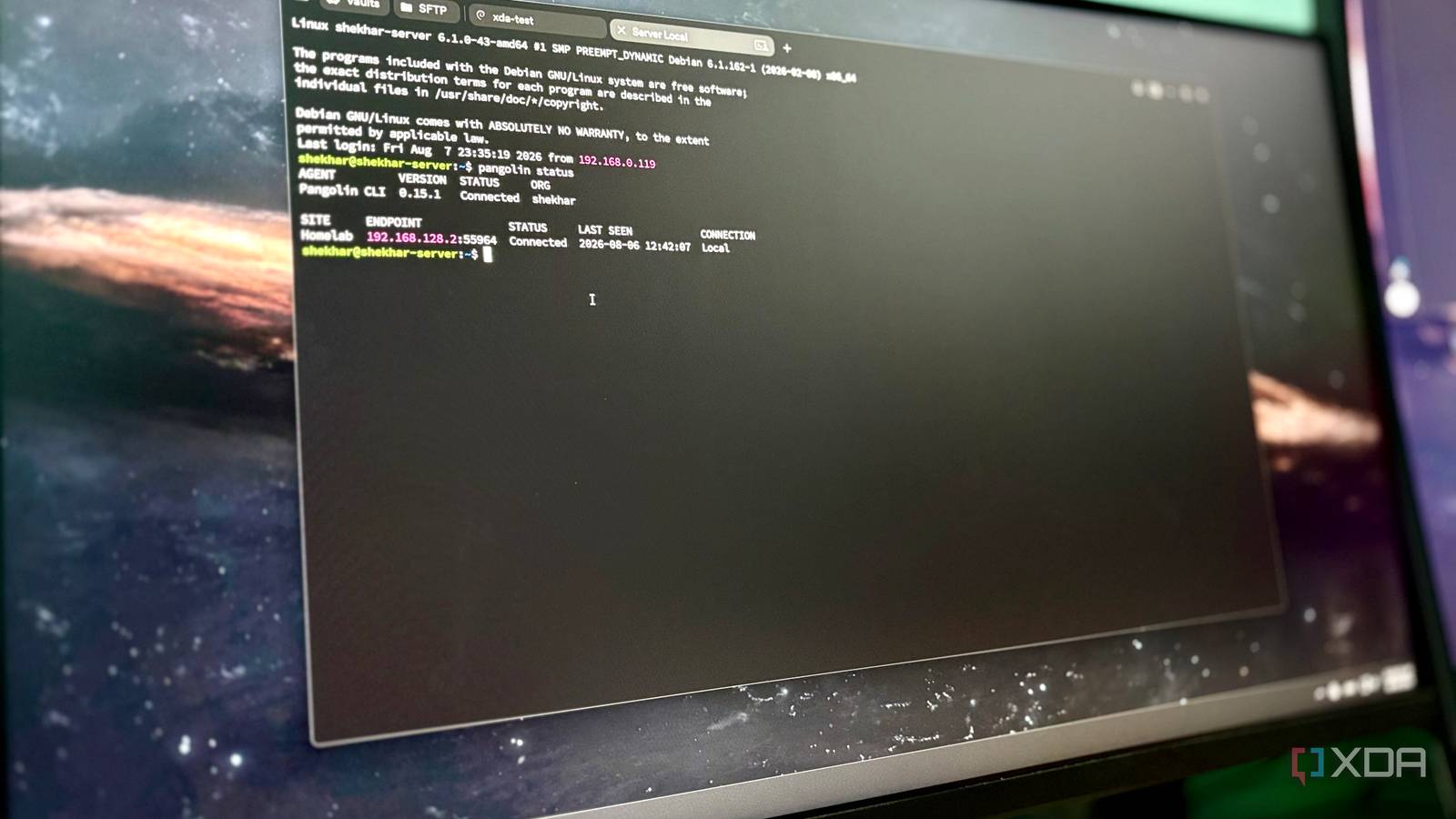
Published Aug 9, 2026, 2:30 PM EDT Shekhar Vaidya is a veteran technology journalist and computer science engineer. He is the founder of TechLatest, where he has spent years providing technical analysis on hardware and Windows ecosystems. Now a Computing Writer at XDA, Shekhar leverages his deep background in NAS, storage solutions, and PC internals to help readers master their tech. I use Pangolin for exposing my self-hosted services publicly and Tailscale for private external access. Both work as expected. While I was setting up Headscale as a self-hosted alternative to Tailscale's cloud control server, I ran a few ping tests between devices on my home LAN. Surprisingly, some replied at 5-19ms (direct), others at 88-102ms (relayed through Tailscale's DERP). That made me wonder why traffic was detouring when both devices were on the same network. A few days ago, I was going through Pangolin’s changelogs, and the latest 1.21 update claimed to support same-network detection. That one line in the changelog made me ask myself: does this feature actually deliver what Tailscale couldn't? But the honest answer to this question took more digging than I expected. A gap I'd been living with Where Pangolin already lived in my setup, and why I went looking for this External access to my homelab was something I had struggled with from day one, because both my ISPs sit behind CGNAT. I started with Tailscale, added Cloudflare Tunnel for public endpoints, and later moved off Cloudflare to Pangolin to own the entire ingress path. Then I also swapped Tailscale's cloud control server for my self-hosted Headscale. Finally, Pangolin was handling my public ingress for five self-hosted services, and Tailscale (via Headscale) was my private mesh for my own devices. Everything was working fine. Pangolin and Tailscale were both doing their jobs perfectly. The only place things stopped making sense was when every device was already inside my own network. Even after adding Headscale to the setup, I expected better results during ping testing. The result wasn’t something I expected. I expected LAN-like latency, but it was DERP-like latency. What I expected was simple: if two devices were on the same local subnet, they should remain local every time, regardless of which VPN client I used. That was something I always had in my mind, but since everything was working as expected, I didn’t look around much. Then Pangolin 1.21 introduced a feature whose description sounded almost too perfect. I was going through the changelogs before updating Pangolin — yes, I read changelogs too; it's not something to skip past as we do with T&Cs. The changelog mentioned ‘Add same network detection for clients and sites, so connections don’t relay when they are on the same network (requires updated clients and sites),' and it's exactly what I was looking for. But I'm not someone who takes a changelog's wording as the final word. We all know networking features often sound straightforward until real devices, DNS, and multiple operating systems get involved. And I was right to think that I faced many hurdles along the way, some because of my negligence and some that were genuine quirks. The setting that was lying to me Building it, breaking it, and the one line that made it worth it Since I was already familiar with the Pangolin configuration, it wasn’t a complex task for me. I knew my Compose files; I was familiar with the dashboard. So I thought the whole process would take a few minutes. Those few minutes somehow became hours before I realized. I started by updating the entire VPS-side Pangolin stack — Pangolin and Gerbil; Traefik didn’t need updating. That went well; the dashboard showed the new version. Then I created a private host resource instead of reusing one of my already existing public resources. For initial testing, I limited the service to a single port — 9000 for Portainer, because that was how I expected to use it. I wanted a noise-free setup for testing direct LAN connections, so I chose to eliminate as many variables as possible. Until then, it was alright; the setup was straightforward. But getting the client to actually use it wasn’t. Windows is my primary workstation, so all these were happening on it. I downloaded the Windows Pangolin client and connected it, but the private resources refused to connect. Then I started my troubleshooting journey, which I will not go into detail on. I am going straight to the "what and why" part. If you take a good look at the changelog wording, it specifically mentioned ‘requires updated clients and sites.' I updated the server but forgot to update Newt — the site connector, not the client — on my server. That was my first mistake. I thought that was the only issue, but even updating Newt didn’t solve anything. I wasn’t able to open Portainer in the browser or access the server via SSH. After many failed attempts, I opened the Windows client settings preferences. There was an option to change the primary upstream DNS server. I thought DNS was acting up, so I enabled my AdGuard Home DNS server and restarted the app, expecting it to work now. But still the same; then I thought of disabling the DNS override altogether, but again, it was the same. At that point, I wasn't even sure I was testing direct LAN connections anymore. Before giving up, I decided to try once more — this time on my Mac. Installed the Mac client, logged in, and even before the first connection, I disabled the DNS override. Finally, I connected to the Pangolin client and tried opening the Portainer dashboard in the browser; surprisingly, it opened instantly. Then I tried SSH; it didn’t work. That made no sense because both pointed to the same machine. After going through the docs and Pangolin dashboard, I eventually discovered that the host resource was effectively capturing the destination IP, while my allowed ports (only port 9000) were too restrictive. So, I expanded the allowed port list, and everything behaved as expected. But it was all good, and I got what I was looking for when I ran Pangolin status on my home Debian server. The output said CONNECTION: Local. It was proof that my traffic wasn’t taking unnecessary detours before reaching the destination. And I ran the same command multiple times just to confirm and rule out the coincidence. Three devices, three different outcomes What "direct" actually meant depended on what you were running it on I used the Debian CLI to verify the direct LAN connection. I ran pangolin status multiple times, and it showed "CONNECTION: Local." It was stable and repeatable. So yes, the feature worked but with a caveat: since the client (Pangolin CLI) and the site lived on the same Debian machine, that was already about as local as a connection could get. And it was also the least demanding scenario possible. It did prove that the mechanism exists, but not necessarily that it works between separate devices. The real test still involved another machine on the same network. So, coming back to the Mac. The Mac was physically separate from the other device on the same network. It connected without any issues. I could open Portainer and access the server via SSH. Both the Mac and the Debian server were on the same subnet. This was exactly the scenario I'd be in most often — the one Direct LAN Connections was supposed to optimize for. But when I dug a little into the Pangolin client’s preferences, the JSON/API still reported isLocal: false and isRelay: true. This was actually more surprising than the Windows issue. Honestly, this wasn’t what I was expecting after finally seeing CONNECTION: Local on Debian. Windows was never a successful test for me, so it makes no sense to talk about it. That left me with only one scenario that truly reflected everyday use. Debian was the only one that confirmed a direct LAN connection, and it was also the easiest possible scenario to pull off. Multi-device tests gave me relayed connections, and these were my everyday scenarios. So, for me, it wasn’t enough evidence to say the feature delivered what it advertised. But it also doesn't mean that the feature doesn’t work at all. For now, I'd call direct LAN connections an interesting capability rather than a solved problem. Direct enough, but not everywhere I wasn’t on a journey to replace Tailscale. It does its job well. I was trying to test the claims that Pangolin made for direct LAN connections. But the results were more nuanced than I expected. The only confirmed outcome came from my Debian server, and it was the simplest possible scenario because both the client and the site were on the same machine. My actual day-to-day scenarios were Mac and Windows. Mac connected but reported isRelay: true, and Windows never reached a usable state to test at all. For now, same-network detection exists and can work, but in my case, it didn't prove reliable enough to trust in an actual multi-device setup. Pangolin Self-hosted reverse proxy and tunnel gateway for exposing services publicly, without relying on your ISP or a third-party ingress.
I tested Pangolin's direct LAN promise across three devices — here's why two of them failed
Full Article
Original Source
Read the full article at Xda-developers →KhanList aggregates and links to publicly available news content. We do not host full articles from third-party sources. Always verify important information with original sources.