
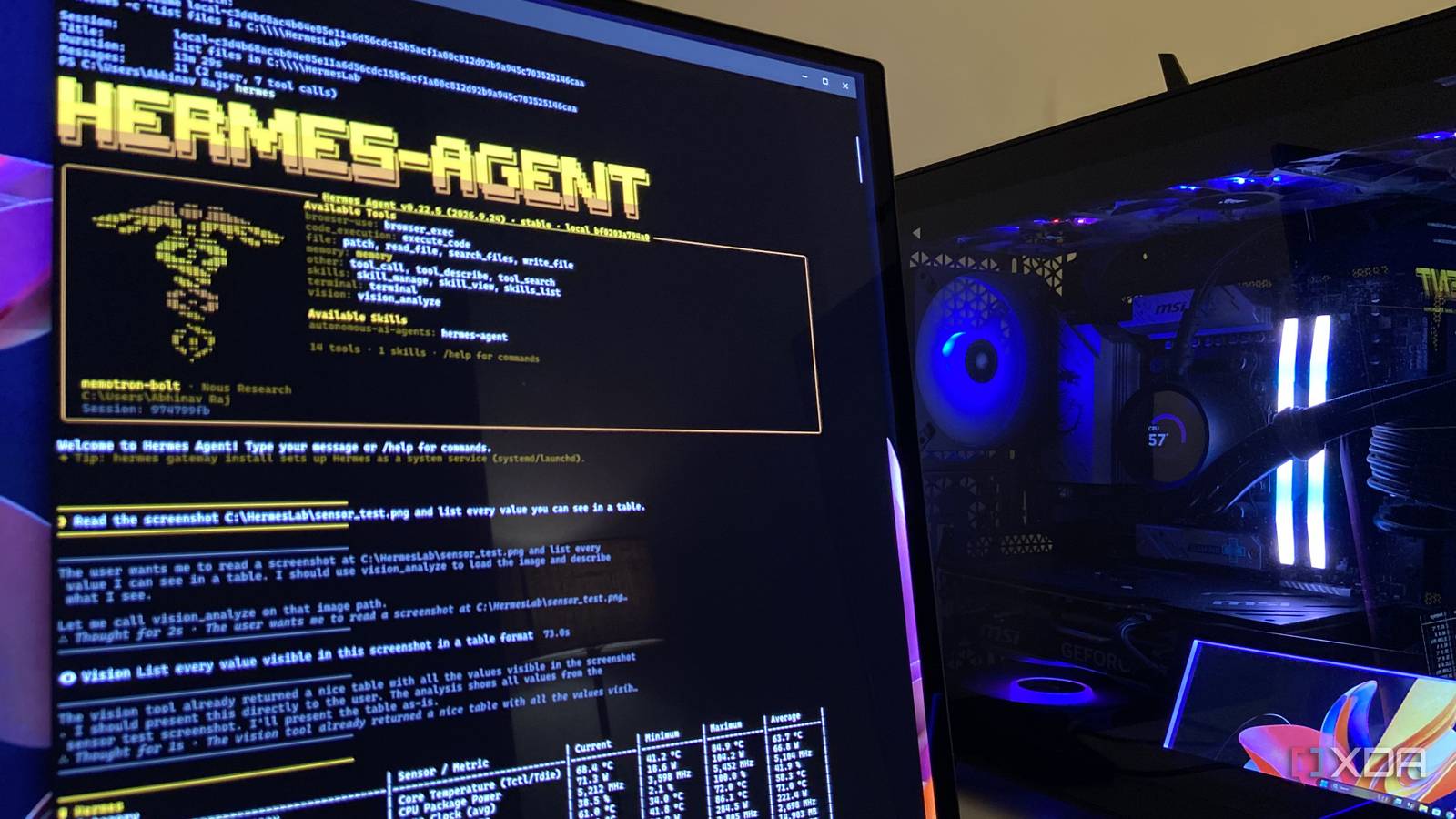
Published Oct 28, 2026, 4:30 PM EDT Abhinav pivoted from a career in banking to pursue his first love in writing. Even while working full-time, he continued contributing as an editor-at-large, a role he has held for more than 7 years. A lifelong tech enthusiast who has built three gaming and productivity powerhouse PCs since 2018, his passion for technology keeps him closely following the semiconductor industry, from NVIDIA and AMD to ARM. His MSc dissertation explored how artificial intelligence will reshape the future of work, reflecting his curiosity about the wider social impact of emerging technologies. When it comes to local AI inference, I've treated my RTX 4070 Ti Super as a one-model-per-job card. As a matter of fact, I've also created an entire ensemble of models suited to a particular job that they do best, as I recently detailed last week, consisting of a research model, a coding model, and an image model. An agent that plans, browses, and acts on its own always felt like something that was exclusive to the most expensive cloud services, that is, until now. Nvidia recently released Nemotron 3.5 Bolt, which is a 74B model with 9B active parameters, built to fit in 24GB with native 2-bit weights. If you go through its model card right now, you'll find that every hardware configuration targets 32GB of memory or more, and it almost felt as though my 16GB card had no business running it. As stubborn as I am, I tried it anyway with nothing but my 16GB GPU, 32GB of RAM, and the right llama.cpp settings. Here's how it turned my gaming desktop into an RTX AI PC. Getting a 74B model on a 16GB card took more than a download My first attempt didn't make it past loading the file Nvidia's official GGUF for the Nemotron-3.5-Bolt-74B-A9B stores every expert in IQ2_XXS quant, with the Mamba layers (a leaner alternative to attention layers) in NVFP4 and the attention layers in Q8_0. Along with the vision projector, the download was just under 24GB, which is already 8GB more than my 4070 Ti Super's VRAM. The next challenge was that my existing llama.cpp build refused to load it. As it turns out, Bolt's experts are pruned differently from layer to layer, and older builds of llama.cpp reject that layout with a tensor shape error. As such, I had to move to build b11927, since the support for Bolt dropped on llama.cpp on the model's launch day. Now, instead of guessing at how many expert layers my card could hold through trial-and-error with --n-cpu-moe, I let llama.cpp's --fit option work it out for me. After running the flag, llama.cpp filled my GPU to 15.7GB and left the rest in system memory. With all expert layers on the CPU, Bolt managed 19 tokens/second, and the fitted setup ran between 22–32 tokens per second, with prompt processing at 110 tokens/second. Bolt also comes with LiLiCorr, which is a small companion model Nvidia trained to guess several words ahead so that the main model can check them in one go. Other model makers like Alibaba and Google have their own variant of it through multi-token prediction, but since LiLiCorr slowed things down on my card instead of speeding them up (as it took VRAM away from experts), speculative decoding went out the window. For this test, I ran everything at 64K context with Nvidia's recommended sampler settings with a temperature of 1.0 and top_p of 0.95, along with llama.cpp's default sampler values of 40 for top_k and 0.05 for min_p. Getting Bolt to load was the first step, turning it into an agent was the next Hermes Agent gave Bolt everything it needed When I had the model running as it should via llama.cpp, it was time to see its agentic capabilities in action. Interestingly enough, Bolt's model card lists Hermes Agent reasoning traces in its post-training data, so it felt natural to pick it for the agent. I pointed it at my llama.cpp server as a custom endpoint and started the setup from a blank slate, enabling terminal, file access, vision, a local Chromium browser (for further tinkering later), memory, skills, and code execution. I left the cloud API key empty, as it wasn't necessary here. I also deleted its 58 bundled skills, since two of them hand tasks to Claude Code and Codex, which could've silently sent work to the cloud. That would've been a problem for the experiment. The first test I ran to check if everything was running as it should was pointing Bolt to a hardware monitor screenshot with 48 readings across CPU, GPU, and memory. Bolt's first attempt went a little sideways, but only because it trusted a folder listing it had run a few minutes earlier, decided the file didn't exist, and proceeded to spend the next two minutes searching the contents of files across my user folder for the file name. Thankfully, it didn't come up with invented values, which is something I feared. I started a fresh session and gave it the full path in the next run. This time, it read all the 48 values correctly, including thousands separators, a 0 RPM fan minimum, and the log filename in the footer. The vision call took about 73 seconds, and the whole run was finished in 1 minute and 42 seconds. Then I made it do what Nvidia says it does best I gave Bolt a multi-step job and didn't step in once For the final test, I gave Bolt a five-step job, wherein it had to find the installed versions of llama.cpp and Hermes on my PC, check GitHub for their latest releases, dig up the pull request that added Bolt support to llama.cpp, write a report with sources, and save the method as a skill for the next time. I did not intervene in any part of the process, and it wrapped it up in 11 minutes and 44 seconds. It first ran llama-cli to read my build number and pulled the Hermes version from the installed files. The browser took some time getting used to, and Bolt burned around eight tool calls figuring out how to read a page. Once it was able to, it pulled the correct links out of the GitHub search results and identified pull request #30520, along with its merge date of October 15. Its first attempt at saving the skill failed, so it opened an existing skill, copied the format, and fixed it all by itself. Oddly enough, it tried to open Hermes' keys file while hunting for a version number, which fortunately Hermes blocked. Clearly, the process wasn't flawless, and the report it made wasn't either. The report credited the pull request with adding an architecture that llama.cpp already supported, got my llama.cpp verdict right, and Bolt spent a little over a minute counting characters by hand to meet a character limit, which was rather silly to watch. Task Result Find installed versions Correct for both llama.cpp and Hermes Check latest releases Correct for both Find the Bolt support pull request Correct Write a well-sourced report Mostly correct, with one misread detail Save the method as a skill Correct, with formatting errors fixed Stay within limits Installed nothing and was blocked from keys file Time taken 11 minutes and 44 seconds Context used About 45K of 64K tokens, including vision test Nvidia had my attention, and it now has my interest Despite its few imperfections, Nemotron 3.5 Bolt 74B-A9B showed me what I didn't think my 16GB GPU could do, and somehow running a 74B model was just the start. It gave a PC that I built for gaming an on-device agent that I could hand complex, multi-step jobs to and expect a reasonable degree of accuracy from it. It may not be completely hands-off yet, but every task it takes is every task that's off my desk.
I tested Nvidia’s Nemotron 3.5 Bolt, and it changed what I thought my 16GB GPU could do
Full Article
Original Source
Read the full article at Xda-developers →KhanList aggregates and links to publicly available news content. We do not host full articles from third-party sources. Always verify important information with original sources.