
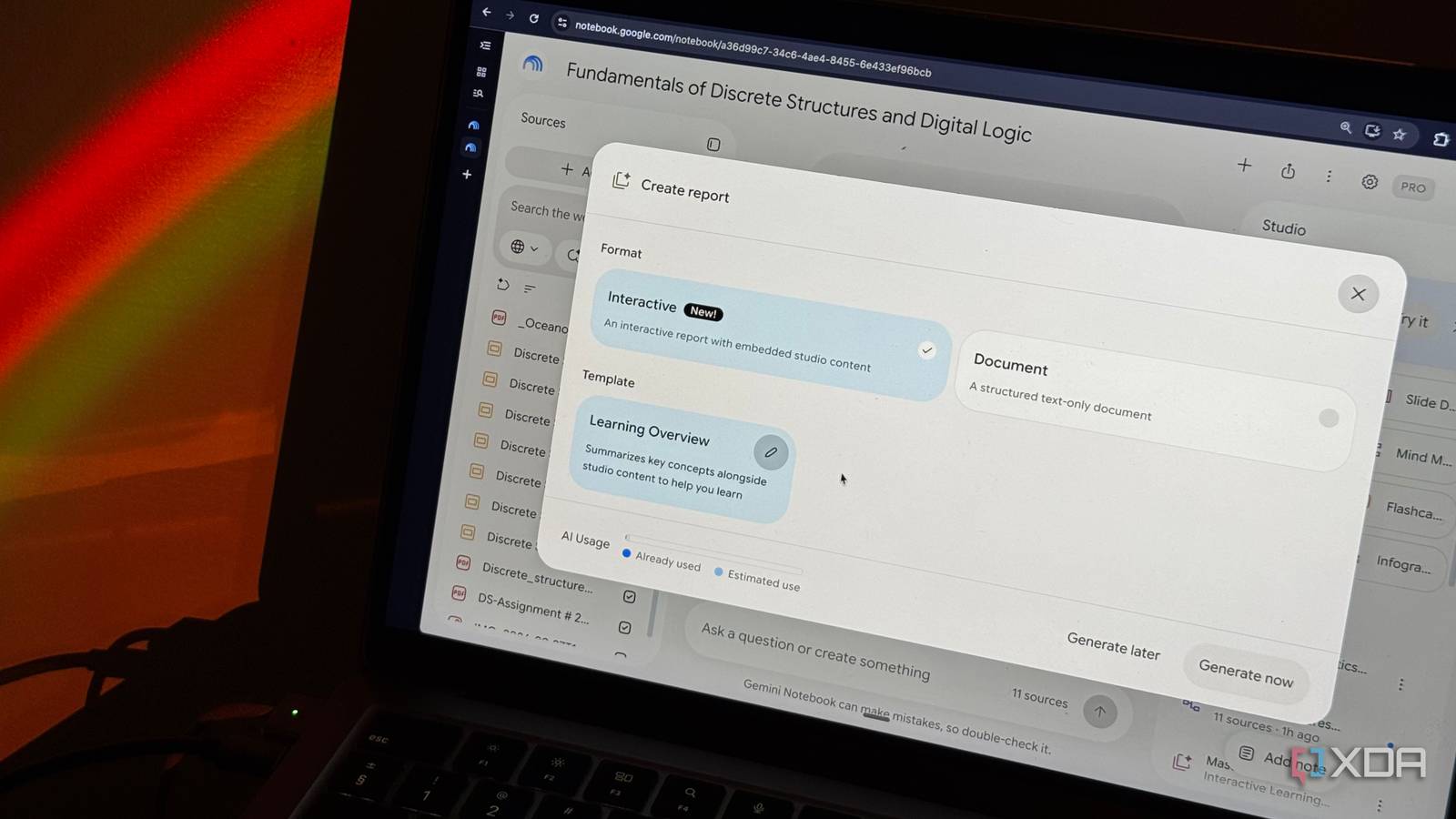
Published Sep 28, 2026, 8:30 AM EDT Mahnoor Faisal is a tech journalist covering AI and productivity tools with bylines at XDA, SlashGear, MakeUseOf, Laptop Mag, and Android Police. She's been writing professionally since she was sixteen, and has since penned hundreds of articles. This includes in-depth coverage of AI tools like NotebookLM to breaking news across the AI space. Her passion for technology started when she received her first iPod Touch (4th generation) on her 8th birthday, and she's been deep in the tech world ever since. Currently pursuing a degree in computer science, Mahnoor brings both a journalist's eye and a technical foundation to her coverage of how AI is reshaping the way we work and learn. After a summer of reaching for NotebookLM (now Gemini Notebook) mostly for testing rather than actually studying, I’m finally back to using it for what originally drew me to it in the first place. With college back in full swing, I've started feeding it lecture slides, notes, and readings again. Well, while I might not exactly be thrilled about studying for the multiple quizzes I have this week, they did give me the perfect excuse to put one of NotebookLM's newest features through its paces: Interactive Learning Overviews. I've been actively testing pretty much every major feature Google has added to NotebookLM lately, but this one immediately felt different. NotebookLM has had one weird imbalance for a while The pieces were there I've praised NotebookLM a lot since its launch, and one reason I've consistently come back to is that it's one of the few AI tools that actually feels meaningful. Rather than feeling like AI for the sake of AI, most of the features are targeted at very specific problems students run into when they're actively trying to learn something. None of the features make you immediately think: "hey, who will actually use this feature?" For example, Audio Overviews are clearly useful for students who learn best by listening, or anyone who'd rather turn a dense reading into something they can absorb on the go. Mind Maps and Infographics are best for those who need the visual side of things to make a complicated topic click, while Flashcards and Quizzes are there for the point where simply understanding something isn't enough and you need to make sure you can actually recall it. That's what I've always liked about NotebookLM. Its features don't feel like random AI experiments bolted onto the product. Each one has a fairly obvious purpose. The imbalance is that, until now, all of those useful features have mostly existed alongside each other rather than actually working together. Say you're studying for an exam. You need to actively figure out which of these tools makes sense at each stage. You might start with an Audio Overview to get a condensed version of everything, then head back to the Studio panel to generate a Mind Map to see how all of your sources connect. You might then decide to generate a Slide Deck to get a more structured walkthrough, before switching over to Flashcards to test your memory and finally a Quiz to see whether any of it actually stuck. None of those steps are difficult by themselves, but together they start to feel surprisingly fragmented. NotebookLM gives you all the pieces you could possibly need, but you're still the one figuring out how to stitch them into an actual study session. Interactive Learning Overviews finally fix that disconnect This is where it all clicks Interactive Learning Overviews are a new NotebookLM feature that changes exactly that. Rather than asking you to generate a bunch of Studio outputs separately and figure out how to work through them, NotebookLM essentially builds the study session for you. Interactive Learning Overviews live under Reports, but calling them a report almost undersells what they actually are. They’re more like full-fledged, interactive walkthroughs of whatever you’re trying to learn. Each one is broken into different sections with a table of contents, so you can jump between concepts instead of scrolling through one giant wall of text. But the bigger difference is what happens inside those sections. Rather than just giving you explanations to read, NotebookLM can weave in things like quizzes, flashcards, and other Studio outputs as you work through the material. For instance, I have a notebook for a course called Discrete Structures. This specific notebook is filled with lecture slides, reports, assignments, web resources, and pretty much everything else I've accumulated for the course so far. To generate an Interactive Learning Overview, all you need to do is click Reports in the Studio panel. You'll see two options: Interactive and Document. Select the former, and you'll currently only see one option under Template: Learning Overview. From there, you can hit Generate now, or choose Generate later if you're running low on your usage limits and would rather have NotebookLM create it once those limits reset. The overview that was generated for this notebook was divided into 8 headings: Introduction, Foundations of Logics and Propositions, Conditional Statements and Logical Arguments, Logic Gates and Digital Circuits, Set Theory and Venn Diagrams, Relations and Their Properties, Functions and Compositions, and Summary. Within each section, NotebookLM recommends a Studio feature it thinks makes sense for that specific part of the material. In my overview, it suggested a Mind Map for logical connectives, Flashcards for implications and arguments, a Slide Deck for digital logic, an Infographic for set theory, and even an Audio Overview for functions. At the very end, it suggested a Quiz covering everything I'd just worked through. The recommendations aren’t random What I really like about this feature is that it's clear NotebookLM isn't just recommending Studio outputs randomly. Instead, the suggestions actually make sense for the material they're attached to. Using the same example as above, set theory is something that's inherently visual. This makes an Infographic a natural fit, especially when you're dealing with things like Venn diagrams, set operations, and relationships between different groups. The same goes for the other recommendations. Conditional statements and logical arguments are concepts I need to actively recall, so Flashcards make sense there. Digital logic is easier to understand when it's broken down step by step, which makes a Slide Deck useful. And by the time I reached the Summary section, NotebookLM suggested a Quiz covering the material I'd just worked through. Hitting Add doesn't immediately lock you into whatever NotebookLM suggested, either. It opens the usual generation window with a topic already filled in, and you can tweak it before generating the artifact. For my final Quiz, for example, I could change the number of questions, difficulty, sources, and even the topic itself. That's what makes Interactive Learning Overviews feel different from another feature Google has simply added to Studio. They're almost a layer sitting on top of all the features NotebookLM already had, figuring out when each one might actually be useful! This feature is still rolling out, though, so if you haven't gotten access yet, you might just need to wait a little longer. Google says Interactive Learning Overviews are rolling out to all users over the next few weeks, which likely explains why there still isn't much chatter around them yet!
I tested NotebookLM’s new Interactive Learning Overviews, and they fixed my biggest problem with it
Full Article
Original Source
Read the full article at Xda-developers →KhanList aggregates and links to publicly available news content. We do not host full articles from third-party sources. Always verify important information with original sources.