
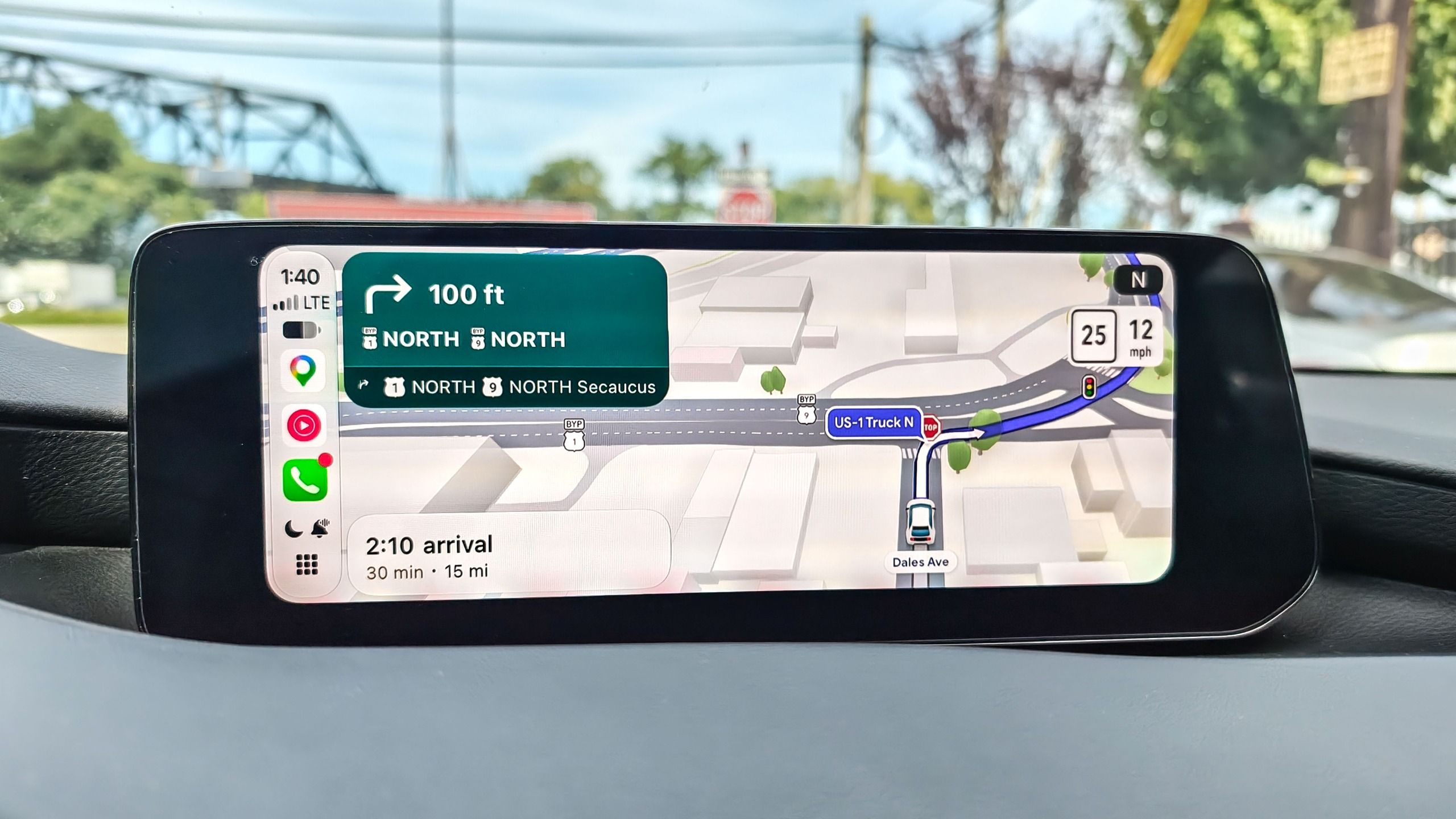
(Image credit: John Velasco / Tom's Guide) On average, I drive about 300 miles a week testing new vehicles. But while I’m constantly switching cars from week to week, one thing has remained constant: Google Maps. I’ve tested Apple Maps, Waze, and even TomTom over the past year alone while reviewing many of the best electric cars, but I always find myself going back to Google.The arrival of Google Maps Immersive Navigation is further proof that it delivers the most comprehensive navigation experience around — especially now that it’s available on both Android Auto and Apple CarPlay. After putting it through my daily commutes for the past two weeks, I can tell you it finally solves one of driving's biggest headaches: making confusing, split-second freeway exits effortless to navigate.Real depth for tricky exits (Image credit: Future)Driving rarely stresses me out, but navigating unfamiliar roads during complex traffic conditions certainly puts me on high alert. That's especially true when approaching multi-lane highway splits and sudden off-ramps. Even local freeways I travel regularly, like the Garden State Parkway and the New Jersey Turnpike, can become overwhelming in congested areas — yet Immersive Navigation noticeably cuts through the chaos.First and foremost, the updated 3D map view renders the surrounding environment with true depth and elevation. I'm not just talking about roadside buildings and trees, either. The roadways themselves now reflect actual depth, making it much easier to distinguish overpasses and elevated flyover ramps. Multi-level highways are notoriously tricky on a flat 2D screen, but Immersive Navigation makes it instantly clear whether I'm traveling above or below an overlapping route. Image 1 of 3 (Image credit: Tom's Guide) In the screenshots above that show Google Maps Immersive Navigation with CarPlay, you can clearly see how perpendicular overpasses crossing my path demonstrate the visible separation and depth between the elevated roadway and the lanes below.Smart zoom dynamically frames the road ahead Image 1 of 2 (Image credit: Future) The first few times I tested Immersive Navigation on my commute into New York City, I genuinely thought Android Auto was glitching whenever the display shifted unexpectedly. I quickly realized, though, that these dynamic adjustments were deliberate — cleverly engineered to provide me with more immediate context for what's ahead.Most in-car navigation displays maintain a relatively static view, but Google’s "smart zooms" kick in contextually to deliver the ideal perspective. For instance, when I'm cruising along an open 10-mile stretch of the New Jersey Turnpike, the camera smoothly pulls back to reveal the highway far ahead. That bird's-eye vantage gives me ample warning if a route suddenly flips from blue to red, so I have plenty of time to consider alternate routes.Get instant access to breaking news, the hottest reviews, great deals and helpful tips.Just as impressively, the camera punches in close whenever precision matters — such as approaching a multi-lane merge or an intricate off-ramp. That tighter frame takes the panic out of lane positioning, ensuring I don't overshoot an exit. Whether I'm navigating gridlock or fast-moving traffic, smart zoom makes it significantly easier to anticipate my next move.Comprehensive experience (Image credit: Tom's Guide)At this point, I can’t see myself using anything other than Google Maps — Immersive Navigation has been an absolute game-changer. Yet while the visual overhaul is welcome, the visual makeover means very little if the underlying navigation data falls short. That reliable foundation is ultimately why Google Maps remains my default choice for turn-by-turn directions.Its real-time traffic engine consistently proves its worth on my commutes, actively saving me time by spotting gridlock early and rerouting on the fly. Factor in dependable speed-trap notifications and community-driven hazard alerts, and the driving experience remains second to none.Best of all, Immersive Navigation isn't restricted to a single ecosystem because it works seamlessly across Apple CarPlay, Android Auto, and the standalone Google Maps app. Whether I'm plugging in an iPhone one week or an Android device the next, that cross-platform flexibility guarantees that smarter, stress-free navigation is along for every ride. Follow Tom's Guide on Google News and add us as a preferred source to get our up-to-date news, analysis, and reviews in your feeds. More from Tom's GuideAndroid president on Apple's iPhone Duo: 'I'm glad to see more people joining what is now the obvious party'Forget iPhone 18 Pro — 9 reasons to wait for the iPhone 20I finally unlinked my iPhone alarm from my ringer volume — here is where Apple hid it in iOS 27 John’s a senior editor covering phones for Tom’s Guide. He’s no stranger in this area having covered mobile phones and gadgets since 2008 when he started his career. On top of his editor duties, he’s a seasoned videographer being in front and behind the camera producing YouTube videos. Previously, he held editor roles with PhoneArena, Android Authority, Digital Trends, and SPY. Outside of tech, he enjoys producing mini documentaries and fun social clips for small businesses, enjoying the beach life at the Jersey Shore, and recently becoming a first time homeowner.
I tested Google Maps Immersive Navigation for 2 weeks — and it makes seeing tricky exits a breeze on Apple CarPlay and Android Auto
Full Article
Original Source
Read the full article at Tomsguide →KhanList aggregates and links to publicly available news content. We do not host full articles from third-party sources. Always verify important information with original sources.