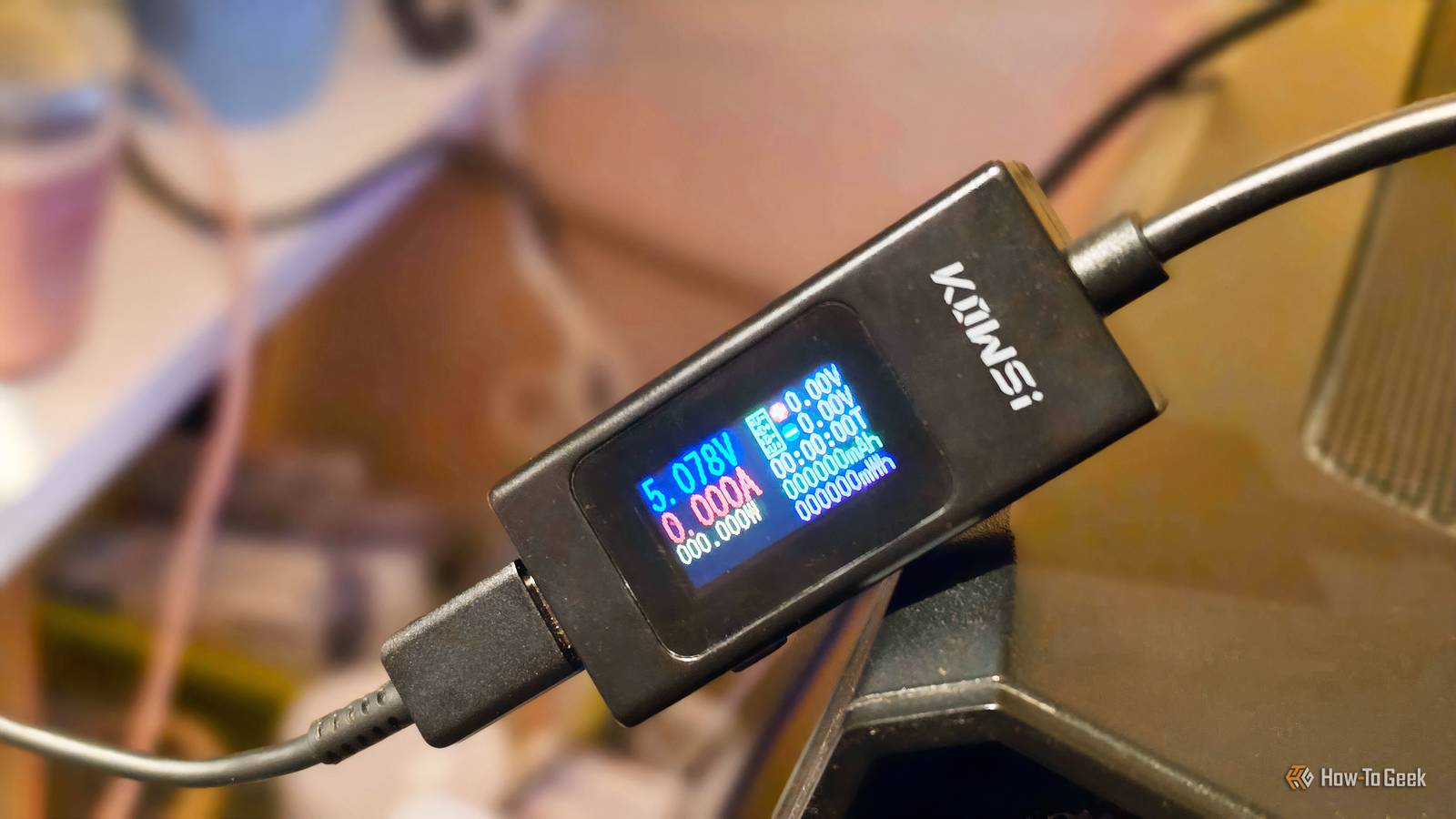
Credit: Monica J. White/How-To Geek Published Jul 31, 2026, 11:45 AM EDT Monica J. White is a journalist with over a decade of experience in covering technology. She built her first PC nearly 20 years ago, and she has since built and tested dozens of PCs. PC hardware is her main beat, and graphics cards and the GPU market at large are her main area of interest, but she has written thousands of articles covering everything related to PCs, laptops, handhelds, and peripherals. From GPUs and CPUs to headsets and software, Monica's always willing to geek out over all things related to computing. Outside of her work with How-To Geek, Monica contributes to TechRadar, PC Gamer, Tom's Guide, Laptop Mag, SlashGear, Whop, and Digital Trends, among others. Her ultimate goal is to make PC gaming and computing approachable and fun to any audience. Monica spends a lot of time elbow-deep in her PC case, as she's always making upgrades, testing something, or plotting out her next build. She's the go-to tech support person in her immediate circle, so she's never out of things to do. Whenever she has spare time, you'll find her gaming until the early hours and hanging out with her dog. Sign in to your How-To Geek account The problem with USB-C cables and ports is that they all look identical, but their performance and capabilities can vary wildly. Short of digging through spec sheets, you might never really know what they are truly supposed to do. Fortunately, turning into a private investigator of sorts isn't the only way to find out what you're dealing with. You just need to test them, and there are a few ways to do that. Here's how I did it. I checked the cable and port for clues first The easiest way, although not the best way When I expressed my frustration with the state of USB-C and USB-A cables, I received many questions about how to really figure out what each cable does. The annoyance is real, because all cables look the same, but some can be super slow, some can handle DisplayPort video, and some can charge up to 240W. So I set off on a mission to figure this out, both for myself and for you, to save you some elbow grease. I started with the obvious stuff, and I recommend you do the same. Look closely at the connector housings, the cable itself, and the area around the port. You may be lucky and spot a Thunderbolt lightning bolt, a DisplayPort symbol, or a number that points you in the direction of the data speed or charging limit. Newer certified cables may spell things out, although honestly, none of mine did. You may see labels like 20Gbps, 40Gbps, 60W, or 240W, for instance. The same goes for ports. One USB-C port may be the fastest thing ever, while the one right next to it might be a complete disappointment. When it comes to ports, checking case and motherboard manuals (or manuals for whatever device you're using) is usually your best bet. USB C Tester Power Meter Brand YEREADW Cable Type Type-C This cheap USB-C tester was all I needed to figure out quite a lot about my USB ports and cables. A USB cable tester gave me the fastest answers Although I ended up buying the wrong one Credit: Monica J. White/How-To Geek Before I even started any of this, I already knew that the best and easiest way to get the job done would be to get a USB-C cable tester. But my first attempt at this was a bit of a fail, because I tried to be cheap, and I bought the cheapest thing on Amazon. It was good, but it wasn't what I thought: I bought a USB-C power meter instead. An easy mistake to make, so when you shop, make sure you pick up something like this tester instead. The power meter still helped me learn about the voltage, current, and wattage passing between a charger and device, so it was still useful when comparing how quickly different cables charged my phone. For the full picture, you need a proper USB cable tester. Basic models check continuity by showing which pins at one end of the cable are actually connected to the other end. This can reveal broken connections and help separate simple charging or USB 2.0 cables from fuller-featured cables with the additional wiring needed for faster data transfers. Some testers also let you flip each USB-C connector and test it again, which can expose damage that only causes problems in one orientation. More advanced testers read the cable's e-marker, measure resistance, and display all of the capabilities. This means you get the full-page review of the cable, including data standard. They're not that cheap ($30-$60), but they're really helpful. When you do this, make sure to test everything separately One successful connection doesn't mean much Credit: Kris Henges / How-To Geek The fact that the USB-C cable you're eyeing can charge your phone should come as no surprise, but it may still be limited to USB 2.0 data speeds, making it a bottleneck for external SSDs. The same applies to ports. As such, you should only test one part of the setup at a time, and check for all capabilities one after another before moving on. Keep the same charger and device while swapping cables to compare charging power, then use the same port and external SSD to compare transfer speeds. For video, start with a monitor, adapter, and cable you already know are going to work. Otherwise, one incompatible adapter or limited port can make a perfectly capable cable look pretty much useless. Quiz 8 Questions · Test Your KnowledgeUSB standards & connectorsTrivia ChallengeFrom clunky Type-A plugs to lightning-fast USB4 — test your knowledge of the universal serial bus revolution.HistoryConnectorsSpeedsStandardsHardwareBegin In what year was the original USB 1.0 specification officially released?A1993B1998C1996D2000Correct! USB 1.0 was released in January 1996 by a consortium led by Intel, Compaq, Microsoft, and others. It aimed to replace the chaotic mix of serial ports, parallel ports, and PS/2 connectors that plagued early PCs.Not quite — USB 1.0 launched in January 1996. It was developed by a consortium including Intel and Microsoft to simplify the frustrating tangle of legacy ports on personal computers at the time.Continue What is the maximum data transfer rate of USB 2.0, also known as 'Hi-Speed' USB?A12 MbpsB480 MbpsC960 MbpsD5 GbpsCorrect! USB 2.0 tops out at 480 Mbps, which is why it earned the 'Hi-Speed' label when it launched in 2000. That was a massive leap over USB 1.1's 12 Mbps Full Speed ceiling, making it practical for external hard drives and cameras.Not quite — the correct answer is 480 Mbps. USB 2.0 is branded 'Hi-Speed' and launched in 2000, offering a 40x improvement over USB 1.1's Full Speed 12 Mbps mode, which made external storage far more viable.Continue Which USB connector type was specifically designed for use with mobile phones and cameras, featuring a distinctive 5-pin trapezoidal shape?AUSB Type-BBUSB Micro-BCUSB Mini-BDUSB Type-CCorrect! USB Mini-B was the go-to connector for early digital cameras and mobile phones before being largely replaced. It features a recognizable five-pin trapezoidal design and was formally specified in USB 2.0, though it has since been superseded by Micro-B and USB-C.The correct answer is USB Mini-B. It was the standard connector for early digital cameras and many mobile phones, featuring a 5-pin trapezoidal shape. It was eventually displaced by the slimmer Micro-B connector, which allowed for thinner device designs.Continue USB 3.0 was later rebranded by the USB Implementers Forum. What is its current official name?AUSB 3.1 Gen 2BUSB 3.2 Gen 2x2CUSB 3.2 Gen 1DUSB 3.1 Gen 1Correct! The USB-IF rebranded USB 3.0 as USB 3.2 Gen 1 to fit into a unified naming scheme. It still delivers the same 5 Gbps 'SuperSpeed' transfer rate — the confusing renaming was meant to streamline the standard's versioning but arguably made it more complicated.Not quite — USB 3.0 is now officially called USB 3.2 Gen 1. The USB Implementers Forum rebranded the entire USB 3.x family to create a unified naming structure, though the 5 Gbps SuperSpeed performance of the original USB 3.0 remains unchanged.Continue What key physical feature makes USB Type-C different from all previous USB connector types?AIt uses gold-plated contacts for better conductivityBIt is fully reversible and can be inserted either way upCIt is the smallest USB connector ever madeDIt supports only digital audio signalsCorrect! USB Type-C's most celebrated feature is its symmetrical, reversible design — you can plug it in either way without fumbling. Introduced in 2014, it also supports far higher power delivery and data speeds than older connectors, making it a true universal solution.The standout feature is its fully reversible design — you can insert a USB-C plug either way up, ending the frustration of guessing the correct orientation. Introduced in 2014, USB-C also supports higher power delivery and data speeds than its predecessors.Continue Which organization is responsible for developing and publishing the USB specification?AIEEE (Institute of Electrical and Electronics Engineers)BISO (International Organization for Standardization)CUSB-IF (USB Implementers Forum)DANSI (American National Standards Institute)Correct! The USB Implementers Forum (USB-IF) is the non-profit organization formed by the original USB developers to maintain and promote the USB specification. Founded in 1995, it certifies compliant products and grants the right to use the official USB logo.The correct answer is the USB-IF, or USB Implementers Forum. This non-profit was founded in 1995 by the companies that originally developed USB, including Intel and Microsoft. It maintains the specification, runs compliance programs, and certifies products to carry the USB logo.Continue What maximum power output did USB Power Delivery 3.1 introduce, enabling charging of high-performance laptops?A60 wattsB100 wattsC140 wattsD240 wattsCorrect! USB Power Delivery 3.1, released in 2021, dramatically raised the ceiling to 240 watts using Extended Power Range (EPR) mode. This is enough to charge even power-hungry gaming laptops and workstations over a single USB-C cable, replacing bulky proprietary chargers.The answer is 240 watts. USB Power Delivery 3.1, introduced in 2021, added an Extended Power Range (EPR) mode that maxes out at 240W over a USB-C cable. Earlier PD versions were capped at 100W, which was insufficient for many high-performance laptops.Continue USB4, released in 2019, is based on which company's proprietary technology that was donated to the USB-IF?AApple's Lightning protocolBIntel's Thunderbolt 3 protocolCGoogle's USB-C Audio standardDAMD's SuperSpeed architectureCorrect! Intel donated the Thunderbolt 3 specification to the USB-IF, which became the foundation for USB4. This means USB4 at its fastest tier (40 Gbps) is technically compatible with Thunderbolt 3 devices, blurring the line between the two standards significantly.The correct answer is Intel's Thunderbolt 3. Intel donated its Thunderbolt 3 spec to the USB Implementers Forum, and it became the basis for USB4. The top USB4 speed tier of 40 Gbps mirrors Thunderbolt 3, and the two standards share a high degree of compatibility.See My Score Challenge CompleteYour Score/ 8Thanks for playing!Try Again You can also use software for this job All by switching things one step at a time Credit: Patrick Campanale / How-To Geek Trying out software is the final frontier here. On Windows, USB Device Tree Viewer, also called UsbTreeView, is the exact program I'd use. It's still actively maintained in 2026, and it shows which controller and port a device is using, along with the USB speed the connection actually negotiated. Get yourself a cable that can do everything Once you're satisfied with all your testing, keep one properly labeled USB4 or Thunderbolt cable as your known-good reference. You can use it whenever you need to find out whether problems are caused by the cable or something else. Plus, it can become your go-to for all the most demanding tasks. UGREEN 100W Retractable USB-C Cable $11.99 $15.99 Save $4 This cheap USB cable makes organizing everything a whole lot easier.
I tested every USB-C cable in my drawer and finally figured out why some are useless
Full Article
Original Source
Read the full article at Howtogeek →KhanList aggregates and links to publicly available news content. We do not host full articles from third-party sources. Always verify important information with original sources.