
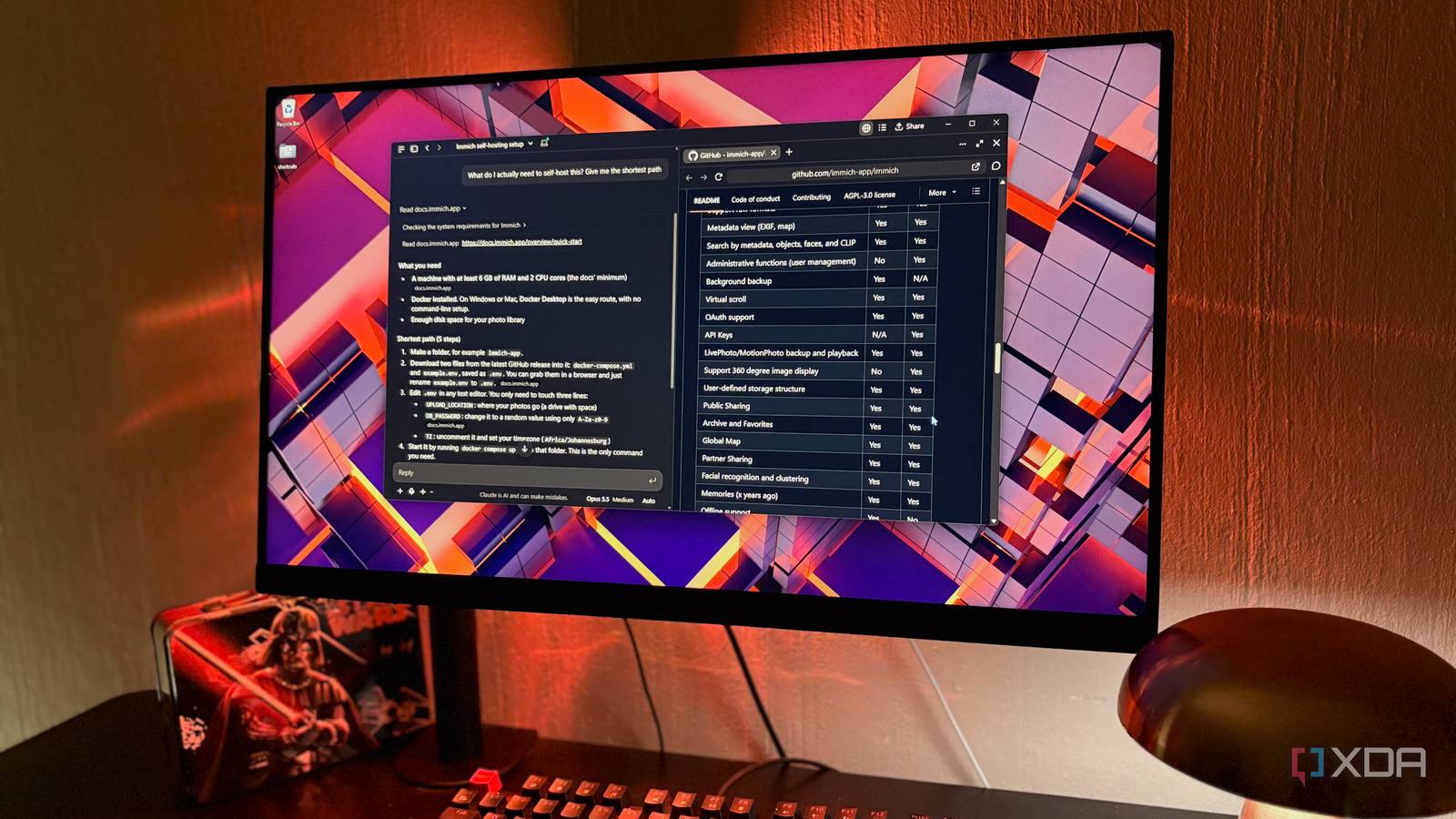
Published Nov 18, 2026, 7:00 PM EST Nolen began their writing career in 2019, with three years dedicated to editing the Creative section at MakeUseOf. Their expertise lies at the crossroads of technology and creativity, covering areas like photography, video editing, and graphic design. Outside of work, you'll often find Nolen diving into a good book, writing their own stories, or playing video games. This past year or so, every AI company decided that it needs its own browser. But there's always a catch, and it's that you have to move your whole browsing life over to get the assistant. Comet is free now, and Dia put its AI features behind a $20 a month plan, but they're all still competing to be the browser you open every morning. OpenAI's Atlas didn't make it that far; it shut down in August less than a year after launch, and its browsing features got folded into ChatGPT's desktop app now. It seems plenty of people who try an AI browser just end up drifting back to Chrome, and it has its own optional AI integrations now anyway. Moving logins, tabs, and history into a brand new app just to get an AI sidebar is a big ask, and having an agent sit inside the same browser as your accounts is not something I felt super comfortable with. However, most of what I wanted AI to do on the web is reading, comparing, and synthesizing pages, and that doesn't need my accounts. Claude's built-in browser is underrated It never touches my real browser, and that's the point I'm not talking about the Claude in Chrome extension. Claude's desktop app has had its own built-in browser in Cowork since August, and it moved into regular chat in September when Cowork and Chat merged. Whenever a request needs a website, a pane slides open next to the chat and Claude works in it, and you can watch it work live. It can open and read pages on its own, and it'll click through and fill in forms if a task needs it. The pane has proper tabs and an address bar that you can manually interact with too. It runs on Chromium built into the desktop app, so there's no need to install anything extra. What I'm mainly concerned with here is that it's completely separate from my main browser where all my logins are. This is not just for security purposes, although prompt injection is my main concern, but also simply so there are no accidental actions on my important accounts. There's an Import cookies button that brings logins over site by site (banking, email, and single sign-on sites are unchecked by default), but I've never used it and don't sign into my accounts here. Finding pages works a little differently from a normal browser, since Claude runs its own web search first and then opens the results in the pane. It doesn't cost anything extra on top of a paid plan, but it does count toward your regular Claude usage. It also asks permission the first time it acts on a new site. Anthropic is upfront that hidden instructions on a webpage can still try to steer Claude off task, though, so it's best kept on sites you already know. Research that comes back as something useful Ten tabs, and I didn't have to open or keep track of any of them A lot of my browsing is comparison work for software so I can figure out what an app costs, what type of features are paywalled or not, and just the overall rundown compared to its competitors. In a regular browser this usually involves keeping a million tabs open next to one another and hopping between them, then going into a different tool to make my notes. Now, Claude opens each one in its own tab in the pane, reads through them, and builds a comparison table in the chat - and then I can either have it make a Google Doc for me or use filesystem to add it to my Obsidian vault. It reads the whole page and not just the banner at the top, so the table picks up the fine print too, for example a price that only applies if you pay annually. When I'm reading long blog posts or older papers on something like sound design, it reads the page and pulls the relevant points and dates into the chat, with a small source tag next to each claim showing which page it came from. And it keeps the pages open in the pane afterward, so if something looks off or doesn't make sense to me, I can just flip back to that tab and verify for myself. The questions that used to take a dozen tabs to answer Before I install an open-source app or some new self-hosted tool, I want to know whether anyone's still working on it, and then how much the setup is going to cost me. Claude can open a project's GitHub page and pull the star count and last commit date into a table, which tells me roughly how many people use it and whether the devs are still maintaining it. It also reads the latest release notes and can explain to me what actually changed in plain terms, since I don't really know much about development. I think self-hosted tools are where it saves me the most time, actually. I ask what I actually need to run something, and it reads the official docs and quick-start pages and comes back with the requirements and the shortest set of steps. This way, it helps me catch stuff that I would have missed halfway through a setup before hitting a wall (looking at you, ComfyUI). It's not perfect though. Once, the star counts in its table came from an earlier read of the page and didn't quite match the live version, so now I ask it to open the actual repo in the pane and I check the number myself. The browser log in the chat lists every page it visited, which helps. I didn't need to switch browsers after all Given how entangled my research workflow has become with my AI stack, I can't see a way to keep them separate anymore. But I never wanted AI in my real browsers I use for work and personal use, so I think this is the best way to marry them. I get the same assistive and agentic functionality, and don't have to worry about Claude looming over my logins or seeing my private data. Moreover, Claude has my entire session history, so it already knows what I'm working on and can tie the research into specific past sessions.
I stopped using AI browsers and replaced them with this Claude setup
Full Article
Original Source
Read the full article at Xda-developers →KhanList aggregates and links to publicly available news content. We do not host full articles from third-party sources. Always verify important information with original sources.