
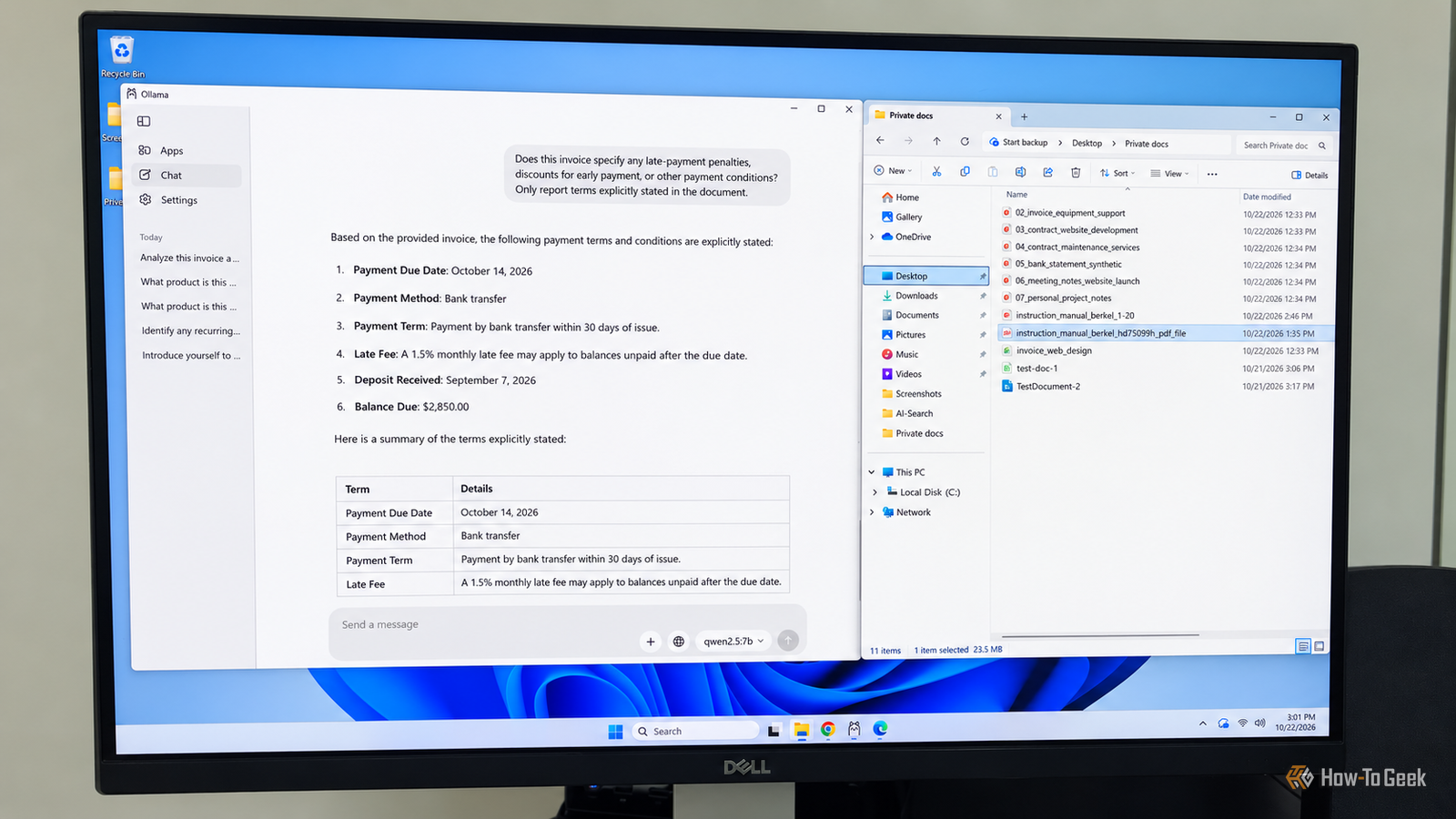
Published Oct 25, 2026, 10:31 AM EDT Rich Hein is a veteran technology journalist with more than two decades covering developer, consumer and enterprise topics. Rich's career has been dedicated to service journalism, connecting readers to content that informs and delights. Previously, Rich was vice president and editor-in-chief for Simpler Media Group, director of audience development for IDG and editor/writer for sites like CIO.com, ComputerWorld, CodeGuru and other tech-centric publications. He's received numerous accolades, including the IDG Summit and Azbee awards and has been covered by Medium for his work in audience development. When not at his desk, Rich lives in Daytona Beach with his wife and three dogs. He enjoys playing guitar, surfing and staying abreast of the latest in tech. I don't know about you, but I have more bills, invoices, bank statements, and healthcare documents than I know what to do with. Finding a specific detail, understanding a complicated term, or comparing this month's charges with last month's can take up more time than I'd like, not to mention the frustration involved. Tools like ChatGPT and Claude can make this much easier, but I'm not particularly comfortable with the idea of handing my financial, medical, or other sensitive information over to big tech companies just to get a few questions answered. I have enough concerns about how much data these companies collect without voluntarily giving them more. There's no denying the convenience of AI, but I want to take advantage of it without giving up control of my private information. That's why I use local AI to analyze documents and answer questions right on my own mini PC. With Ollama and a locally downloaded Qwen model (Qwen2.5:7B), I can attach documents, ask questions, and get useful summaries without sending their contents to a cloud AI provider. And I don't need an expensive AI workstation to do it. Everything runs on my mini PC with an AMD Ryzen 5 processor and 32GB of RAM. Ollama makes analyzing private files surprisingly simple Analyzing documents is as easy as attaching a file One of the things I appreciate about Ollama is that you don't have to be particularly technical to get good results. The Windows application provides a graphical interface, so there's no need to spend time in the terminal. You just visit Ollama's website, download the software, and install it. Once that's done, you can browse and download AI models directly through the application. There are plenty to choose from, but my mini PC doesn't have a powerful graphics card, so I needed something that could run locally without bringing everything to a crawl. I settled on Qwen2.5:7B, a relatively small model (4.7GB) that runs well on my mini PC. Once I had the model downloaded and running, using Ollama felt surprisingly similar to ChatGPT or Claude. I can drag a PDF into the conversation or use the attachment option to select a document. From there, I can ask it to summarize the document, find specific information, explain complicated language, or answer questions about its contents. You don't need elaborate prompts to do any of this. You can ask questions just as you would another person. And like with cloud AI, you can ask follow-up questions about the same document without uploading it again, as long as you stay in the same conversation. I tested Ollama with invoices, contracts, and lengthy PDFs I was surprised by how much Qwen understood I wanted to see how useful Ollama could be with the kinds of documents I regularly deal with, rather than just using it as another AI chatbot. I created eight sample documents, including invoices, bank statements, service contracts, and product manuals. I recommend attaching each document individually and asking Qwen questions about its contents, starting with simple questions before moving on to more complicated ones. For example, I asked Qwen whether there were any exclusions in a maintenance service contract. It correctly identified several, including hardware replacement, ransomware recovery, and after-hours onsite work. I followed that up with a hypothetical situation involving a network outage on a Saturday. Qwen was able to connect several provisions in the contract and explain why Saturday onsite support wasn't included and would require separate approval and additional charges. I also used Qwen to analyze a sample bank statement, asking it to identify potentially recurring expenses and calculate their total. It extracted the information and organized the results in a way that was easy to understand, although it initially overlooked one charge. I'll get to that later. Invoices are another natural use case. Rather than sorting through line items and payment terms, I can ask Ollama to find billing dates, explain individual charges, or summarize what I owe and when. This can be particularly helpful when trying to decipher medical bills and other healthcare documents. The real benefit isn't just getting a summary. It's being able to ask follow-up questions in normal language and find the information I need without having to read through the entire document again. Ollama handled the work, but there were a couple of limitations Local AI isn't perfect, but neither is cloud AI Overall, I've been impressed with how well Qwen handles my documents, especially considering that everything is running locally on my mini PC. That said, I did encounter a couple of limitations. For example, when I asked Qwen to identify recurring charges on my bank statement, it quickly identified my streaming subscription and mobile phone plan but overlooked my gym membership. When I asked it to review the statement again, it found all three and correctly calculated the total. I think it's a good reminder that you should always double-check AI-generated answers, whether you're using ChatGPT, Claude, or a local LLM. The second issue involved a large PDF that Ollama wouldn't accept. I tried attaching a 24MB document, and initially nothing happened. I thought the application had frozen. On my second attempt, I got a "File too large" error message. Rather than spending time trying to figure out why, I opened the PDF in Microsoft Edge and used the print feature to split it into smaller files. That allowed me to attach the document in sections and continue working. Neither issue was a dealbreaker, but both are worth understanding before relying on local AI to analyze important documents. Local AI has earned a place in my workflow I'm not ready to give up ChatGPT or Claude, and I don't think local AI is going to replace everything they can do anytime soon. But when it comes to working with personal documents, I've found very little reason to use anything other than Ollama. It's free, easy to use, and runs well enough on hardware I already own. I still need to double-check its answers, but that's true of any AI tool. What surprised me most was just how little I had to give up by running AI locally. For the kind of document analysis I do, Ollama has become my first choice.
I stopped uploading private documents to AI, this free app handles them on my PC
Full Article
Original Source
Read the full article at Howtogeek →KhanList aggregates and links to publicly available news content. We do not host full articles from third-party sources. Always verify important information with original sources.