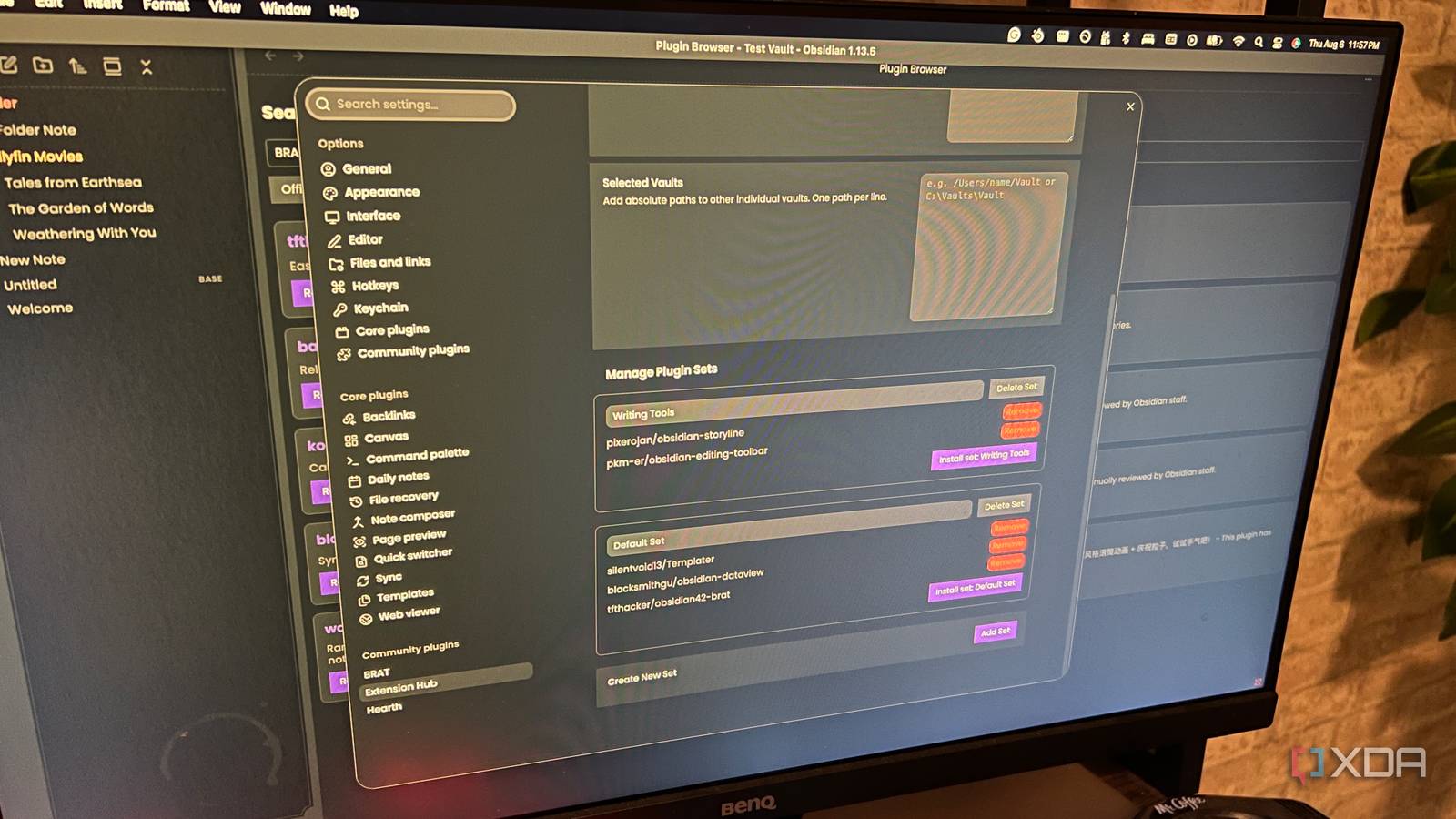
Published Aug 8, 2026, 4:00 PM EDT Patrick is a seasoned writer with more than a decade of experience, specializing in any and all things tech. His work has been featured on platforms like CNET, Yahoo, Xfinity, and many other outlets. When not typing away, he can be found with his nose in a book. I know a lot of people work inside a single Obsidian vault, but I prefer to keep certain projects separate. For example, each time I start a new novel series, I create a new vault. It isolates the project and allows me to keep everything much more streamlined. There's just one issue: I use the same set of plugins for writing a novel across every vault, and it can get tedious re-downloading those same plugins by hand each time. Extension Hub offers a solution to that problem. Think of it like Ninite, but for Obsidian. I can install a "set" of plugins with just a few clicks, saving myself the hassle of doing it all manually. I can add plugins to a "set" and then install all of them at once I can go from an empty vault to fully configured in seconds Whenever I create a new vault for a novel series, I always install the same basic plugins: Storyline, Word Sprint, Indent, Hearth, etc. I install these before I start working in the vault, especially since some plugins (like Storyline) fundamentally change the vault's structure. Installing things can take a fair amount of time, so if I'm eager to get started on a new project, I probably don't want to spend the half-hour or so it takes to install everything. There are other plugins I always install outside of these, but those are the main ones aimed at writing. There are also the backend tools, like Templater and Dataview, that are basic must-haves for every vault. Once I have added all these plugins to a set, I can open the Extension Hub settings page and click "Install Set." From that point, the process is relatively hands-off; it'll install anywhere I tell it to. I can choose whether those get installed to all vaults or just specific ones. The built-in search is discoverability at your fingertips I can even search by GitHub username To add plugins to a set, I just have to search inside the Extension Hub plugin browser. This is accessible by clicking the "Browse Plugins" icon in the ribbon bar (there's no way to open it from the Command Palette that I could find). Users can search for plugins by keyword, plugin name, or developer, and searches aren't limited solely to the official archive; users can also search GitHub or the Obsidian forums. From there, plugins can be added straight to the set, or you can open their GitHub repo to learn more about what they do. A quick note here: by default, the repo page opens in your browser, but if you enable the Obsidian Core Plugin "Web Viewer," you can open the pages directly in Obsidian without leaving the app. In my experience, that's a much faster solution. Extension Hub can update even non-official plugins But only in your active vault One of the less flashy features of Extension Hub is the "Check Updates" feature. Not only does it check for updates to your standard set of plugins, but it also checks for updates to those unofficial tools. It showed me several plugins that I had installed through BRAT to test (and subsequently forgotten about), which I wouldn't otherwise know needed an update unless I checked through BRAT itself. This is a small feature, but it's an easy way to get a clear overview of any plugins in your library that need a little extra attention. Beyond that, it can also tell you if you have something with an update newer than the latest official release. That isn't likely to happen unless you're testing a plugin's beta release before it's hit the official repo yet, though. The plugin is still new, with only a few forks Long-term viability is a concern Obsidian is home to hundreds of plugins created by single developers, but I'm always somewhat wary of them, and for good reason. If the developer stops working on it for any reason (and no one else picks up the project), then it's only a matter of time before a major Obsidian update breaks the entire thing. With a tool like Extension Hub that spans multiple vaults, I am a bit concerned about its long-term viability. That said, PixeroJan (the developer) is also the author of several other plugins and has a pretty solid track record of maintaining them and responding to user concerns. Extension Hub offers the kind of feature that should be available by default I've said it before: the Obsidian community delivers on features that feel like they should already be part of the software. The ability to set up a vault and install a specified set of plugins seems like a no-brainer, and I'm grateful to have found a plugin that makes it as easy to tackle as Extension Hub. I recently created a new vault for an upcoming project, and this tool lets me load it up with all of my must-have plugins in no time at all. Obsidian OS Windows, macOS, Linux, iOS, iPadOS, Android Individual pricing Free normally; $4/month for Obsidian Sync Obsidian is a feature-rich note-taking app that's available on different platforms and offers a neat and clean interface. It's also free-to-use for individuals.
I stopped setting up every Obsidian vault by hand thanks to this plugin
Full Article
Original Source
Read the full article at Xda-developers →KhanList aggregates and links to publicly available news content. We do not host full articles from third-party sources. Always verify important information with original sources.