
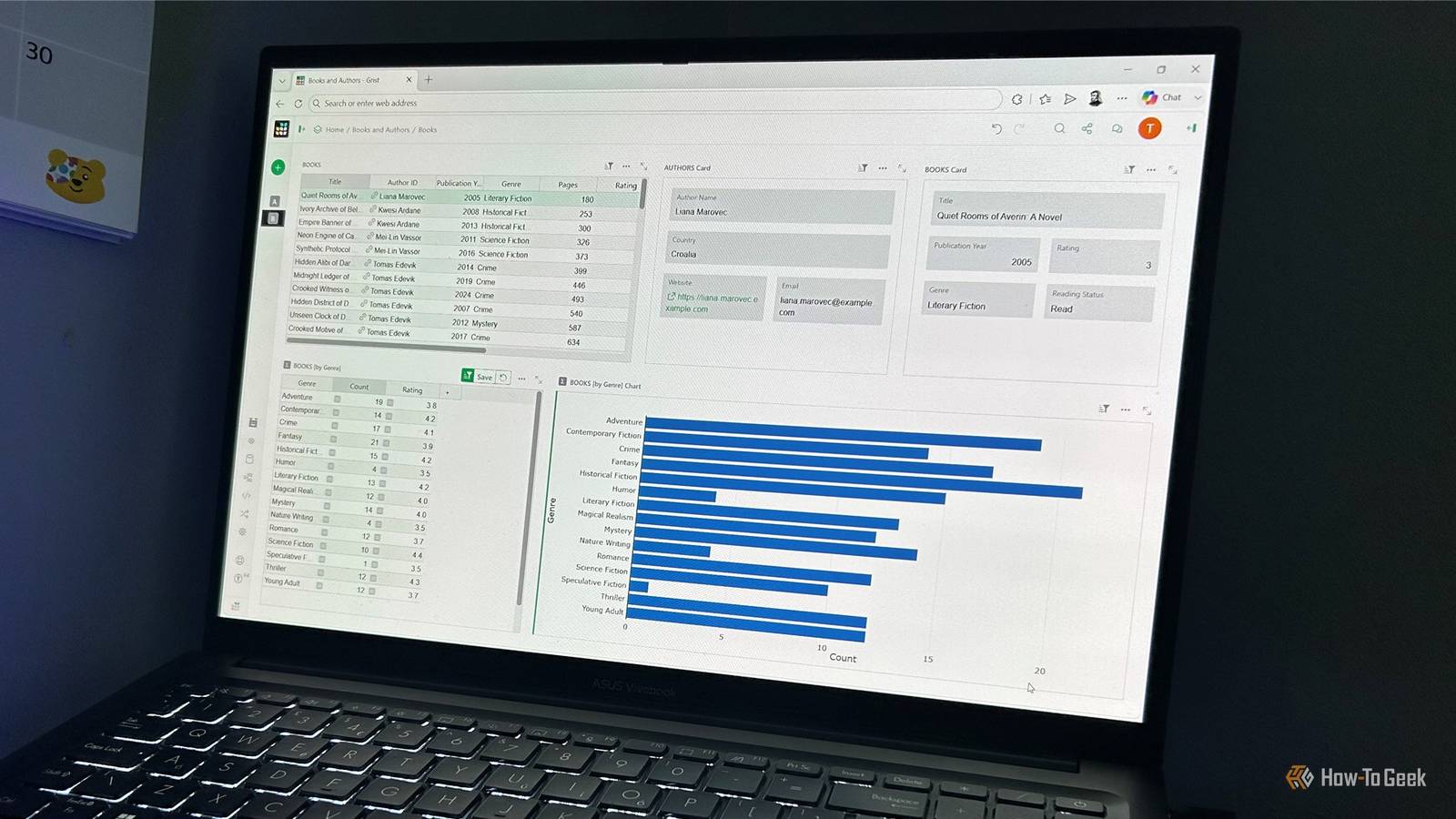
Published Aug 29, 2026, 11:30 AM EDT Tony Phillips is an experienced Microsoft Office user with a dual-honors degree in Linguistics and Hispanic Studies. Prior to starting with How-to Geek in January 2024, he worked as a document producer, data manager, and content creator for over ten years, and loves making spreadsheets and documents in his spare time. Tony is also an academic proofreader, experienced in reading, editing, and formatting over 3 million words of personal statements, resumes, reference letters, research proposals, and dissertations. Before joining How-To Geek, Tony formatted and wrote documents for legal firms, including contracts, Wills, and Powers of Attorney. Tony is obsessed with Microsoft Office! He will find any reason to create a spreadsheet, exploring ways to add complex formulas and discover new ways to make data tick. He also takes pride in producing Word documents that look the part. He has worked as a data manager in a secondary school in the UK and has years of experience in the classroom with Microsoft PowerPoint. He loves to encounter problems in Microsoft Office and use his expertise and legal-level training to find solutions. Outside of the Microsoft world, Tony is a keen dog owner and lover, football fan, astrophotographer, gardener, and golfer. I've used Excel for decades, and I'm perfectly comfortable using it for things it wasn't really designed to do. But when my data started behaving like a database, I decided to see what would happen when I used a tool that's actually built for the job: Grist. I started with a fictional Excel workbook containing details of 40 authors on one sheet and 180 books on another, and each book have an Author ID linking it to the relevant author. I then imported the workbook into Grist, an open-source spreadsheet-and-database hybrid, and began rebuilding the project around those relationships. I replaced lookup formulas with native relationships The data started behaving like connected records In Excel, I'd normally use XLOOKUP to turn that Author ID into useful information from the other sheet. If things got more complicated, I'd use Power Pivot and the Data Model to create a proper relationship. Grist approached the same problem from a different direction. I could turn the Author ID column directly into a Reference column pointing to the Authors table. Instead of treating the ID as text that I needed to use in another formula, Grist treated it as a link to a specific author record. The difference became obvious once I started using the relationship. Each of my 180 books could point to one of the 40 authors, so I wasn't repeatedly storing the same author information alongside every book. This also gave me a single source of truth. If I changed an author's name or contact details in the Authors table, the linked records reflected that change. I could also use a lookup to pull information from the author record into the Books table when needed. Excel can achieve the same result, particularly with the Data Model, but I found Grist much more direct for this kind of workflow. I stopped worrying about the spreadsheet grid Widgets made the dashboard feel like an interface The biggest visual difference came when I started building the interface. Whenever I create a dashboard in Excel, the worksheet grid is always lurking underneath it. Even with charts, shapes, tables, and other elements, I'm ultimately arranging things around cells, ranges, row heights, and column widths. PivotTables can make this especially awkward, as they define their own columns and widths, so I have to accommodate them within the layout. Changes to the data can also affect the space I've allowed for them. Grist takes a different approach with widgets. I could add a table or card to an existing page, drag it around, resize it, and have it snap into place alongside the other widgets. For someone who's spent years making spreadsheets look like apps, this felt liberating. I didn't have to worry about designing around the limitations of the worksheet, and the interface came together much faster than it normally would. I let the relationships drive the interface The data connection became an interactive feature Once the Books and Authors relationship existed, Grist could use it to make the widgets interact. Its Select By feature let me use the existing Author ID relationship to drive another Books widget, so selecting a book in the main table displayed all the other books by that same author. I could then tailor the second widget by hiding unwanted columns and bringing the Author name forward, while a Card widget displayed information about the selected author. I could customize that card's theme, rearrange its fields, and shape the layout into something that looked more like a dedicated profile than a raw database record. Yes, Excel can produce similar interactions with Data Model relationships, PivotTables, slicers, formulas, and connected elements. But what I particularly enjoyed about Grist was how naturally the interface grew from the data structure I'd already created. Sorting, filtering, and summaries still have their place Moving into a relational environment didn't mean giving up the basic tools I use constantly in Excel. Grist still gave me straightforward sorting and filtering, and I could add summary tables to group and count records. For my book data, I could summarize the number of books by genre and instantly turn those summary tables into visual charts, placing them right alongside the other widgets. I didn't need to create a separate PivotTable sheet with PivotCharts and then find somewhere to put it on my dashboard. The tables stayed put so I could manage the records, and the widgets provided a more app-like way to present them. Grist changed how I thought about the project The biggest difference was the mental model For calculations, financial models, quick analysis, and plenty of everyday spreadsheet jobs, I'd still reach for Excel without hesitation. The difference was the way Grist made me think about the data. In Excel, I tend to start with the worksheet and work out how everything will fit into the grid, but with Grist, I started with the records and their relationships, then built an interface around them. For this project, that made much more sense. The authors and books were separate records, but each book was connected to an author. Once I'd set up those relationships, the interface could take advantage of them. Grist changed what I thought I was building. Instead of starting with a spreadsheet and trying to make it behave like a database and look like an app, I could start with the data and build the interface around it. I'd use Grist again There was definitely a learning curve, but Grist's AI Assistant, Help Center, and YouTube channel made it easier to get up to speed. I'd certainly rethink how I approach large, relational datasets in the future. Excel still has its place, but Grist showed me when a database-first approach makes more sense.
I stopped pretending Excel is a database and switched to this open-source app
Full Article
Original Source
Read the full article at Howtogeek →KhanList aggregates and links to publicly available news content. We do not host full articles from third-party sources. Always verify important information with original sources.