
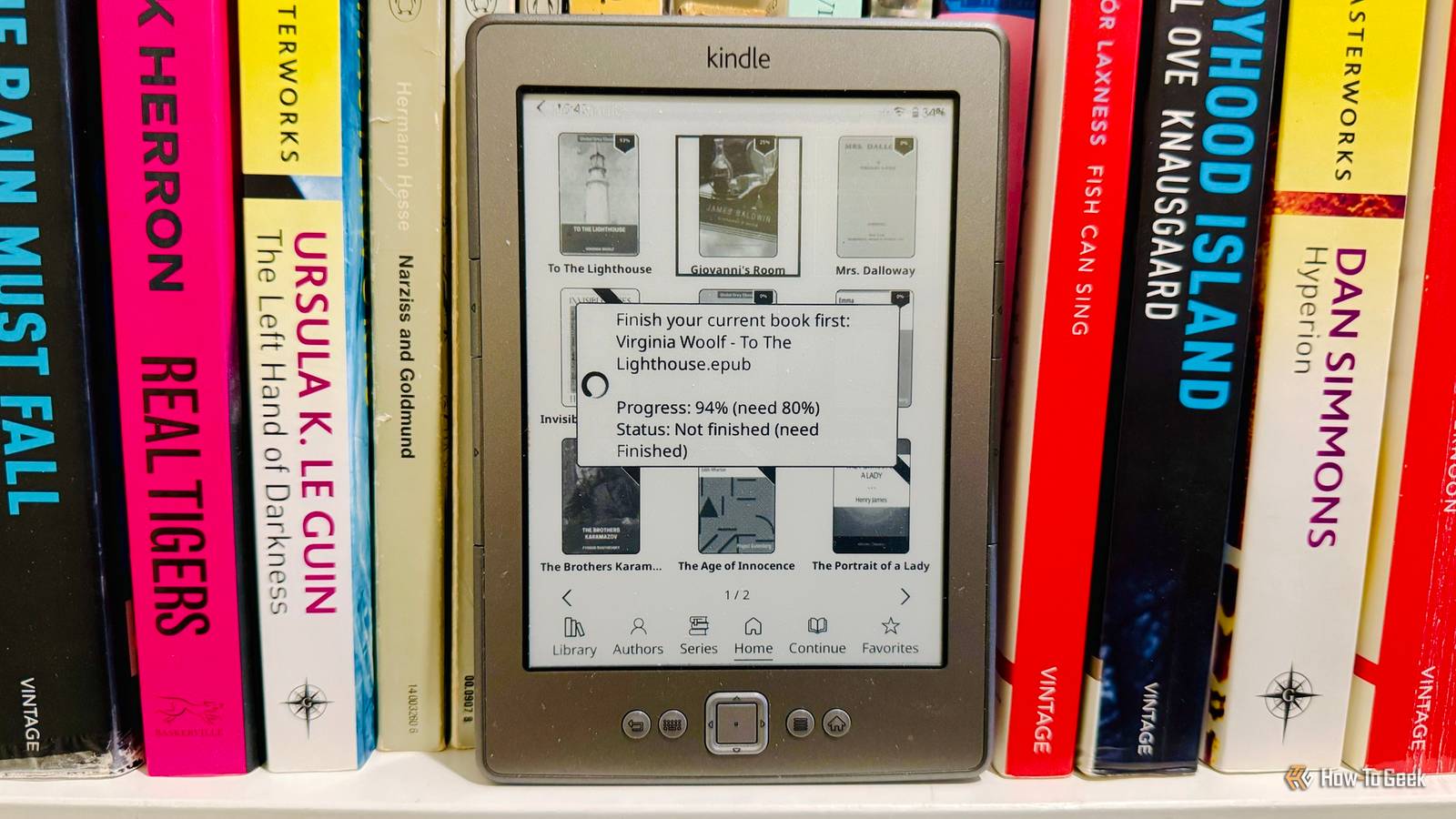
Published Sep 27, 2026, 7:00 PM EDT Adam has a degree in Engineering and has a life-long interest in technology. He has been writing for over a decade for various print and online publications, with a focus on consumer tech. He joined How-To Geek in 2024 while working at Pocket-lint. As well as being a long-term fan of Apple products, he also has a strong interest in smart home tech, running a Home Assistant server at home to automate all his smart home devices. He believes that the ideal smart home should work with minimal interaction from the user, with automations running as if by magic rather than requiring you to push buttons on a control panel. You can find more of his work on Muck Rack. I love reading. My home is stuffed full of books, and so are my eReaders. The problem is that with so many great books to read, I find it hard to finish the book I'm on before I start the next one. I ended up adding a small script to my jailbroken Kindle that stops me from opening any other books until I've finished the one I'm reading. I have a terrible habit of starting several books at once My eReaders are littered with half-finished books I read a lot, and I have so many physical books in my home that it's getting hard to find space for them all. There are shelves of books in every room, and I still have piles of books on the floor. I regularly buy multiple books at a time from thrift stores, but the problem then is that I want to read them all at once. I often start one book, then spot another that I really want to read, and start reading that one, too. I end up with five or six books on the go at once. The problem is even worse with my eReaders, since I can fit a large number of books onto each device. There are so many unread titles to tempt me that I usually have multiple eBooks at various stages of completion. It means that between my physical books and my eBooks, the total count of books that I've started but not finished can easily hit double figures. The situation was beginning to get a little bit ridiculous. I wanted to give myself an incentive to finish one book at a time Focusing on a single book is a far better experience The problem with having so many books on the go at one time is that you forget what has happened from book to book. If I start one book, then pick up another, then move on to a third, by the time I start reading the first book again, I've forgotten a lot of what's happened. I then end up skimming the previous parts to catch up. This is a far worse experience than just reading a book from start to finish. Even when I quickly skim the parts I've already read, I can easily miss crucial bits of information that are vital for later in the book. I also lose all the other things that make great books so good, such as the sense of place or character. Reading one book at a time is a much more immersive experience, and there are plenty of books that just aren't suited to a quick catch-up. Trying to figure out who all the characters in Middlemarch are and how they relate to one another can take so long that it's almost quicker just to start the book again from the beginning. I decided to try to find a way to curb this terrible habit. That way, I could give each book the attention that it deserved. I can stop books from opening when using KOReader I can't open a new book until I finish the current one My plan was to block other books from opening on my Kindle until I'd finished the one I was currently reading. On a standard Kindle, this isn't possible; there are no native Amazon features that can stop books from opening. Thankfully, I've jailbroken my Kindle 4, because Amazon dropped support for it. I now have the KOReader reading app running on my Kindle, and it's far better than the standard Kindle software. Not only does it give me far more control over how my eBooks look, but it also allows me to add custom scripts that can change how KOReader functions. I created a small script that KOReader runs when it starts. The first time it runs, it checks KOReader's lastfile setting to determine the last book opened and saves that as my "locked" book. When you open a book, KOReader normally calls the showReader function with the book's path. The script replaces this function with a wrapper that first checks the locked book's KOReader status. If the reading status isn't Finished, the wrapper stops without calling the original showReader function, so the new book doesn't open. I realized that this alone might not be enough. I could always cheat and mark a book as Finished even when I'd only read a chapter or two, so I added a second check that looks at the current reading percentage for the locked book. Unless it's at least 80%, I can't open any other books, even if I've marked the book as Finished. I set the cutoff to 80% because some books include lengthy appendices or preview chapters of later books, which means that when you reach the end of the main book, you're still not at 100%. 80% seemed like a reasonable middle ground even if the book doesn't have extra material at the end; if I've read 80% of the content of the main book, the chances are that I'm going to finish it. With my script in place, until I've read at least 80% of the book and also marked it as Finished, no other books will open in KOReader. Instead, a message pops up on the screen explaining why I can't open a new book yet. I'm enjoying each book much more It's great to use tech to save me from myself The script is simple but remarkably effective. Even if I'm tempted to read a few pages of another book before I've completed the current one, my Kindle won't let me. If I ever want to restore my Kindle to its usual functions, I can just remove the script, and I'll be able to open whichever books I want again. For now, however, I can't see a reason to remove it. It's really helping me to focus on a single book at a time, and the reading experience for each book is so much better. KOReader makes almost anything possible I honestly wish that I'd jailbroken my Kindle sooner, because KOReader allows you to do almost anything you can think of. I've added an AI chatbot to my ancient Kindle, used it as a smart home dashboard, and even set it up so that I can turn the pages of my eBook just by tapping my fingers together.
I stopped my Kindle from opening other books until I’ve finished the current one
Full Article
Original Source
Read the full article at Howtogeek →KhanList aggregates and links to publicly available news content. We do not host full articles from third-party sources. Always verify important information with original sources.