
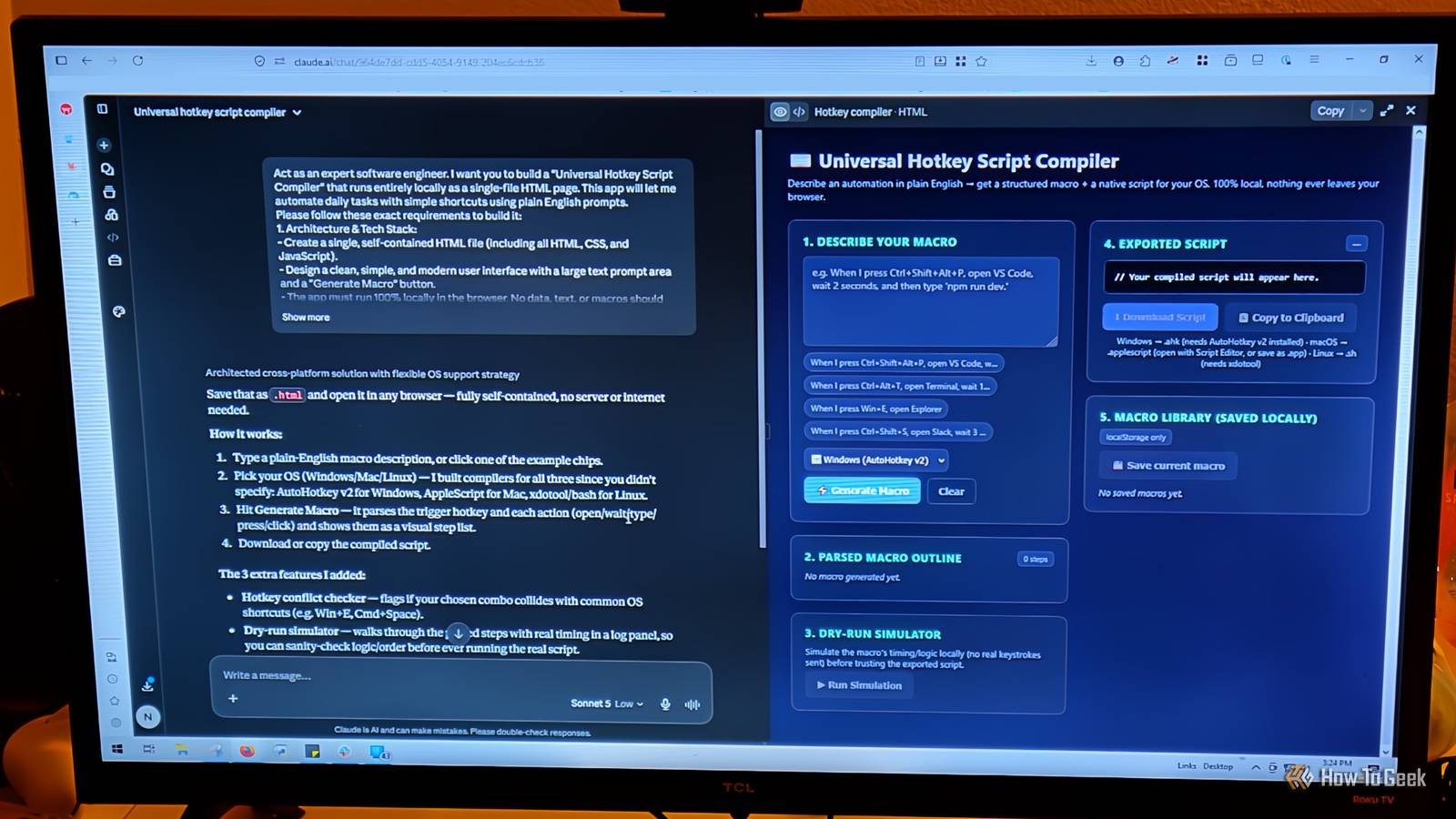
Published Aug 21, 2026, 11:30 AM EDT Aggy is a veteran writer and editor in the technology and gaming space. Having served as a Managing Editor for high-traffic digital publications, alongside being an editor and consultant for over a dozen sites. Aggy's published work spans a wide and respected array of tech and gaming outlets, including WePC, Screen Rant, How-To Geek, Android Police, PC Invasion, and Try Hard Guides. Beyond editorial work, Aggy's direct experience in the tech sphere extends to app development. Aggy has published two games under Tales and is always eager to learn and do more. He also likes working on computers and researching in his spare time. He knows about Windows, Linux, Audio, Video, and much more. Most people think building your own apps takes months of learning or a computer science degree. It really just takes a free weekend and a few conversations with Claude to get tools that work exactly the way you want, without ads, without subscriptions, and without features you never asked for. I've built versions of all of these myself, and the gap between what you can make for free and what you'd download from an app store isn't as big as people think. Gamifying your work makes focus a lot easier Tell Claude what you want, so your pet turns out right Credit: Jorge Aguilar / How-To Geek I've made so many pets for productivity through vibe coding, and it's so much simpler than it seems, so I don't know why everyone downloads versions from the app store. A pet pal is a weekend project that puts a fun spin on personal productivity by turning the classic focus timer into a creature-raising game. The idea is straightforward: instead of staring at a countdown clock, you're keeping a little virtual monster alive and watching it grow. Every time you finish a focus session, you earn experience points, food, and stat upgrades that go directly toward leveling up your creature or nursing it back to health after you've neglected it. Ignore your study sessions long enough, and your monster's health starts dropping, so a boring work block turns into something you actually care about. That layer of stakes and progression is exactly what people respond to, so it's a good fit for anyone who needs to gamify their life to stay on task. Don't just tell Claude you need a pet; tell it that you want a detailed version, and that you want it to help with ideas. That way it can ask you questions about what you want. It also helps to have an example of a pet project you like. My most recent one is a slime named Jasper, and I love it so much. You can automate daily tasks with simple shortcuts Keep it running locally so your data stays safe Credit: Jorge Aguilar / How-To Geek Hotkeys and Macros are the most important features that many regular PC users don't know much about. It won't take Claude very long to make a Universal Hotkey Script Compiler. You can use this to automate repetitive tasks, set up keyboard shortcuts, or launch programs faster. You can basically set one up that works in plain English if you describe it that way to Claude. The interface should be a simple, single-file HTML page with a text prompt where you type something like: "When I press Ctrl+Shift+Alt+P, open VS Code, wait two seconds, and then type 'npm run dev.'" The app takes that sentence and figures out what you mean. You don't have to code or memorize any syntax. Make sure it knows words like "press," "open," "wait," and "type" so it can match those to patterns and build a structured macro in memory. Nothing should ever be sent to a server. The entire process runs locally in your browser, which matters if your macros include passwords or file paths you'd rather not send anywhere else. Also, make sure to tell Claude your operating system, because it may cause issues otherwise. In this case, it's a good idea to tell Claude to bring its own ideas, because you could forget something on the way, and it's easy to click a button to tell Claude no, not that or add that in. Resizing tons of photos takes seconds in your browser Processing images on your computer saves time Credit: Jorge Aguilar / How-To Geek If you work in any type of job that has image specifications, or you use a tool that needs it, you definitely should use Claude to make a bulk resizer. This is a browser-based utility built to handle one of the more soul-crushing chores in digital work. If you've ever had to open dozens of product images one by one in Photoshop just to resize and export them, you know exactly what this is for. The Bulk Resizer lets you dump an entire folder of high-resolution images into a single web page and apply the same scaling, format, and compression settings to all of them at once. The whole thing should run in your browser, so hours of clicking turn into seconds. And because it's just HTML, CSS, and JavaScript, you can build the whole thing with Claude's free plan over a weekend after one prompt and maybe some adjusting. Instead of routing your files through some remote server, make sure the app works directly with your local file system. The first time I made this, it was with Gemini, and it was a pretty bad version. I also used Python instead of a browser, which has its own issues. The version Claude made for free for me feels a lot faster and easier. Building your own gallery gives you full control You can add the features you want and skip the rest A photo viewer is another app I made with Gemini that had far too many issues, but I ended up remaking it in Claude's free plan. This should be a local, lightweight image gallery that has everything you want and need. Most people just stick to whatever photo viewer came with their operating system, or some cloud-based tool that sorts everything alphabetically and calls it a day. I hate these because you're stuck with whatever features they want to give, and some offer better features than others. I'd rather just have exactly what I'd like and nothing else. A custom gallery lets you write your own rules and work your way. I made sure Claude let me put multiple images next to each other; the file-changing button was different from moving around the image. I also added a zoom feature and made sure that I could add things to the image, like PNGs that were transparent. This should really be your decision, but anything you don't like can be changed, and you can add anything you'd like with a single prompt. Zero coding required—just a clear idea None of these projects need you to write a single line of code yourself, but that doesn't mean Claude will do all the thinking for you. The more specific you are about what you want, the better each tool turns out. If your prompt is vague, you get a vague result, and you end up spending more time fixing it than building it. That said, even a mediocre first version is something you own and can adjust with one follow-up message, which is more than you can say for anything you download from a store. If a free weekend and a clear idea of what annoys you about your current tools is all it takes, then you should try these as soon as you can.
I stopped downloading ad-filled apps after Claude built me these 4 for free
Full Article
Original Source
Read the full article at Howtogeek →KhanList aggregates and links to publicly available news content. We do not host full articles from third-party sources. Always verify important information with original sources.