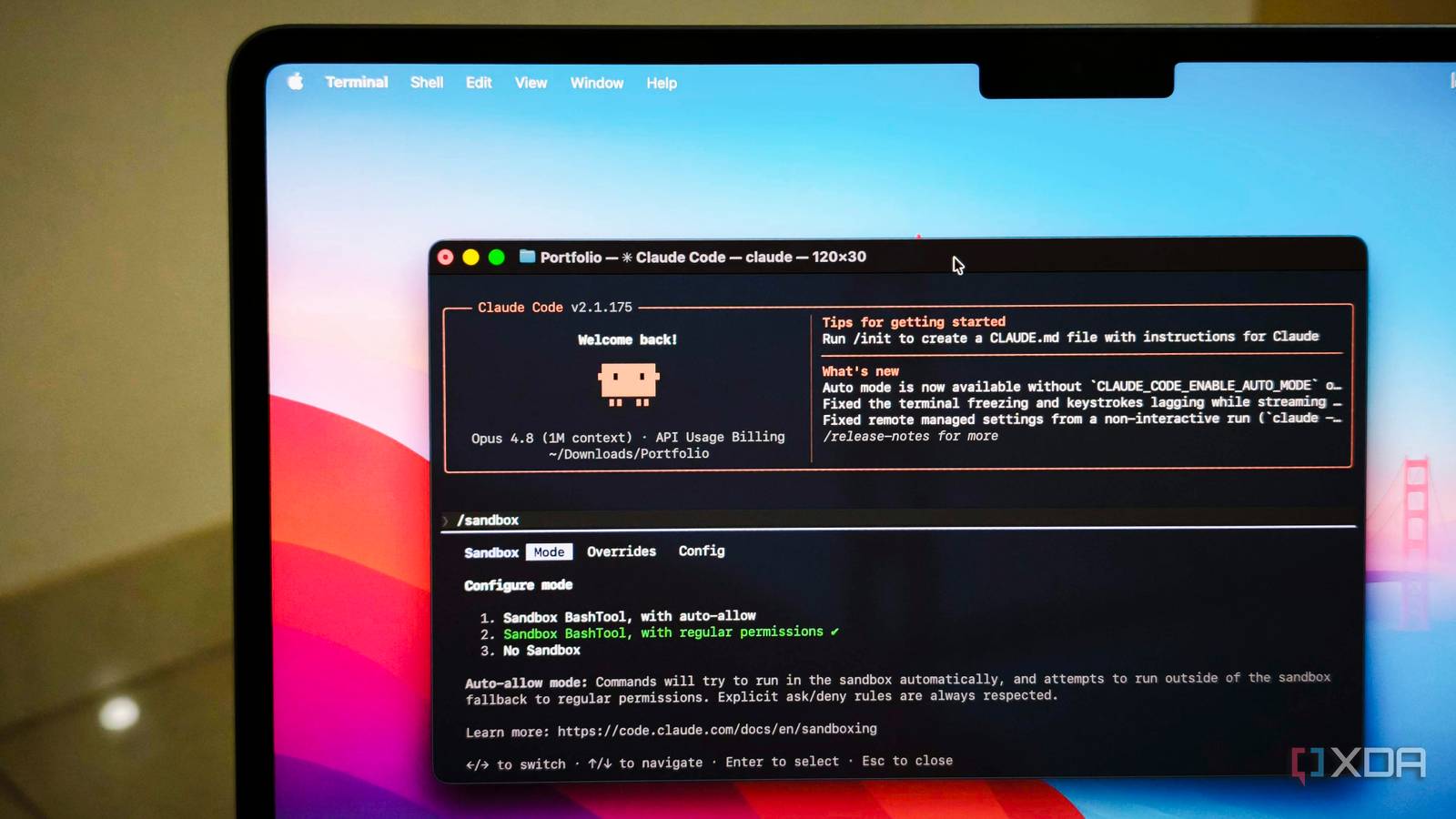
Published Jul 19, 2026, 6:00 AM EDT Anurag is an experienced journalist and author who’s been covering tech for the past 5 years, with a focus on Windows, Android, and Apple. He’s written for sites like Android Police, Neowin, Dexerto, and MakeTechEasier. Anurag’s always pumped about tech and loves getting his hands on the latest gadgets. When he's not procrastinating, you’ll probably find him catching the newest movies in theaters or scrolling through Twitter from his bed. I remember reading about incidents where agents like Antigravity ended up deleting users’ entire hard drives while executing certain tasks. These incidents are few and far between, but they do happen, and people who lose their data will not get it back. I think this is one of the risks we all take when using autonomous systems. I know there are safeguards in place. The AI agent asks you to approve commands, and that is supposed to prevent incidents like these. But let’s be honest, we all get lazy sometimes and approve commands without even checking what the agent is asking to do. Even when you do read them carefully, you never know what could go wrong. I have become increasingly paranoid about these incidents, so I started running Claude Code inside a sandbox. Now, I let it do whatever it wants because I know it cannot break anything outside that environment. This approach has actually increased my productivity because I no longer have to approve every command, and there is very little at risk if something goes wrong. Claude Code has a built-in sandbox And it takes a minute to set it up Claude Code already has a sandbox built in, so I did not have to set up a separate virtual machine or container just to isolate it. You can enable it by running /sandbox inside Claude Code and selecting auto-allow mode. Once enabled, Claude can run most Bash commands without asking for permission, while the operating system limits what those commands can access. By default, sandboxed commands can only write to the current project directory and the temporary session directory, so a malicious command should not be able to delete files elsewhere on your computer. Network access is also restricted, and Claude Code requests approval when a command attempts to connect to a new domain. The sandbox uses macOS Seatbelt on a Mac and Bubblewrap on Linux and WSL2, so the restrictions apply at the operating-system level rather than depending entirely on Claude correctly interpreting a command. You can also make the setup stricter by disabling unsandboxed fallbacks. Setting allowUnsandboxedCommands to false prevents Claude from retrying a blocked command outside the sandbox, while failIfUnavailable stops Claude Code from continuing if the sandbox cannot start. This gives you a useful middle ground in which the agent can work autonomously within the project without unrestricted access to the rest of the computer. With the sandbox enabled, I can let Claude run tests, install project dependencies, move files around inside the repository, rebuild things, and retry commands without constantly checking whether it needs my approval. I am still careful about what directory I start it in, and I do not give it unnecessary access to other parts of my system. Within that boundary, however, I can stop babysitting it. Sandbox makes Claude Code more productive I don't have to sit and approve commands Sandboxing has revolutionized how I use Claude Code. There have been times when I gave Claude Code a task and forgot to approve a command. It would just sit there, waiting for me to approve it, when it could have completed a significant amount of work in that time. Sandboxing helped me get rid of that problem, especially the constant approval flow. I am not saying approvals are unimportant, but when you are running Claude Code inside a sandboxed environment, what’s the worst that could happen? Whatever goes wrong is unlikely to be something you need to sweat over. That has made Claude Code far more useful for tasks that involve repeated trial and error. If it is fixing a broken build, refactoring a project, or working through a long list of issues, I want it to keep going until it either solves the problem or reaches something that genuinely needs my input. I do not want to approve every npm install, test run, or file operation along the way. There is also less mental overhead. Before this, I had to choose between watching every command and blindly approving whatever appeared. Neither option was particularly good. The sandbox gives me a more practical middle ground. Claude gets enough freedom to work autonomously inside the project, while the rest of my computer remains outside the area it is allowed to modify. The built-in sandbox is not 100% isolated A Docker container or a VM is a better choice It’s worth noting that Claude Code’s sandbox mainly isolates Bash commands and their child processes. Its built-in Read, Edit, and Write tools continue to use Claude Code’s permission system, while computer-use features operate on your actual desktop. The default configuration also allows sandboxed commands to read much of the computer, including credential files, unless you explicitly block them through the credential or filesystem settings. You therefore still need to configure the sandbox properly before treating it as a hard security boundary. Creating a sandbox that’s 100% isolated from your system is tough, but you can get close with a Docker container or a VM. You can also use Claude Code on the web for a similar experience. All you need is a Claude Code subscription and GitHub. Claude Code on the web runs each session in an isolated, Anthropic-managed virtual machine. A network proxy enforces a default allowlist, and a separate proxy holds your GitHub token outside the sandbox while issuing scoped credentials for repository access inside it. Make the most out of Claude Code Claude Code is now more capable than ever, thanks to the new Fable 5 model, which was recently made available again to users globally. With this new model and Claude Code’s capabilities, you can now build almost any piece of software in one shot and get relatively close to a production-ready result. Claude is an AI assistant and LLM developed by Anthropic.
I stopped approving Claude Code's commands after discovering its built-in sandbox
Full Article
Original Source
Read the full article at Xda-developers →KhanList aggregates and links to publicly available news content. We do not host full articles from third-party sources. Always verify important information with original sources.