
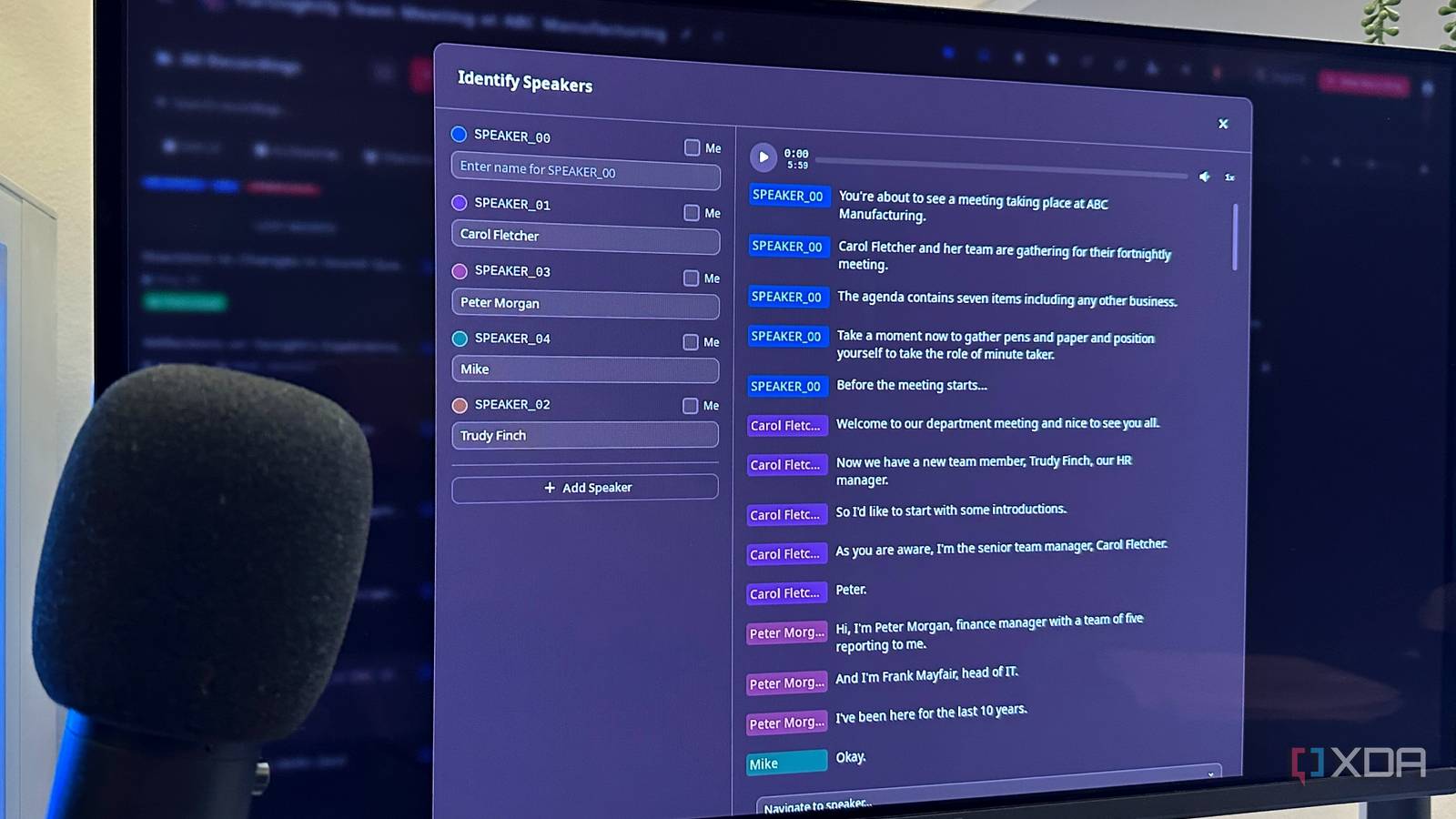
Published Aug 18, 2026, 6:00 AM EDT Gaming has been Samarveer’s greatest passion, and the Literature graduate in him takes immense joy in dissecting games for their themes, messages, and impact. Samarveer holds a deep appreciation of gaming, and considers the platform to be the most immersive and impactful across all media. He can be found engaging with gaming communities online, always ready to debate the finer points of ray tracing or itching to write an 8-page collegiate thesis on any game that impacts him emotionally. Between customers explaining what they need when building a PC and meeting four days out of five, I spend a frankly ridiculous amount of time turning spoken instructions into text. The conversations are rarely short, either, and missing one detail can mean going through an entire recording just to find what mattered. By now, I've spent a significant time down the self-hosting rabbit hole, with plenty of subscription models canceled over the past few months. I'd been waiting to finally start hosting Docker containers, and decided to stop reading about them and actually deploy one, with Speakr being the first self-hosted tool I'd use with it. At this point, transcription felt like one job I absolutely shouldn't pay a subscription for anymore, and thankfully, Speakr helped me prove I could keep things local, all while having my meetings transcribed perfectly. Why I wanted my transcription back The subscription started making less sense I build PCs for customers, which means a surprising amount of my work happens with someone explaining exactly what they want, what they absolutely do not want, and the oddly specific reason they need 12 USB ports. Those conversations do matter, and I rely on those notes afterward. I was using Google's built-in meeting transcription tools via a subscription, but the longer I used it, the more the subscription started feeling like a tax on something I should simply own. Another problem I couldn't quite ignore, especially after self-hosting multiple services, was the privacy issue. Having recordings of my customer conversations sitting on somebody else's servers isn't automatically a deal-breaker, but since I'd already covered enough distance down the self-hosting rabbit hole, paying for the transcription became increasingly difficult to justify. Finally, Docker became something I was finally deploying instead of something I'd just been "meaning to learn." Speakr just happened to be the first container I tried. I figured self-hosted transcription would be a weekend project, much like Jellyfin and Nextcloud. Instead, all it took was fifteen minutes to really get started. Docker did the heavy lifting From container to customer meeting Getting Speakr running was considerably less dramatic than I had initially expected, even with this being my first experience with Docker containers. I pulled the Docker Compose file, added whatever environment variables it required, and pointed it at a self-hosted WhisperX endpoint that I got running on my own hardware. This bit required some long YouTube tutorials, but it was definitely worth the effort. I deliberately went this route instead of using OpenAI's transcription API because the entire appeal of Speakr for me was keeping customer recordings off somebody else's cloud. WhisperX also gives me speaker diarization, letting me clearly see which speaker spoke what, which is a pretty nifty Otter feature that I'm glad to be self-hosting now. My two-person, three-person meetings no longer come as one giant wall of text, and I wouldn't have it any other way. Building my own little transcription service meant I would pay Google $14 less every month. Speakr handles the interface, storage, summaries, and everything around the transcription, while WhisperX does the actual speech-to-text work. Once the containers were talking to each other, I had effectively built my own little transcription service, and that was $14 I no longer paid Google for Google Meet notes. Once everything was running, I dropped an actual customer meeting into Speakr rather than some convenient test recording. Within minutes, I had a complete transcript that I could search through without scrubbing back and forth through an hour-long recording like some kind of human VCR. Clearly, I had spent an afternoon building something I could run myself, and that, too, became a point in the process that brought me joy. The trade-off has been pretty easy to accept You give up polish, but not the important stuff Speakr is still an alpha project at the moment, and that does become pretty obvious when you put it next to something as mature as Otter AI, for example. A commercial product like Otter has clearly spent years refining features and adding little quality-of-life touches that Speakr simply doesn't have yet. Plus, since I'm the one in charge of keeping my containers alive, using Speakr does have the same vibe as 2018–2019 Jellyfin, where the elbow grease involved is all yours, and the polish is years down the line. And yet, these rough edges have stopped bothering me remarkably quickly. There is no monthly subscription hanging over my head now, and more importantly, the recordings from my customer meetings as well as my work meetings never leave my hardware. For my particular workload, this trade-off is an incredibly easy one to make. It was certainly time to stop paying indefinitely for something my own PC could handle easily on its own. And yet, self-hosting my own transcription service with Speakr has also made a case for paid products like Otter. After all, for users who do want a polished, plug-and-play transcription service without having to dive into self-hosting or learning how to virtualize with Docker, paid commercial products for a small subscription fee are still the sensible choice. If you do have the hardware though, and don't mind getting your hands dirty while actually caring about where your recordings end up, Speakr can make a surprisingly compelling case for doing it yourself. Speakr Speakr is a Docker-based self-hosted transcription tool that helps you capture, transcribe, and label speakers in your audio content. The subscription was the easy part The more interesting thing I took away from this experiment wasn't that I could replace another subscription. Instead, it was how quickly something I had mentally categorized as "too complicated to self-host" became another service running quietly alongside everything else. That changes how I look at these tools. Once the barrier to entry is a Docker Compose file and a day of tinkering, paying someone else indefinitely starts to require a better justification. This still doesn't mean I'm days away from building an honest-to-goodness home lab and self-hosting every service under the sun. Some services are still worth paying for, because I don't want to have to maintain them the entire time. But transcription turned out to not be one of them.
I spent an afternoon with Speakr and haven't paid for transcription since
Full Article
Original Source
Read the full article at Xda-developers →KhanList aggregates and links to publicly available news content. We do not host full articles from third-party sources. Always verify important information with original sources.