
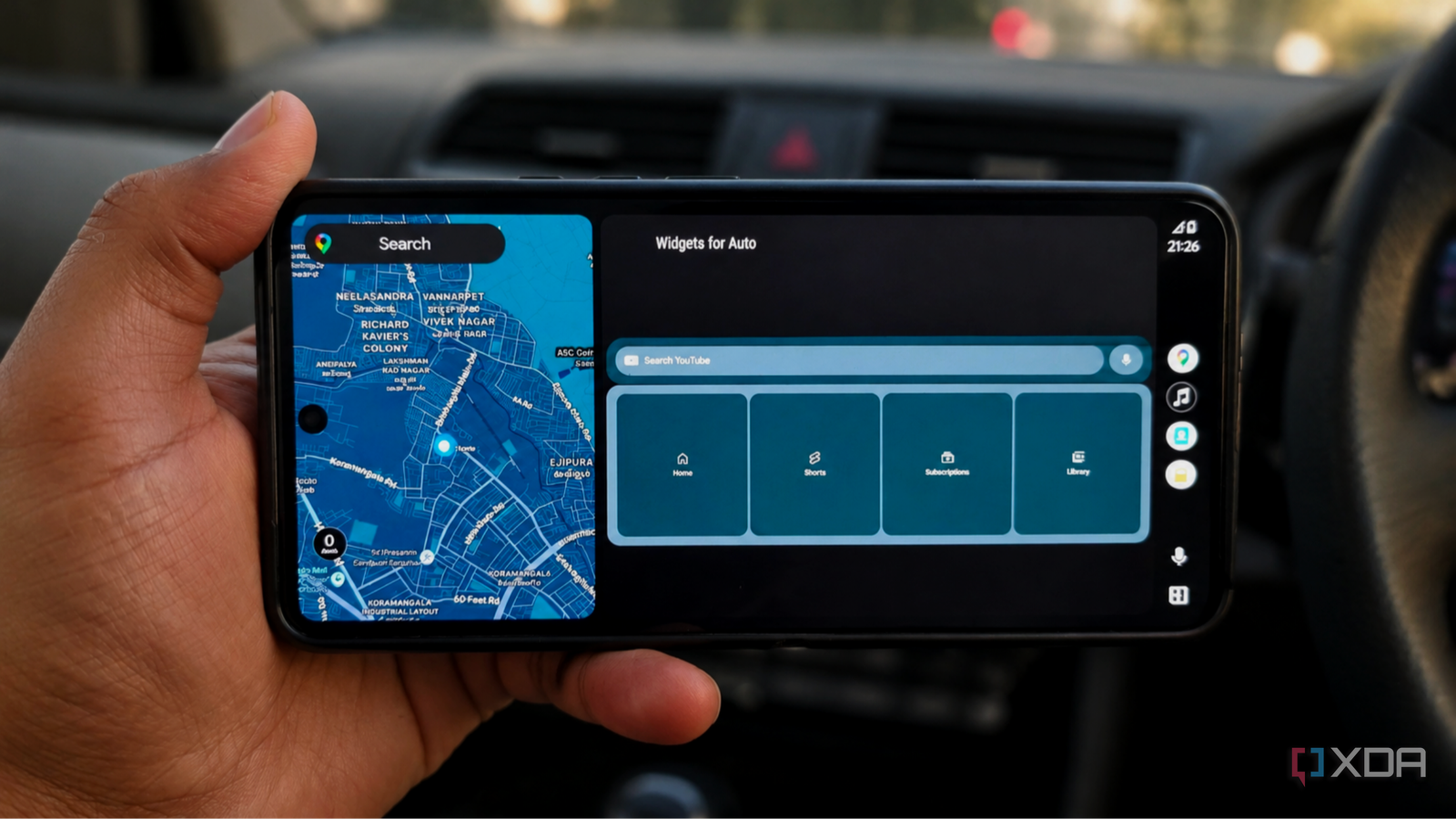
Published Nov 5, 2026, 11:30 AM EST Anurag is an experienced journalist and author who’s been covering tech for the past 5 years, with a focus on Windows, Android, and Apple. He’s written for sites like Android Police, Neowin, Dexerto, and MakeTechEasier. Anurag’s always pumped about tech and loves getting his hands on the latest gadgets. When he's not procrastinating, you’ll probably find him catching the newest movies in theaters or scrolling through Twitter from his bed. I want to get more use out of the screen in my car, especially when I’m parked. It already connects to my phone, so opening a webpage or using an app that works perfectly well on that phone shouldn’t require much effort. Android Auto limits what reaches the dashboard, though, and its selection of supported apps is rather abysmal. So I sideloaded a few apps to expand those options without rooting my phone. They bring features like Android widgets, screen mirroring, additional phone apps, and a browser to the car’s display. Bringing phone widgets to the dashboard Android Auto’s dashboard focuses on navigation and media controls, and the apps you use on your phone don’t automatically appear on the car’s screen. That leaves useful information in apps you can’t access through the dashboard. Widgets for Auto bridges that gap by displaying an Android widget on your car’s screen. This comes in handy because an app's widget can already show useful information without opening its full interface. The widgets I considered first were a weather summary and a calendar agenda. Before setting off, I want to check the forecast or see when my next appointment starts without picking up my phone. Google Calendar’s schedule widget, for example, already collects upcoming events and tasks in one place. For installation, you’ll need KingInstaller and version 0.2.3 or newer, since Google blacklisted the older application ID. I’d stick to widgets with large text and minimal information. If you squeeze a dense agenda onto a dashboard, it defeats the convenience, especially if you have to scroll or decipher tiny labels. Fermata Mirror Putting the phone screen within reach Credit: Some apps I want on the car’s display have perfectly usable phone interfaces but no Android Auto version. Fermata Mirror gives those apps another route onto the dashboard by projecting the phone’s screen. You open the app on your phone, and its interface appears on the head unit. Fermata Mirror also includes a launcher for opening apps from the mirrored interface. For parked use, that opens up more interesting possibilities than another video player. I can bring up a webpage with booking details, look at a destination’s photos, or check information in an app Android Auto doesn’t support. These are things I’d otherwise reach for my phone to do, even with a much larger display sitting in front of me. The phone still supplies the interface, though, so its orientation and layout matter. When you mirror a portrait app onto a wide dashboard, you don’t automatically get a version designed for that screen, and displaying an app doesn’t guarantee every control works. If you have a non-rooted setup, installation can get a little tricky. The developer recommends wireless adapters, including AAWireless with developer mode enabled, as a route for Android 14 and newer. I used AAWireless, and it worked just fine for me. AA Anything More phone apps on the dashboard AA Anything patches selected Android apps so you can launch them through Android Auto. You choose an app on your phone, use its Patch & Install option, and connect to your car. You need Android 15 or newer, but you don't need root access or bootloader unlocking. VLC is the example that interests me most here. By patching it, you get access to a familiar media player on the dashboard during a parked break, especially for videos stored on your phone. The developer also lists browsers and utilities as candidates. Which apps deserve space on the car screen depends on how well their interfaces work at that size. Something with large playback controls makes more sense than an app packed with tiny buttons. Patching has limits. Apps that enforce signature verification, Play Integrity checks, or certain DRM protections won’t work through AA Anything. Updates also need attention because you’re using a modified package. AA Anything supports patching apps again in place, and I’d recommend trying that if an Android update stops a patched app from opening. AA Browser A browser for the parked car AA Browser gives Android Auto a browser built around the car’s display, with tabs, bookmarks, and shortcuts to your favorite websites. I love being able to open a webpage during a parked stop without using a patcher or screen-mirroring tool. It requires Android 15 or newer, and you install the APK directly from the developer’s GitHub releases page. I use it to look up restaurant menus, hotel information, and opening hours when deciding where to go next. Multiple tabs let you keep those pages open, and you can add up to six website shortcuts to the start page. You can also adjust the interface scale and switch between mobile and desktop views to make websites fit the screen better. The browser includes fullscreen video playback, though you’ll need to test whether your preferred streaming service works. Its newer releases also offer preset and custom user agents to help with websites that handle different browsers differently. Changing that setting doesn’t change the underlying browser engine. One feature I still want is ad blocking. AA Browser currently lacks it, which is an annoying omission when websites already waste enough screen space on a phone. Google has already promised an upgrade CarPlay already supports widgets, and Google announced similar functionality for Android Auto earlier this year. I’d welcome official support that saves me from dealing with separate installers and compatibility workarounds. Until that update reaches my setup, these companion apps give me more ways to use the dashboard without rooting my phone.
I sideloaded companion apps to run alongside Android Auto and finally got the multitasking Google refuses to allow
Full Article
Original Source
Read the full article at Xda-developers →KhanList aggregates and links to publicly available news content. We do not host full articles from third-party sources. Always verify important information with original sources.