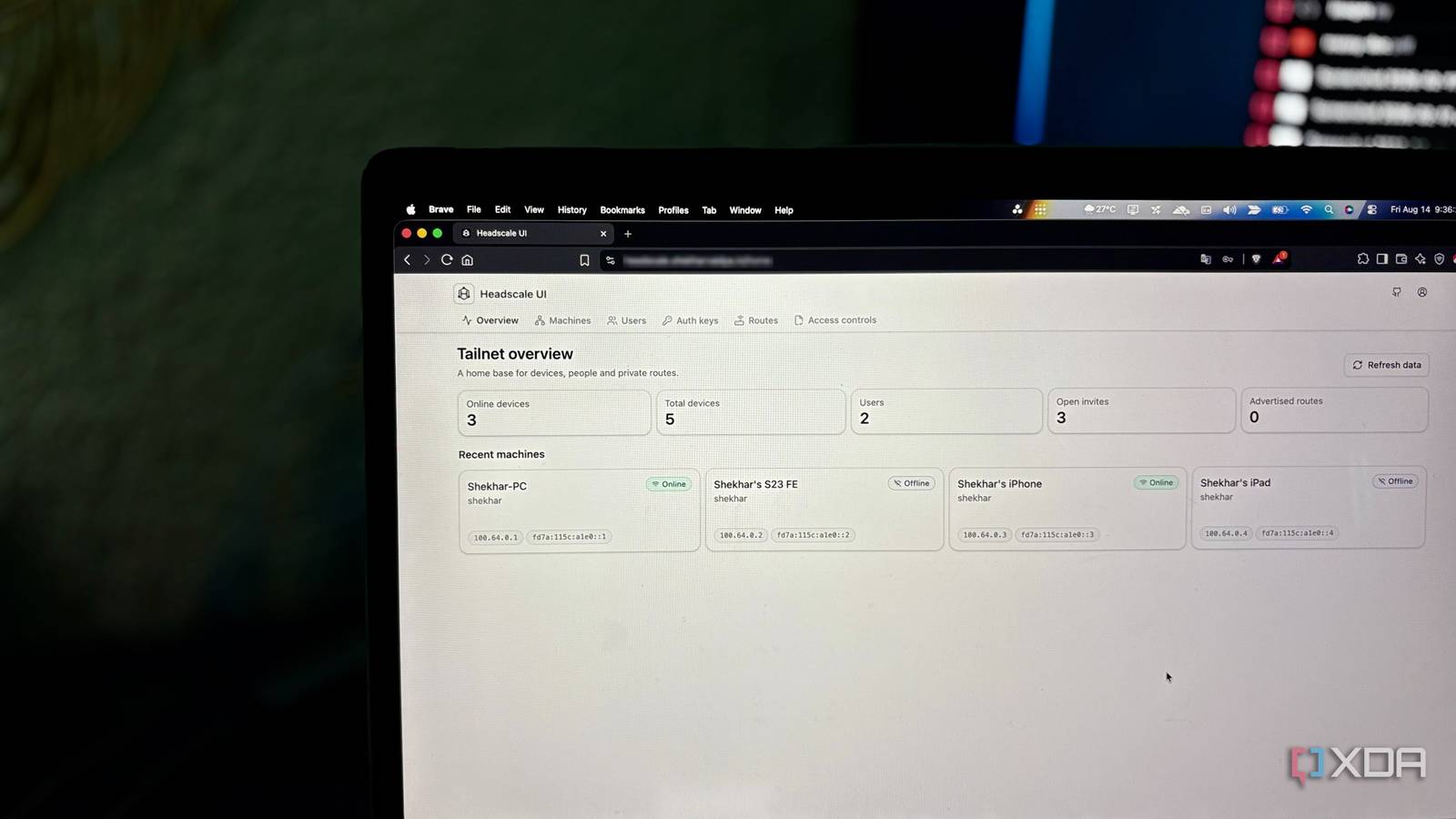
Published Aug 15, 2026, 1:00 PM EDT Shekhar Vaidya is a veteran technology journalist and computer science engineer. He is the founder of TechLatest, where he has spent years providing technical analysis on hardware and Windows ecosystems. Now a Computing Writer at XDA, Shekhar leverages his deep background in NAS, storage solutions, and PC internals to help readers master their tech. Tailscale is one of the most recommended services for private external access. It earned its place not just by being free, but by making networking feel almost unfairly easy. You add your devices to the tailnet, and suddenly they can talk to each other without any unnecessary overhead. But one thing always bothered me. My tailnet’s coordination depended on someone else’s infrastructure — Tailscale's hosted control plane. I wanted to find out how much of this Tailscale magic would survive if I moved the control plane to something I owned and controlled. I didn’t actually need Tailscale The magic wasn’t where I thought Tailscale is one of the services I chose in my early days with my homelab, and I still use it. The setup was so simple it was hard to resist. You just create an account on Tailscale, it assigns a tailnet to that account, and you are all set. Next, install the Tailscale client on your devices and log in with the same credentials. Your devices can suddenly reach each other without punching a hole in your router. From the user's perspective, it looks like a single product doing all the heavy lifting. But it's actually two: WireGuard does encrypted networking under the hood, and a Tailscale-managed control plane handles identity, keys, coordination, and routing. Tailscale just bundles both into one polished product. You might have thought, “Do we even need the control plane?” To answer your question, yes, we need it not because it's the only way, but because it's the more reliable one. I even tried replacing Tailscale with raw WireGuard, but at the time, CGNAT made me ditch that idea. Then comes Headscale. It is a self-hosted control plane that replaces Tailscale's coordination server. The good thing for me is that I don’t have to deploy it in my homelab. It can comfortably live on a disposable VPS. You might be thinking, "If I am anyway using a VPS, why not just install WireGuard again and use it?" You are right to ask, but the best part of Headscale is that you don’t have to worry about the client apps. You can use the same Tailscale client and change the coordination server. Eventually, it would just be moving the coordination layer from Tailscale’s infrastructure to my own. Headscale lets me own that coordination without giving up the Tailscale client experience. Headscale An open-source, self-hosted implementation of the Tailscale control server. Lets you run your own coordination layer while keeping the standard Tailscale client on all your devices. Headscale wasn't the easy part It didn’t just work I already had a small VPS on Hetzner, with two shared vCPUs, 4GB of RAM, and 40GB of NVMe disk space. I was using it to host my own ingress via Pangolin. And it was plenty of resources for a small- to medium-sized homelab. A dual-stack setup with a public IPv4 and a public IPv6 address is recommended, but IPv4 alone works just as well. Headscale also recommends creating a separate user for the implementation, but I didn’t want the hassle of maintaining multiple users. I pulled up the Docker Compose file and deployed it like any other Docker container. It was up and running in a few minutes. By default, Headscale doesn’t come with a UI, so it was just CLI commands. At first, I didn’t have any problems with it. According to the documentation, it was just three commands — one to create a user, another to generate auth keys, and a final one to register the nodes. But unfortunately, I never reached that part to create anything. The API simply wasn’t reachable. services: headscale: image: headscale/headscale:latest container_name: headscale restart: unless-stopped command: serve volumes: - ./config:/etc/headscale - ./data:/var/lib/headscale networks: - pangolin networks: pangolin: external: true The VPS already had Pangolin, and Pangolin depended on Traefik to handle the reverse proxy. So I assumed adding Docker labels would be enough to expose Headscale through Traefik — but nothing happened. Turns out Traefik had no Docker provider enabled, so the container wasn’t even visible to it. Finally, I fixed it by adding a router/service block to the dynamic_config.yml file, instead of relying on automatic routing. headscale-router: rule: "Host(`headscale.example.com`)" service: headscale-service entryPoints: - websecure tls: certResolver: letsencrypt headscale-service: loadBalancer: servers: - url: "http://headscale:8080" After a few more minor issues here and there, Headscale was finally up and running. I created a user, generated auth keys, and registered a few nodes. All went well. I ran a few ping tests; latency jumped from 2ms to 100ms, but 0% packet loss was the result I was looking for. docker exec headscale headscale users create docker exec headscale headscale preauthkeys create --user --expiration 24h tailscale up --login-server --authkey This was all happening on the CLI. The steps were pretty simple, but for someone already managing plenty of other services, remembering each command was kind of tedious. So, I went ahead and deployed a third-party admin UI from the Headscale recommended list. And the first impression of the dashboard? It felt like I never left Tailscale; it was almost the same. But I gave something up Convenience has a price All the configuration issues I faced were around getting the control plane running, not rebuilding the encrypted network underneath it. If we set aside the one-time control-plane setup, the experience after was almost the same as Tailscale. I added most devices to the Headscale network either with a single terminal command or by putting the auth key into the mobile apps. They all behaved like they were under Tailscale's hosted control plane. Tailscale is primarily a peer-to-peer network, so even after changing the coordination server, the client didn’t notice anything. As I mentioned many times in my previous article, the only easy part of self-hosting is running the service itself; managing that service is more tedious than you think. Tailscale's hosted control plane removes a lot of work you simply don't see. When you host it in your own infrastructure, the data stays with you, but the responsibility shifts to you. Even if we set aside recurring billing, things like uptime, updates, backups, configuration, and recovery fall under your constant attention. And Headscale isn’t a drop-in replacement for every feature of Tailscale. A few features like Tailscale Funnel and Tailscale Serve are missing, and a few features like MagicDNS need additional work. For someone like me, who already maintains not only a few containers but also multiple infrastructures, adding one more service isn’t the same burden it would be for someone starting from scratch. In the end, it is not whether self-hosting is good and Tailscale is bad; it's a choice between convenience and control. Whose infrastructure do you trust more? Tailscale’s free tier is generous enough to handle everything we just experienced. The only trade-off with Tailscale is that you are handing over all your devices to its coordination servers. If you can live with it, Tailscale is one of the best products available for private external access. But if the fact that all your data is living on someone else’s infrastructure bothers you, Headscale is proof that the magic was never Tailscale’s to keep.
I run Tailscale's magic network without handing Tailscale a single one of my devices
Full Article
Original Source
Read the full article at Xda-developers →KhanList aggregates and links to publicly available news content. We do not host full articles from third-party sources. Always verify important information with original sources.