
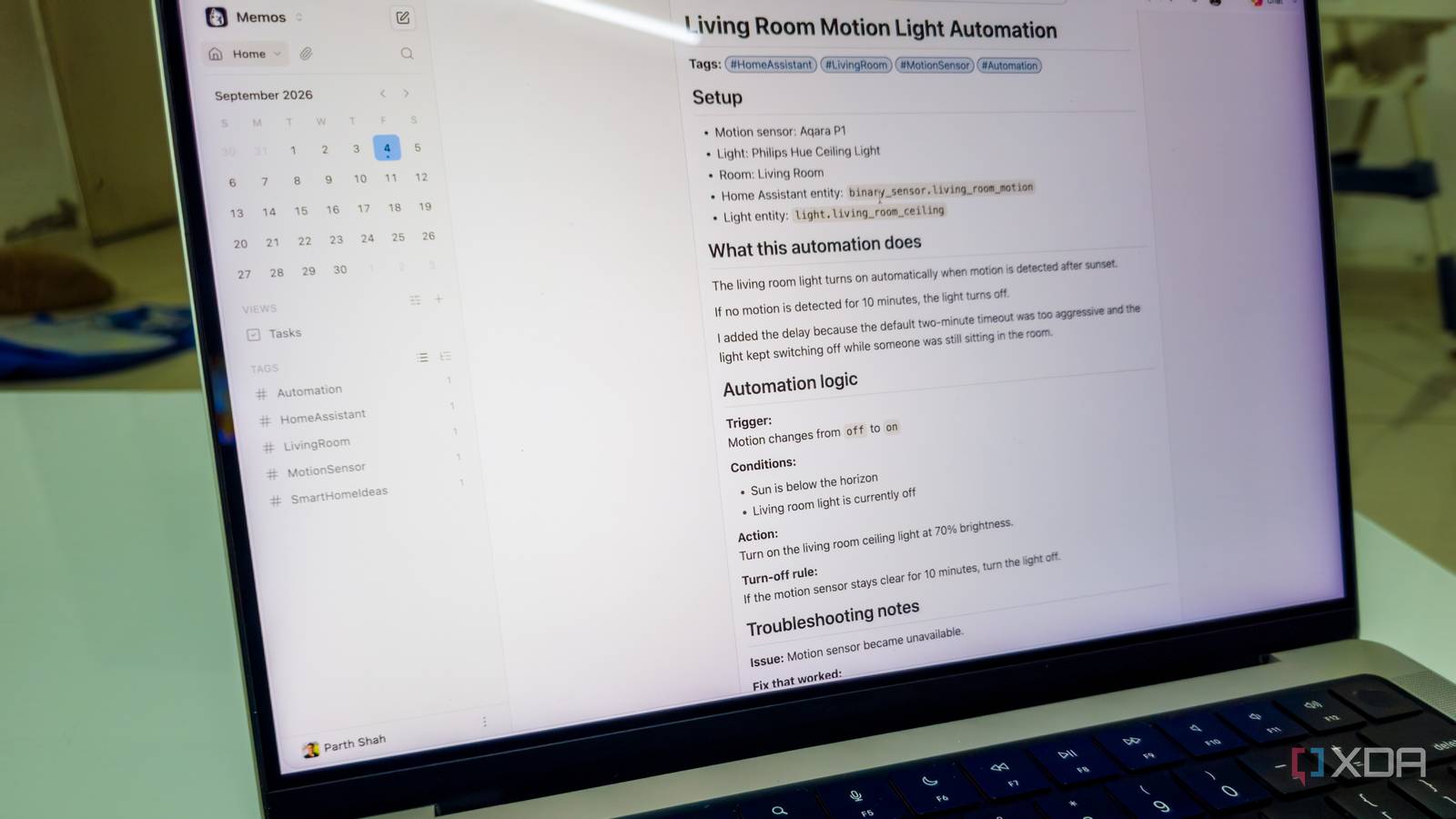
Published Sep 7, 2026, 7:30 AM EDT Parth, a seasoned tech writer, wields the keyboard (or pen) with finesse to unravel the intricacies of both Windows and Mac operating systems. He has covered evergreen content on mobile devices and computers for multiple publications over the last six years. You can find his work on AndroidPolice, GuidingTech and TechWiser. Whether it’s demystifying system updates, deciphering error codes, or exploring hidden features, Parth’s prose guides readers through the binary maze. When not immersed in tech jargon, you’ll find him sipping chai, pondering the next software review, and occasionally indulging in a friendly debate about mechanical keyboards. Smart homes get messy for one simple reason: we keep adding more software as the setup grows. But in my case, I don’t need dozens of containers running just to feel organized. Instead, I rely on three that cover what I actually care about: controlling the house, documenting how everything works, and tracking every device I own. Together, these three containers turned an old mini PC into the only smart-home service I really need. Home Assistant The control center for my house Home Assistant is the heart of my smart home. I can remove Memos or Homebox and still keep things running, but if Home Assistant goes away, the whole setup falls apart. Thanks to Home Assistant, I can pull everything into one place. I have lights, plugs, sensors, cameras, switches, media devices, and other smart-home gear from different brands, yet I can control most of them from the same dashboard. I don’t need to remember which device belongs to which app. I just opened Home Assistant, and everything is there. The integrations are a huge reason why it works so well for me. Home Assistant supports a massive number of services and platforms, so I can connect everything from Philips Hue and Aqara to Google services, smart TVs, weather platforms, media players, routers, and plenty more. Even when a device doesn’t have perfect native integration, there is usually another way to bring it into Home Assistant. I can create dashboards for different rooms, build scenes, monitor sensor history, check energy usage, create notifications, and automate almost anything. For example, I can turn off lights when everyone leaves, change a room based on motion, or trigger a routine at a certain time without touching the original device app. And Home Assistant can grow with the rest of my setup. I can integrate ESPHome for DIY sensors and ESP32 devices, use Node-RED when I want more visual, advanced automation flows, and connect MQTT-based devices without changing how I interact with the house. Memos My smart home instruction manual Once I started adding more sensors, switches, automations, and integrations, I quickly realized that remembering how everything was configured was becoming almost impossible. That is where Memos earned its place on my mini PC. I basically use it as a personal knowledge base for my house. Whenever I change an important Home Assistant setting, create a new automation, fix a strange issue, or discover something useful, I drop a quick note into Memos. Since it supports Markdown, I can keep notes clean with headings, lists, checkboxes, tables, code blocks, and links. I can also attach screenshots or PDFs when a simple text note is not enough. Tags are especially useful here. I can use tags such as #HomeAssistant, #Zigbee, #Troubleshooting, and more to quickly pull up everything related to a single place. A motion sensor was acting up months after I installed it. Instead of trying to remember what I did the first time, I can open Memos and search for that room or device. I might already have a note containing the pairing steps, Home Assistant entity name, battery type, screenshots of the automation, and the fix I used when it previously stopped responding. I also use Memos for ideas I have not implemented yet. Homebox Remembers every device I own with astute details Homebox also solves another problem: keeping track of all the hardware around my house. That may sound unnecessary when you have five or six smart devices. But once I start adding smart bulbs, plugs, motion sensors, and networking gear across several rooms, it becomes difficult to remember what I actually own. Homebox gives me a proper inventory instead of forcing me to keep all of that information in my head. I can organize devices by location, category, and tags, so I can quickly see everything installed in my living room, bedroom, office, or anywhere else. I can also add custom fields, upload photos, search through inventory, and keep documents like warranty receipts and manuals. Suppose one of my motion sensors suddenly stops working. Home Assistant tells me that the sensor is unavailable. But Homebox gives me the information I need to deal with the actual device. I can open its entry and check exactly where it is installed, when I bought it, what I paid for it, its warranty details, and any other information I have saved. The simplest smart home server What I like most about this setup is that each container has a clear job and none of them feels like filler. Home Assistant runs the smart side of the house, Memos keeps all the little details from getting lost, and Homebox gives me a proper inventory of the devices across different rooms. Together, they make the whole setup easier to understand and maintain without turning my old mini PC into an overworked server. Of course, these are just my preferences. If you want even more control over your smart home, try exploring containers like Zigbee2MQTT, Frigate, Node-RED, and MQTT broker.
I run only 3 Docker containers on an old mini PC, and they handle my entire smart home
Full Article
Original Source
Read the full article at Xda-developers →KhanList aggregates and links to publicly available news content. We do not host full articles from third-party sources. Always verify important information with original sources.