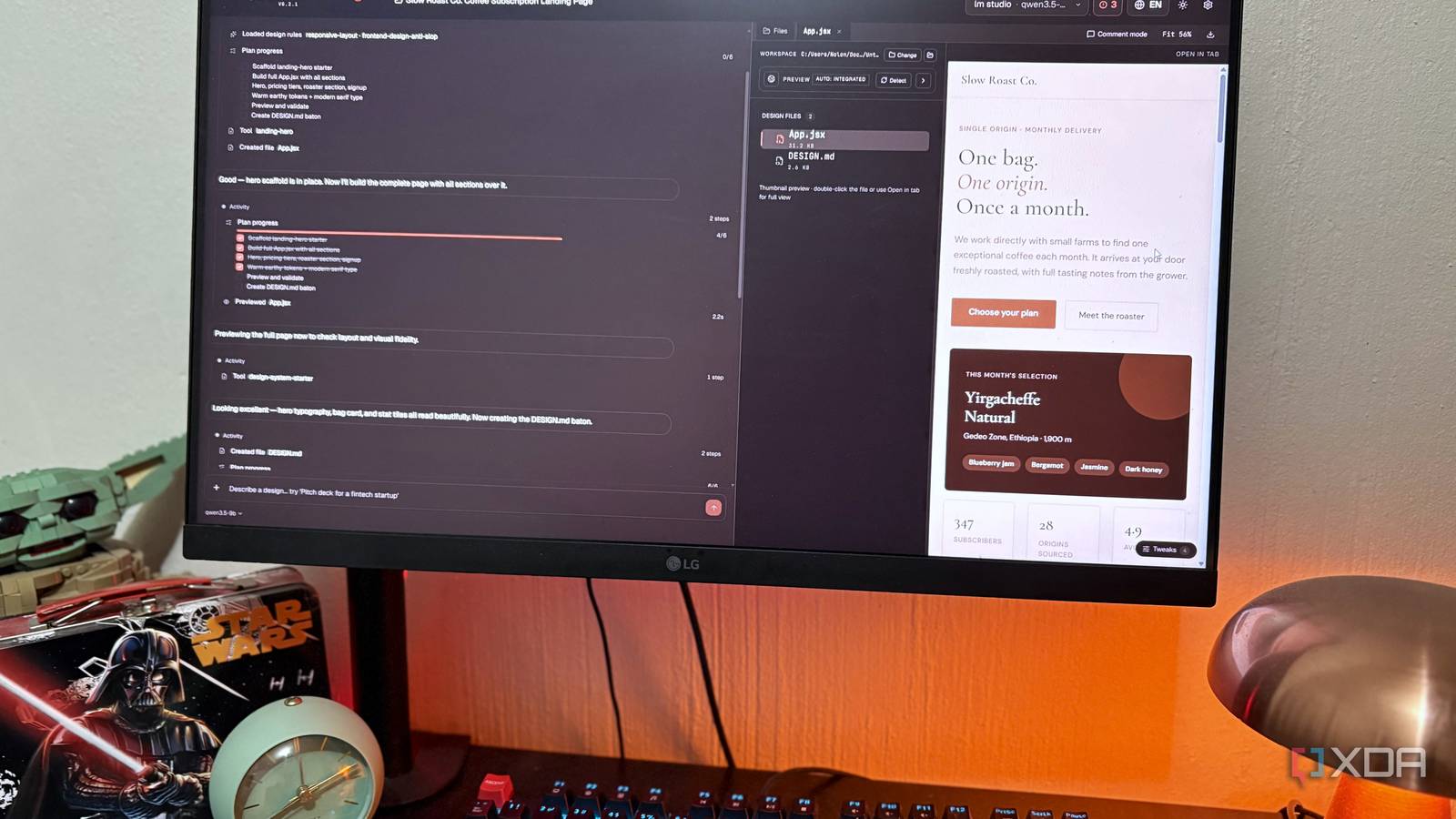
Published Aug 17, 2026, 2:00 PM EDT Nolen began their writing career in 2019, with three years dedicated to editing the Creative section at MakeUseOf. Their expertise lies at the crossroads of technology and creativity, covering areas like photography, video editing, and graphic design. Outside of work, you'll often find Nolen diving into a good book, writing their own stories, or playing video games. Claude Design was probably the tool that made vibe coding and, more specifically, vibe designing feel serious rather than a novelty or fun pastime. It became one of the first in the game where a prompt turns into something that's nearly ready to ship, and not just that, but it gives you a fully integrated visual design space for iteration, so you don't have to rely on prompts alone. The only downside is that it comes with a price tag and lives on Anthropic's servers. Which is exactly why local vibe coding has been keeping up right beside Claude Design. At the end of the day, the output from Claude is HTML and Tailwind classes, which are just code. So, theoretically, all you'd need is a strong coding model to replace it, but there's a little more to it than that. Here's what I've been managing to spin up as a local Claude Design replacement on my small GPU... Want to stay in the loop with the latest in AI? The XDA AI Insider newsletter drops weekly with deep dives, tool recommendations, and hands-on coverage you won't find anywhere else on the site. Subscribe by modifying your newsletter preferences! Why a coding model for design work, and not a creative one? Design output is just code When you hear the words "UI design", it's easy to assume that it's a super creative role where you sit and tweak colors and draw shapes all day. But it's actually a very analytical process, and when it's time to hand off to developers, the whole project is just code underneath. When I first started exploring vibe designing, my first instinct was also to reach for something a little more creative, like Gemma, which has a friendlier tone and goes overboard with emojis. Wrong instinct. What comes out of a tool like Claude Design (or any other AI design tool, really, including Figma Make) is HTML, CSS, and sometimes React components. The output is code, so the brain generating it needs to be a coding brain rather than one that excels at creative writing, for example. A creative-leaning model will still produce weaker markdown than a coding one when given the same brief, because design work needs something with valid semantic HTML and fluency with utility classes like Tailwind, plus instruction following at the layout level. I've recently tried to upgrade to Qwen 3.6 35B-A3B at Q2_K_XL, the most aggressively squashed version of this model available from Unsloth. But my 8GB VRAM still couldn't handle it. So I went with my tried-and-true Qwen 3.5 9B Q4_K_M, which is only 5GB, but how much headroom you have also depends on your context length, KV cache size, and whatever else is loaded on the card. Its coding scores are strong for its size and it uses Gated DeltaNet architecture, which is a fancy way of saying most of its layers scale linearly with context length instead of the exponential curve standard attention has, so I can keep a whole HTML file in context without having my VRAM climb higher. It won't match Opus 4.8 on first-try polish, but it produces valid and editable code that I can iterate on. Bringing my local LLM into a local design workspace Adding the tooling I need I started out just in the chat of a runner - lately I've been flipping between Jan and LM Studio. This simply involves grabbing the code block and saving it as HTML, or having the model do it for you if you give it filesystem access. This sounds too basic to write about, but it's the baseline before any design wrapper gets involved, and every local design tool is doing this exact thing anyway, just with a UI wrapped around it and some type of rendering window. Once I've got my file, I open it with VS Code's Live Server, and every iteration lands as a new file I can preview instantly. Tool calling on a 9B isn't bulletproof though, it'll sometimes forget to save or write to the wrong path, but this is why I keep the temperature low - it's better for code generation, and higher temps are more prone to hallucination. But the code generation is just one part of it. As I mentioned, there are dedicated local design tools that render the code in real time so you can see exactly what you're working with before exporting anything. They often also come with a bunch of pre-tuned design systems and style guides, so if you want brand consistency, you're going to need a design wrapper. Here, I'm talking about tools like Open Design and Open CoDesign (they sound related but they're actually completely different products). Open CoDesign is the one I'd recommend for a 9B setup - it's a desktop app that talks to local Ollama out of the box or LM Studio through the OpenAI-compatible endpoint. It ships with 12 design modules covering things like dashboards, landing pages, and slide decks, plus a few visual styles like glassmorphism. It also uses DESIGN.md files as brand systems, which are just plain markdown files where you define and store your color palettes, typography, spacing rules, and so on. The model will reference this file across generations so your outputs stay consistent. Open Design is a little more ambitious. It auto-detects over 20 CLIs on your PATH and ships with hundreds of skills modeled on companies like Stripe and Linear. But from my experience, it's better suited for hosted APIs than local; I just haven't had much luck running Qwen on it; I think this is where my hardware constraints are really starting to show up. So if you're packing more than I am, then Open Design will probably be a good fit for you. On my PC, Qwen still runs a little slow in these design wrappers. But its output is anything but subpar. It sticks to my instructions and iterates where I left things open. It's not quite as context-aware or creative as Claude's models, so I recommend giving it a few more hard rules for your design, especially when it comes to layout. But Qwen even nails the super trendy cursive typography that all vibe-coded sites use these days, which tells me it's not out of the loop when it comes to stylistic choices. There are a bunch of other tools that do similar things. Presenton is a local Docker text-to-slides tool that works with Ollama - this is if your main thing is decks and presentations. And Dyad is also a local AI app builder that's really just the Lovable and Replit cousin of this category, rather than a complete Claude Design replacement. What you give up with Claude Design There are honest trade-offs There are a million reasons to run a vibe code/design workflow locally, and that will change from person to person. Perhaps you're working on a confidential project, or you don't want the subscription overhead, or you want ownership of your work, or you just like the novelty of being able to do it. Whatever your reason, there will be trade-offs to ditching Claude Design. You have access to Claude's latest models, including Fable 5 and Opus 5, which are going to produce noticeably more polished results, there's no reason to pretend otherwise. However, it's not a dealbreaker, because you can run 40 iterations locally in the same time and token quota that it takes Claude to run five. First-try quality only really matters if you're short on time or trying it out once. Vibe designing is really an iteration process. Then there's the trade-off that's not so obvious, and that's the "second opinion" you get from the bigger cloud models. Sometimes Opus makes a design choice I wouldn't have and it's actually better than what I had in mind. This isn't really something smaller open weights are as good at. Local models are more predictable, especially if you've locked in the parameters. This could be an upside or downside depending on what you're looking for. Lastly, vision. Qwen is a vision model but it's weaker at turning a sketch into working code than Claude is. Most of what I do locally is text-based, whereas with Claude I could send it screenshots and ask for replica interactive prototypes, and it gets really close. Running this setup locally changed my perspective on vibe-designing The things that keep me on this setup are the lack of credit cap, and being able to run the whole process offline. Claude Design is better at that first-try polish, but several prompts in and my local setup produces similar quality output that a rate subscription wouldn't support.
I run a local coding model on my 8GB GPU for real UI work, and I'm not going back to Claude Design
Full Article
Original Source
Read the full article at Xda-developers →KhanList aggregates and links to publicly available news content. We do not host full articles from third-party sources. Always verify important information with original sources.