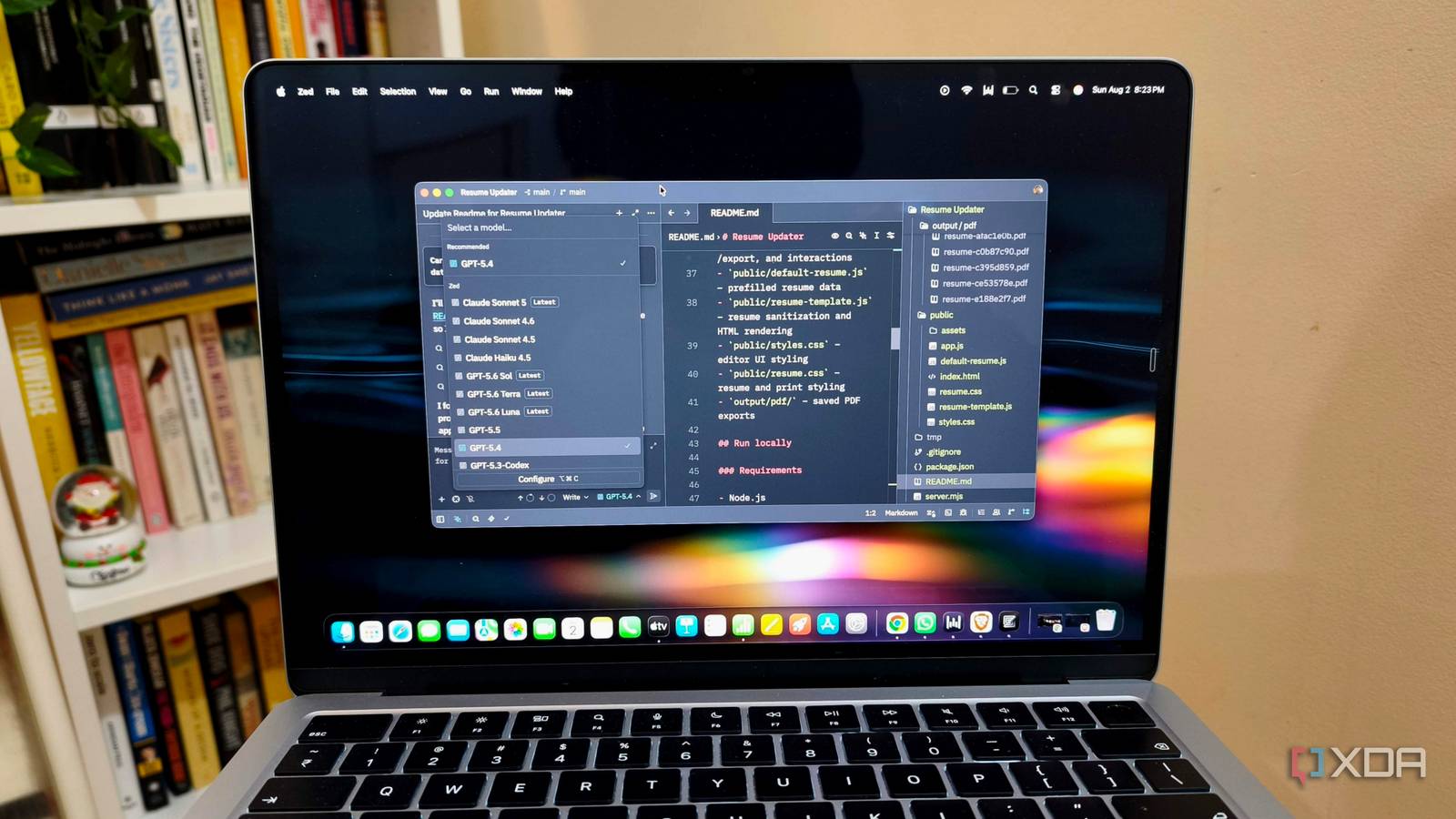
Published Aug 4, 2026, 3:30 PM EDT Anurag is an experienced journalist and author who’s been covering tech for the past 5 years, with a focus on Windows, Android, and Apple. He’s written for sites like Android Police, Neowin, Dexerto, and MakeTechEasier. Anurag’s always pumped about tech and loves getting his hands on the latest gadgets. When he's not procrastinating, you’ll probably find him catching the newest movies in theaters or scrolling through Twitter from his bed. VS Code is the most widely used code editor, but I’ve never been a big fan. I’ve still used it regularly for years because there simply wasn’t a better option. You could point to Cursor and Antigravity as alternatives, but both are built on the same Electron foundation. The only difference between the two is that instead of giving your telemetry data to Microsoft, you're giving it to Anysphere and Google. There are completely open-source options available too. VSCodium is a good example. It’s VS Code without Microsoft’s telemetry and tracking, but it doesn't address my main problem because it is still built on Electron. The framework bundles Chromium and Node.js with every app, making Electron-based editors extremely heavy on CPU and RAM. In my search for a VS Code replacement, I have finally found an IDE that is not based on the Electron framework. I’m talking about Zed, which is completely open-source and built in Rust, with its own GPU-accelerated UI framework. It's an absolute speed demon, and recent updates have also brought strong support for AI agents and many of the other modern features you would expect from an editor in 2026. VS Code has a fundamental problem Extensions quickly eat through your resources VS Code is not slow if you use it as it comes out of the box, but you can’t because you need all those extensions, whether that’s an AI extension or anything else necessary to your development workflow. The moment you start adding extensions, VS Code slows down significantly and can use 3 to 4GB of RAM. Since VS Code is based on the Electron framework, it renders graphics through Chromium, which results in some latency. Zed is written entirely from scratch in Rust and uses its own framework, GPUI. It renders UI components directly on your graphics card, which means you get a 120 FPS scrolling experience. In the company’s own benchmark testing, opening a large, multi-thousand-file project takes Zed roughly 0.25 to 0.6 seconds, compared to VS Code’s 1.3 to 3.8 seconds. I have not been able to verify these numbers, but I have definitely seen speed differences when opening larger project files in Zed. Since Zed has a lower idle memory footprint, you can run more apps together, even on a lower-spec machine. My MacBook has 16GB of RAM, and the editor is competing with browser tabs, local development servers, Docker containers, and whichever AI agent I’m using. Two or three VS Code windows quickly make that memory look less generous than it did on the spec sheet. Zed also has a proper place for my AI agents ACP keeps every agent under one roof Zed’s Parallel Agents update is what makes the switch from VS Code practical for me. Released in April 2026, the update added a Threads Sidebar, where I can run and monitor multiple agent sessions in the same window. Threads are grouped by project, and each one can use a different agent. I can have Codex working on one project, Claude handling another, and Zed’s native agent running alongside them. You can connect external agents to Zed through the Agent Client Protocol, or ACP. It’s an open protocol that allows agents to use Zed’s project context, multi-file editing, and change-review interface. Claude, Codex, Gemini CLI, OpenCode, Copilot, Cursor, and several other agents are available through the ACP Registry. These tools continue running as separate processes and retain their own authentication, subscriptions, model settings, tools, and instruction files. Each thread can be limited to particular folders or repositories. Zed also lets me run a thread inside a separate Git worktree, which becomes important when multiple agents are changing the same project. Zed added Terminal Threads a month after the Parallel Agents release. These let me run codex, Claude, or another command-line agent in the Agent Panel, even when the Agent Panel doesn’t support it. The terminal remains scoped to its project and worktree, appears beside the other threads, and can send a notification when the process needs attention. ACP agents and terminal agents can also run side by side in the same sidebar. You don't lose much when switching from VS Code Except a bunch of extensions you might use once a year While VS Code is definitely a more mature platform, you don’t lose much when you ditch it for Zed. The most obvious limitation is the extensive ecosystem of extensions that VS Code has built over the years. Features such as Live Share are also more mature and work better than Zed’s equivalents. VS Code also offers better integrated tooling for advanced debugging, Git, and remote development, along with deeper GitHub Copilot integration. Since the platform has been around for years, it also benefits from ubiquity and strong community support. There is extensive documentation, a massive user community, and a good chance that it is already the default editor within your team. However, most of these shortcomings are not deal-breakers. Extension support is the one possible exception. Zed includes many features that would require separate extensions in VS Code, and its extension ecosystem continues to grow. Most of the extensions you would normally need to get work done are already available. I haven’t yet come across an extension I use in VS Code that I can't replace in Zed. The gaps mostly concern niche extensions that some developers depend on. Their absence is frustrating for those specific workflows, but Zed has everything I need otherwise. VS Code still has its place As I mentioned above, VS Code is one of the most widely used code editors. That reality is not going to change anytime soon, no matter how good the alternatives become. That’s not to say VS Code is a bad platform. For teams looking for stability, or even individual developers who just want to get things done, VS Code is still the best option.
I replaced VS Code with Zed, and after its latest update it's faster, lighter, and finally handles my AI agents too
Full Article
Original Source
Read the full article at Xda-developers →KhanList aggregates and links to publicly available news content. We do not host full articles from third-party sources. Always verify important information with original sources.