
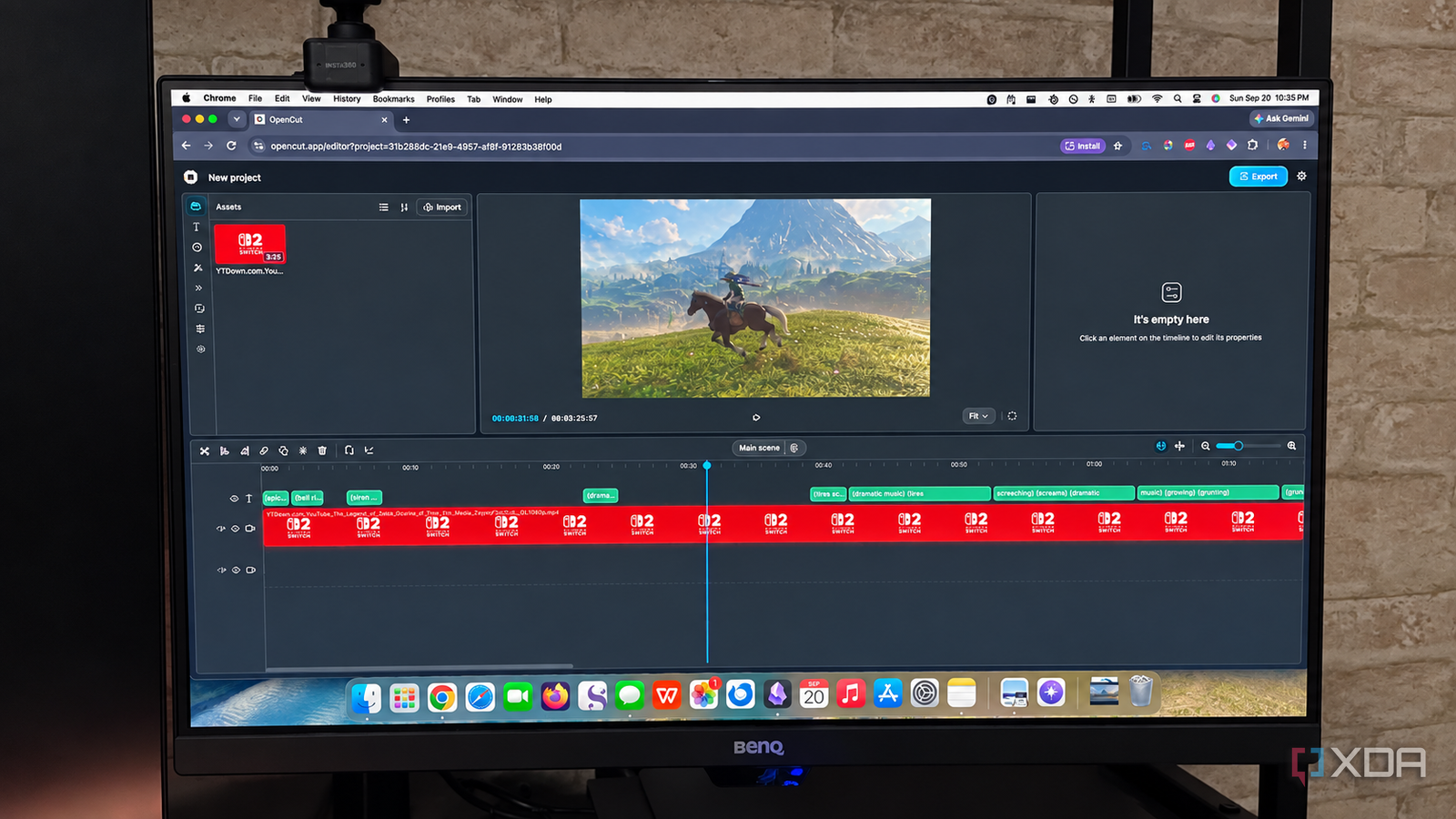
Published Sep 23, 2026, 6:00 AM EDT Patrick is a seasoned writer with more than a decade of experience, specializing in any and all things tech. His work has been featured on platforms like CNET, Yahoo, Xfinity, and many other outlets. When not typing away, he can be found with his nose in a book. I've made no secret of my feelings toward Adobe products, especially with the ever-rising cost of Creative Cloud, but I also can't deny that Adobe is incredibly good at nearly everything it does. Premiere Pro is no exception. When it comes to video editing, few applications are as widely known or used, but it's far from the only option. And while Premiere is undeniably powerful, power and complexity aren't the same as usefulness. For the kind of editing I do — stringing a few clips together, making a post for social media here and there — Premiere is a bit overkill. I've been in search of a good alternative, and I stumbled across OpenCut. The biggest appeal is that it's free, a far cry from the wallet-busting expense of Premiere, but a close second is that it works perfectly fine for everyday video editing. OpenCut doesn't force me to learn a professional workflow I don't need a Hollywood-level editing tool If you've ever used any Adobe application before, then you're familiar with the at-times-overwhelming interface it throws at you. There are dozens of different panels, menus, tools, and effects to learn to get the most out of the application. Premiere could absolutely handle creating posts for TikTok, but the app is designed with professionals in mind. That level of complexity is great for someone who spends all day staring at video timelines, but it's a lot for the layperson to pick up. OpenCut takes a different approach. I can do everything I need in an interface that feels familiar but also much more streamlined. With OpenCut, I can easily import and trim footage, tweak audio tracks, and add basic effects. I can export in two video formats (MP4 and WebM), choose Low, Medium, High, or Very High quality, and choose whether to include video in the export. I've worked with various editors in the past, and OpenCut has one of the more intuitive interfaces I've ever used. The free and open-source aspect is also appealing I prefer owning my software I already mentioned that OpenCut was free, but the fact that it's also open-source means I know exactly what's happening under the hood. The app emphasizes on-device processing. On the "About" page, it reads: "All video editing happens locally on your device. We don't upload your videos to the cloud, track your activity, or sell your data. Your creative work remains entirely yours." I appreciate the openness with regard to my data, but my appreciation of on-device processing goes further. I don't edit a lot of video. One of the most common things I'm working on is family videos, and I don't want to upload my personal videos to a server I don't trust. There's no watermark, either, which puts it a step above some free video editing options. You won't have to deal with an ugly logo marring the video of your kid taking their first steps. It's easier on my system OpenCut doesn't demand high-end hardware Editing video is a resource-intensive task. Premiere runs well on many different setups, but if your system isn't up to the job, the application can simply fail to start at all. Even when it does run well (which, on my aging MacBook, it does not), Premiere still feels heavy, especially when editing and rendering more complex video. Professional studios have dedicated workstations for film production for a reason. OpenCut runs in my web browser, meaning my MacBook doesn't beg for mercy when I'm editing footage. That said, RAM is still a requirement, so systems with less RAM might struggle. I definitely noticed my performance take a hit when performing a task in the background, like rendering captions. OpenCut isn't going to replace Premiere Pro It's just not as powerful Here's the thing: as much as I like OpenCut, I'm not going to claim it's superior to Premiere. For one, it's still in early beta, so the app has a lot of room to grow. Premiere has seen numerous iterations and improvements and has been refined into the application it is today. Where OpenCut takes the lead is that it's easier. It has no subscription cost, has all the functionality I need for occasional video work, and doesn't require high-end hardware to run. If a time ever comes that I need Premiere's complexity, I know where to find it, but Premiere has a slew of features I've never needed (and wouldn't know how to use properly even if I did). Premiere is necessary, but not for everyone Premiere Pro exists for a reason. More sophisticated work, like advanced audio editing, elaborate effects, or anything that requires more granular control, needs something like Premiere. OpenCut is great for family videos and social media work, but it doesn't compete at the same level as Adobe. But for me? OpenCut is exactly the thing I was looking for. OpenCut OpenCut is a free and open-source video editor that runs in your browser.
I replaced Premiere Pro with a free and open-source tool built for everyday editors and not studios
Full Article
Original Source
Read the full article at Xda-developers →KhanList aggregates and links to publicly available news content. We do not host full articles from third-party sources. Always verify important information with original sources.