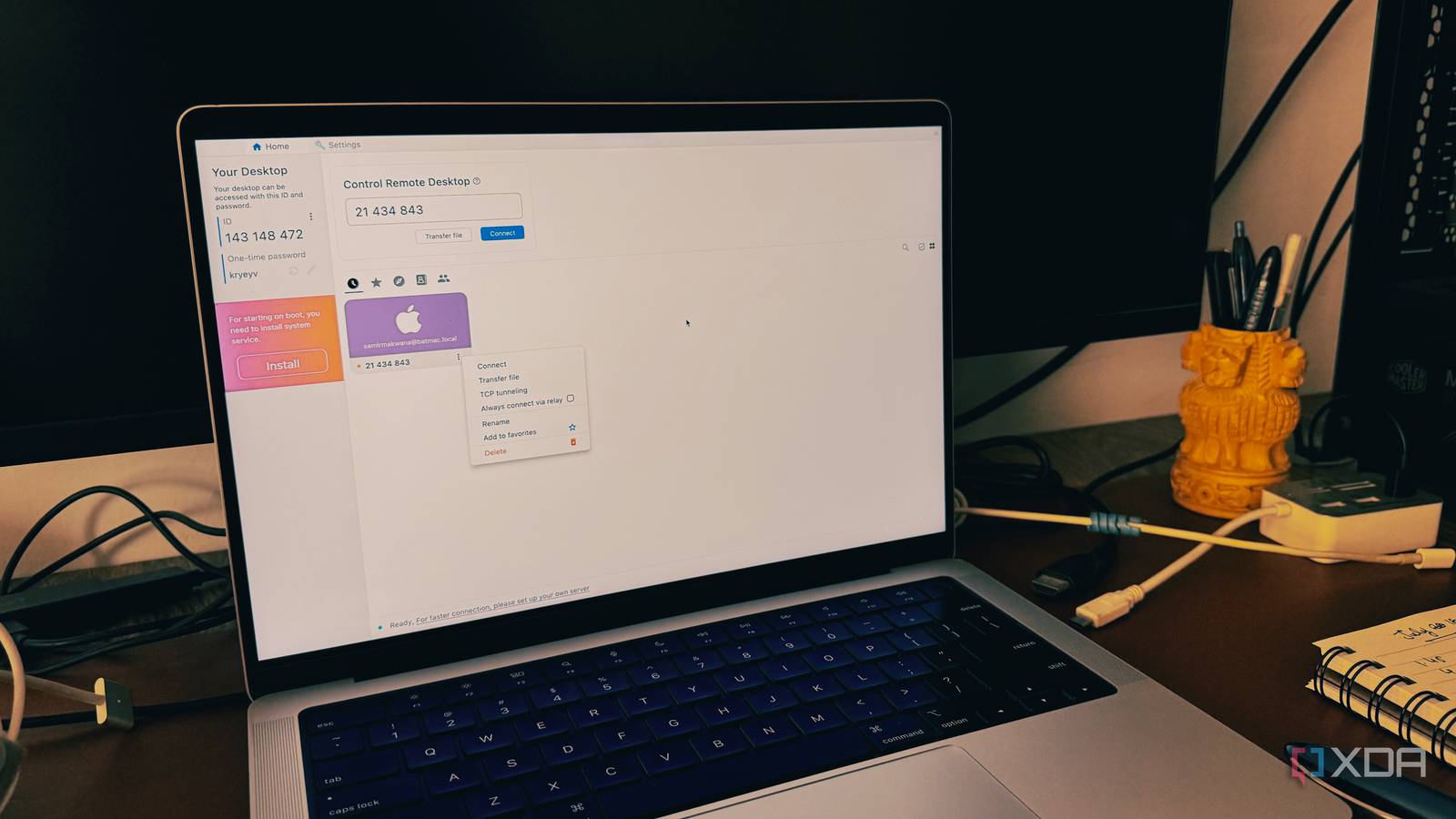
Published Aug 12, 2026, 7:00 PM EDT Beginning his professional journey in the tech industry in 2018, Yash spent over three years as a Software Engineer. After that, he shifted his focus to empowering readers through informative and engaging content on his tech blog – DiGiTAL BiRYANi. He has also published tech articles for MakeTechEasier. He loves to explore new tech gadgets and platforms. When he is not writing, you’ll find him exploring food. He is known as Digital Chef Yash among his readers because of his love for Technology and Food. Managing a mini PC is much easier when you can access it from anywhere. Whether you're at home or in a different room, remote access saves you from plugging in a monitor and keyboard every time you need to use it. For a long time, I relied on a paid app because it was simple and dependable. But as my home lab grew, I started wondering if I really needed another subscription for something so basic. After trying a self-hosted alternative, I realized I could get the same remote-access experience while keeping more control over my own setup. TeamViewer was the heart of my remote access setup Great software, wrong fit for my home lab TeamViewer was my go-to app for accessing my mini PC remotely. Whenever I needed to check on my home server, install updates, restart a Docker container, or transfer a file, I simply opened TeamViewer and connected. It was easy to use, worked reliably, and never gave me a reason to look for something else. Over time, though, the way I used my mini PC changed. It became the center of my self-hosted setup, and I was only connecting to my own devices. I wasn't supporting clients or managing dozens of computers. Most of the advanced features that came with a paid TeamViewer plan just weren't useful for my setup. That's when I started questioning whether I really needed to keep paying for it. I wasn't looking for a feature-packed replacement or a new way to work. I simply wanted a remote-access tool that could do the same everyday jobs without another monthly subscription. Since I was already self-hosting several services, switching to a self-hosted remote-access solution felt like the next logical step. RustDesk offered everything I was actually looking for A lightweight and private alternative While searching for a replacement, I found RustDesk, a free and open-source remote desktop app. Like TeamViewer, it lets you connect to another computer from anywhere. The difference is that you can also host your own server, so you don't have to rely on someone else's service if you don't want to. As I looked into it, I realized RustDesk had everything I needed. It supports unattended remote access, file transfers, clipboard sharing, multiple monitors, and works on Windows, Linux, macOS, Android, and iPhone. These were the same features I used most often on my mini PC. The self-hosting part is what convinced me to give it a try. Since I already had Docker running on my home server, setting up the RustDesk server was quick and straightforward. Once I connected my devices, using it felt very familiar. After a few remote sessions, I stopped thinking about the switch altogether. RustDesk handled my everyday tasks just as well, so I didn't feel like I was giving up anything by moving away from TeamViewer. My permanent remote-access solution A simple tool that gets the job done After using RustDesk for a while, I realized it had everything I expected from a remote-access app. It covers all the core features without overcomplicating things, which is exactly what I wanted. It supports unattended remote access, so I can connect to my mini PC whenever I need to. File transfers are built-in, making it easy to move files between devices without using another service. Clipboard sharing lets me copy and paste text between my local and remote machines, and multi-monitor support works well when I connect to my desktop instead of my mini PC. Another thing I like is its cross-platform support. The same app works on Windows, Linux, macOS, Android, and iPhone, so I can connect from almost any device I have. The interface is also simple and familiar, so there wasn't much to learn after switching from TeamViewer. For my needs, RustDesk checks every box. It has the features I actually use, works reliably, and hasn't given me a reason to switch back to a paid remote-access app. Running my own server gave me more control over my remote connections More control, fewer compromises The biggest reason I stuck with RustDesk was the option to host my own server. Instead of routing my remote connections through someone else's servers, my devices connect to a server I manage. That gives me more control over how everything works. Setting up the server was easier than I expected because I already use Docker for other self-hosted apps. Once it was running, I didn't have to do much else. It just works in the background whenever I connect to my mini PC. I also don't have to worry about subscription plans or device limits. If I want to add another computer, I simply install RustDesk and connect it to my server. Everything stays under my control rather than relying on another company's service. That fits perfectly with why I built a home lab in the first place. I already self-host several services, so it made sense to do the same with remote access. It gives me more freedom, more control, and one less subscription to pay for. Sometimes the simplest switch is the best one Switching from TeamViewer to RustDesk turned out to be much easier than I expected. I got the same remote-access experience I was used to, but without another recurring payment. More importantly, it fits better with the way I manage my home lab today. If you only need remote access for your own computers, a self-hosted solution like RustDesk is well worth trying. It takes a little time to set up, but once it's running, you can forget about it and just use it. For me, it has become one of the most useful self-hosted tools on my mini PC. RustDesk RustDesk is a free, open-source remote desktop software designed as a secure, self-hosted alternative to proprietary tools like TeamViewer and AnyDesk.
I replaced my mini PC's paid remote-access app with a self-hosted tool that does the same job
Full Article
Original Source
Read the full article at Xda-developers →KhanList aggregates and links to publicly available news content. We do not host full articles from third-party sources. Always verify important information with original sources.