
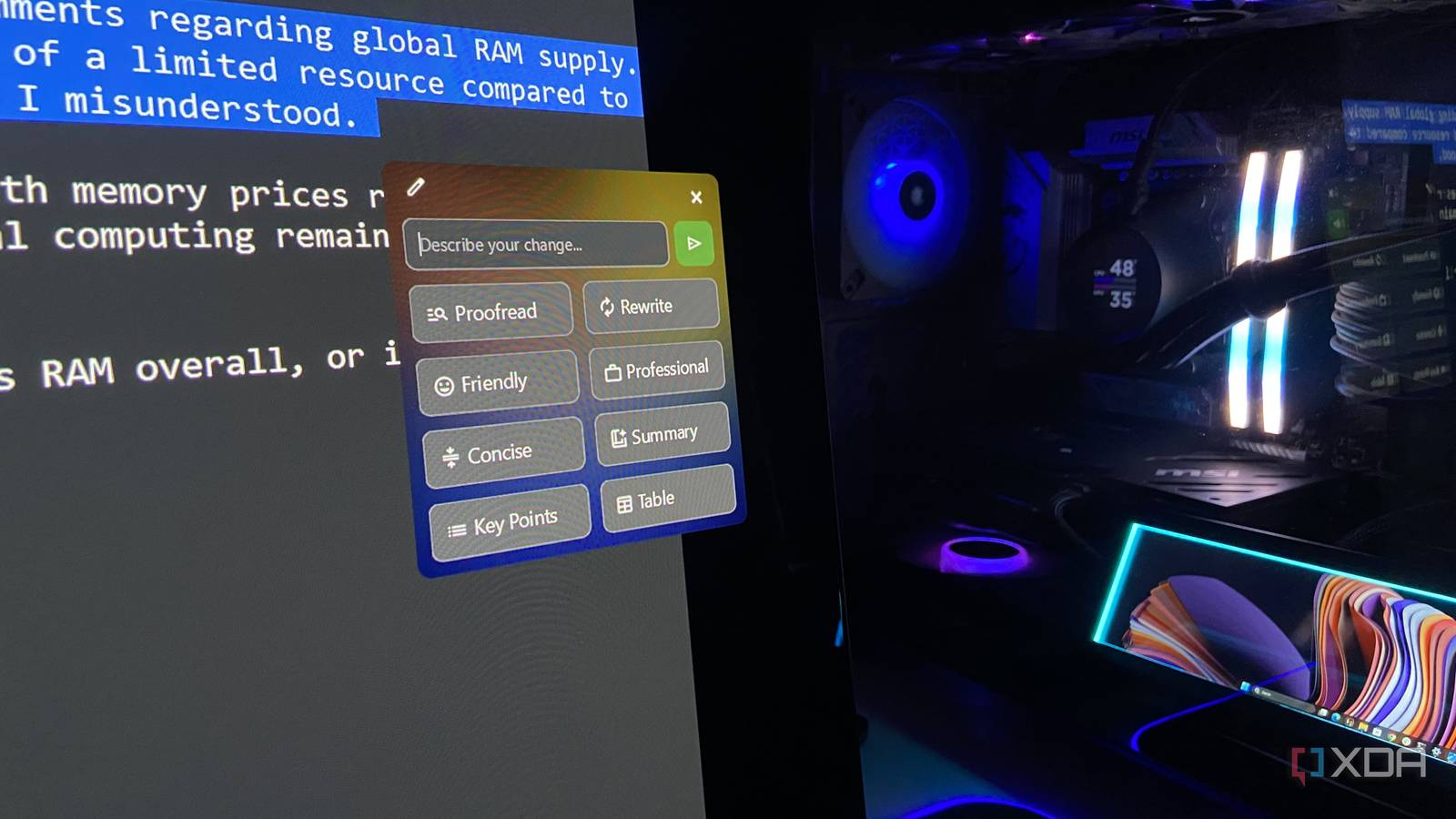
Published Nov 6, 2026, 4:01 PM EST Abhinav pivoted from a career in banking to pursue his first love in writing. Even while working full-time, he continued contributing as an editor-at-large, a role he has held for more than 7 years. A lifelong tech enthusiast who has built three gaming and productivity powerhouse PCs since 2018, his passion for technology keeps him closely following the semiconductor industry, from NVIDIA and AMD to ARM. His MSc dissertation explored how artificial intelligence will reshape the future of work, reflecting his curiosity about the wider social impact of emerging technologies. Month after month, it feels like we're getting close to what I'd call a subscription pandemic. Every other service demands a premium for a "Pro" or a "Premium" tier that drags down your balance on the first of every month and tries to get you hooked on its ecosystem. Over time, you're made to believe that the service you're paying for is an essential expense, and it earns a rather stubborn spot on your bank statement. Grammarly Premium, now sold as Grammarly Pro, was one of those charges I was convinced I had to pay for, but it took me a little while to realize that it cost me a little more than just a flat $30 a month, in that every single draft and every single edit could end up training its models unless I explicitly opted out. That was a dealbreaker for a subscription that was perhaps one of the easiest ones to replace, especially when my GPU could already run a local LLM that could proofread my writing without sending my drafts to someone else's server. Grammarly opts every individual account into AI training by default Your drafts could be improving the service for someone else, at your expense When you're signed in to an individual account on any tier in Grammarly, including the Free and the paid single-user Pro plan, you're opted in by default to what the company refers to as Product Improvement and Training. If you go through its privacy FAQ, you'll find that Grammarly can sample random, de-identified excerpts of your writing to improve the product. If you've never skimmed through your privacy settings, all your drafts are fair game. The issue with this sort of service sending even anonymized data to its servers is the fact that a writing assistant rarely stays within the confines of a single draft, and over time, becomes a part of everything you draft, including personal emails to corporate communication you'd rather not want a third party prying into. Even if you're a privacy-conscious user who has opted out of Product Improvement and Training through your account settings, the service still needs an internet connection to analyze your text, so whatever you write still has to reach its servers beforehand. A free app turned my local model into a system-wide proofreader I can just select the text, hit a hotkey, and the fixed text appears right there One of the aspects where I always found local models to be rather hamstrung when compared with Grammarly is reach. Even if you loaded a fine-tuned local model that's perfect for your proofreading needs, you'd find that when it's confined to a chat window, it will only ever replace half of what Grammarly does. As such, a local model that's stuck in a chat window where you have to paste text in and out has a fundamental usability problem. Meanwhile, Grammarly, which can follow you into almost every app you type in, does not. Before I got anywhere close to advocating for a replacement for Grammarly, that was a central problem that needed attention. Luckily, there happens to be an open-source fix to it. Writing Tools by theJayTea on Github is a free app that can stay in your OS's system tray and send any text you select to a local model of your choosing. The entire setup involves downloading a zip file from its GitHub releases page, extracting it, and running the executable. Out of the box, it defaults to Google Gemini, but you can change that with a few clicks. During setup, I chose OpenAI Compatible and pointed it at the llama-server instance already running on my RTX 4070 Ti Super, which made its "brain" my Qwen3.6-35B-A3B model at the UD-IQ4_XS quant. As Writing Tools only talks to llama-server over a localhost address, every request that I make only makes a round trip to my own GPU without touching a third-party server. It also beautifully solves the accessibility problem. By pressing Ctrl+Space over the selected text, I can choose to proofread it for errors, choose between a variety of tones and voices (such as friendly or professional) or make amendments to length by asking the model to produce a "concise" variant of a draft. Whatever preset I pick replaces the selection right where I'm typing, and a simple undo command (Ctrl+Z) brings back the original in case I don't like the result or want it worded differently. The proofreader fixed all 24 errors I planted And not once did it ask for my credit card details When the usability aspect is covered, you want a utility that's handling your day-to-day proofreading to be reliable, and reliable in a way that it can be completely hands-off on the days you're too busy to check and re-check its output. After all, a utility that makes you work overtime to fix its own errors isn't fixing any problems at all, is it? To see how far I could trust it, I ran a deliberately messy email to "John Rockstar" about "Grand Car Thief 6" skipping a PC release, with 24 planted errors. Proofread fixed every single one of the planted errors, and the only unrequested change was rewording a single sentence, albeit without altering the meaning in any significant way. I'd like to be honest about its limitations, in that, the other buttons, such as "Professional", aren't as precise when it comes to preserving the overall meaning. In another run, it tried to "correct" my joke email by addressing Rockstar Games about the upcoming Grand Theft Auto VI. That preset very much needs some oversight, as do most AI-generated inputs generally do. One less charge on the first of the month, thanks to local AI With a local model and llama.cpp as the runtime, I was able to offload nearly everything I used Grammarly Pro for, and an open-source tool helped me make it such that it was accessible virtually everywhere I could input text. That said, llama.cpp isn't the only way in. Writing Tools also has a built-in Ollama provider, and LM Studio's local server plugs into its OpenAI Compatible option, so either can be used with the same hotkey with far less command-line work for those who prefer it. Both alternatives can save you the subscription fees regardless, and ensure your data stays on your PC.
I replaced Grammarly Pro with a local model on my GPU, and my drafts never leave my PC
Full Article
Original Source
Read the full article at Xda-developers →KhanList aggregates and links to publicly available news content. We do not host full articles from third-party sources. Always verify important information with original sources.