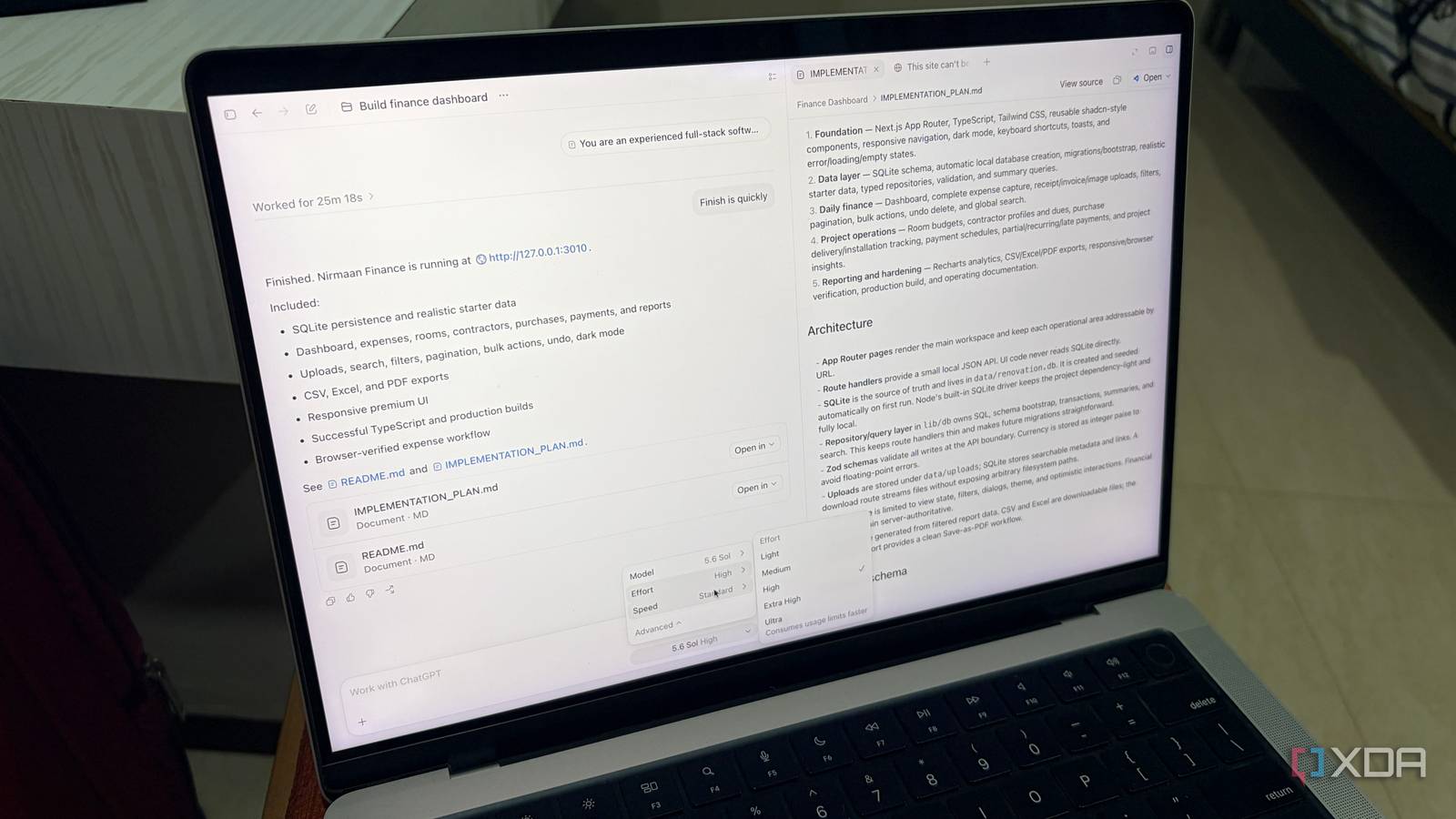
Published Jul 24, 2026, 3:30 PM EDT Parth, a seasoned tech writer, wields the keyboard (or pen) with finesse to unravel the intricacies of both Windows and Mac operating systems. He has covered evergreen content on mobile devices and computers for multiple publications over the last six years. You can find his work on AndroidPolice, GuidingTech and TechWiser. Whether it’s demystifying system updates, deciphering error codes, or exploring hidden features, Parth’s prose guides readers through the binary maze. When not immersed in tech jargon, you’ll find him sipping chai, pondering the next software review, and occasionally indulging in a friendly debate about mechanical keyboards. Claude has been my go-to AI assistant for months, especially when I needed thoughtful writing, detailed analysis, or help with complex coding tasks. ChatGPT was always in the mix, but I never saw it as a complete replacement. That changed when I decided to move my entire workflow to ChatGPT for a week. I expected to miss Claude’s deeper reasoning almost immediately. Instead, ChatGPT handled far more than I anticipated and delivered results that changed how I viewed both tools. ChatGPT felt more complete from day one Answers felt natural, not robotic The first thing that stood out after switching was how complete ChatGPT felt as an everyday assistant. I could use it for brainstorming, research, writing, file analysis, coding, and even image generation (more on that in a minute) without jumping between different tools. More importantly, its responses sounded natural from the start. This is noticeable when I used to draft emails. With Claude, I occasionally had to soften certain phrases, remove overly formal wording, or rewrite parts that did not sound like me. ChatGPT usually gave me a cleaner and more conversational draft on the first attempt. I could specify the recipient, context, and tone, and the final email was often ready to send with only a few minor changes. Codex is right up there with Claude Code GPT-5.6 closes the gap Codex was noticeably behind Claude Code for a while, especially when I used both tools for complex projects that required careful planning and precise execution. Claude Code usually understood the broader context better, handled small implementation details more reliably, and needed fewer corrections along the way. However, GPT 5.6 has narrowed that gap. I recently used Codex to build a complex dashboard, and the final execution surprised me. It understood the structure I wanted, created a polished interface, and handled data-rich elements without forcing me to constantly step in. Fable 5 can still be better in certain situations, particularly when a project requires deeper reasoning or specific UI refinements. However, for my use case, Codex is right up there with Claude Code, and the difference between them feels smaller than ever. The memory difference surprised me ChatGPT felt better at remembering my preferences The biggest surprise after moving to ChatGPT was how quickly it started feeling familiar. I did not have to explain my writing preferences, article formats, or the devices and services I use frequently. It already understood my preferred writing tone just from a few conversations. That continuity saved me more time than I had expected. I could return to an ongoing idea, mention a previous comparison, or ask for another section, and ChatGPT usually picked up the context without making me rebuild the entire prompt. Claude’s memory was useful too, but ChatGPT felt more deeply connected to my workflow. The difference was noticeable across long-running writing projects, where remembering small preferences often mattered just as much as producing a strong answer. ChatGPT’s image generation is excellent Way more useful than I imagined One area where ChatGPT pulled ahead for me very quickly was image generation. I use it all the time to create eye-catching banners for my diamond business, along with Instagram posts and stories, and it has become a useful part of my workflow. What I like most is how little effort it takes. I can drop in a single sentence, a rough idea, or even an entire paragraph, and it turns that into a polished visual in no time. Whether I want a clean promotional banner, a stylish product-focused graphic, or a bold text-led social post, ChatGPT usually gives me something visually striking right away. That saves me from jumping between multiple tools or overthinking the design process. Claude simply doesn’t offer that kind of built-in image generation. For my daily workflow, that gap matters more than I expected. Claude Design remains unrivaled The only major thing I missed during the switch One feature I missed during my switch was Claude Design. It is still one of the best tools I have used for quickly turning an idea into something visual and interactive. I could give it a brief for a presentation, website, dashboard, or app mock-up, and it would usually produce a clean, usable concept within minutes. The layouts felt thoughtful, the information hierarchy made sense, and the final result was often polished enough to use as a strong starting point. This was helpful when I wanted to explore an idea without opening a dedicated design tool or writing everything from scratch. ChatGPT can help me plan interfaces and generate code, but Claude Design often felt faster and smoother for rapid prototyping. I missed it several times during the switch. I did not miss Claude much Replacing Claude with ChatGPT turned out to be far easier than I expected. ChatGPT’s natural responses, stronger memory, excellent image generation, and rapidly improving Codex experience made it a more complete fit for my daily workflow. However, Claude still has clear strengths. Fable 5 can be better at certain complex coding tasks, and Claude Design remains unmatched for mock-ups. Still, when I consider everything together, ChatGPT offers the better all-around package for me, and I’m not canceling my Plus plan anytime soon. ChatGPT ChatGPT is a cloud AI that rivals Claude and Gemini.
I replaced Claude with ChatGPT and the results actually shocked me
Full Article
Original Source
Read the full article at Xda-developers →KhanList aggregates and links to publicly available news content. We do not host full articles from third-party sources. Always verify important information with original sources.