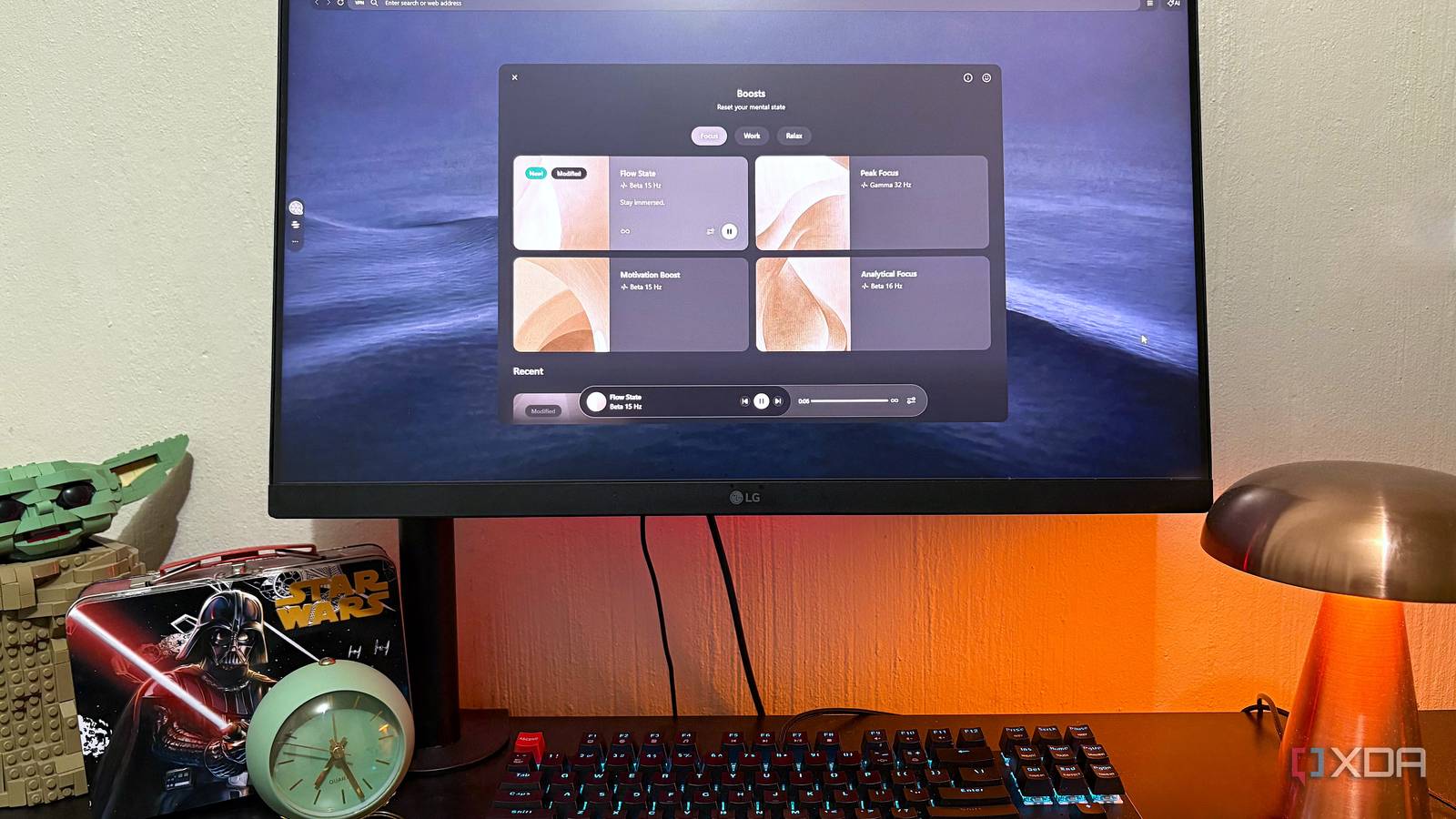
Published Aug 4, 2026, 10:30 AM EDT Nolen began their writing career in 2019, with three years dedicated to editing the Creative section at MakeUseOf. Their expertise lies at the crossroads of technology and creativity, covering areas like photography, video editing, and graphic design. Outside of work, you'll often find Nolen diving into a good book, writing their own stories, or playing video games. It's pretty normal for most of us to have multiple browsers open across the day. For me, Chrome is where my work lives, Brave is where my studying lives, and Firefox is for everything else. I don't think any of them are particularly bad, but they do kind of keep adding stuff you didn't ask for: a Gemini nudge here, a Copilot sidebar there, a new page trying to get me to pay for something, etc. Enter Opera Air, which markets itself as "the first mindful browser", which I thought was a little gimmicky at first because using a browser is the opposite of mindfulness. But I decided to give it a go after seeing one of my favorite YouTubers use it, and it turned out to live up to this philosophy… It's a real browser first, mindful second The minimalism is about the clutter it removes, not the features it lacks Opera Air launched in February 2025 as Opera's fourth desktop browser, sitting alongside Opera One, GX, and Neon. It runs on Chromium, so every site I use loads properly and every Chrome extension I still wanted was still available to me. It follows a Scandinavian design and a frosted glass UI, which is perhaps a little overdone now in the era of vibe-design (literally everyone seems to go for this aesthetic), but it is genuinely an uncluttered and easy UI to navigate. There are no shopping recommendations or news feeds or "trending" being shoved in my face. Moreover, you can easily import your stuff from Chrome or Firefox, this is built into the onboarding flow. Onboarding is usually the part that makes or breaks a tool, but with Air, it's three clicks and you're done, and also no long-winded tutorials. First, I want to touch on the features that aren't missing, given it might look a little empty at first glance. It has a free built-in VPN and native ad and tracker blockers, which were the first things I toggled on when getting started. Chrome doesn't offer a VPN. Firefox doesn't. Brave charges for its VPN service. The ad and tracker blocking part isn't a knockout blow against Brave or Firefox because they both do that well, but the point is that Air matches them, so you're not giving up privacy and security features. The Speed Dial is where the minimalism really shows. That's Opera's name for its new tab page, and in Air it's stripped down to a search bar, a row of shortcuts, and a nature wallpaper (static or animated, your choice). None of the "resume where you left off" type of prompts. If you've ever tried to get Chrome's new tab page to shut up, you'll know how rare this is. Beyond this, it's just a regular Opera browser. You have the option for integrations with things like Discord and WhatsApp, you can group tabs, use Flow to send files between devices, Pinboards for research, and so on. I will say, again, that Brave is still more aggressive on fingerprinting and script blocking, and Firefox has stronger tracking protection in some categories. But it is meaningfully more private than Chrome, and the only one of the four that ships a free VPN without an account. The features that make me touch grass It does actually live up to its marketing This is the part that I fully expected to be cringe, because breathing exercises in a browser sounds so unserious. But the pitch isn't that it's some meditation app, it's that this feature is one click away in a browser you already live in, so why not utilize it? The Boost feature is audible, and it's built on binaural beats layered with lo-fi music and ambient sound - 19 presets across Focus, Work, and Relax categories, things like Flow State, Peak Focus, Motivation Boost, and Deep Relaxation. Each preset is three components - a music track, an ambient sound (birds in woods, rain on a countryside yard, campfire, sea waves), and a binaural frequency (Beta, Alpha, Gamma, Theta). And every component is adjustable. Boosts also keep playing when you start a Spotify track or a YouTube video in another tab, so I can layer the binaural beats under my own music. Yes, I know I could get this on YouTube. But I already live in the browser, and clicking a sidebar button beats alt-tabbing to Spotify and hunting for a lo-fi playlist every time. Then there's the Take a Break feature, and it's a small set of physical exercises rather than just breathing. There's the Destress breathing flow with a slowly expanding fractal pattern that walks you through inhale and exhale, Refresh, Box, and Relax variants alongside it. And then Neck Exercise, which uses a 3D head model to walk you through tension release stretches. All of this opens in a full screen window, with a calm animation and a voice guide (which is adjustable by volume and language). I'm not going to claim any of this changed my life. Flow State was on while I was writing this, and the neck stretches are actually helpful for when I've been at the desk for hours, which is more than I can say for any wellness app I've ever downloaded, because I actually followed through this time. It has a sensible AI assistant It's just not throwing it in your face Every browser has AI now. So the question wasn't whether Air had AI, it was whether Air's AI held up, because switching to a minimalist browser and finding a hobbled assistant would have been a dealbreaker. Opera's assistant was called Aria for a couple of years, but as of a December 2025 update, it's been rebranded to just Opera AI. It runs on Opera's Composer engine, which routes queries between OpenAI's GPT models and Google's models depending on the task, and it's free with no account required. In Air specifically, it lives in the sidebar as an icon, or you can open it from the top bar. There's no lighting up of buttons trying to get your attention; you only use it when or if you want to. The reason the AI works better here than in the browsers I came from is that the minimalism gives it room to be invisible. It's also context-aware and agentic - I can toggle "allow access to page content" per chat, ask it to summarize a YouTube video I'm watching, or ask it to compare information across a group of tabs in a Tab Island. I had a small fumble when I asked it to help me find desktop backgrounds similar to my current one. It generated an image instead of pulling links. That was actually a really surprising feature, just not the one I wanted, so I had to specify clickable web links, and it delivered. I don't miss the noise I still open the others, because some sites still want it and some workflows are just muscle memory. But Opera Air is not only competent at everything the others do, but it's also not loud about it. It has everything I need from a browser, such as privacy and built-in AI, with the addition of focus and meditation features. If you spend most of your day in a browser like me, I reckon it's worth a shot. Opera Air
I replaced Chrome, Firefox, and Brave with a minimalist browser that forces me to touch grass
Full Article
Original Source
Read the full article at Xda-developers →KhanList aggregates and links to publicly available news content. We do not host full articles from third-party sources. Always verify important information with original sources.