
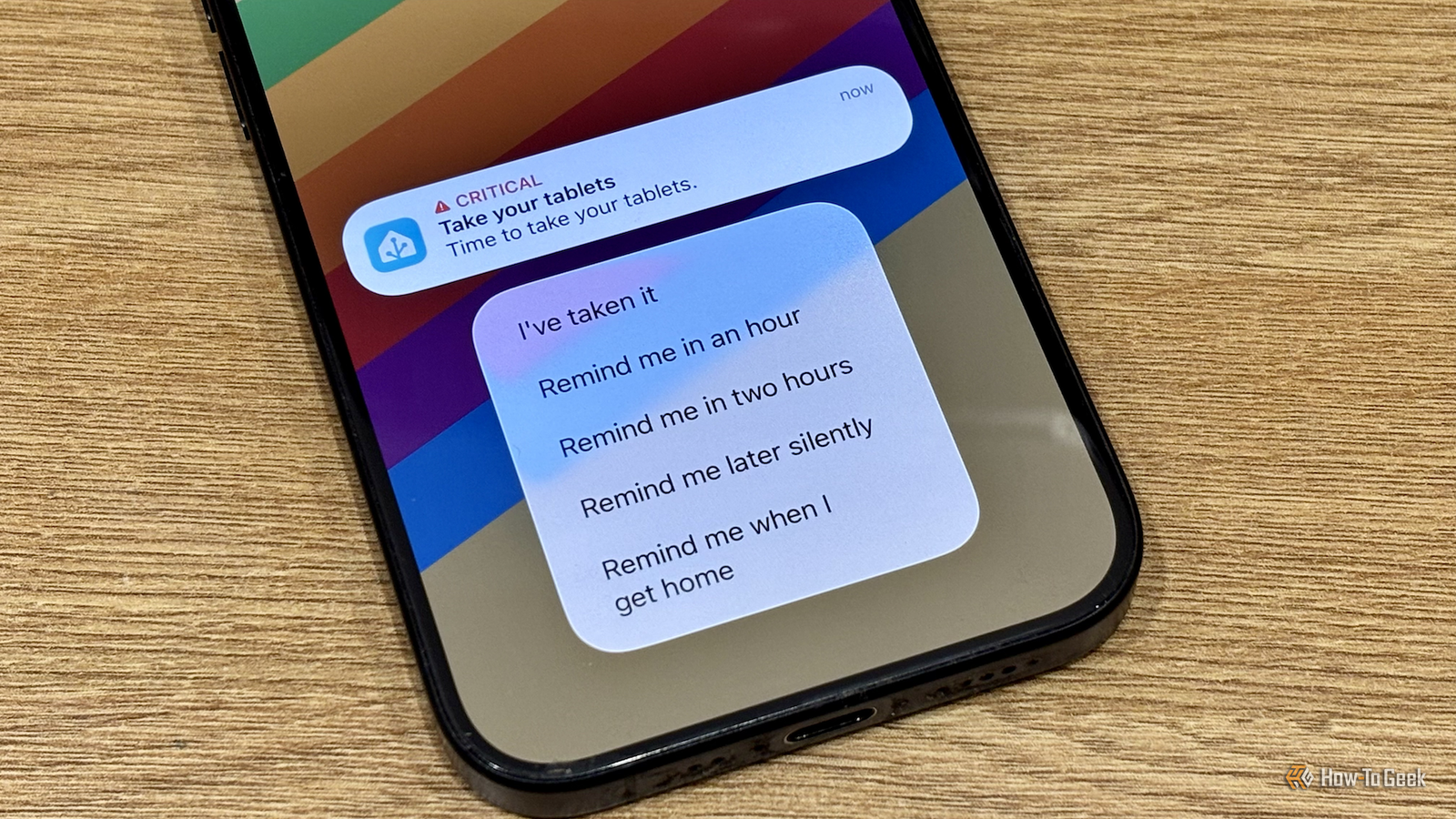
Published Nov 9, 2026, 12:01 PM EST Adam has a degree in Engineering and has a life-long interest in technology. He has been writing for over a decade for various print and online publications, with a focus on consumer tech. He joined How-To Geek in 2024 while working at Pocket-lint. As well as being a long-term fan of Apple products, he also has a strong interest in smart home tech, running a Home Assistant server at home to automate all his smart home devices. He believes that the ideal smart home should work with minimal interaction from the user, with automations running as if by magic rather than requiring you to push buttons on a control panel. You can find more of his work on Muck Rack. Home Assistant is incredibly powerful and almost endlessly customizable. If there's an idea you want to make a reality, the chances are that you can make it happen. I've used Home Assistant to replace several different apps that just couldn't match what I could set up with the smart home software. Medication reminder apps I couldn't find an app that did everything I wanted I have to take two different types of medication every day. When you repeat the same thing so many times, it's easy to get confused about whether you actually took your pills today or whether you're just remembering taking them yesterday. Medication reminder apps can help. I started off using a paid iPhone app, and then Apple added its own medication tracker features to Apple Health. However, neither of these apps did everything that I wanted, and I'd still end up missing a day. With Home Assistant, I've set up reminders that include features that I couldn't find in any single medication reminder app. When it's time to take my medication, I get a critical notification on my phone that plays an annoying sound even if my phone is on silent, and these messages continue to be delivered every 30 minutes until I select the option in the actionable notification to confirm that I've taken my pills, or scan the NFC tag on the back of my pill storage. The problem is that if I'm out somewhere like the movie theater, I don't want my phone to make a loud sound every 30 minutes. Other actionable notification options let me pause alerts for different periods of time, but the killer feature is that there's a "remind me when I get home" option. If I'm out, I can tap this option, and the nagging stops until I walk back in the door, at which point it starts all over again. Pomodoro timer apps Home Assistant can do more than most existing apps I've tried a lot of Pomodoro trackers in my time in an attempt to keep focused on work and to force me to take regular breaks. While these apps can be useful, none of them ever really hit the mark for me. While they could measure blocks of time, they couldn't stop me from getting distracted. My first Home Assistant Pomodoro timer was fairly simple. It used Music Assistant to play relaxing music for 25 minutes, after which the music would pause, and a spoken announcement would play telling me to get out of my chair. After five minutes, the process would start again, unless the presence sensor in my room detected that I was away, in which case the next focus session wouldn't start until I sat back down. It worked reasonably well, but it still didn't stop me from procrastinating, so over time I added more features, such as using the Home Assistant app on my Mac to track which app I'm currently using. If it's an app that isn't necessary for work, after a minute, my smart speaker tells me I'm wasting time and that I should get back to work. It's made me far more productive than any Pomodoro app I'd tried. Parental control apps I can keep on top of screen time If you have kids, then you'll understand the constant battles over screen time. They love watching shows, trawling through YouTube, or playing games on their devices, and trying to get them to stop can be almost as hard as trying to force yourself to stop doomscrolling. The trouble is that the more screen time they have, the more irritable they can become, and the worse their behavior can be. It's just not great for them to use screens for too long. Parental control apps can help, but Home Assistant can do the job without them. I set my system up using Pi-hole, which is far from the best option, but works well enough for my needs. With Home Assistant, I can use Pi-hole to block every domain on specific devices, which is enough to make apps such as Netflix stop working. Using automation, this kill switch can turn on after they've had their daily allowance of screen time, so we're no longer seen as the bad guys telling them to turn everything off. Home Assistant can also control access to my kids' Nintendo Switch via a native integration that's linked to Nintendo's own parental controls. This allows me to shut down access to the Switch earlier than their one-hour limit if necessary. Chore tracking apps Home Assistant lets my kids activate their own rewards Another benefit of setting up parental controls in Home Assistant is that I've been able to integrate them into my chore-tracking automations. There are some excellent ready-made custom integrations for Home Assistant that allow you to set up your own complex chore tracking system with dedicated dashboards for kids and parents. Parents can set daily chores, kids can mark them as completed, and parents can verify that the tasks were done to grant the earned rewards. I started off with a star system that they could trade in for rewards such as candy, but after a while, we realized that what they really wanted the most was screen time. Since screen time controls were already set up in Home Assistant, it was trivial to tweak the system so that their daily screen time is unlocked as soon as they complete their daily chores. If they earn enough stars, they can win additional screen time on the weekends, but if they do something naughty, their screen time can automatically be reduced. The whole system works really well. The kids do things such as their piano practice or tidying their rooms as soon as they get in so that they can unlock their screen time, without us having to nag them to do them anymore. Home Assistant lets you create exactly what you want While there are apps that can match many of the features of the things listed above, I couldn't find any apps that could do everything I wanted. That's the beauty of using Home Assistant; you can build exactly what you want, with the exact features that you need.
I replaced 4 apps using Home Assistant, and I'm never going back
Full Article
Original Source
Read the full article at Howtogeek →KhanList aggregates and links to publicly available news content. We do not host full articles from third-party sources. Always verify important information with original sources.