
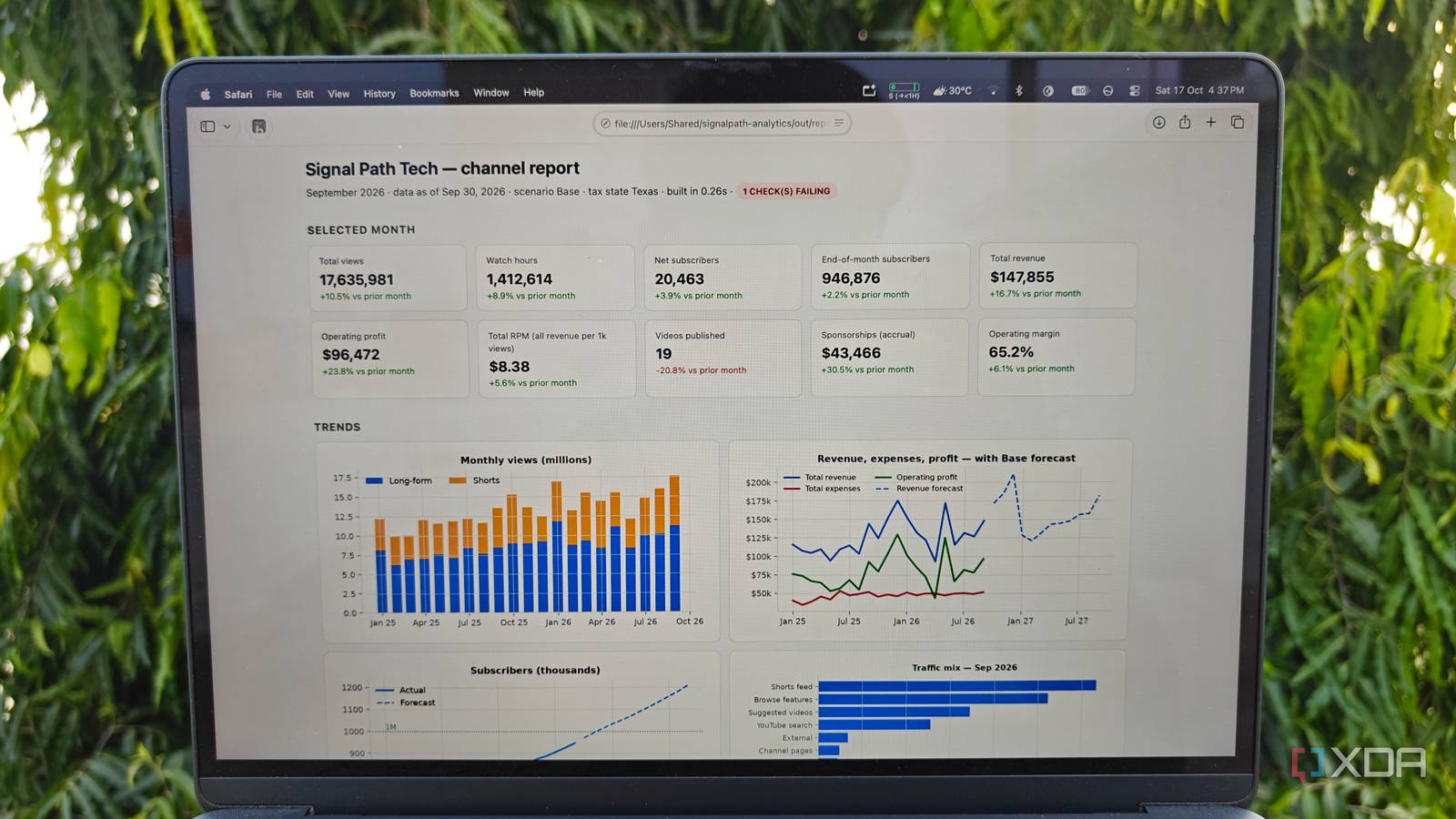
Published Oct 18, 2026, 6:00 AM EDT Shivansh began his tech journey as an avid reader of tech publications, which inspired him to launch his career in video media at Sillycorns. He has led content across multiple tech YouTube channels and Instagram accounts, crafted go-to-market (GTM) strategies for Vivo, and consulted on digital growth. Coming full circle to his roots in written media, he now delivers deep-dive tech journalism. Outside of his professional work, Shivansh loves watching movies, riding bikes, and playing cricket. My most complicated Excel workbook has 78,766 formulas, 189 named ranges, and one yellow dropdown cell that quietly controls all of them. It holds 21 months of fake analytics for a made-up US tech YouTube channel. It's stitched together with every Excel function a creator picks up and never cleans out. I handed it to Claude Opus 5.5 on my Claude Team plan and asked it to rebuild the whole thing in Python. I've watched AI coding agents build plenty of toy apps. A spreadsheet is a meaner test, because its numbers can't bluff. Python matched Excel on all 63,309 calculated cells the tests checked. Then it flagged two bugs Excel had been calculating around the whole time, and that's why I'm not going back. What a 78,766-formula Excel workbook looks like I asked for a monster on purpose I wanted an ugly fight, not a fair one. So I had Claude generate the workbook first, for a fictional channel called Signal Path Tech: 364 uploads, 9,969 rows of daily per-video stats, sponsors, thumbnail tests, expenses, taxes, and a 12-month forecast. That's twenty sheets, and almost every one leans on another. Then it got fragile the way real files do. An OFFSET formula calculates year-over-year growth and INDIRECT drives a dependent dropdown, and Microsoft's recalculation docs list both as volatile, so Excel re-runs them on every recalculation. The Forecast sheet reads the P&L while the P&L reads the Forecast's seasonality. Even the tax tab follows the IRS estimated-tax calendar, where the payment periods run three, two, three, and four months long. On my MacBook Air, changing the as-of date kept Excel calculating for 3.4 seconds, and the Audit tab greeted me in red with 2 CHECK(S) FAILING. I knew exactly why, and I'd still have needed four sheets to prove it to anyone else. So where would an AI agent even start? On Windows, Ctrl + Alt + F9 forces Excel to recalculate every formula in every open workbook, which makes it the fairest stopwatch test. How to plan an Excel to Python migration with an AI agent Count the unique formulas first The first move surprised me. Claude didn't port anything yet. It wrote a small script that walked all 20 sheets and rewrote each formula relative to its own cell, so =B2+C2 on row 2 and =B3+C3 on row 3 counted as one idea. The result made me laugh out loud: 78,766 formulas collapsed into 469 unique pieces of logic. The Video_Daily sheet had 39,876 formulas and exactly four distinct ones. INDEX appeared in 43,400 of them, mostly doing a lookup that the pandas library handles in one line. python3 tools/formula_inventory.py SignalPath_YouTube_Analytics_v14_FINAL.xlsx On Windows, run the same commands in PowerShell and swap python3 for py, so the tests become py -m pytest. After that, the plan was boring in the best way. A one-time extract step pulled the raw data into 12 CSV files and every assumption into one readable config file, finding each input by its named range or header instead of a cell address. Each calculated sheet became its own small module, and the Forecast and P&L loop became two function calls in the right order. If you want to try this on your own workbook, steal that order. Count the unique formulas, extract the raw data once, and keep the old file around as the answer key. An answer key only helps if you grade against it, though. How to test a Python rebuild against Excel Compare every calculated cell to a billionth So the test suite opens the original workbook, reads every value Excel itself calculated, and compares it with Python's answer, cell by cell, to one part in a billion. Python never sees Excel's formulas during the comparison, only Excel's results. The first run failed, and I felt weirdly relieved. Two sponsor invoices had due dates a day early, one on Veterans Day and one on Martin Luther King Jr. Day. Claude's extract step had misread where the holiday list started, so Python only knew about one federal holiday all year. The test named the exact rows, Claude changed one line, and the next run printed the sentence I wanted: 63,309 calculated cells matched across 15 sheets. python3 -m pytest Two smaller test files pin down the bugs and the tax math, for 27 tests in all. The whole rebuild took 14 minutes from my prompt to a tested package, which is less time than I once spent hunting a single #REF! error. Excel workbook Python rebuild Logic 78,766 formulas, 189 named ranges About 1,450 lines of Python Recalculation 3.4 seconds in Excel 0.6 seconds in Python Proof it's right A 15-check Audit sheet 27 tests, 63,309 cells Bugs flagged on load 2 Matching Excel cell for cell proved the logic was right. It didn't prove Excel had been right. Python caught the two bugs Excel never complained about Excel noticed them and kept calculating, anyway Claude built two classic spreadsheet mistakes into the workbook, the kind every real file collects. The Audit tab saw both, and nothing stopped the numbers flowing anyway. One expense, a $1,800 invoice from the channel's accountant, had been pasted in as the text "1,800.00". Every SUMIFS skipped it, so June 2026 expenses came up exactly $1,800 short, and that leaked into profit, the forecast, and the tax estimate. Python parsed it on load and printed a FIXED line. The other was a sponsor deal pointing at video SPT-O122, with a capital O where a zero belonged, which quietly zeroed its view bonus. Python wouldn't guess. It asked: did you mean SPT-0122? Yes, Claude built this workbook earlier in the same conversation, but that couldn't fake a match, because the tests grade against Excel's own results. A decade-old file from a real team would still take longer than 14 minutes, mostly to untangle shortcuts nobody wrote down. Excel isn't useless here, either. Poking one number and watching everything move is instant, and Excel's own Python in Excel cells are handy for one-off analysis. Those =PY() cells still scatter the logic across a grid, though, with no test suite watching it. Why I moved my Excel workbook to Python for good The yellow dropdown that used to run my dashboard now looks like this: python3 -m signalpath run --month "Dec 2025" That one command builds the report, the charts, and a plain Excel file of results in 2.6 seconds. Someone will always want a spreadsheet, and that's fine: Excel is the output now, and Python is the engine. If your workbook has an Audit tab you've learned to ignore, rebuild it like this. I'm not going back.
I rebuilt my most complicated Excel workbook in Python with an AI agent's help, and I'm not going back
Full Article
Original Source
Read the full article at Xda-developers →KhanList aggregates and links to publicly available news content. We do not host full articles from third-party sources. Always verify important information with original sources.