
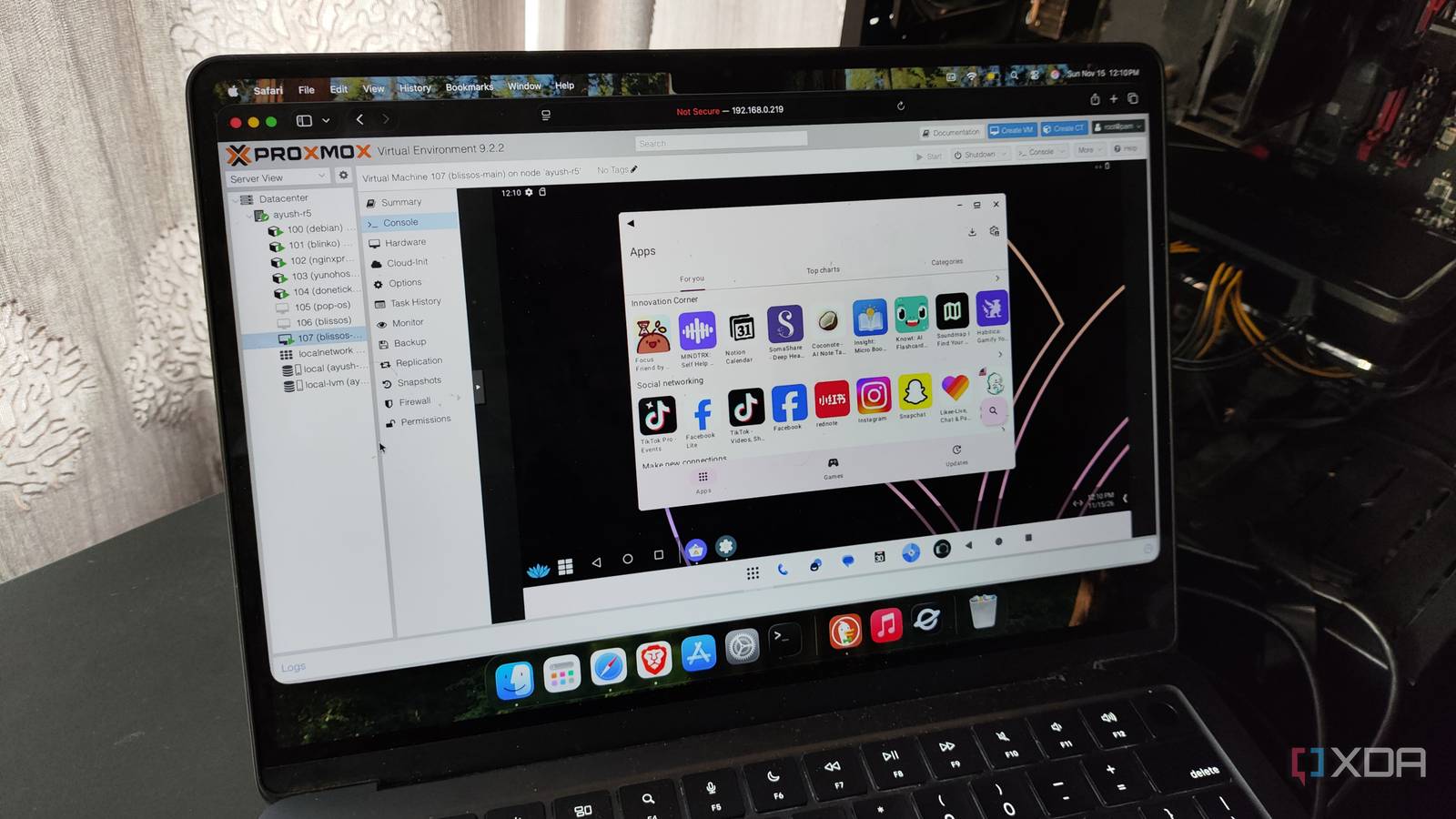
Published Nov 16, 2026, 9:00 AM EST Ayush Pande is a PC hardware and gaming writer. When he's not working on a new article, you can find him with his head stuck inside a PC or tinkering with a server operating system. Besides computing, his interests include spending hours in long RPGs, yelling at his friends in co-op games, and practicing guitar. Ever since I got into Proxmox, I’ve tinkered with all sorts of wacky experiments involving different operating systems. On the more sensible side of my projects, I’ve deployed a Windows 11 gaming VM, a reliable (yet virtualized) TrueNAS instance, and an ultra-secure QubesOS installation, and each of these virtual guests has some niche utility. Then there are the macOS, ESXi, and nested Proxmox VMs I configured simply because I wanted to see how these wild setups would fare on my local hardware. And after this week, I can add an Android virtual machine to this list, as it’s the latest guinea pig I deployed on my PVE home lab. I decided to roll with BlissOS instead of Android-x86 Other alternatives had some deal-breaking issues When it comes to virtualizing Android on an x86 platform, I have a couple of options at my disposal. I could technically enable nested virtualization on a Windows 11 VM, and grab some community repos centered around restoring the now-discontinued Windows Subsystem for Android on this isolated Windows environment. But between the extra virtualization layers and the fact that I won’t be able to access a full-fledged Android OS, I decided to drop this idea. I wanted to hone in on Android-x86, but since it’s stuck on Android 9, it’s not all that effective for modern apps. Although PrimeOS technically supports Android 15 in its newer releases, these versions are only available for Primebook hardware, and I could only go as high as Android 11 if I tried installing it in a VM. FydeOS was my next consideration, as this Chromium OS fork includes rock-solid support for Android apps. Unfortunately, I never managed to get it working on Proxmox in the past, so this option was also a dud. BlissOS was the only one left through this process of elimination, and although the latest version I could find was still on Android 13, it was the only option at my disposal if I wanted to build this project. I had to fiddle with the GPU settings a bit Unlike typical distros, where I’d just allocate a bunch of resources, go through the installation wizard in seconds, and go about my merry way tinkering with my freshly-configured, BlissOS needed a few tweaks before I could get it up and running. Once I arrived at the System tab on Proxmox’s Create VM wizard, I had to switch the Graphics card option to VirtIO-GPU and replace i440fx with q35 as the Machine setting. I also switched from SeaBIOS to OVMF, allocated the local storage pool as the EFI Disk, and disabled the Pre-Enroll key toggle. Once I’d gotten through the rest of the resource allocation tabs, Proxmox created the VM, and I chose the BlissOS Installation option at the startup screen. Inside the CLI menu, I agreed to Create a new partition, continued with cfdisk, and created two partitions. I gave the first one the EFI partition type alongside 2GB of storage space, while leaving the second one as a Linux filesystem and granting it the remaining 98GB of space on the virtual disk. Then, I agreed to format the EFI disk as FAT32 and left its new name as ESP. Likewise, I chose the ext4 format for the BlissOS installation disk. After enabling the OTA updates and picking Grub2 as the bootloader, the setup wizard had worked its magic, and it was time to access my painstakingly-created BlissOS VM. My virtualized BlissOS instance works well with simple Android apps It may not be a gaming VM, but it can hold its own against typical Android tools One of the first things I noticed after booting into my BlissOS VM was that the colors on my app icons were inverted. So, I launched the Settings app and used the invert color option to fix this problem. While I was there, I also wanted an easier way to navigate the UI, so I swapped the gesture controls for good ol’ triple navigation buttons. Since I didn’t want to deal with Google’s ecosystem on this custom Android instance, I grabbed the Aurora store and used it to start installing typical Android apps. Todoist, Obsidian, and TickTick, worked fine, though I had a little bit of latency if I switched to a different app without closing the current one first. As you’d expect, the gaming performance was a letdown, but I had no trouble installing a couple of clients for my self-hosted apps, including Bitwarden, Home Assistant, Jellyfin, and Immich. It’s a neat way to create a disposable Android environment Personally, I’m quite satisfied with the BlissOS VM. Sure, I wish there was a way to get Android 17 working on this system, but Android 13 still holds up for old applications. Likewise, it’s also a neat way to test custom Android apps as well as suspicious APK files without putting my daily driver at risk. I’ve also heard good things about Intel GPU passthrough, so I’ll probably give this project another spin as a gaming Android setup once I’m done testing LLMs on my Arc A750. Proxmox Proxmox is an open-source platform built on Debian Linux designed for server virtualization.
I ran Android in a Proxmox VM, and it holds up better than I expected
Full Article
Original Source
Read the full article at Xda-developers →KhanList aggregates and links to publicly available news content. We do not host full articles from third-party sources. Always verify important information with original sources.