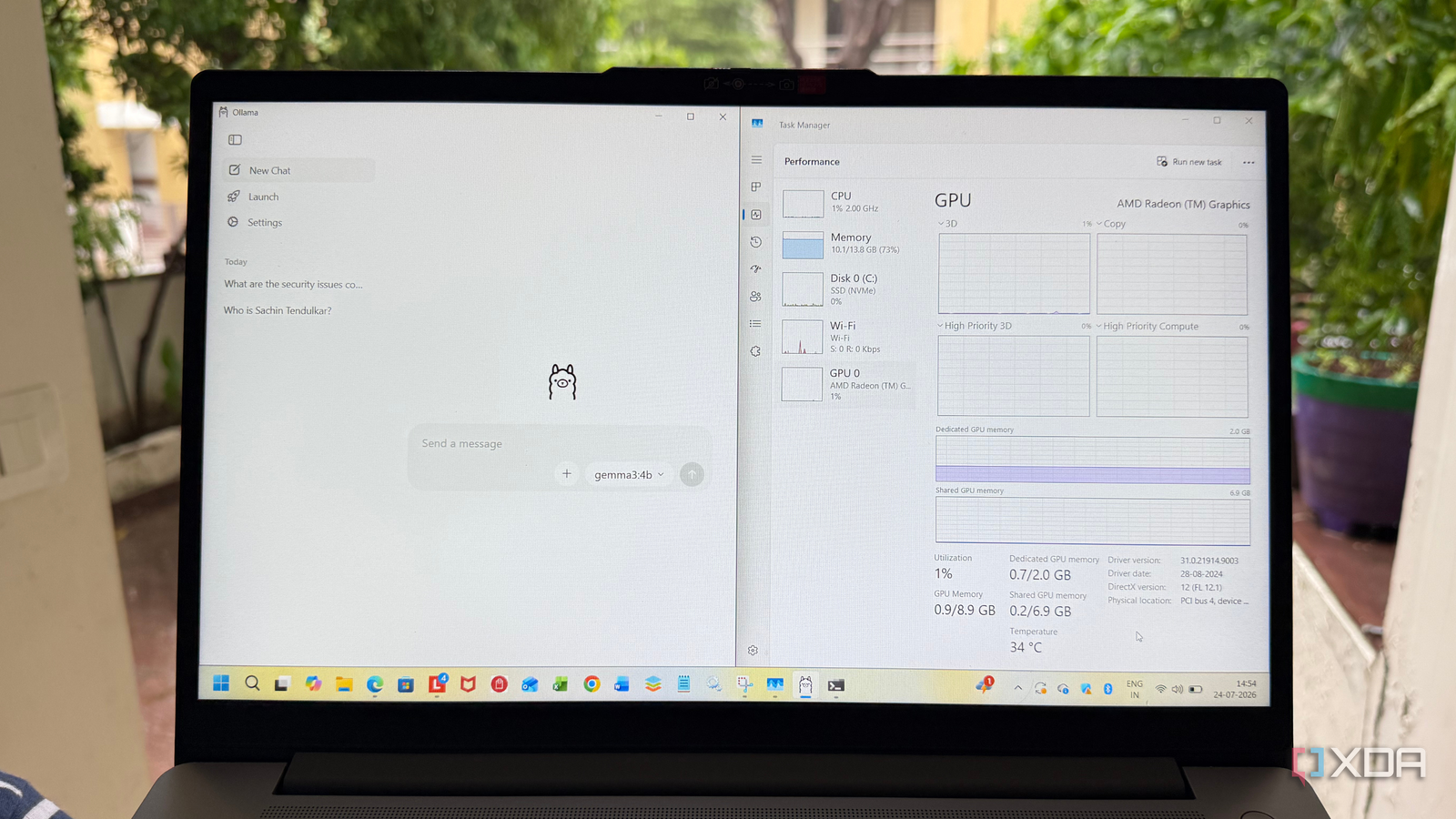
Published Jul 28, 2026, 3:30 PM EDT Beginning his professional journey in the tech industry in 2018, Yash spent over three years as a Software Engineer. After that, he shifted his focus to empowering readers through informative and engaging content on his tech blog – DiGiTAL BiRYANi. He has also published tech articles for MakeTechEasier. He loves to explore new tech gadgets and platforms. When he is not writing, you’ll find him exploring food. He is known as Digital Chef Yash among his readers because of his love for Technology and Food. Almost every guide I came across suggested the same thing: if you want to run a local LLM, you need a dedicated GPU. I already had a self-hosted AI setup running smoothly on my machine with an Nvidia GeForce RTX 5070, so I knew what a good local LLM experience looked like. That got me wondering how much of that experience could be replicated on a laptop with only integrated graphics. Instead of relying on benchmarks or online opinions, I decided to test it myself using the same model and everyday tasks I normally use AI for. The results were far better than I had expected. Here’s what my testing setup looked like A real-world practical setup, not a benchmark rig For this experiment, I decided to use my dad’s second laptop. It has an AMD Ryzen 7 5825U processor with integrated Radeon Graphics and 16GB of RAM, which is a setup many people already have. To keep things simple, I installed Ollama and ran Gemma 3 4B locally. I used both the command-line interface and a GUI, depending on the task, to interact with the model. I deliberately chose Gemma 3 4B because it's small enough to run on modest hardware while still being capable of handling everyday tasks. Rather than chasing benchmark numbers, I wanted to find out whether a local LLM could actually be useful on a machine without a dedicated GPU. Another reason I chose Ollama with Gemma 3 4B was familiarity. I already use the same setup on my more powerful desktop with an Intel Core Ultra 9 processor, 32GB of RAM, and an Nvidia GeForce RTX 5070 GPU. Using the same software and model made it easier to compare the experience across both systems. Throughout my testing, I used the model the same way I use cloud-based AI tools. I asked it to brainstorm blog ideas, summarize articles, explain technical concepts, rewrite paragraphs, and answer general questions. These are the kinds of tasks I perform almost every day, so they were a much better measure of real-world usability than synthetic performance tests. If the experience felt smooth enough for my regular workflow, that would matter far more than any benchmark score. I wasn't expecting much But the first response changed my mind Going into this test, I had fairly low expectations. Most discussions about local LLMs make it sound like a dedicated GPU is the bare minimum for a decent experience. Since this laptop only relied on integrated Radeon graphics, I assumed every prompt would take a long time to process and that the responses would be too slow for regular use. That wasn't what happened. The first thing that surprised me was that Gemma 3 4B loaded without any issues. After sending my first prompt, I didn't have to wait nearly as long as I expected. The response wasn't instant like ChatGPT running in the cloud, but it was quick enough that I never felt like I was fighting the hardware. More importantly, the quality of the answers was exactly what I expected from the same model on my more powerful desktop. As I continued testing, I stopped paying attention to the laptop's specifications and focused on the tasks instead. Whether I was asking for writing suggestions or summarizing content, the experience felt smooth enough that I could actually imagine using it every day. That's when I realized my biggest assumption had been wrong. The integrated graphics weren't stopping me from running a local LLM, they were simply setting realistic limits on what kind of model I could run comfortably. Integrated graphics are not the bottleneck Only if combined with enough RAM and correct models After using the laptop for a while, I realized that the integrated GPU wasn't the biggest factor affecting performance. Memory and model size made a much bigger difference. With 16GB of RAM, Gemma 3 4B had enough room to run comfortably without making the system feel sluggish. I could keep a browser open alongside Ollama and still use the laptop normally. The choice of model also mattered. If I had tried to load a much larger model, I'm sure the experience would have been very different. Bigger models need more memory and compute, so expecting them to run well on integrated graphics isn't realistic. But that's not a limitation of integrated graphics alone; it's a limitation of the overall hardware. This test reminded me that there's no universal "best" model for every computer. A lightweight model that's well-matched to your system will usually provide a better experience than forcing a much larger one to run. In my case, the balance between 16GB of RAM, integrated Radeon graphics, and Gemma 3 4B turned out to be much better than I had expected. You might not need that GPU upgrade after all This experiment completely changed how I think about running local AI. I no longer believe a dedicated GPU is the starting point for everyone. If your goal is writing, learning, research, or other everyday AI tasks, your current laptop might already be capable enough with the right model. Of course, a dedicated GPU still makes sense if you want to run larger models or need maximum performance. But before spending money on new hardware, I'd recommend trying a lightweight model first. You might be surprised by how much your existing machine can already do, just like I was.
I ran a local LLM on integrated graphics instead of buying a GPU, and the results surprised me
Full Article
Original Source
Read the full article at Xda-developers →KhanList aggregates and links to publicly available news content. We do not host full articles from third-party sources. Always verify important information with original sources.