
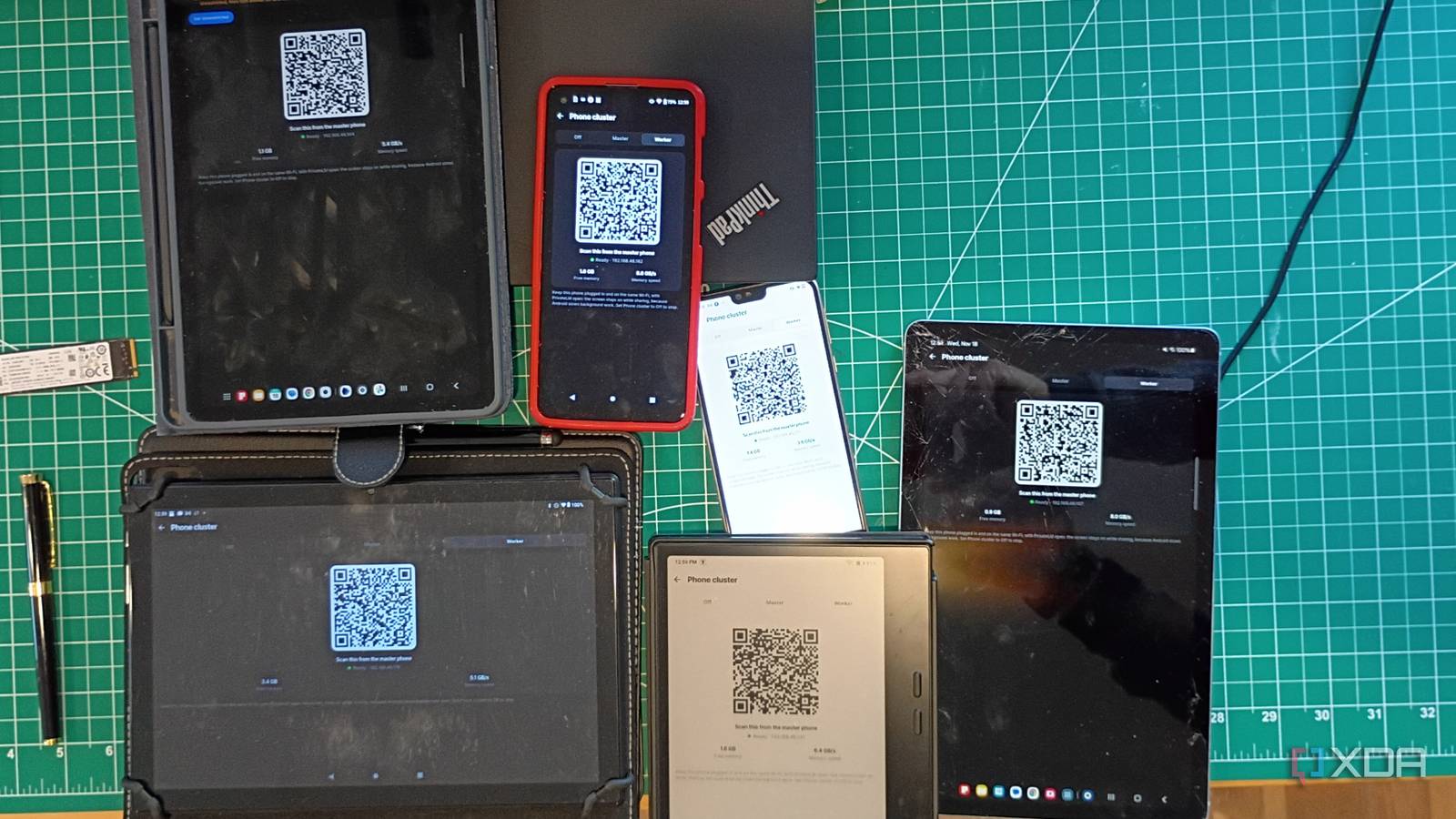
Published Nov 27, 2026, 10:00 AM EST Richard Sezov has worked in IT most of his life, and loves all things Linux, 3D printing, and retro computing. When Rich isn't working, you'll find him spending time with his wife and kids, playing with single board computers, packaging Linux software, 3D printing, reading science fiction, playing games, and hopefully not blowing anything up. I have old devices lying around, and so probably do you. In fact, before I started this project I didn’t realize how many old devices were hidden in drawers around my house. But as soon as I saw the PrivateLM project, I knew I had to dig up all the discarded, old phones and tablets (some with broken screens) I could find. Why? Because this project promised to turn them into a cluster that could run LLMs these phones individually had no business running. Not only that, but the cluster could sit on my WiFi network and serve those LLMs using OpenAI’s APIs to any harness I wanted to point at it. Let the jaw dropping commence. From trash to treasure A desperate scramble to dig up old devices Suddenly, all those old devices we had somewhere, had become important again. I scrounged up everything I could find: my daughter’s old Nokia whose USB-C port struggled to connect well enough to charge, my wife’s Samsung Galaxy Tab S6 Lite with a cracked (but functional) screen, my no-name, generic Android tablet I bought off Amazon for $100 (something called an "Antemper"), and more. I even enlisted the help of my Boox Go Color 7 e-reader (which runs Android). Here’s what made up my cluster: A Moto G 2025. A Nokia TA-1085. 2 Galaxy Tab S6 Lite tablets (one with a cracked screen, and the one that replaced it). A Moto G Power 2021. A no-name tablet from Amazon with the brand name Antemper, but reporting D115 as the model. A Boox Go Color 7, Gen 2 that I got for my birthday last year. I actually tried three other devices: a OnePlus Nord N30 (model CPH2513), a 5th generation iPad, and a Moto G7. Neither Android would run the worker (see below). The iPad required that I get Altstore running so I could side-load the app. For that, I needed a Mac or Windows, which made this a project-within-a-project. I’m a Linux guy. I don’t have a Mac, and Windows is relegated to an NVMe I insert into a spare Thinkpad (that normally runs Linux) very rarely. It is for this reason that I was unable to run the biggest, most holy grail model available for PrivateLM: Gemma 4 26B-A4B. If you have newer devices than I had access to, perhaps you can do better than I did. Side-loading PrivateLM Sometimes the best apps aren’t in the store PrivateLM is available as a downloadable APK from GitHub. Use your device to download the file, and then select it from your Downloads in your browser or from the Downloads directory in a file manager. When you do that, Android stops you, as by default whatever you’re using (the browser or file manager) isn’t allowed to install applications. This is for security purposes; it prevents random applications from installing things without you knowing about it. In this case, you’re trying to install the .apk, so use the settings link to allow your browser or file manager to install applications. You can always remove the permission later. Connecting workers in a cluster and loading a model We can do more together than we can alone Use the device with the best specs as what PrivateLM calls your “master” device. Other devices are “worker” devices. After you’ve loaded PrivateLM on all the devices you plan to use, launch it. The first thing you see is a chat interface you can’t use until you load a model. So tap the Models link at the bottom. Then you’ll see a list of curated models; some meant for chat, some meant for images, some uncensored models (tread lightly), and some vision models for recognizing objects. Remember, you’re running these models on old phones and tablets, so set your expectations accordingly. I didn’t try image models, though I might later (and if there’s interest, I’ll write about it). I went right for the Qwen2.5-3B model first, because I wanted a model I could share between at least two devices. I have a 256GB MicroSD card installed in my "master" device, so storage for these LLMs wasn’t a problem. On each "worker" device, I navigated to Settings and Phone Cluster. This screen has three tabs: Off, Master, and Worker. After tapping the Worker tab, a short pause occurs while the app measures the performance of this device. The worker then runs and shows a QR code. This worker is now ready to serve a model. Do this for all your worker models and we're good to go. When you’re ready to chat, grab your master device. Go to the same Phone Cluster screen, except this time, tap the Master tab. Here is a convenient button you can use to scan a worker’s QR code and add it to the cluster. Scan all your devices. Now go to the Models tab and choose a model you downloaded. Hit Load model, and the model is distributed across your devices. PrivateLM tells you if your model is too big for your cluster; in that case, you’ll have to add more devices to your cluster (which is why I kept trying to find more devices so I could load the biggest models). Once your model is loaded, you’re ready to chat! Chatting on small devices is surreal when you know the model isn’t remote In this case, even the smallest devices won’t change the world Now you can ask the model whatever you want. Of course, I asked Lfm2.5-1.2b (runs on 1 device), Qwen2.5-3b (runs on 2 devices) and then Kimi Moonlight 16B-A3B (runs on all 6 devices) what they thought of XDA. All three confused this site with the forum. I guess even with LLMs, it’s hard to escape your legacy. Interestingly, I did run into issues at times with workers losing their connections with each other. In those cases, I got an "ERROR: Generation failed—Exception: Failed to decode prompt" error, from which the system could never recover. I had to bring the whole cluster down and reload the model again. I also wasn’t able to get more than 5 tokens per second, which makes this sort of chatting rather slow. You wouldn’t want to run this to help you do anything more than chat. But you can, and because you can, I tried it. Running an OpenAI-compatible server on a cluster of phones Because even the smallest devices—okay, now we’re stretching it When I first learned of this project, the most compelling use case for me was having a coding assistant available on my home network. Well, either my devices aren’t up to the task, or—well, probably my devices aren’t up to the task. But here’s what I did. There’s a Server tab, where you can host an OpenAI-compatible server and then point your coding harness at it. Security is built-in: you can’t allow network access without requiring an API key. First you load a model, and then you hit that big Start server button. Then you should be able to point OpenCode at it. Unfortunately, I could never get this to work; OpenCode could never use the model once connected. I’m sure it had something to do with the API, and I might come back to this later. Because, however, I am the developer of VimStar, which is my own Neovim distribution that integrates the CodeCompanion agent into Neovim, I decided to try to get CodeCompanion connected to my PrivateLM cluster, and it worked. I did the first thing I always do when trying out a new model: I asked it to describe the VimStar repository. This shows me if the model reads the AGENDS.md file and the skills properly. In this case, however, that request was too much for my cluster, because I got "ERROR: Model did not respond. Try a smaller model or shorter conversation." However, my follow-up ("Hi there!") produced my original response, so I think there’s a timeout somewhere that I haven’t yet identified. Will I keep experimenting with this? Definitely! It’s really cool, and I’ve spent so much time on it that I really want to find some use for it. Will I keep this setup permanently? Probably not. At least with the devices I have access to, it’s too slow for real work. But you might have a different experience, particularly if you have newer and faster devices. You know you want to give it a try. So what’s stopping you?
I ran a 16B LLM on a cluster of old phones and tablets, and I might keep it permanently
Full Article
Original Source
Read the full article at Xda-developers →KhanList aggregates and links to publicly available news content. We do not host full articles from third-party sources. Always verify important information with original sources.