
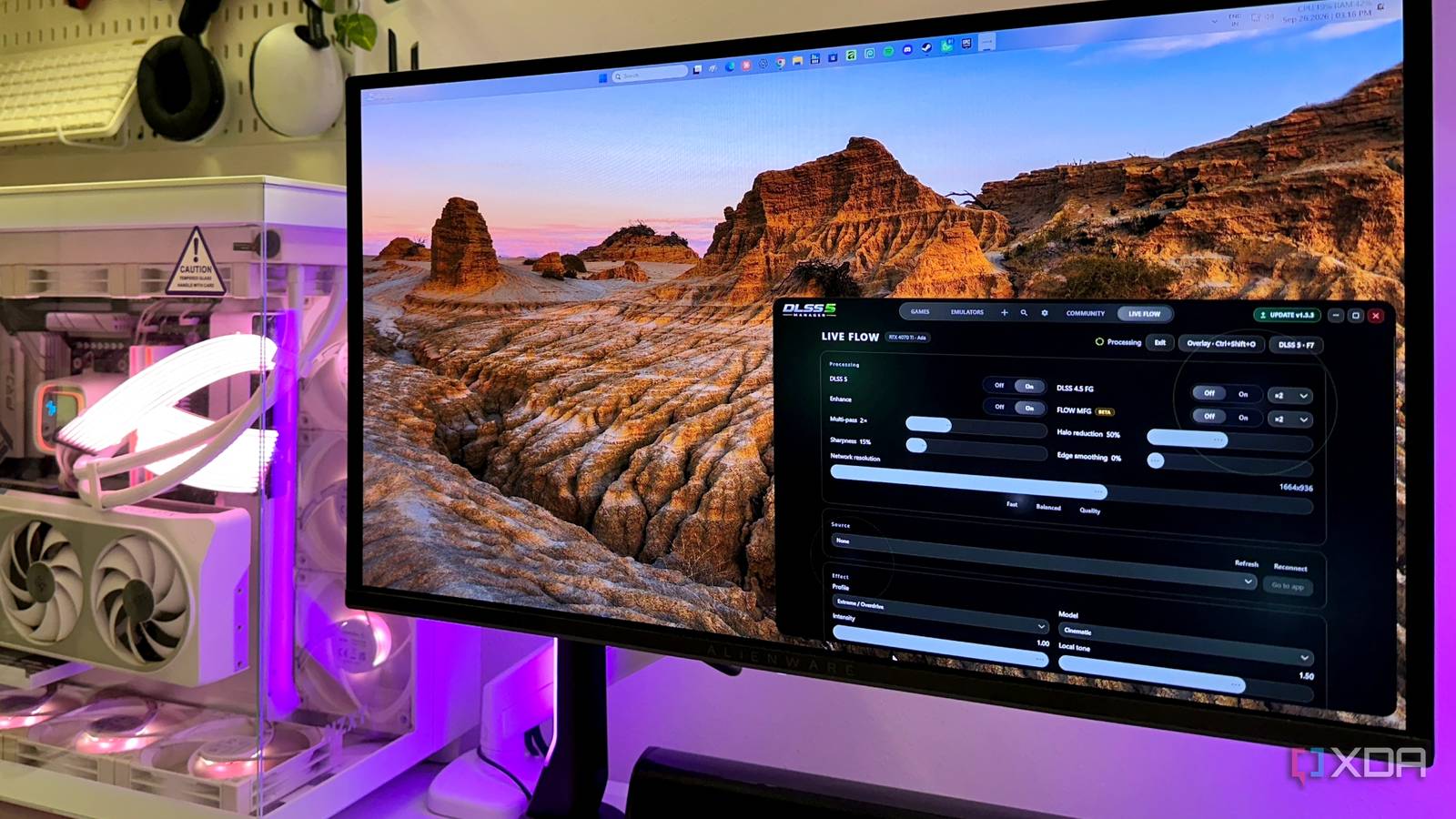
Published Sep 28, 2026, 12:31 PM EDT Gaming has been Samarveer’s greatest passion, and the Literature graduate in him takes immense joy in dissecting games for their themes, messages, and impact. Samarveer holds a deep appreciation of gaming, and considers the platform to be the most immersive and impactful across all media. He can be found engaging with gaming communities online, always ready to debate the finer points of ray tracing or itching to write an 8-page collegiate thesis on any game that impacts him emotionally. I've spent the better part of the past few weeks throwing DLSS 5 at things it probably was never meant to touch. I've put it into old games, emulators, and some rather questionable experiments, and so far, DLSS 5 has impressed me but not without clear caveats. At the same time, DLSS 5 does sometimes feel less like an evolution of computer graphics and more like a glimpse at a future I'm not entirely sure I asked for. And yet, I keep coming back to it. It's been strangely addictive to see a familiar image transformed in real time, all on my own local machine. In fact, it's even more fun when the source was just never designed for DLSS in the first place. So, naturally, I started wondering what would happen if I stopped limiting DLSS 5 to games altogether. Turns out, my desktop was next. Live Flow promised to put DLSS 5 over everything I could see I'd already been using DLSS 5 Manager for a full week, seeing how it is now clearly the most convenient and hassle-free tool on the internet when it comes to injecting DLSS 5 into your games, be it through ReShade or OptiScaler. As interesting as it has been to inject DLSS 5's neural rendering passes into my games, it was DLSS 5 Manager's Live Flow feature that caught my eye, as it promised to run a neural rendering pass (or five) on your entire desktop. In my mind, it seemed like a couple of DLSS 5's neural rendering layers would end up completely transforming my desktop, from my YouTube videos looking like they came out of Seedance, to my locally stored screenshots taking on a whole new world of detail. One neural rendering pass of Nvidia's DLSS 5 consumes about 1.2GB of VRAM. With Live Flow, I could customize the resolution of the neural rendering layer, set the number of passes I wanted to throw over my entire screen, and even which screen in my dual-monitor setup I wanted it to run on. Furthermore, it gave me control over the intensity of each neural rendering layer, from Natural and Faithful options to Extreme and Overdrive presets as well. The moment I turned on DLSS 5 Live Flow, none of what I expected to happen, happened. Images and videos did indeed brighten up and run with more detail, but it wasn't quite as transformative as I thought it would be. Of course, that was before I properly dove in. I threw DLSS 5 at everything I use on my PC Including the games that use DLSS 5 through motion vectors I started with Elden Ring because I only ever need the slightest excuse to run that game. More importantly, though, if Live Flow couldn't make a difference in a game overflowing with foliage, reflections, and fine geometry, I wasn't expecting miracles anywhere else. With DLSS 5 Live Flow, the image did look different, particularly around nearby detail and high-contrast edges. However, by no stretch of imagination was this the same as native DLSS 5 integration. The effect was more like applying a neural finishing pass to the image I'd already rendered — think Lossless Scaling and its Frame Generation integration for GPUs that don't support the tech. YouTube was considerably stranger. I deliberately picked detailed 4K footage with foliage, buildings, and movements, so that Live Flow would have plenty to chew on. Static details looked cleaner, but compression artifacts and motion occasionally gave the neural processing something it really had no business touching. It was impressive, but also reminded me that a sharper, over-processed image doesn't automatically mean more accurate. With RPG maker games, Live Flow didn't quite achieve what I saw DLSS 5 do to my PS2 and PS3 games. My final stint with DLSS 5 was on some games built on the Ren'Py and RPG maker games, neither of which expose the in-game motion vectors for DLSS to latch onto the traditional way. As such, a screen-on neural rendering layer is the only way to run the experiment. Sadly, it didn't much transform the characters and environments on the screen as much as it froze my PC when the GPU ran into its VRAM limit. Characters barely looked different, as if the neural rendering layer simply wasn't registering them as people with skin — a far cry from what I saw with DLSS 5 on my PS2 and PS3 games. I don't think DLSS 5 belongs on everything That's what makes this so fascinating As mesmerizing as it has been to use Nvidia's neural rendering technology in my games, on my desktop, and on everything else on my PC, I still firmly believe that DLSS 5 doesn't belong on everything. Sure, when injected the right way as a neural upscaler into compatible games, it is nothing but transformative. But when it has to simply read an image on the screen in real time, it isn't nearly as impressive. No matter what hoops you jump through, a native renderer can always provide more information than a simple image on the desktop. It doesn't quite make Live Flow "pointless," though. I can see myself using this when watching decade-old television shows or movies that never quite got a good remaster, since DLSS is never going to work on them the way it works for games. There's always RTX Video Super Resolution, but it never touches the details of the image like Live Flow's neural rendering layer does. DLSS 5 Manager No, I'm not running DLSS 5 constantly on my PC There's certainly a temptation to treat Live Flow like some magical universal image-quality switch. However, I don't quite think that it is. The best results were the ones where I gave it a difficult image and let it do its thing, while the worst were the moments where I expected it to understand something it simply couldn't. DLSS 5 doesn't suddenly make every application look better, but Live Flow has made the technology feel considerably less confined than I originally thought. I can now point it at practically anything on my screen and see what happens. It's spectacular sometimes, but it's also rather pointless just an equal number of times. For an obsessive pixel-peeper like me, that's probably enough reason to keep the toggle within reach.
I put DLSS 5 on my entire desktop, and it showed me neural rendering's real limits
Full Article
Original Source
Read the full article at Xda-developers →KhanList aggregates and links to publicly available news content. We do not host full articles from third-party sources. Always verify important information with original sources.