
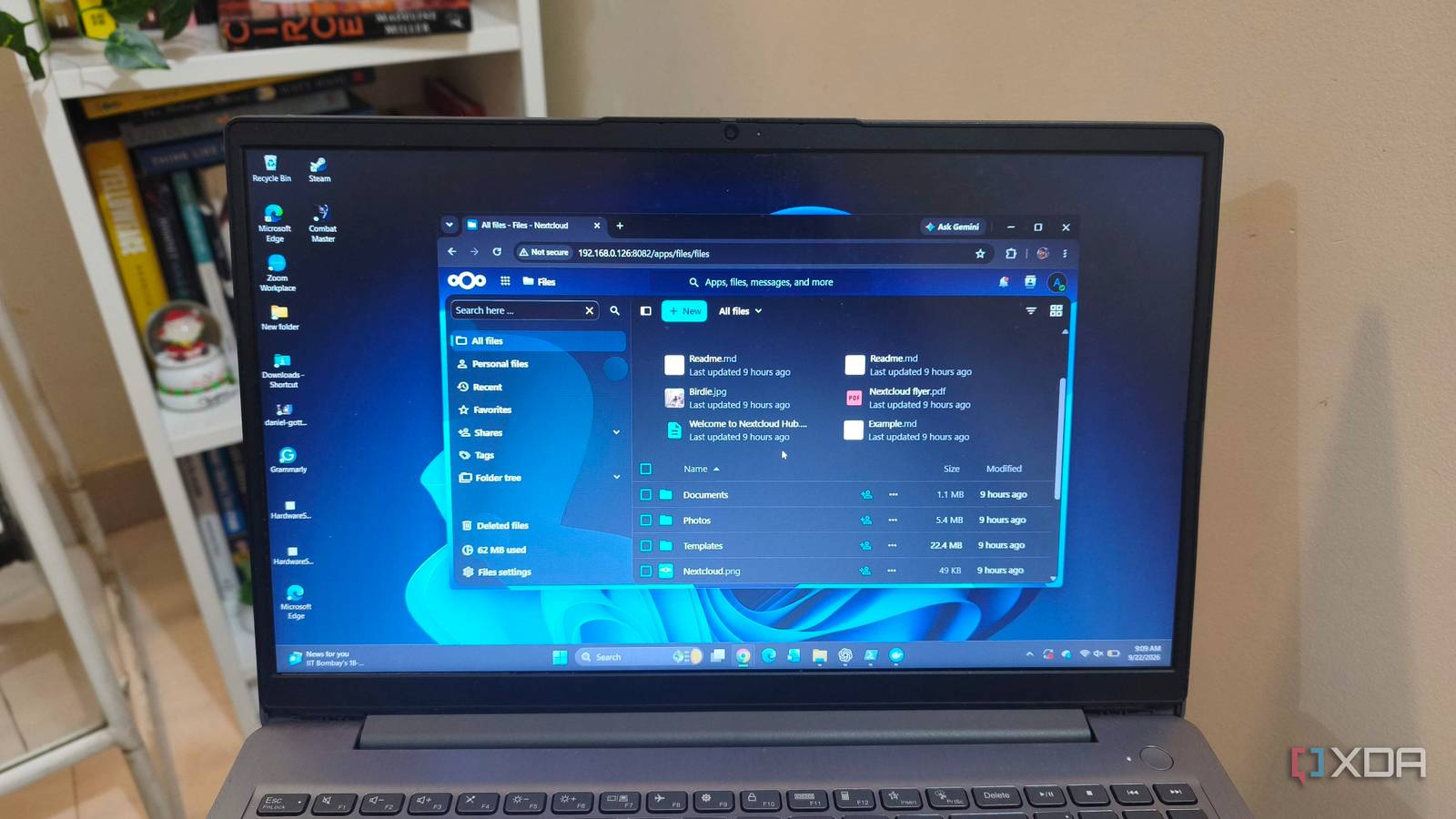
Published Sep 23, 2026, 8:00 AM EDT Anurag is an experienced journalist and author who’s been covering tech for the past 5 years, with a focus on Windows, Android, and Apple. He’s written for sites like Android Police, Neowin, Dexerto, and MakeTechEasier. Anurag’s always pumped about tech and loves getting his hands on the latest gadgets. When he's not procrastinating, you’ll probably find him catching the newest movies in theaters or scrolling through Twitter from his bed. I have an old Lenovo laptop with a Ryzen 5 processor, 8GB of RAM, and 1TB of storage, which makes it a little too capable to leave unused. So I put it to work as a central file server for my family instead of spending money on a dedicated NAS. Windows 11’s built-in network sharing could handle the basics, but I wanted the server to be useful beyond our home network. My family should be able to open files from a browser or phone, keep folders synchronized, and access everything without treating the laptop like a shared Windows PC. I used Nextcloud, an open‑source platform for file storage and sharing, and Tailscale to make it available outside my home network, and almost two years later I still use this setup. Nextcloud gives the laptop proper cloud storage features You get almost everything you get with Google Drive Nextcloud gives the laptop most of the features people expect from a service such as Google Drive. Each family member gets a separate account with private storage, and they can use shared folders to keep documents, photos, and videos in one place. You can decide who can view, edit, or share a folder instead of giving everyone unrestricted access to the entire drive. All the files are available through Nextcloud’s web interface, so you don’t need to configure a network drive on every computer. It also offers desktop clients for Windows, macOS, and Linux that can automatically sync selected folders. You can also use Android and iPhone apps to provide access from a phone and upload new photos and videos to the server. Nextcloud also keeps previous file versions and deleted files for a period of time. Sharing works much like mainstream cloud storage services such as Dropbox and Google Drive. You can share a folder with another Nextcloud user or generate a link, add a password, and set an expiration date. There are also optional apps for calendars, contacts, collaborative documents, and video calls, although I never really used them. Setting up Nextcloud on the Windows laptop You need Docker and Tailscale Nextcloud All-in-One runs through Docker Desktop and includes the database and other components the server needs. After installing Docker Desktop, run the Docker Run command in Windows Command Prompt to start the installation. Before running that command, decide where Nextcloud will store the family’s files. By default, it uses a Docker volume, but I like to specify a folder on the laptop’s drive. Once the installation is sorted, you can make a separate Nextcloud account for each family member and set up the folders they need to share. I leave the optional office, search, and video-call components disabled. My laptop has only 8GB of RAM, and file storage is the only job it can handle well. The laptop also has to stay awake for Nextcloud to be available. If you have a Windows laptop like me, set it to remain on when plugged in, check what happens when you close the lid, and make Docker Desktop start when you sign in. Now Nextcloud will work for everyone on your local network, but a file server is of little use if you can't access it outside your home. I use Tailscale Serve to make Nextcloud available when we’re away from home. It gives the laptop a private HTTPS address and forwards requests to Nextcloud without opening ports on my router. The address works only for devices connected to my Tailscale network. Each family member connects their phone or computer to the Tailscale network, then opens Nextcloud in a browser or its app and signs in with their own Nextcloud account. The only catch is that Tailscale has to be installed and connected on every device that needs access. Also, a sharing link won’t work for someone outside our Tailscale network. That limits casual sharing with other people, but it suits a server meant primarily for my family. Almost two years later, I still use it And I don't hate it The laptop has been running as my family’s file server for almost two years. Once Nextcloud and remote access are set up, using it is as easy as using a cloud service. However, if you want to use it seriously as a replacement for Google Drive, you will have to spend time ensuring your data is secure. By secure, I mean backed up to a reliable source, whether that’s a hard drive or cheap cloud storage. When you use a cloud service, it has multiple layers of backup, and you will almost never lose your data. However, it’s not the same when you use a laptop or even a NAS to host a file server. I still use Google Drive for important work and files I cannot afford to lose. It also makes sharing with people outside my family easier. I can give someone access to Nextcloud, but I can’t expect everyone I work with to use it, and Google’s collaboration tools are more convenient. A practical role for an old laptop This approach is for anyone with an old laptop who's comfortable maintaining a self-hosted service and wants a private place for family files. I continue using it because it puts hardware I already own to good use and gives my family a convenient way to store and share photos, videos, and documents. If not a file server, you can also turn your laptop into an AI hub for your family. You just need a laptop that is slightly more powerful than mine.
I put an old laptop to work as my family's file server, and it's been running for two years
Full Article
Original Source
Read the full article at Xda-developers →KhanList aggregates and links to publicly available news content. We do not host full articles from third-party sources. Always verify important information with original sources.