
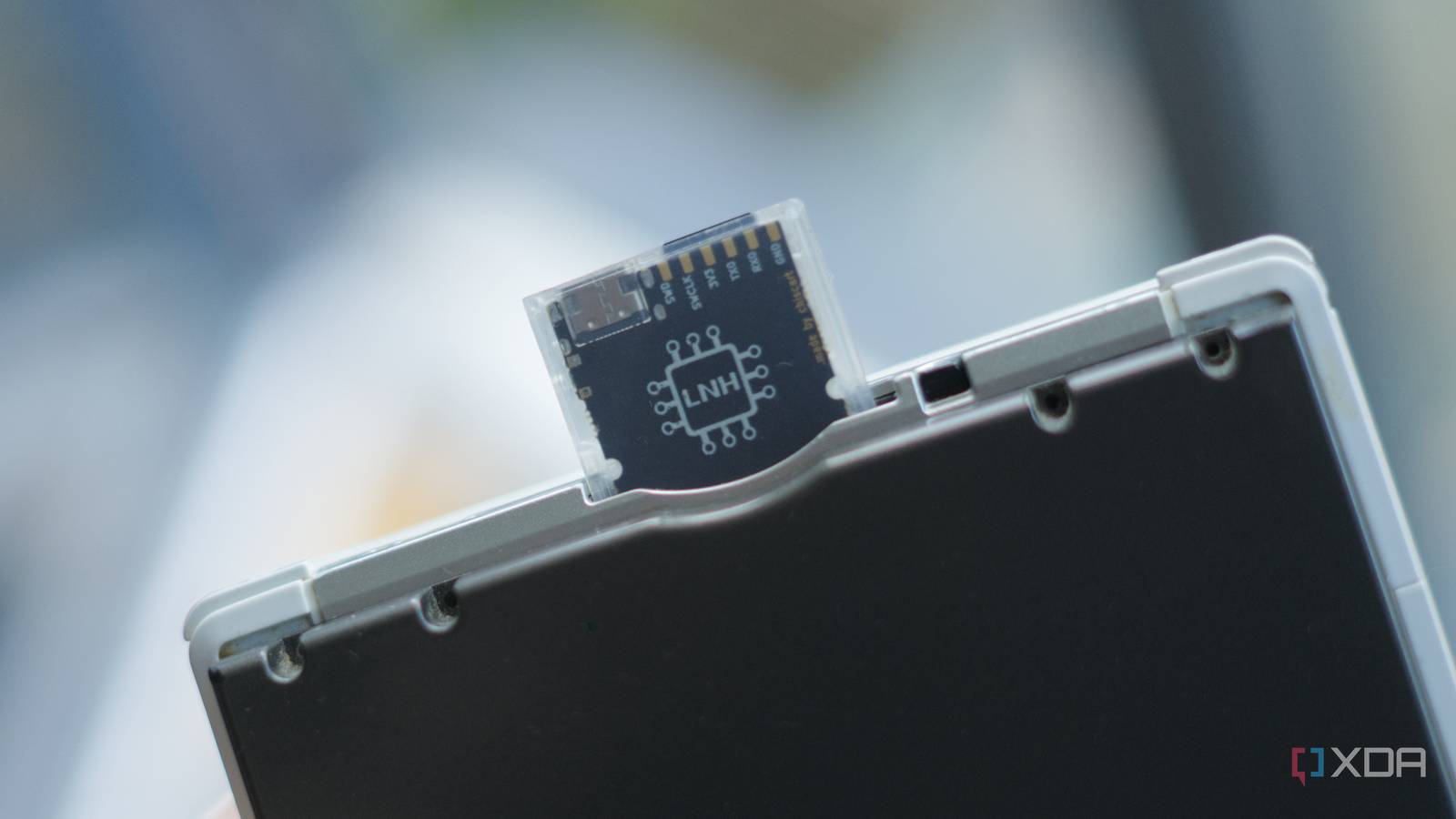
Published Sep 16, 2026, 11:00 AM EDT I’m Adam Conway, an Irish technology fanatic with a BSc in Computer Science and I'm XDA’s Lead Technical Editor. My Bachelor’s thesis was conducted on the viability of benchmarking the non-functional elements of Android apps and smartphones such as performance, and I’ve been working in the tech industry in some way or another since 2017. In my spare time, you’ll probably find me playing Counter-Strike or VALORANT, and you can reach out to me at adam@xda-developers.com, on Twitter as @AdamConwayIE, on Instagram as AdamConwayIE, or u/AdamConwayIE on Reddit. Sign in to your XDA account The Nintendo DS, DSi, and 3DS have all never had a USB port, and you could never connect any of them physically to a computer and use them as a device that your computer actually sees. There are homebrew applications that can connect over Wi-Fi, but that's been the extent of it... until now. The DSpico, an all-new open-source flashcart built by the LNH team, changes that in a pretty ridiculous fashion. It's built around an RP2040, which is a Raspberry Pi microcontroller and, in fact, the same chip you'll find in a Raspberry Pi Pico. Alongside it is a microSD card slot you can expect from a flashcart, but there's a USB at the top of the cartridge, too. The LNH team has published a handful of homebrew apps that actually use it, making it possible to plug a cable into your DS or 3DS and the other end into your PC. With this, I've been able to turn my 3DS into a speaker, a microphone, and a webcam. I'm running these on a Chiscart DSpico, which is a USB-C version of this board, and I was able to write another application myself: a USB gamepad. With it, my 3DS shows up as a game controller that Windows picks up, and I can use it in Steam for controller-enabled games. Unfortunately, the camera is slow, but the gamepad works surprisingly well, and the microphone sounds better than it has any right to, to be honest. The DSpico is an open-source flashcart with a Raspberry Pi It plays games too, obviously Before getting into the USB capabilities, this is still a flashcart, and it does that part perfectly fine. You put game backups on a microSD card, the cart shows up as a retail cartridge, and the built-in Pico Launcher gives you a front-end to browse. It supports sequential microSD card reads of up to 6MB/s and idle power of around 57mW, a significant step-up from the R4 era, and it's incredibly cheap. The unusual part is how open the entire thing is; the PCB, shell, artwork, firmware, bootloader, DLDI, and the loader are all freely available, with the hardware licensed under CC BY-SA and the firmware under Zlib. The LNH team doesn't even sell it themselves, which also means that what you buy is a product based on the open design rather than an "official" product. Mine came from Chiscart, which took that design and swapped in a USB-C port. Having an RP2040 is a pretty big deal, though, as it has a Cortex-M0+ microcontroller with 264KB of RAM. It's modest, but it still enables you to do the things a Pico is actually good at. Under the hood, that chip is doing a lot; the firmware uses the RP2040's PIO blocks to drive an SDIO interface to the microSD card on one set of pins and the DS cartridge bus on the other. There's a development port on the board as well, with UART, I2C, a couple of GPIO, and SWD debug. The USB port is how you flash the initial firmware on it. Remove the SD card, plug the cart into a PC, then copy a UF2 file. The console runs the USB stack, not the cartridge The cartridge is merely a conduit I assumed that the card was handling USB and the console was just feeding it data, but I found out from the source code that it's actually the other way around. And it's all thanks to TinyUSB, an embedded USB library which all of LNH's examples are built on. TinyUSB normally talks to a USB controller through its device-controller driver, and on the DSpico, that driver runs on the DS and translates TinyUSB's low-level operations into custom cartridge commands, which the RP2040 carries out against its USB peripheral. The DS then runs the rest of TinyUSB on its ARM7 core, and the RP2040 translates calls against its own USB block, and the cartridge interrupt line, which a game can use to know when the card has something ready, gets repurposed as the USB interrupt. So, when the ARM7 sees it, it drains the event queue and reassembles things such as setup packets from successive 32-bit reads. Plugging the cart into your computer means that the enumeration, descriptor negotiation, endpoint handling, and the class driver for the imitated device are all on the ARM7TDMI running at 33MHz, which is... an old, slow core, even by 2004's standards. That bus was designed for game cartridges only, but it can be used to carry video and audio as well. The cartridge is essentially just a USB peripheral controller, with the DS being what's actually driving it. Out of the box, there are four examples written by the LNH team for the DSpico, including a mass storage mount for the DSpico's microSD card, and applications that can turn your DS into a speaker, a microphone, or a webcam. I was surprised to see that there wasn't a gamepad example given what the DS is, so I investigated if I could make my own. The DS is just a box with a D-Pad and some buttons, so it made sense. As it turns out, it was surprisingly quite easy. It's just a standard HID gamepad built with TinyUSB's report descriptor, a single interface, and an interrupt endpoint that gets continuously polled. It's treated as a generic controller by major platforms, so it doesn't need a special driver to actually work, and there's no configuration needed, either. Most buttons are standard, except for the X and Y buttons, which can only be read by the Arm7 core rather than Arm9. It's a DS-specific quirk, and it comes from the fact that the DS is built on the groundwork laid by the Game Boy Advance. In place of the right analogue stick, I had the touchscreen report values consistent with one instead. I know that the circle pad on the Nintendo 3DS, when in DS mode, isn't the same as an analogue stick, given that it's essentially interpreted as a Nintendo DS-style D-Pad, but it gives the illusion of a true controller-esque feeling... even if it's hard to play a game like that. The camera and microphone tap into DSi-mode hardware The microphone also sounds... genuinely good? One of the first examples I tried out was LNH's microphone test, which turns the 3DS into a USB device presenting as a 32,728Hz, mono, 16-bit audio input over USB. The sample rate confused me at first, until I found its likely source: the DSi's I2S clock. The Arm7 configures the DSi's audio codec, sets up PLL, enables mic bias, and increases the microphone's preamp to a 40 dB gain. It sounds... surprisingly good. Like, way better than a 3DS has any right to sound, to be honest. I joined a Discord call with some friends using it, and while they could tell it was a different microphone, it did not sound like you would expect a 3DS microphone to sound. Think more like a semi-decent laptop microphone, rather than a handheld. Unfortunately, the Nintendo DS doesn't have the necessary TWL encoder that the example uses, so this is only possible on either the DSi or the Nintendo 3DS running in DSi mode. You can use the speaker on any device in the DS family, though, and the same goes for USB mass storage. The USB is slow though, topping out at 1 MB/s. An uncompressed frame comes out at 96 KB, which struggles over a 6.7 MHz card bus with a 33 MHz CPU. That slow speed is why the camera quality for the webcam example is rather poor. It works, but not only are you wrangling with the poor quality 3DS camera hardware, but you're limited to an aspirational 10 FPS, but it's even lower than that. As well, it's a mere 256x192 output, which is the native resolution of the Nintendo DS display. So, in summary, the webcam works, kind of, but other USB applications are genuinely pretty good. I've been toying around with a way to see if I could take native screenshots from the display and dump them over the cart to my computer, and I've got somewhere with it. The next step is to modify the native Pico Launcher to create my hooks on start. All of this is to say that the DSpico has a lot of room to grow. The DSpico is arguably an expansion card USB-C directly to your DS' CPU To get the DSpico running on my 3DS, it was a bit of a project in and of itself. It has a hybrid firmware that works on the original DS/DS Lite, and it also works on a modded DSi or 3DS, but it doesn't work on an unmodified version of either. For that, you need a special WRFUxxed build, which uses an exploit in Nintendo's signed WRFU Tester software to gain full-access DSi-mode code execution. At the end of it all, though, I have a 3DS that my PC can recognize as a controller, then as a webcam, then as a speaker, then as a microphone. What's more, it's all code that runs natively on the Arm7 cores from the early 2000s, with the RP2040 acting more as a bridge than anything else. If you can write Nintendo DS homebrew, you can actually do this too. The DSpico is one of the most interesting flashcarts that I've ever used, and being an open-source, start-to-finish card is an incredibly interesting prospect. Would I be racing to replace my webcam on my computer anytime soon? Probably not. Does it unlock new capabilities and ways to use your DS that weren't available before? Absolutely.
I put a Raspberry Pi inside my Nintendo 3DS, and now my PC sees it as a gamepad, webcam, and microphone
Full Article
Original Source
Read the full article at Xda-developers →KhanList aggregates and links to publicly available news content. We do not host full articles from third-party sources. Always verify important information with original sources.