
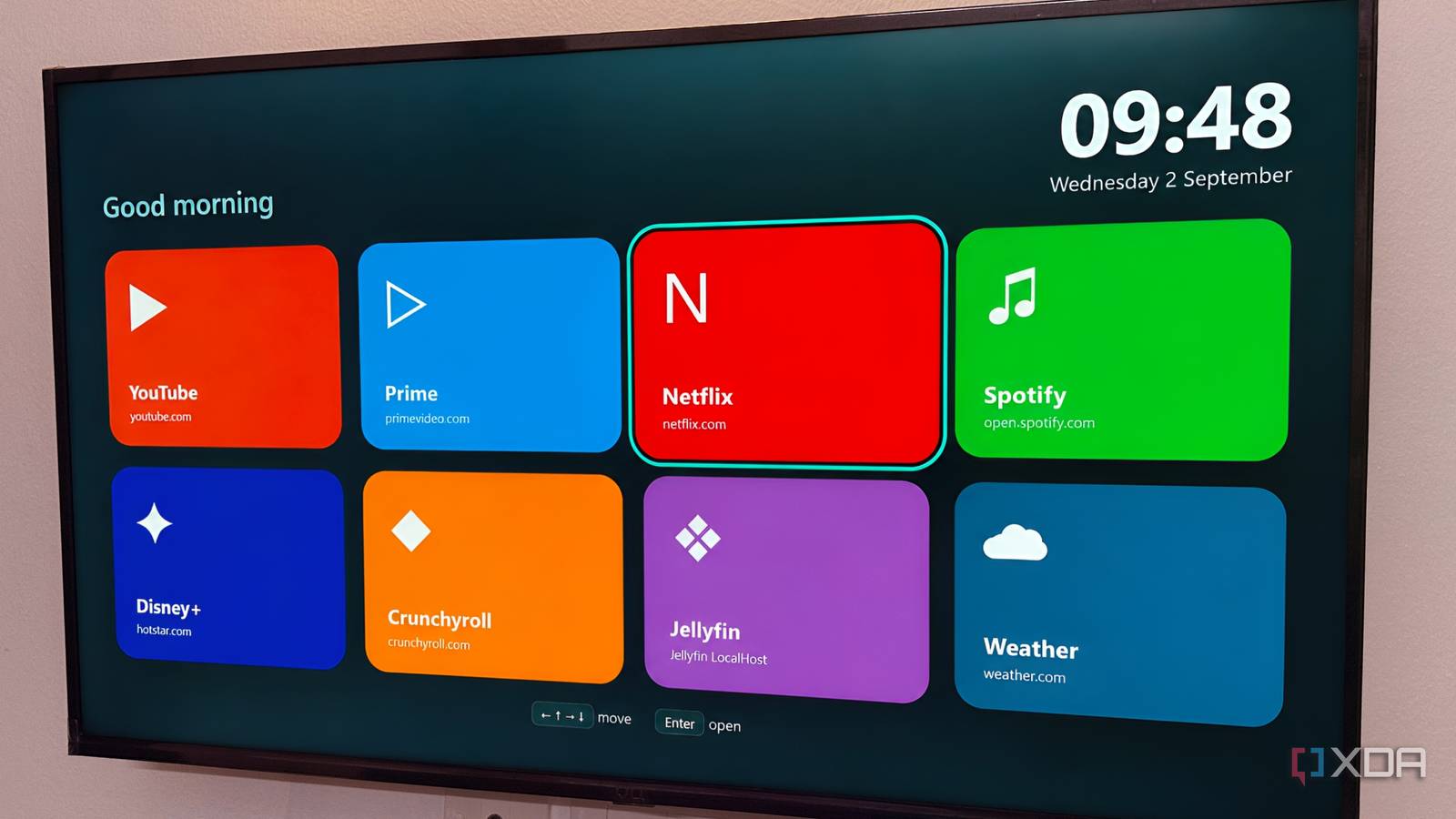
Published Sep 4, 2026, 11:30 AM EDT Gaming has been Samarveer’s greatest passion, and the Literature graduate in him takes immense joy in dissecting games for their themes, messages, and impact. Samarveer holds a deep appreciation of gaming, and considers the platform to be the most immersive and impactful across all media. He can be found engaging with gaming communities online, always ready to debate the finer points of ray tracing or itching to write an 8-page collegiate thesis on any game that impacts him emotionally. Out of all the TVs I have in my house, the oldest (and cheapest) one had reached the point where calling its software "smart" felt generous. It's an old 1080p set with a painfully dated interface, so I've spent years jumping between its built-in apps and the 2017 Fire TV Stick, depending on what I want to watch — Netflix and YouTube on TV, and Prime Video, along with all my sideloaded apps on the Fire Stick. Then I remembered my old laptop, sitting around, useless for everything else. It was too slow to be a PC, but there was no reason it couldn't do one job. So, I plugged it into the TV, shoved it behind the screen, and started wondering whether I'd just found the better setup. I gave my old laptop a new job It's finally found something it was good at The laptop I used for this experiment is not some secretly capable machine waiting for its second life. It is genuinely bad at being a computer. Ever since it received Windows 11, modern websites have been making it wheeze, and so have Google Chrome tabs, with multitasking being completely out of the question. Asking this laptop to do anything remotely demanding has been enough to remind me why it was retired in the first place. Video streaming, however, is a much less demanding proposition. Instead of asking it to behave like a proper PC despite its aging hardware, I just needed it to output a video signal and handle a browser. That was a job it could still manage without turning every interaction into a test of my patience. So I connected it to the TV with HDMI and simply left the cable plugged in. The laptop now lives behind the television, permanently connected and completely out of sight. I don't have to move it, open it, or treat it like a conventional computer whenever I want to watch something. The only thing I need is a remote mouse app on my phone. It gives me cursor control, scrolling, and enough control to operate everything from the sofa. With that, the laptop has become just another component of the TV, and arguably its most useful one. I made Chrome look like a TV The browser became the interface The first thing I changed was Google Chrome's homepage. Instead of opening to a blank tab that immediately reminded me I was technically using a computer, I turned it into a TV-style launcher. Netflix, Prime Video, Jellyfin, HBO, Crunchyroll, YouTube, and the other services I use are all represented by large thumbnails that are easy to hit from the sofa. That small change matters more than it sounds. I don't have to remember which website I need, hunt through bookmarks, or navigate a desktop full of tiny icons. I turn on the laptop, and Chrome opens by itself, and I'm looking at something that behaves much more like a streaming interface than a Windows desktop. Google Chrome tends to use significant resources — you can use Brave or K-Meleon browser on particularly old hardware. This is still a full web browser, with everything that implies. There just isn't a single TV operating system that could match the flexibility of Chrome. I can open an obscure streaming site, manage my Jellyfin server, watch YouTube, or just do something the TV manufacturer never supported. In fact, since I'm using Jellyfin on a web client, I also get to enjoy every single plugin I've installed on my server, which isn't something any of the native TV apps for the self-hosted media server can boast about. It also makes the old laptop's limitations far less important. A machine that feels painfully slow with Chrome tabs, Office work, or modern Windows applications can still have plenty of life left when its entire job is decoding video and loading a handful of websites. The streaming box I didn't buy Good enough isn't the same as perfect, though There are reasons I wouldn't tell everyone to throw their streaming box in a drawer. A dedicated device wakes faster, works better with a proper remote, and is designed for someone sitting several feet away. The laptop needs considerably more cooperation. I had to set the laptop to auto-log in to the user account, then add the Chrome "kiosk" command to Task Scheduler, which launches it in fullscreen with no address bar, tabs, or UI chrome. Despite its advantages, this system is still a computer plugged into a TV, meaning I'm dealing with more failure points than I would with a streaming stick. Windows can sometimes decide to update itself, Chrome can just straight up refuse to behave properly, and the experience isn't quite as appliance-like. If the laptop crashes, I have invented a streaming box that can also blue-screen. But for my particular TV, those compromises are easy to live with. The laptop is already sitting around unused, the HDMI cable is still connected, and my phone is already in my hand. I didn't have to buy any new hardware, or learn another interface, or add another device. I'm not going to claim this as some sort of magical replacement for every streaming box, but I've certainly found a better use for hardware I had already written off. When an old laptop can become a competent TV computer, buying something new starts to look less like an upgrade and more like a reflex. Repurposing old hardware can give it a second wind We tend to measure old hardware against everything it can no longer handle, rather than asking whether what remains is enough. That distinction matters as functional devices get replaced simply because their original purpose has moved on. I don't think every television needs an old laptop hiding behind it. But we have become good at buying solutions to problems that existing hardware can solve with a little imagination. This particular useful upgrade, though, cost me nothing, took an afternoon to set up, and made me wonder why I bought the replacement at all.
I plugged an old laptop into my TV instead of buying another streaming box, and both got a new life
Full Article
Original Source
Read the full article at Xda-developers →KhanList aggregates and links to publicly available news content. We do not host full articles from third-party sources. Always verify important information with original sources.