
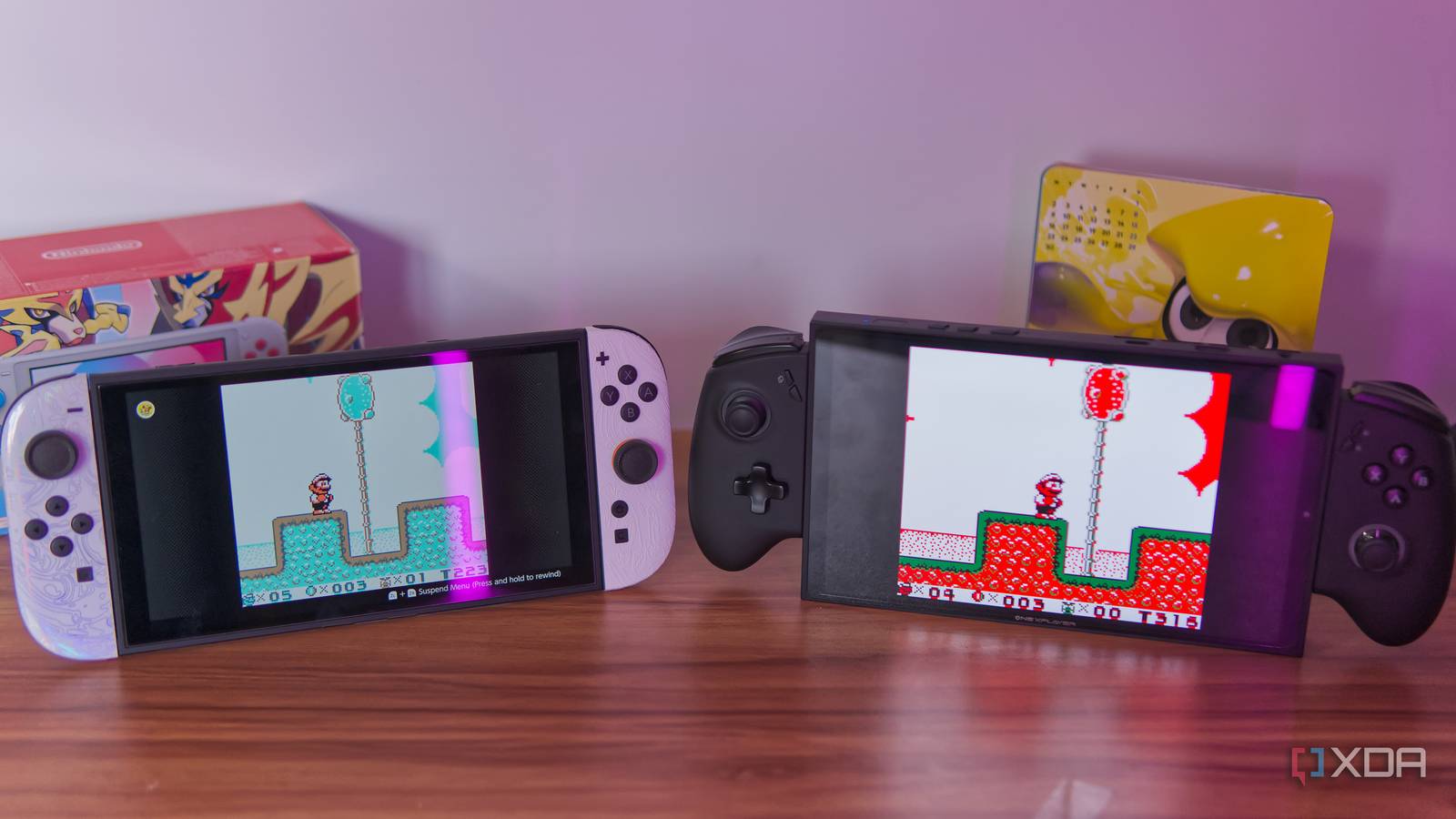
Published Nov 7, 2026, 6:00 PM EST João has been covering the tech world for over 7 years, with a heavy focus on laptops and the Windows ecosystem. I also love all things tech and videogames, especially Nintendo, which he's always happy to talk about. Prior to joining XDA in 2021, he worked at Neowin: https://www.neowin.net/news/poster/jo%C3%A3o-carrasqueira/ These days, it's easy to play almost any retro game on any device you own. These old consoles are so easy to emulate that even low-power devices like phones can run them smoothly, and it's a great way to learn more about this medium. Even Nintendo offers its own official emulators now, and they're generally pretty solid. But that does beg the question: how should you play some of these games? Using Nintendo's emulators is probably the easiest way to get started, but is it the best? The short answer is no, and there are a few reasons for that. Fast forwarding Some old games are slow I recently talked about the idea of time manipulation making old games much better, along with features like save states. To some extent, Nintendo's official emulators on Switch Online do benefit from this: the company offers save states with multiple slots, so you can easily go back to a previous save point, and most of the emulators also include a rewind feature for undoing mistakes. It can be a life-saver in some of these old, unforgiving titles. But one thing Nintendo doesn't offer is the ability to fast-forward in their emulators, and that can also be a game-changer. Some of these older games have long, drawn-out sequences, slow scrolling text, and other elements that can make the experience feel like a slog, and fast-forwarding really helps. An example I've previously given is Wario Land 3, originally for the Game Boy, as well as The Legend of Zelda: A Link to the Past, which also has a somewhat long intro with slow-scrolling text. You could make similar arguments for the original Ocarina of Time, too, and many other titles suffer from this problem. Normally, I'd be tempted to bring up Pokémon as well, but Nintendo doesn't actually offer those through Nintendo Switch Online, so it's not a valid comparison. From black and white to any color you want One fun aspect of playing Game Boy games via emulation today is that you can display them in a wide range of ways. Even the original titles had different presentations on different hardware. They were originally black and white, but if you inserted a Game Boy cartridge in a Game Boy Advance, or if you happened to own a Super Game Boy accessory for the SNES, these games could be colorized, sometimes even giving you different color options. Nintendo's official Switch Online emulators kind of embrace this, but only to a limited extent. If you play a Game Boy game, you can choose between the green-ish look of the original Game Boy screen, the more neutral tones of the Game Boy Pocket, or a colorized version from the Game Boy Color. All of these are only meant to mimic real hardware and not much more than that. But you're missing out on some fun options. Loading the same game up in RetroArch with the Gambatte core, there are dozens of options for colorizing your Game Boy games to suit your preference. If you set the emulator to use its internal colorization engine, you get so many options. Multiple color variants based on the Game Boy Color's approach, many more based on the Super Game Boy, and even more original options that simply slap a color filter over the game. When you have a black-and-white base, you can do so much to make the game look like anything you want, but Nintendo's emulators don't do that. A free emulator lets you get a much more customized experience. Widescreen and higher resolution Even for the SNES Nintendo's own emulators upscale the resolution of its games, but only in very basic ways, and for 3D-based platforms like the Nintendo 64 or GameCube, there's room to go much further than the official emulators do. For example, GameCube games can render at double the original resolution on the Nintendo Switch 2, but a free PC emulator can increase the internal resolution by up to a factor of five, and it makes a real difference on big screens. But to me, the coolest part of this actually lies in a handful of SNES games, such as Super Mario Kart or F-Zero. These games used a dedicated graphics mode called Mode 7, which stretched and distorted a background layer in a variety of ways, often to produce a 3D effect. This mode was crucial to making these racing games feel somewhat intuitive, but on the SNES, that lower render resolution put a hard limit on how sharp the games could look, and Nintendo's official emulator does nothing to address it. However, when you load RetroArch with the bsnes-hd core, you can choose a scaling factor for Mode 7, and it makes a huge difference. I can easily increase the resolution by five times, and F-Zero looks so much sharper playing on my gaming handheld compared to the original. Not only that, but the emulator can also enable widescreen support for these Mode 7 games, which works wonders for them. In fact, widescreen support is another big deal for many emulated games from the early 3D generations, including the GameCube, which Nintendo still doesn't support. It's not normally possible to enable widescreen for 2D titles without some weird glitches, but when games are fully 3D, it can be done relatively easily, yet Nintendo won't offer the option. And there's more Cross-game connectivity can also be big One thing I didn't really get to try for this article, but I've seen in action before, is cross-game and cross-platform connectivity for some of these titles, another feature Nintendo has mostly ignored. The biggest example is Pokémon Stadium and its sequel, Pokémon Stadium 2, on the Nintendo 64. Both games are on Nintendo Switch Online, but they're stripped of what made them great. One of the biggest selling points of these titles was that, with a Transfer Pak accessory, you could connect your Pokémon games from the Game Boy and bring your favorite monsters to the big screen. It let you see them in 3D for the first time, but it also offered unique benefits. While you can play the games entirely using "rental" Pokémon provided by the game itself, you can't change their moves at all, and many times, creatures with higher stats have weaker moves, forcing you to choose between non-ideal options. It's certainly possible to beat the game this way (that's what I did as a kid), but it's much more limiting strategically. One notable feature of these two games is that if you gave your creatures a custom nickname in your Game Boy games, they would have altered color palettes when you brought them into the Nintendo 64 titles. You can see this in action when you battle the game's NPCs, which all have nicknames for their Pokémon, but you can't experience it for yourself using the rental Pokémon offered by the game. As I've mentioned, though, Nintendo doesn't even offer its Game Boy Pokémon titles through Nintendo Switch Online, so you're missing out on a lot. Many Nintendo 64 emulators on PC let you point to a Game Boy save file and ROM so you can get those benefits, and it's very fun. Other titles have this kind of connectivity, too, such as Mario Golf and Mario Tennis. Different ways to preserve games Preserving old video games doesn't just have to mean allowing them to be playable in the modern day. The broader emulation scene shows that emulation can also bring those old titles up to modern standards in ways that make them more enjoyable, visually pleasant, or easier to play. Nintendo has clearly opted for a more faithful interpretation of its games, and even then, it can be even more limited than the original experience allowed. But the community has done incredible work to make some of these titles as great as they can be while preserving the feel of the originals. And if you want the best experience, that's clearly the way to go. So long as you can obtain those games legitimately, of course. RetroArch OS Windows, macOS, Linux, Android, iOS, Others
I played the same retro game on Nintendo Switch Online and a free emulator, and Nintendo's version lost
Full Article
Original Source
Read the full article at Xda-developers →KhanList aggregates and links to publicly available news content. We do not host full articles from third-party sources. Always verify important information with original sources.