
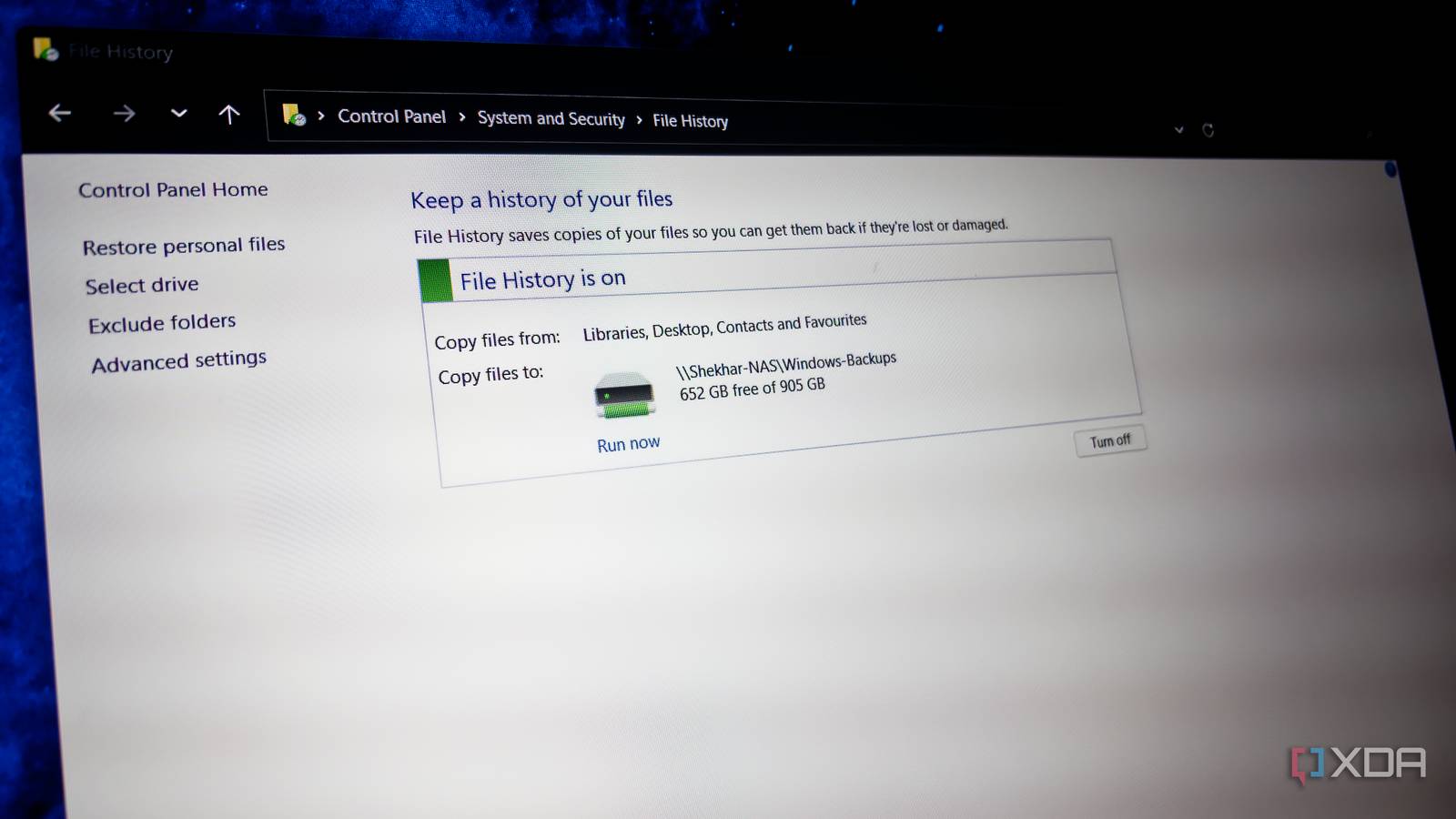
Published Aug 27, 2026, 8:00 AM EDT Shekhar Vaidya is a veteran technology journalist and computer science engineer. He is the founder of TechLatest, where he has spent years providing technical analysis on hardware and Windows ecosystems. Now a Computing Writer at XDA, Shekhar leverages his deep background in NAS, storage solutions, and PC internals to help readers master their tech. OneDrive is the default choice when it comes to Windows backup, not because it is better than others, but because Windows keeps putting it in front of you. Once you enable OneDrive, it feels too convenient to question. I've used it from day one, but as my workflow expanded, my storage needs grew too. Synced files were alright because I could see them and delete them if I wanted to, but backups were messy because they could quietly consume space by stacking version history over time. I was always checking the remaining space in my OneDrive account until I realized that I already had a NAS and Nextcloud running on my home server. If the storage was already sitting in my homelab, why was I worried about running out of cloud space? OneDrive's free tier turned backups into a countdown clock It wasn't the space that ran out first — it was my patience If you are a Windows user, you already know my pain. As soon as you log into your Windows PC for the first time with your Microsoft account, which these days is compulsory, a OneDrive notification is one of the first things you see. I did try to boot Windows 11 without a Microsoft account, but that is a story for another day. If you ignore the pop-up asking you to enable OneDrive for Windows backups, it will keep nudging you on every boot until you either give in and enable it or uninstall the app permanently. On the other hand, OneDrive is an effortless service; it is already deeply integrated with Windows, so with a few clicks, my important files and file history are backed up to the cloud. So it was frictionless for me to use. The issue isn’t the constant nudging; it's the storage. By default, Microsoft gives only 5GB of free storage with OneDrive, which is a third of Google Drive’s 15GB free tier. For someone like me, whose Documents folder is larger than OneDrive's total free storage, it's a wall I hit immediately. These were the ordinary synced files that I use every day; the Windows backups made the problem worse in a whole different way. My Windows backups keep file history without any time frame. It backs up every day and stores that backup permanently. That is where the 5GB OneDrive storage limit starts to feel annoying. I'm always anxious about watching the available storage meter. And I didn’t want it to become another storage-management problem. At the same time, I was also thinking, I’d already paid for Windows and Office; I don’t want to pay for storage again, just for the backups. Then, while looking around, it struck me why I was even using OneDrive for backups in the first place. I was already using self-hosted Nextcloud for file sharing. Why can’t I just use Nextcloud for Windows backups too? I gave my Windows backups a local home My NAS suddenly had a second job I immediately opened Windows Backup, looking for a way to change the backup destination. There were only two options — Don’t back up and Continue — no setting preferences, no configurations, nothing. The app was tied to OneDrive as a destination. Microsoft being Microsoft, I wasn’t even surprised by that. Then I decided to try the old Control Panel because I used to manage backups from there in previous Windows versions. Fortunately, File History was still sitting there in the Control Panel. And like before, it was fully configurable. But there was a catch; the only allowed destinations were non-system drives, removable drives, or network locations. And Nextcloud was none of these. So, I pivoted the destination. Nextcloud was running on my home Debian server, and the storage was mounted on my dumb NAS. So, I decided to use the NAS’s SMB share as a network location. And unlike the Windows Backup app, I could even exclude the directories I didn’t want backed up. I created a dedicated directory on my NAS, added it as the destination, and turned on File History. On top of that, Nextcloud Desktop was already syncing my daily-use files and folders independently. So, the jobs and paths stayed separate. File History → NAS share Nextcloud Desktop → Nextcloud data directory → NAS I didn't build a new backup server or buy another storage device. I simply gave infrastructure that was already running another job. The setup is less convenient, but much less stressful I stopped checking how much space was left OneDrive is more convenient to use on a Windows PC. It is deeply integrated with Windows, and more importantly, it doesn’t require you to reach a NAS to store the backup. So it is not a bad option if you already have enough storage in OneDrive and are comfortable storing your data in the cloud. On the other hand, that wasn’t the case for me. I was already up against that ceiling. And I already had my own infrastructure to save the backups. My point is that OneDrive’s convenience wasn't worth constantly thinking about storage. In my case, the biggest advantage wasn’t better speed or fancy features that I don’t use. It was the hardware I already owned. I no longer had to worry about how much storage I had left on OneDrive. My NAS already had plenty of storage. And in the future, if it ever ran low, I could easily upgrade the drive by paying a one-time fee instead of OneDrive’s or any other cloud-based storage’s recurring bills. The biggest advantage was that backups became a background activity without demanding my constant attention. Another advantage was that I could exclude directories I didn’t want backed up. Videos and Music directories are examples. Those libraries already live on my NAS and are served through Jellyfin and Immich. Those are large media collections, so duplicating them through File History would add little value. Zooming out of my specific setup, I used Nextcloud for file sync and direct NAS SMB for Windows File History, but this exact combination may not work for everyone. I had that infrastructure handy, so I used it. The point is that I stopped depending on one service to do everything. I divided the job and handed it over to different services. I didn't really replace OneDrive. I removed backups from a storage pool where they were competing with the files I actually wanted in the cloud. The fix was never about finding more space The OneDrive storage limit was the minor issue. The major concern was paying for something I didn’t really need. OneDrive is a convenient and excellent option for someone without a NAS sitting around. Windows Backup bundles sync, storage, and backup into one app. I untangled them with two options. Windows File History now backs up to the NAS directly over SMB, and Nextcloud handles the daily-use files and folders independently. I didn’t buy another storage device; it was already there in my homelab. I just pointed the right tool at it.
I moved my Windows backups off OneDrive and stopped worrying about the storage limit
Full Article
Original Source
Read the full article at Xda-developers →KhanList aggregates and links to publicly available news content. We do not host full articles from third-party sources. Always verify important information with original sources.