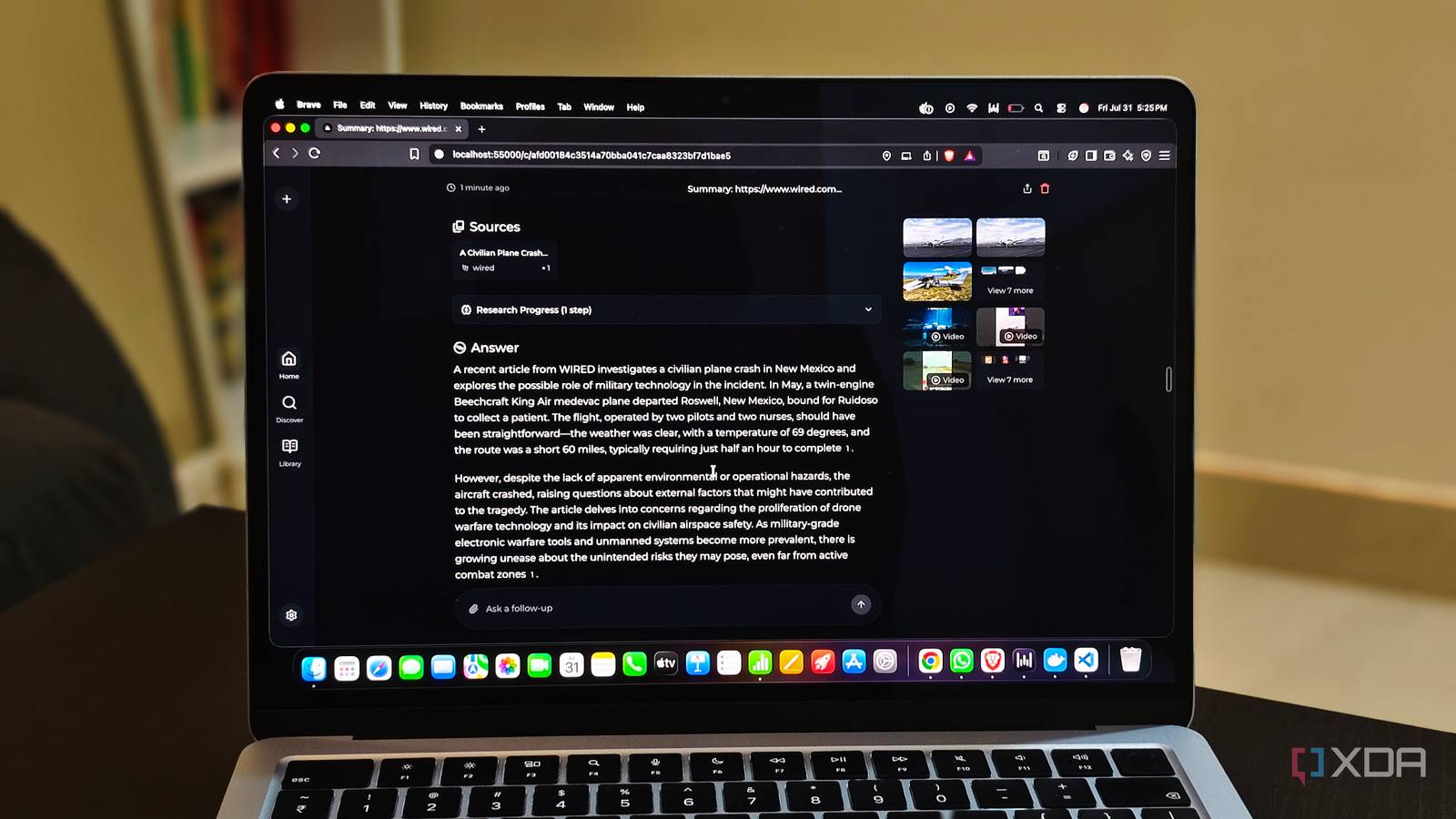
Published Aug 2, 2026, 6:00 PM EDT Anurag is an experienced journalist and author who’s been covering tech for the past 5 years, with a focus on Windows, Android, and Apple. He’s written for sites like Android Police, Neowin, Dexerto, and MakeTechEasier. Anurag’s always pumped about tech and loves getting his hands on the latest gadgets. When he's not procrastinating, you’ll probably find him catching the newest movies in theaters or scrolling through Twitter from his bed. I have a hard time trusting the responses I get from AI models. Recent releases have become far more accurate, and hallucinations have reduced considerably. That is a welcome change, but I still don’t trust a standalone AI response as much as something I can verify through Perplexity. Google Search itself has now adopted a similar approach. For many searches, it places an AI overview above the traditional results and attempts to answer the query directly. Perplexity is no longer as distinct as it once was, but the idea it introduced has stuck with me — let an AI search the web, bring together relevant information, and show exactly where it found everything. Instead of continuing to pay for Perplexity every month, I decided to build the same basic experience locally. It was much easier than I expected. All I needed was an inference engine such as Ollama and a search tool that could connect the model to the web. I’m using Vane, although there are several other options. It produces a direct answer, attaches sources to its claims, and lets me check the original pages whenever I don’t trust what the model says. Vane brings all the pieces together I only had to provide the model I didn’t create an AI search engine from scratch. Vane does most of the difficult work by bringing together a search engine, an interface, and a language model. It was previously called Perplexica, which is the tool I used for my earlier setup, but it has since been renamed and received a fairly big overhaul. Vane uses SearXNG to search the web and collect results from multiple search engines. It then passes the relevant information to a model running through Ollama, which reads the sources and puts together a direct answer. The response includes citations, so I can open the original pages and confirm whether the information is accurate. The experience is quite similar to using Perplexity. I enter a question into a familiar search interface, wait for Vane to look through the results, and get a summarized answer with its sources attached. I can limit a search to the general web, online discussions, or academic papers, depending on what I’m trying to find. It also supports file uploads and domain-specific searches, so I can ask questions about a document or restrict the research to websites I already trust. There are separate modes for different kinds of searches. Speed Mode works well when you need a quick answer, while Balanced Mode spends more time collecting information. Quality Mode takes the process further by repeatedly searching, reading pages, and refining its findings before generating the final response. It takes longer, especially when the model is running locally, but it is useful for questions that cannot be answered from a couple of search results. Your model dictates the quality of the search results Though SearXNG does equal heavy lifting The model you choose through Ollama has a big effect on the experience. Smaller models respond faster and require less memory, while larger models generally do a better job of understanding complicated questions and combining information from several sources. Vane does not remove those hardware limitations, but it gives the model access to current information instead of forcing it to rely entirely on what it learned during training. The raw search results still come from SearXNG, but the model decides which ones are relevant and how their information should be combined. A weaker model can receive perfectly good sources and still produce a poor answer because it overlooks an important detail or fails to notice that two sources contradict each other. This difference is less noticeable with simple factual questions. Even a small model can check a few pages and tell you when a product has launched or explain what a feature does. The larger models become more useful when a question requires comparisons or information from various sources. They are generally better at connecting the findings and keeping citations attached to the correct claims. You don’t necessarily need the largest model your computer can run. Vane supplies the current information, so reliable instruction-following and summarization matter more than extensive built-in knowledge. You should also leave enough memory for the retrieved pages and longer context. A model that barely fits during an ordinary chat can become painfully slow once Vane starts feeding it information from several websites. Setting up Vane is surprisingly straightforward Docker does most of the work Setting up Vane is much easier than building an AI search engine sounds. The first step is installing Ollama and downloading the model you want to use. Ollama runs the model locally and exposes it through an API that Vane can access. You can also install a separate embedding model, although Vane includes local embedding options if you do not want Ollama handling that part. Vane itself runs through Docker. Its recommended container includes the application and SearXNG, so you do not need to install and configure the search engine separately. Once the container starts, Vane becomes available through your browser at localhost:3000. The initial setup screen lets you connect Ollama, select your models, and choose how the application stores its data. Most of my setup time goes into downloading the models because the actual configuration only takes a few minutes. Once everything is connected, Vane can search the web, pass the relevant pages to Ollama, and generate an answer with citations. There is no account to create or subscription to activate, and your search history remains stored locally through the Docker volume. Do you even need Perplexity anymore I’m one of Perplexity’s longtime users because of its accurate research and the time it saves compared with going through sources manually on Google Search. However, its moat is now gone, as almost every other AI tool can perform a good web search and return accurate information. That is especially true when you use capable models such as GPT Sol or Claude Opus 4.8. You also have Google AI Mode, which does much of the same job without costing anything.
I made my own Perplexity locally, and the only thing I lost was the monthly bill
Full Article
Original Source
Read the full article at Xda-developers →KhanList aggregates and links to publicly available news content. We do not host full articles from third-party sources. Always verify important information with original sources.