
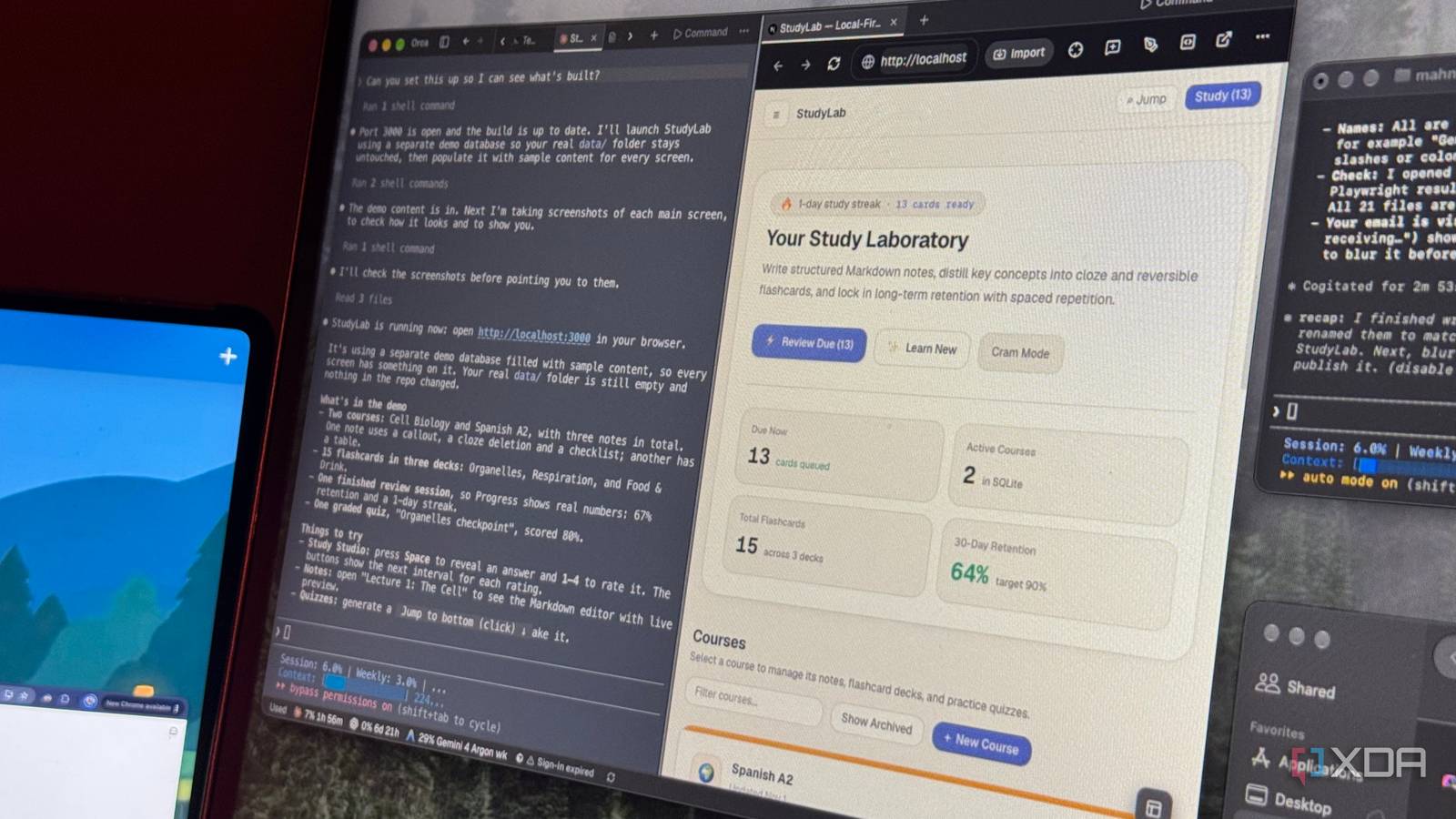
Published Nov 2, 2026, 5:30 PM EST Mahnoor Faisal is a tech journalist covering AI and productivity tools with bylines at XDA, SlashGear, MakeUseOf, Laptop Mag, and Android Police. She's been writing professionally since she was sixteen, and has since penned hundreds of articles. This includes in-depth coverage of AI tools like NotebookLM to breaking news across the AI space. Her passion for technology started when she received her first iPod Touch (4th generation) on her 8th birthday, and she's been deep in the tech world ever since. Currently pursuing a degree in computer science, Mahnoor brings both a journalist's eye and a technical foundation to her coverage of how AI is reshaping the way we work and learn. I've spent the better part of the last few months jumping from one AI coding tool to another. The big three are undoubtedly the ones I reach for most: Anthropic's Claude Code, OpenAI's Codex, and Google's Antigravity. One of my favorite things to do has been pitting them against each other to see which one comes out on top. However, after months of comparing them, I started wondering what would happen if I stopped treating them as competitors and got them to work together instead. After all, each has its own strengths, so why not put those strengths to use on the same project? So, that's exactly what I did. I made all three collaborate to build a study app from scratch, with each agent handling a different part of the project. There are a few reason I use multiple AI coding agents Why settle for one when you can use three? If there's one thing I've learned from experimenting with different LLMs and coding agents, it's that each has its own strengths and weaknesses. While I now have my own preferences for which coding harness I reach for first and which ones I tend to avoid for certain tasks, I've realized that there's no single LLM that's the best at everything. After all, AI labs are constantly releasing newer models that improve upon their predecessors, and the model that excels at one task today might not necessarily be the best choice a few months down the line. For instance, Codex was one of the tools that really grew on me over the last few months, and I was using it for practically all my coding-related tasks (and even a lot of non-coding tasks). However, after building just a tool or two, I realized its frontend capabilities were lacking. It'd build something technically solid, but the UI screamed vibe-coded from all angles, and I just couldn't get it to look the way I wanted without a lot of hand-holding. I had gotten used to using Claude Design and Claude in general for frontend work, so I began to pair Codex with Claude Code. Gemini's models have almost always disappointed me when it comes to coding, but Argon 4 has been a massive update. I wrote about testing it against Opus 5.5 for MUO, and while I won't go as far as calling it the "best coder in the world" like Google did, Gemini surprised me massively with its frontend design and product decisions. So, Argon 4 has now made it to my list of coding agents I enjoy using alongside the others! Beyond the fact that different models can make up for one another's weaknesses, there are plenty of other benefits to using multiple coding agents. For one, I'm no longer restricted by a single tool's usage limits. If I hit my limits with one agent, I can simply switch to another instead of putting my entire project on hold. There's also the fact that I can have multiple agents working on different tasks simultaneously, rather than waiting for one to finish before moving on to the next. When you're working on larger projects with several moving parts, that can make a massive difference. Sure, you could technically use parallel agents within a single coding tool, but that still means relying on the same model or ecosystem for everything. By using different coding agents, I get to take advantage of what each one does best while getting multiple parts of a project done at the same time. I used Orca to get all three agents working together Orca was the glue that held everything together Now, this is obviously not my first time using Claude Code, Codex, and Antigravity in parallel. I've used the three to build a portfolio website, my dream note-taking app, complex mobile apps, landing pages, B2B websites, focus apps, and more. However, the process has always been a little messy. I'd have multiple terminal windows open, constantly jump between agents to check their progress, and manually keep track of what each one was working on. This is when I went off to look for an app that would make managing multiple agents working in parallel easier. That's when I came across Orca, an open-source Agent Development Environment (ADE) that lets you run and manage multiple AI coding agents from one place. It supports Claude Code, Codex, Antigravity, OpenCode, Qwen Code, Hermes Agent and several other coding agents, bringing them all together under one roof. While going through Orca's features, I came across its support for Git worktrees, which allow multiple coding agents to work on different parts of the same project simultaneously without interfering with one another's changes. That's what led to the idea behind this article. I decided to put all three agents to work simultaneously to build me a study app, with each one handling a different part of the project based on its strengths. I assigned frontend development and UI design to Antigravity, backend development and database management to Claude Code, and the study algorithms and testing to Codex. The coding process was quicker, more hands-off, and surprisingly impressive Teamwork really does make the dream work For this experiment, I decided to build a study app that would combine some of my favorite features from NotebookLM, Quizlet, and Anki. I'll talk about what I ended up building in a separate article very soon, but what I really want to talk about here is the process of building it, how well the three agents worked together, and whether getting them to collaborate actually made a difference compared to my usual approach. I began by asking Claude Code to set up the foundation for the app, which I decided to call StudyLab. Rather than having it build the entire thing, I instructed it to create the project architecture, shared data models, API contracts, and an AGENTS.md file outlining which parts of the project each agent would be responsible for. Once that was done, I created three separate Git worktrees in Orca, all starting from the same foundation. I assigned frontend development and UI design to Antigravity, backend development and database management to Claude Code, and the study algorithms, spaced repetition system, and testing to Codex. I then gave each agent a prompt explaining its responsibilities and let them get to work. This is where things got interesting. Instead of having to wait for one agent to finish its work before moving on to another, all three were building different parts of StudyLab simultaneously. I could jump between their sessions in Orca, see what they were working on, and check their progress without having to manage multiple terminal windows. For the most part, I barely had to intervene. Once all three agents finished, I returned to Claude Code and asked it to merge their contributions into a single application. I was expecting this to be the part where things would get messy, especially since the agents had been working independently. Surprisingly, though, there was only one merge conflict, and it involved a documentation file that both Claude and Codex had edited. Claude resolved it by preserving both changes, and the application passed its initial verification checks. I also had Claude test the actual user experience. Its first attempt to do so through Chrome ran into a permissions issue, so I switched to Playwright for automated browser testing. Ultimately, all five user journeys passed, including creating courses, saving notes, reviewing flashcards, completing quizzes, and tracking progress. The project also passed 141 automated tests. The best part is that I loved the result it produced. The interface felt polished, the different sections worked smoothly together, and everything I tried behaved the way I'd expect a proper study app to. My usage limits also didn't take the hit they usually do when I'm relying on a single coding agent to build an entire project. Since the workload was split across three different agents, I wasn't burning through one tool's limits as quickly as I normally would. Three agents are officially better than one Despite having three different agents working on three different parts of the application, the finished product felt surprisingly cohesive. There was very little back-and-forth required on my end, and I didn't have to spend hours manually fixing code to get the different components to communicate. For something that started as an experiment to see whether competing coding agents could collaborate, I couldn't have been happier with how it turned out.
I made Claude Code, Codex, and Antigravity work together on one project instead of competing
Full Article
Original Source
Read the full article at Xda-developers →KhanList aggregates and links to publicly available news content. We do not host full articles from third-party sources. Always verify important information with original sources.