
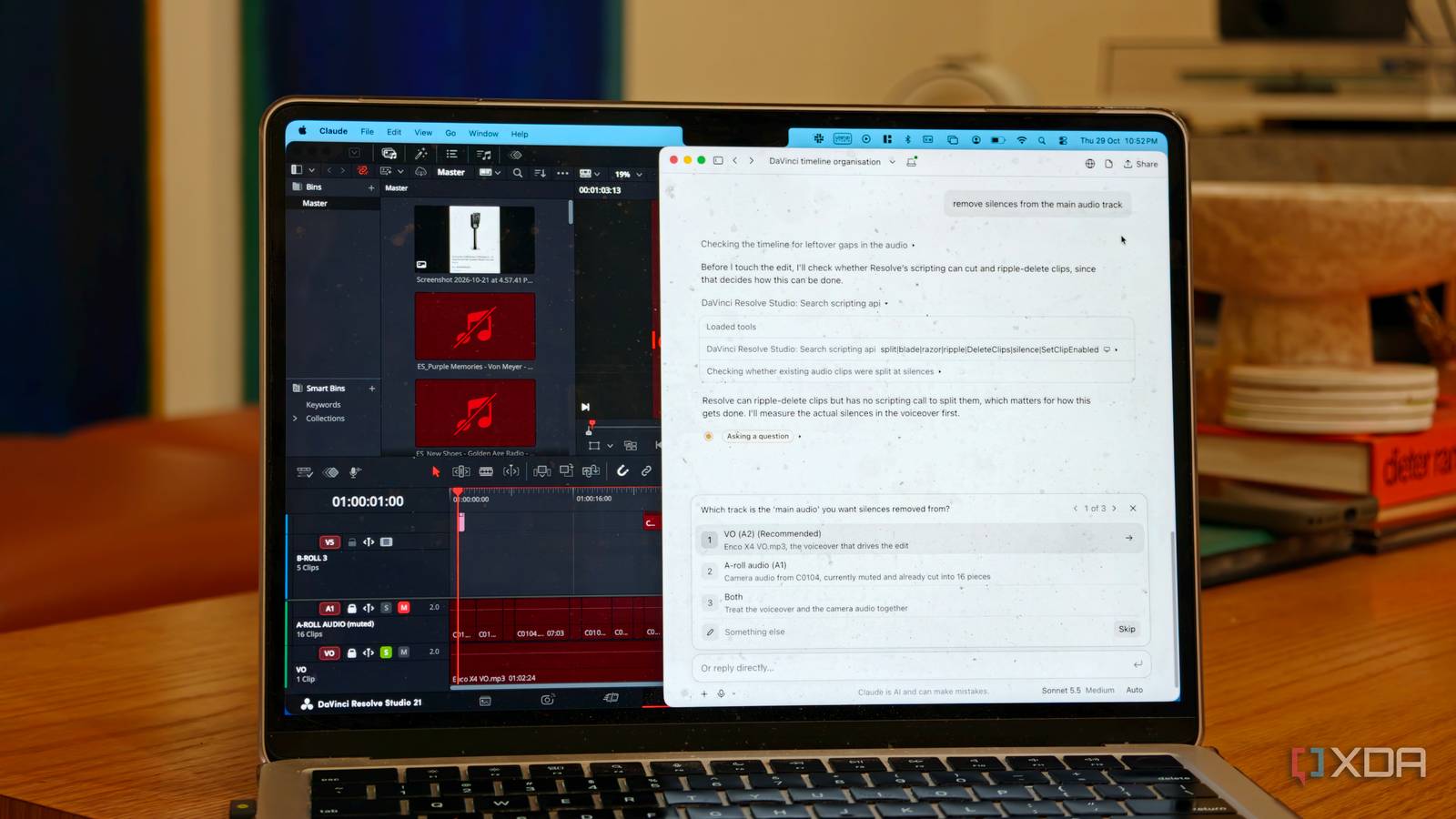
Published Oct 30, 2026, 9:00 AM EDT Dhruv Bhutani has been writing about consumer technology since 2008, offering deep insights into the personal technology landscape through features and opinion pieces. He writes for XDA-Developers, where he focuses on topics like productivity, networking, self-hosting, and more. Over the years, his work has also appeared in leading publications such as Android Police, Android Authority, CNET, PCMag, and more. Outside of his professional work, Dhruv is an avid fan of horror media spanning films and literature, enjoys fitness activities, collects vinyl records, and plays the guitar. I dabble in video from time to time, and the one thing that slows me down is that video editing takes much longer than it should. Things like trimming footage, removing pauses, and adding captions are slow and tedious processes if you are not a professional editor. I wanted to spend less time on these repetitive tasks without sacrificing how the final edit looks. Lately, Claude-based video editing has been doing the rounds, so I wanted to see how well it would fit into my workflow. I also tried connecting Claude to DaVinci Resolve through its MCP server to see if a more professional workflow would work out better for me. Let's just say that the results were interesting, to say the least. Claude can automate repetitive video editing tasks Using Claude with DaVinci Resolve's MCP integration Credit: My interest in AI-assisted video editing comes down to a problem that anyone who has edited video has faced. Simpler things like recording product demos or tutorials are fairly straightforward. But turning that footage into something crisp and optimized for the short attention spans on video is where time goes. I need to clip through repeated takes, mistakes, tighten up the pacing, and package the final product. That's where Claude Code and DaVinci Resolve's MCP integration become useful. MCP, or the Model Context Protocol, integrated into newer versions of DaVinci Resolve, allows an AI assistant to interact with it through a defined set of tools. Through this connection, Claude can work with the editing timeline, manipulate clips and perform supported operations. I can ask it to remove sections, rearrange footage, and, my personal favorite, ask it to organize the timeline in a properly color-coordinated way without manual steps. Of course, the benefit isn't that Claude comes with a better way to edit videos. It just automates certain logistical parts of the process that would otherwise need repeated manual work. Cropping out silent sections within a video is a task that takes me 20 minutes, and Claude does it in barely 20 seconds. Similarly, if I have a voice-over recording, transcription gives Claude a way to work with the spoken content to gauge appropriate timestamps. And I can achieve all of this in natural language. I like the idea of using Claude as an initial cut. Instead of starting with an empty timeline and working through every clip, I can have it perform the basic cleanup before I review the footage myself, giving me a starting point for the edit. That said, there's a difference between producing an initial cut and properly editing a video. The MCP connection gives Claude access to supported editing operations, but it does not give the assistant the understanding of the footage that I have when watching it. That distinction becomes much more important when your expectations are more creative than purely editorial. Claude struggles to understand on-screen context It works for simple edits, but creative decisions are a different story My biggest concern with this setup is the fact that Claude struggles to understand the on-screen context of a video. That makes sense since it can't really see a video the way I can. It can work with the timeline and use a transcript to identify voice-overs, but that does not give it an understanding of on-screen visuals. That's a big difference because a good edit is about more than just removing empty space from a video. When recording a video showing off a new software feature, I might pause while navigating a menu, waiting for an app to load or just scrolling across. These pauses can seem unnecessary in the audio recording, with Claude opting to cut the section, but the footage is still showing important information. Removing every silence without making sense of the visuals on hand can make a video harder to follow. This same problem also applies to cutting out a voice-over. A transcript might show a repeated sentence or false start, but Claude doesn't know which take I want to keep. In my experience with AI-assisted video editing, Claude works well enough when a task has predefined boundaries. Things like organizing timelines or cutting out silence. Even captioning is a good task, but it doesn't do very well when creative decisions are needed. I could try to work around this by giving Claude more detailed instructions, providing a transcript, or asking it to inspect selected frames. These approaches can help, but they also add steps to the workflow. I'd just end up spending more time explaining the context and checking the results, which reduces the advantage of automating the edit in the first place. Not to mention the cost of tokens. Claude is a great video editing assistant, not a full-on editor I can see a place for Claude in my video editing workflow, but for now, I feel the advantages are overblown. I would not hand over complete responsibility for a video project yet. Even from users who have put a more advanced workflow in place, the results are generic, so to speak. The more useful approach for the moment is to separate predictable, cookie-cutter operations from creative decisions that require context. It can still save you a lot of time and give you a standard timeline in a video editing tool like DaVinci that you can play around with to tweak to your liking. DaVinci Resolve This video editor comes in either free or paid versions, so you can choose one based on your editing needs. It offers a balanced mix of editing features, including face refinement, noise reduction, motion effects, and more.
I let Claude edit my DaVinci Resolve timeline, and it still couldn't see what matters
Full Article
Original Source
Read the full article at Xda-developers →KhanList aggregates and links to publicly available news content. We do not host full articles from third-party sources. Always verify important information with original sources.