
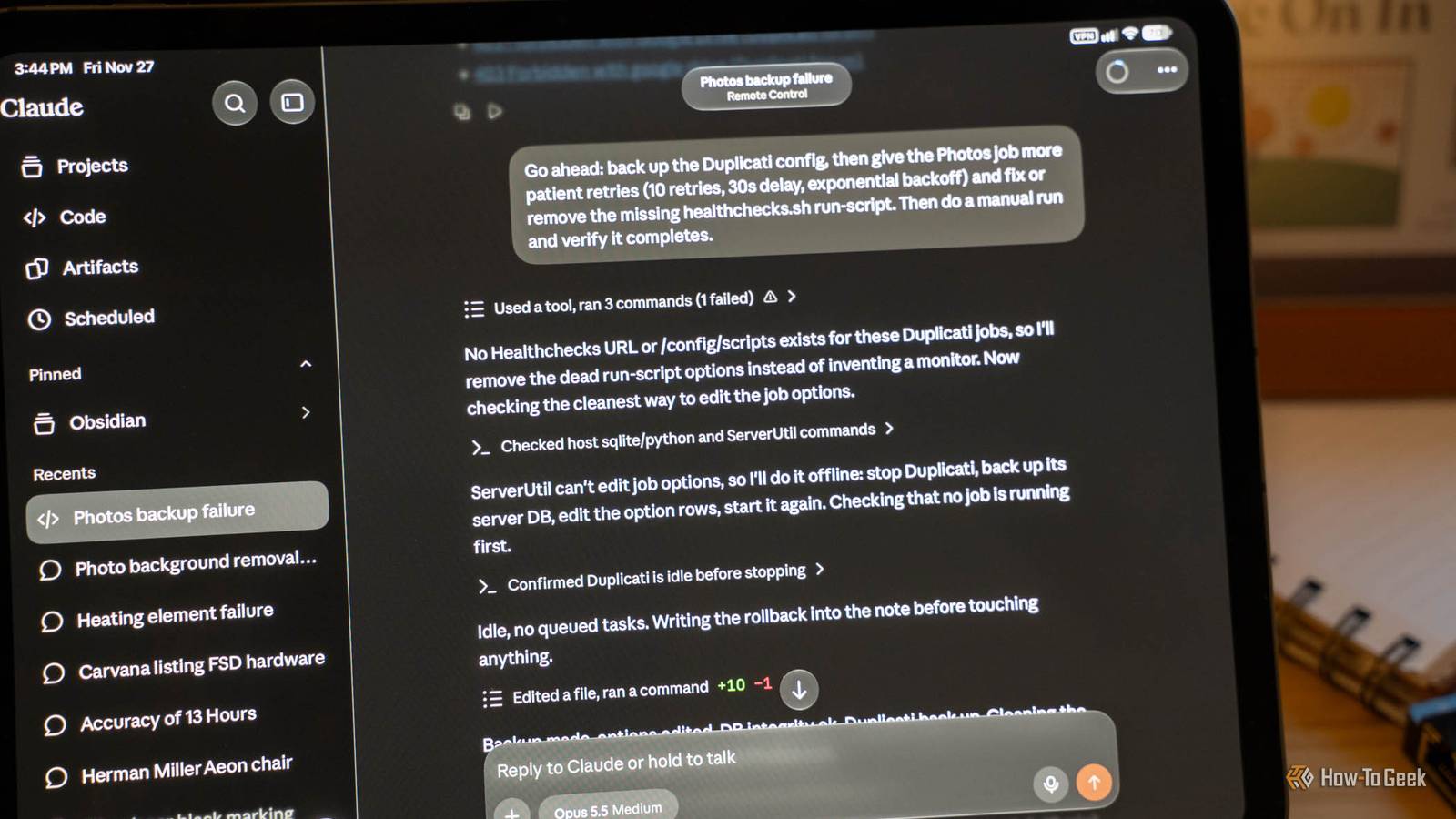
Published Nov 29, 2026, 7:00 AM EST Patrick Campanale has been in the tech space for well over a decade, specializing in PC/gaming news and reviews, as well as maker-focused products to build small businesses. With a start in technology back in 2010 surrounding the Palm/webOS ecosystem, Patrick spent his formative years developing mobile applications as well as blogging for various publications, eventually leading to starting his own website in 2014. After running a technology blog for a few years, he stepped out of that role and into the world of high-end custom PC manufacturing and building, with a focus on YouTube video production and overclocking. Then, in 2017, Patrick joined the 9to5Toys team as an editor/writer/reviewer with over 14,000 articles being published during his time there, ranging from deals and roundups to in-depth reviews on the latest technology, video games, 3D printers, and more. In his free time, Patrick loves to create projects from wood using various robots and methods, including leveraging the technologies of CNCs and lasers. If Patrick isn't working on a computer or playing video games, he's likely in his 2-car garage workshop creating something unique. In addition to all this, Patrick is also the media director at his local church where he feels God has called him to serve, and he loves every minute of it. When I was just running two or three Docker containers, I maintained them myself and kept up with everything about them. These days I run dozens and dozens of containers and there’s just no way for me to manage it all, so I’ve hired Claude Code to be my homelab ops (operations) manager, and it has found issues that I would have missed for months. Thankfully, since Claude Code can run automated checks and dig into things automatically without my intervention, it was able to find problems early before they would have grown to be massive issues. This type of proactive maintenance is the sort of thing that I wish I had time to do, but I don’t, so it’s great to have a system set up that can catch issues for me before they blow up in my face. My photo backups were failing, and nothing was telling me The health check it was supposed to ping didn't even exist Credit: Patrick Campanale / How-To Geek I change hardware a lot in my homelab, and that frequent changing actually broke something that I never realized got broken. A few months ago, I moved all of my photos and videos off of one NAS to another. I did this because I was consolidating systems and gave one NAS the job of just being my media server, and the other the job of being my files/backup server. This move went just fine. All the files made it from one NAS to the other, and I was able to free up space for more media. The problem is, I had a backup job running in Duplicati on the first NAS that no longer could run as all the photos had moved to the new NAS. No big deal. After a few weeks, I found that myself and got the backup job moved. The problem that Claude Code found was actually on the new system. It was simply not backing up because it was hitting a 403 error with Google Drive after five retries some nights, and on other nights it had to retry one or two times before it would start working. Claude Code was able to find not only the problem that was happening (failed backups), but also the cause of the failures (fixed by implementing a 30-second delay with exponential backoffs) and fix the notification system that should have been alerting me from day one. I rarely open Duplicati. It’s just an app that I have running in the background backing up my stuff for me, so, unless I need it for some reason, I never access it. That’s why it is supposed to be running a health check to notify me if something fails. The problem is, when I moved the backup script from my iDX6011 Pro NAS to my DXP4800 GT NAS, I forgot to move the health check script with it. So, even though the health check script that pings me on error was programmed, the file was never copied to the new Duplicati install. So, the script looked for something that wasn't there, and I probably never would have found that myself. The monitor watching everything else had gone blind Docker said it was healthy the whole time Another health monitoring system I have in my homelab is Uptime Kuma. I run Uptime Kuma on a VPS I maintain because then it lives outside of my homelab. It accesses my homelab through Tailscale so it can monitor local containers and stuff, but I want Uptime Kuma itself outside of the homelab because if my homelab goes down then it can still reach me to notify me. This had worked flawlessly for around a month, but then randomly, it just stopped working. The thing is, none of my monitored services were actually down—Uptime Kuma itself was down. Since Uptime Kuma was down, it couldn’t notify me of any issues, so it just failed silently. Uptime Kuma is another app that I don’t regularly check the dashboard of. I have notifications set up and it pings me if there is a problem. In a routine scan of my homelab that Claude Code does every morning, it found the issue and alerted me to it. Uptime Kuma had logged 33,481 failed checks across all 18 monitors that I have it run. Basically, the issue was Uptime Kuma came up with no network routes, so everything it tried looking up was failing even though the services were up. And since Uptime Kuma didn’t have network access, it couldn’t send any notifications through my ntfy integration. Claude Code was able to see that Uptime Kuma had been up for four days as a healthy container, but just with no network route. So, once this was found, Claude Code recreated the container and every monitor came back online just fine and everything was good from then on. Claude Code found both by reading what I never look at It checked the logs, not the green badges I’ve been running Docker containers for years at this point, but I maintain too much infrastructure to dig into the logs of each container routinely. If something looks like it’s running fine, then it’s running fine in my eyes. Duplicati looked just fine on the surface. But, it wasn’t until Claude Code pulled the job database out and read every run that it found the actual issue. This was way deeper than I have time to dig and I’m glad that Claude Code was able to track it down. Uptime Kuma is a similar story. Looking just at the Docker host, it would have seemed fine. Four days of uptime and the container was healthy, so, unless I tried to visit the Uptime Kuma dashboard, I wouldn’t have ever seen a problem. It was only on a routine scan of the system that Claude Code does every morning that we actually found the issue. It took four days to find the issue because I had paused Claude Code’s scans as I was away for a bit but found it out when I got back. Claude Code is the best homelab ops manager I could ever ask for I know how to run my homelab—I set it all up myself over the years. But, having a proper operations manager in my homelab is so nice now. Claude Code does things automatically for me, like checking the status of containers, checking for updates, managing proper updates with backups and rollback plans, and more. I no longer have to worry about the status of my homelab as Claude Code manages it for me. When necessary, I step in, but Claude Code is getting better at making fewer mistakes and I’m giving it more and more access to things for it to just manage automatically for me, and I couldn’t be happier.
I let Claude debug my homelab and it found issues I'd missed for months
Full Article
Original Source
Read the full article at Howtogeek →KhanList aggregates and links to publicly available news content. We do not host full articles from third-party sources. Always verify important information with original sources.