
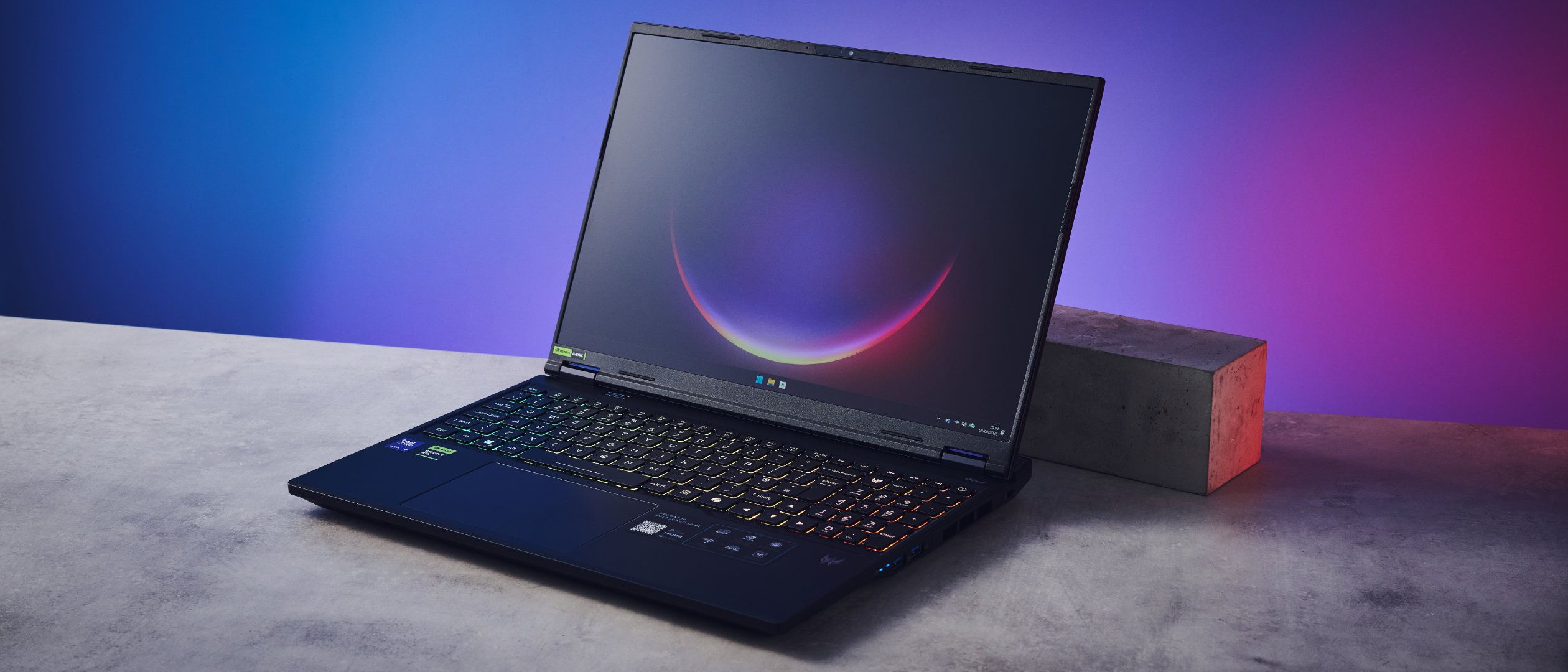
Tom's Guide Verdict The Acer Predator Helios Neo 16 AI features one of the most beautiful screens I’ve tested on a laptop. It’s bright and features stupendous color coverage and accuracy. Its 240Hz refresh rate delivers smooth gaming performance, and the laptop is great for everyday tasks, too. But its flaws are hard to overlook. An ineffective cooling system, slow SSD hampered by bloatware, bulky design, and short battery life make the Neo 16 AI a hard sell. Pros +Beautiful, bright display +240Hz delivers solid gaming performance +Strong everyday performance, too +Excellent color coverage and accuracy Cons -Gets very hot -Not the fastest SSD -Short battery life -Bulky for travel -So. Much. Bloatware. Why you can trust Tom's Guide Our writers and editors spend hours analyzing and reviewing products, services, and apps to help find what's best for you. Find out more about how we test, analyze, and rate. The Acer Predator Helios Neo 16 AI, on paper, sounds like one of the best budget laptops for gaming and work. Boasting a 240Hz refresh rate and packing up to NVIDIA GeForce RTX 50-series graphics cards (depending on configuration), the Neo 16 AI delivers buttery smooth gaming performance. It’s great for work, too, thanks to strong performance across the board… almost.While color rendition and raw gaming performance are the Neo 16 AI’s strong suits, its glaring flaws can’t be ignored. The laptop tends to get very hot, and the battery life isn’t anything to write home about. The machine itself is bulky to travel with, and don’t get me started on the amount of bloatware that comes pre-installed (and negatively affects SSD speeds).For the complete breakdown, read my full Acer Predator Helios Neo 16 AI review.Latest Videos FromTom's GuideAcer Predator Helios Neo 16 AI review: Specs Swipe to scroll horizontally Specs Acer Predator Helios Neo 16 AI (starting) Acer Predator Helios Neo 16 AI (top level configuration) Price $1,699 / £1,399 $3,299 / £3,299 CPU Intel Core i7 14650HX Intel Core Ultra 9 Series 2 290HX GPU NVIDIA GeForce RTX 4060 NVIDIA GeForce RTX 5080 Display 16-inch (2560 x 1600), WQXGA, Non-Touch, 180Hz 16-inch (2560 x 1600), OLED WQXGA, Non-Touch, 240Hz Memory 16GB 32GB Storage 512GB 1TB Ports 3x USB-A 3.2 Gen 2, 2x USB-C 3.2 Gen 2, 1x HDMI 2.1, 1x 3.5mm headphones jack, 1x RJ45, 1x power adapter 3x USB-A 3.2 Gen 2, 2x USB-C 3.2 Gen 2, 1x HDMI 2.1, 1x 3.5mm headphones jack, 1x RJ45, 1x power adapter Connectivity Killer Wi-Fi 6E, Bluetooth 5.4 Killer Wi-Fi 6E, Bluetooth 5.4 Size 14.05 x 10.85 x 1.05 inches 14.05 x 10.85 x 1.05 inches Weight 5.51lbs 5.95lbs Acer Predator Helios Neo 16 AI review: Cheat sheetWhat is it? A 16-inch gaming laptop with a 180Hz or 240Hz refresh rateWho is it for? Gamers on a budgetHow much does it cost? The Acer Predator Helios Neo 16 AI starts at $1,699 / £1,399What do we like? The bright screen, excellent color rendition, gaming and strong everyday performanceWhat don’t we like? Where do I start… The ineffective cooling system, slow SSD, bloatware, short battery life, and bulky designAcer Predator Helios Neo 16 AI review: The upsThe Acer Predator Helios Neo 16 AI features a beautiful, bright display with accurate color rendition, and a 240Hz refresh rate that delivers strong gaming performance.Beautiful, bright display (Image credit: Tom's Guide)One of the most impressive things about the Acer Predator Helios Neo 16 AI is its beautiful, bright display. The starting (cheapest) model comes fitted with a 16-inch WQXGA non-touchscreen. Unlike the MSI Katana 15 HX B14W ($1,284) which features a 2560 x 1440 16:9 QHD panel, the Neo 16 AI has a resolution of 2560 x 1600, and you get 160 extra vertical pixels to create a taller 16:10 aspect ratio. You can also splurge on the topline configuration which features an OLED panel. Mine didn’t have an OLED screen, but even so, it felt lovely to look at. Swipe to scroll horizontally In my lab testing, the Neo 16 AI achieved a peak brightness of 520.8 nits, which is phenomenal and much brighter than the competition. The MSI Katana 15 HX B14W has a measly brightness of 262.2, while the HyperX Omen 15 ($1,099) falls just short with its 460.2 nits. The MacBook Neo ($699) and the MacBook Air M5 ($1,099) perform well, with 480 and 454 nits respectively, but they’re more productivity-focused laptops.Having such a bright screen meant that I was able to properly view what was on it regardless of the lighting conditions. Even under bright office lights, and with sunlight coming through the windows right behind me, I didn’t struggle to see the panel.Tom's Guide: Direct to Your InboxGet instant access to breaking news, the hottest reviews, great deals and helpful tips.Excellent color rendition (Image credit: Tom's Guide)The Acer Predator Helios Neo 16 AI’s 16-inch screen comes with either 180Hz or 240Hz refresh rates, and both deliver smooth motion while watching. But what good is that if the color rendition doesn’t match up? Thankfully, the Neo 16 AI’s color coverage and accuracy are awesome, and its screen displays vivid, detailed shades and textures. Swipe to scroll horizontally My lab tests showed that the Neo 16 AI covers 155.2% of the sRGB color space and 109.9% of the wider DCI P3 gamut. This is wider coverage than the MSI Katana 15 HX B14W, the MacBook Air M5 and the Alienware 16X Aurora ($2,499). The HyperX Omen 15 performs better, but a score about 100% across both color spaces is what we’re always looking for, and the Neo 16 AI doesn’t let you down in that regard.One of our concerns when coverage is over 150% is that colors can often look oversaturated and artificial. I didn’t think that was the case with the Neo 16 AI’s color rendition. Bright shades didn’t have a neon tinge to them. Neon signs in games like Forza Horizon 5 didn’t appear blown out, and there was plenty of detail to be found in the darker areas. And because the Neo 16 AI covers over 100% of the DCI P3 gamut, the laptop’s great for photo and video editing, too. (Image credit: Tom's Guide)Colors appear accurate, too, as the Neo 16 AI achieved a Delta-E score of 0.09 in my lab tests. Delta-E is a numerical representation of how much two colors differ. The closer the score to zero, the better. As you can see from the table above, the Neo 16 AI upstages pricier laptops, like the Alienware 16X Aurora and the Alienware 16 Area-51 ($2,529). Seeing the 0.09 Delta-E score reassured me that the colors I was seeing on the Neo 16 AI were extremely accurate, and this helped me confidently color-grade photos for my photography account on Instagram.240Hz delivers solid gaming performance (Image credit: Tom's Guide)Even though it’s a budget laptop, the Acer Predator Helios Neo 16 AI goes toe to toe with mid-range beasts, like the Alienware 16X Aurora. Thanks to its 240Hz refresh rate, the latest graphics card (up to NVIDIA GeForce RTX 5080), up to 24 cores, and DLSS 4, gaming performance is formidable. Visuals are beautiful and colorful, while motion is smooth with no input lag or unresponsiveness. Swipe to scroll horizontally Game FPS (various settings) Counter-Strike 2 228fps Forza Horizon 5 112fps F1 25 60fps To gauge the Neo 16 AI’s performance, I played Counter-Strike 2, Forza Horizon 5 and F1 25 — all at the highest graphics possible and at the laptop’s native resolution of 1600P. I thoroughly enjoyed myself and after I’d spent some hours playing them, I ran in-game benchmarks. As expected, Counter-Strike 2 ran at a silky smooth 228fps. It isn’t a very demanding game which is why I said “as expected.” (Image credit: Tom's Guide)The Neo 16 AI handled Forza Horizon 5 in Extreme graphics mode well, too, running at a maximum of 112fps. F1 25, on the other hand, peaked at 60fps in Ultra High graphics mode, which isn’t bad at all. The game features lifelike graphics and the Neo 16 AI managed to keep up. The Alienware 16X Aurora performs better here, though, reaching 109fps in F1 25 — but it’s also pricier than the Neo 16 AI. Swings and roundabouts. You can always drop the resolution down to 1080P for better framerates, of course.Strong everyday performance, too (Image credit: Tom's Guide)Not only is the Acer Predator Helios Neo 16 AI an excellent gaming laptop, it boasts strong performance for everyday tasks, too, like web surfing, photo editing, and other productivity-related tasks. Of course, all of this will depend on your chosen configuration. For context, my review unit came with an Intel Core Ultra 9 275HX processor, 32GB RAM, NVIDIA GeForce RTX 5070 Ti graphics card, and 1TB of storage.It didn’t give me much to complain about when gaming and navigating work-related apps… except for the overheating (which I’ll discuss in the ‘Downs’ section below). Swipe to scroll horizontally I benchmarked the Neo 16 AI, and you can see the results in the table above, as well as comparisons to its closest rivals. On Geekbench 7, which measures overall CPU performance, the Neo 16 AI pulled an impressive multi-core score of 23,100, outclassing all of its competitors, including the pricier Alienware 16X Aurora.Using Handbrake, I transcoded a 4K video to 1080P, and the Neo 16 AI took just two minutes and 26 seconds to do so. That’s speedy, especially when compared to the likes of the MacBook Air M5 and the HyperX Omen 15, which did the same in 04:34 and 03:44 respectively.Acer Predator Helios Neo 16 AI review: The downsAlas, the Acer Predator Helios Neo 16 AI is far from perfect, with glaring issues when it comes to its battery life, SSD speeds (hampered by bloatware), cooling system, and its hefty weight.Short battery life (Image credit: Tom's Guide)As I’ve noted in previous gaming laptop reviews, it isn’t rare for these notebooks to have poor battery life. Chances are you’ll be using the laptop plugged in while gaming anyway. But it’s still worth noting that the Acer Predator Helios Neo 16 AI doesn’t boast the longest battery life, even when doing simple tasks like browsing the internet. Swipe to scroll horizontally I conducted our in-house battery test to see how the Neo 16 AI fared. This test continuously surfs the web and streams videos, with the laptop’s brightness calibrated to 150 nits. In my testing, the Neo 16 AI lasted four hours and 11 minutes before dying. That’s pretty short, and it gets worse when you’re gaming on battery — just over 45 minutes.Though not the worst (the Alienware 16X Aurora takes the cake there), it’s not great news. The HyperX Omen 15 lasted eight and a half hours in our in-house battery test, while the MSI Katana 15 HX B14W had a runtime of just over five hours. Of course, both laptops’ batteries took major hits when gaming only.Gets very hot, and those fans are jarring (Image credit: Tom's Guide)I’m no stranger to my gadgets sounding like they’re going to take off. I’ve had that issue with my PlayStation 4 before I traded it in for my PS5 Slim, and I’ve also seen it with laptops I’ve tested, like the Alienware 16X Aurora. The Acer Predator Helios Neo 16 AI is the latest to join those ranks, as its fans kick up a storm to try and stop the laptop from overheating.The Neo 16 AI is equipped with Acer’s 5th Gen AeroBlade 3D Fan Technology and vector heat pipes which, according to the brand, “keep performance steady under pressure, combining advanced airflow design with intelligent thermal regulation.” Alongside sounding really loud and jarring (I recommend investing in a pair of the best active noise canceling headphones too), I don’t think the heat management is all that great. I found the keyboard and the area surrounding the laptop’s vents quite hot to touch, and it made for an uncomfortable experience.Bulky for travel (Image credit: Tom's Guide)The Acer Predator Helios Neo 16 AI isn’t a compact laptop. As it packs a 16-inch screen, it measures 14.05 x 10.85 x 1.05 inches and weighs 5.95lbs. That’s quite a bit! It feels heavy to lug around in a day bag.If you decide to get the 18-inch Neo 18 AI instead, you’re looking at a hefty weight of 7.3lbs. You could probably skip working out your back and shoulders at the gym — all you have to do is carry around this bad boy for 15 minutes.So. Much. Bloatware. (Image credit: Tom's Guide)The Acer Predator Helios Neo 16 AI isn’t without its faults, and the pre-installed bloatware that accompanies the laptop (and eats into your SSD) is another pain point. There are so many Acer apps on the Neo 16 AI, like ProShield and LiveArt, and I doubt they’ll be useful for everyone.Annoyingly, when I first booted up the laptop to start testing it, I was inundated with pop-ups and notifications from McAfee, because Acer thought it would be helpful to have a free version of the antivirus software installed. ExpressVPN didn’t hesitate to ask me to activate my VPN subscription either.I took 30 minutes out of my day to delete all unnecessary apps, and I recommend you do the same if you buy the Neo 16 AI. It sucks, though, because no one should have to do that. And all that bloatware has a detrimental impact on the laptop’s performance, which brings me to my next point…Not the fastest SSDStraight out of the box, the Acer Predator Helios Neo 16 AI doesn’t pack the fastest SSD — and that’s the price you pay for not taking the time to uninstall the aforementioned bloatware. As we do with other laptops we test on site, I ran the SSD BlackMagic Disk Speed test to measure the Neo 16 AI’s read and write speeds… and the results weren’t great at first. Swipe to scroll horizontally Straight out of the box, the Neo 16 AI performed very poorly, with 1,092 write and 934 read speeds (measured in MBps). Needless to say, I was shocked, and I ran the test multiple times to ensure the speeds were correct. Every time, the speeds would be in the ballpark. I then uninstalled all the bloatware and ran the test again. This time around, the Neo 16 AI showed 3,128 write and 3,786 read speeds — that’s more like it!But do you see the negative impact all that bloatware and spam software has on the Neo 16 AI’s performance? In comparison, the MSI Katana 15 HX B14W and the Alienware 16X Aurora boast better write and read speeds straight out of the box, as you can see in the table above. Even though the Neo 16 AI is a budget gaming laptop, the initial result is still disappointing.Acer Predator Helios Neo 16 AI review: Verdict (Image credit: Tom's Guide)The Acer Predator Helios Neo 16 AI is an ambitious laptop, and I so badly wish it didn’t have so many things wrong with it. Its 240Hz refresh rate, excellent and accurate color rendition, and bright display are its saving grace. Performance is fairly strong across the board, too, making it a decent choice for work and gaming alike.But as I’ve said a few times already, the Neo 16 AI’s flaws are difficult to overlook, and they cast a tall shadow over the things the laptop does right. Straight out of the box, the Neo 16 AI is full of pre-installed bloatware which has a massive impact on SSD performance. Battery life is short, too, and the laptop tends to get quite hot when playing intensive games. Oh, and the laptop itself is bulky for travel.If you’re looking for a budget gaming laptop, you’re spoiled for choice, really, and it’s worth considering a notebook from Alienware, MSI or HyperX. Ultimately, the Neo 16 AI is a good laptop that’s, sadly, bested by others in its weight class. Nikita is a Senior Writer on the Reviews team at Tom's Guide. She's a lifelong gaming and photography enthusiast, always on the lookout for the latest tech. Having worked as a Sub Editor and Writer for Canon EMEA, she has interviewed photographers from all over the world and working in different genres.When she’s not working, Nikita can usually be found sinking hours into RPGs on her PS5, flying a drone (she's a licensed drone pilot), at a concert, or watching F1. Her work has appeared in several publications including Motor Sport Magazine, NME, Marriott Bonvoy, The Independent, and Metro. You can follow her photography account on Instagram here. You must confirm your public display name before commenting Please logout and then login again, you will then be prompted to enter your display name.
I just tested the Acer Predator Helios Neo 16 AI — its 240Hz refresh rate and graphics are stunning but everything else feels lackluster
Full Article
Original Source
Read the full article at Tomsguide →KhanList aggregates and links to publicly available news content. We do not host full articles from third-party sources. Always verify important information with original sources.