
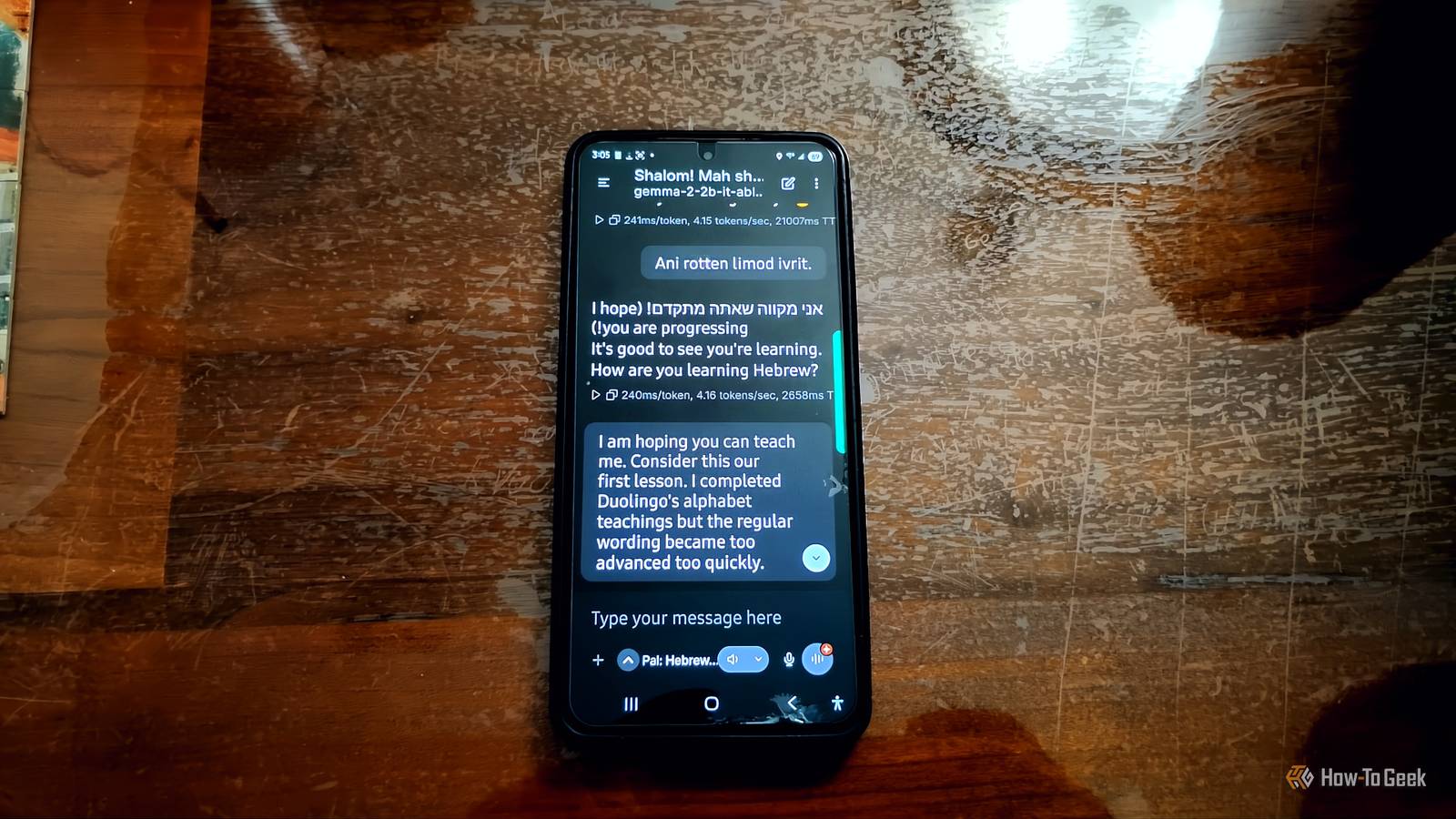
Published Nov 16, 2026, 9:00 AM EST Aggy is a veteran writer and editor in the technology and gaming space. Having served as a Managing Editor for high-traffic digital publications, alongside being an editor and consultant for over a dozen sites. Aggy's published work spans a wide and respected array of tech and gaming outlets, including WePC, Screen Rant, How-To Geek, Android Police, PC Invasion, and Try Hard Guides. Beyond editorial work, Aggy's direct experience in the tech sphere extends to app development. Aggy has published two games under Tales and is always eager to learn and do more. He also likes working on computers and researching in his spare time. He knows about Windows, Linux, Audio, Video, and much more. I wanted a language tutor that didn't need Wi-Fi, a subscription, or a streak counter nagging me every evening. My phone is a few years old, so I assumed I couldn't run any AI models, but I was completely wrong. A free app, a small model, and a couple of settings changes were all I needed to practice Hebrew on a Galaxy S21. You can run an AI on a phone that isn't new A compact model is what makes this work Running an AI chatbot right on your phone means no internet, no monthly fee, and nothing you say leaves your device. I wanted to do this on an older phone, so you know you can do it on yours. I have a Samsung Galaxy S21 with 8GB of RAM, so my goal was to look for a small language model and an app that can run it without cooking my phone. If you bought your phone in the last five or six years, you're probably fine. Surprisingly, there are a lot of choices. I looked at apps like PocketPal AI, ChatterUI, and SmolChat because they can pull this off by using a stripped-down runtime called llama.cpp underneath. They connect the Android app to the AI engine through a small bridge of low-level code. The big trick that makes this work is the way the model file gets pulled into memory. I used to think this wouldn't work because it'd be hard on any machine to load the whole thing into RAM all at once. That's not how it works, though. The system maps the file, so only the pieces you're using get loaded into RAM at any given time. The setup is easier than you'd think You'll need to change a few settings first I liked PocketPal AI the best, so you're going to want to download that. It's free and doesn't need root access or anything unusual, just storage permission. Once it's installed, open it up, and you'll see a home screen with a few models ready to download. Before you do anything else, get on Wi-Fi, because the model file will be a few gigs and you don't want to eat up your mobile data. Next, you'll want to pick a model. Tap the menu, go to the Models section, then choose to download a model from Hugging Face or pick one from the suggested list. I went with the Gemma 2 2B model in the Q4_K_M version, since it's easy to run on a laptop or phone. Once the download finishes, tap Load to bring the model into memory. The first time takes a bit, but it loads faster after that. Before you talk at all, go into the model's settings and bring the context length down to around 2048 tokens. That keeps memory usage in check, so Android doesn't kill the app as it runs. Android shouldn't freeze this app the way it does others, but to be sure, close anything running in the background to free up as much RAM as you can. Go to Pals and make a new pal with a system prompt and give it a good name; mine was 'Hebrew Teacher'. I wrote this with some help from another AI: You are a friendly Hebrew tutor. Have a natural conversation with me in Hebrew. Write every Hebrew sentence in Hebrew letters, then put the English transliteration in parentheses, then the English translation in parentheses. When making my pal the first time, I put the prompt in the description and didn't notice until way later. If you notice your teacher doesn't follow your prompt, double-check where you put it. Press the button under the chat input at the bottom of the screen and pick the pal you just made. Keep every reply under three sentences and use simple, everyday vocabulary. Whenever I make a mistake, correct it gently and explain why in one short English sentence. Ask me one follow-up question every time. My level is beginner. If I write in English, answer in Hebrew and gently encourage me to try again in Hebrew. I'd say to swap Hebrew for whatever language you're learning, and mention your skill level, so the model doesn't talk over your head. I know the alphabet and a few words, so I'm pretty new. Your phone will have limits Short lessons are what will keep it running well Running an AI model nonstop isn't great for your phone, so treat this like a Duolingo lesson, which only lasts a few minutes. The processing is heavy, and after a few minutes of back-and-forth chatting, the phone starts warming up. When that happens, Android automatically throttles the processor to handle heat, which is why it feels quick at first and then slows down. I'd recommend short bursts and separate lessons. Heat is one reason, and memory is the other. The longer the chat runs, the worse it gets. The model has to keep track of everything said so far to answer properly, and that eats RAM. Some models cope better than others, but they all hit a wall. Once you hit that limit, the app starts dropping older parts of the conversation. The model might forget your earlier corrections, repeat itself, or stop acting like a tutor. I start a fresh conversation for each daily lesson. It's all about practicing conversation, so you don't need a tutor that remembers everything about you. If you choose a language that has fewer texts online, you're going to run into problems. It might flag a perfectly normal phrase as an error, misidentify a verb conjugation, or explain a grammar rule in a way that sounds right but isn't. That's because they show up less in the training data. Hebrew is one of them, but it's not at the bottom. It's just not as heavily used as English, Spanish, or French. Swahili, Amharic, Welsh, Irish, and most indigenous languages would struggle even more, and they don't have many apps online either. I like this better than Duolingo, but it depends on you This isn't a real teacher, and Duolingo still has better structure for some languages. I like it better than Duolingo because Duolingo's Hebrew course is terrible, and talking is a better way to learn, anyway. All it takes is a free app and one download, and you'll know in a single afternoon whether it works for you. If you're already doing short daily sessions, it's worth the few minutes it takes to set up. PocketPal AI Chromebook support Yes Inapp purchases No ChromeOS support Yes App Publisher PocketPal AI Team PocketPal AI is a free, open-source app that runs LLMs on your phone without needing an internet connection, cloud servers, or a subscription. Controller Support No Developer PocketPal AI Team Offline downloads Yes
I just replaced Duolingo with a local LLM that took two minutes to set up on my Android phone
Full Article
Original Source
Read the full article at Howtogeek →KhanList aggregates and links to publicly available news content. We do not host full articles from third-party sources. Always verify important information with original sources.