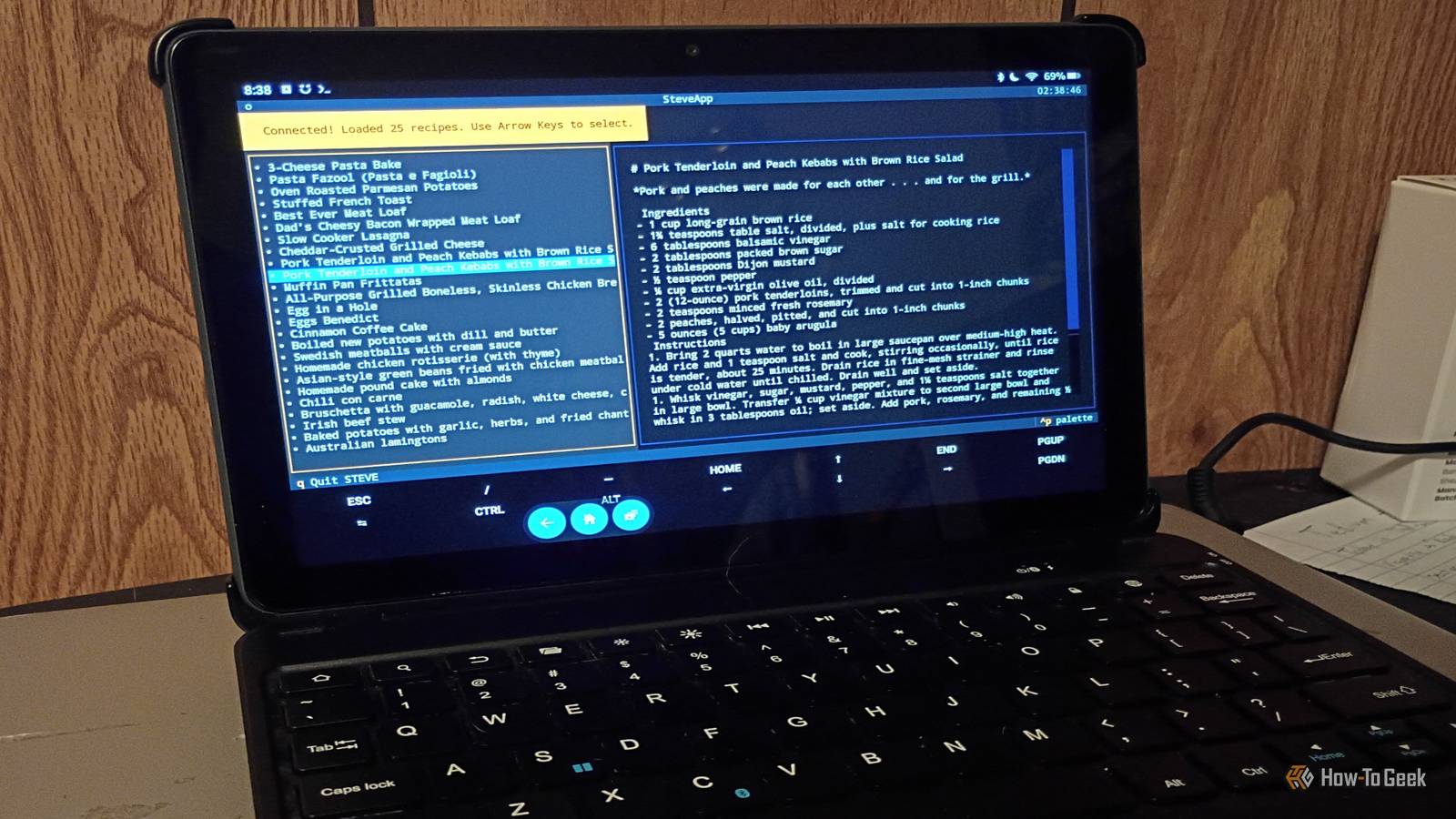
Published Aug 13, 2026, 2:30 PM EDT Former radio and TV guy (I Heart Radio and PBS). Now a writer, researcher, and musician who writes about the absurdity of our modern world and other offbeat topics. Specializes in weird music, the old web, retro video games and tech, and researching strange, yet interesting things. His work has appeared in Vice, Tedium, Star Trek.com, Today I Found Out, Typebar, SyFy Wire, and How To Geek. Currently working on a variety of music, web, and writing projects. Visit him on the web at https://djbuckfreelance.neocities.org/. Finding recipes online can be a hassle at best. I don't like outsourcing stuff like that to an LLM and I absolutely don't want someone's life story before getting a recipe. So I tried making a recipe terminal with a modded Fire Tablet, some Python, and my good friend Docker. Making a dedicated recipe terminal is a great home lab project for an old device My wife is a great cook, but needs help with finding recipes Credit: David J. Buck / How-To Geek The idea behind this project was to create an internet-connected recipe terminal that she could use to organize and look up new recipes. She's a great cook and has a tablet she no longer uses, so I thought it would be a nice gift. There are plenty of recipes she likes that are fully available online, and she has a few cookbooks, but I thought it would be nice and simple to have something a little more interactive. There are a few ways to do this: Start by modding the device; I would prefer to use my old Kindle HD7, but if that doesn't work, I'll have a backup device. Use a locally hosted LLM and a script to make it behave like a terminal you can talk to. Use a combination of Docker, online resources, and Python to make the terminal. I chose the latter option for this project. I originally wanted to use a Kindle Fire HD7 for this, but I couldn't get it to cooperate, even with a Fastboot cable. So I begrudgingly wrote it off as a lost cause. But I had a backup plan: installing Linux and using a mix of Docker and Python on a different modded Fire Tablet (a model from 2021). I had a lot more luck this time. A Docker application, Python, and a website were all I needed It was finally time to assemble all the ingredients To get this to work on the Fire Tablet, I had to install Linux (which I'll be talking about in an upcoming article). Then I installed the Textual Development Framework for Python and Docker Desktop on an always-on Windows PC. The only reason I did that instead of running Docker on my Linux Box is because the Windows PC is my wife's laptop and since she'll be using the device, it made perfect sense to go that route. To make this as simple as possible, I went with a basic setup: creating the backend Docker, then using Textual to create my interface and using the Mealie API to grab database info for the recipes themselves. I used Mealie on my local network (info for setting up your YML file can be found on GitHub). Mealie is great because you can import recipes from a URL or just input your own. I added a few of my wife's recipes and grabbed some of my favorites from the open-source recipe database Open Stove. I generated an API token via Mealie to add to my terminal script and then added some recipes manually to test functionality. For my script, it made sense to use Python Requests, which are a tool to send HTTP requests/work with web resources and Textual (for building user interfaces). I installed Textual and its components on the Linux OS within my tablet. I just built a very basic interface following their tutorial and named it STEVE, after her old boss (he also happens to be a good friend of mine, who helped answer some of my Python questions; I had plenty). Now it's time to check out some recipes Testing the full terminal functionality With all the pieces in place, it was time to run the big test. I ran this on Linux on top of Fire OS, so I had to create a virtual environment (venv) and I run it with the command ./.venv/bin/python steve.py. I also keep my Wi-Fi settings on Private when I connect to other devices like this. The interface works well. It's simple: you select a recipe in one pane and it displays in the other. Every time I add a new recipe (usually multiple recipes at a time) to Mealie, it'll update when I relaunch STEVE. In the near future, I'm going to learn how to write a recipe scraper and add it to the program. I was having a lot of fun experimenting with creating the interface in Textual, but outside the time spent playing with it and setting up recipes in Mealie, the project didn't take long at all (maybe three hours). A good start to a recipe terminal The future of this project requires some work and maintenance, but it'll be worth it. I learned a lot throughout this process and have even more ideas for future projects. I got to learn more Python and use tools like Textual, while my wife gets to enjoy a recipe terminal made from a device we were originally going to recycle. It's a win-win situation and just one of the many wonderful aspects of working in a home lab. Getting to eat the meals we make is just a bonus.
I installed Linux on a tablet nobody wanted and turned it into a dedicated recipe terminal
Full Article
Original Source
Read the full article at Howtogeek →KhanList aggregates and links to publicly available news content. We do not host full articles from third-party sources. Always verify important information with original sources.