
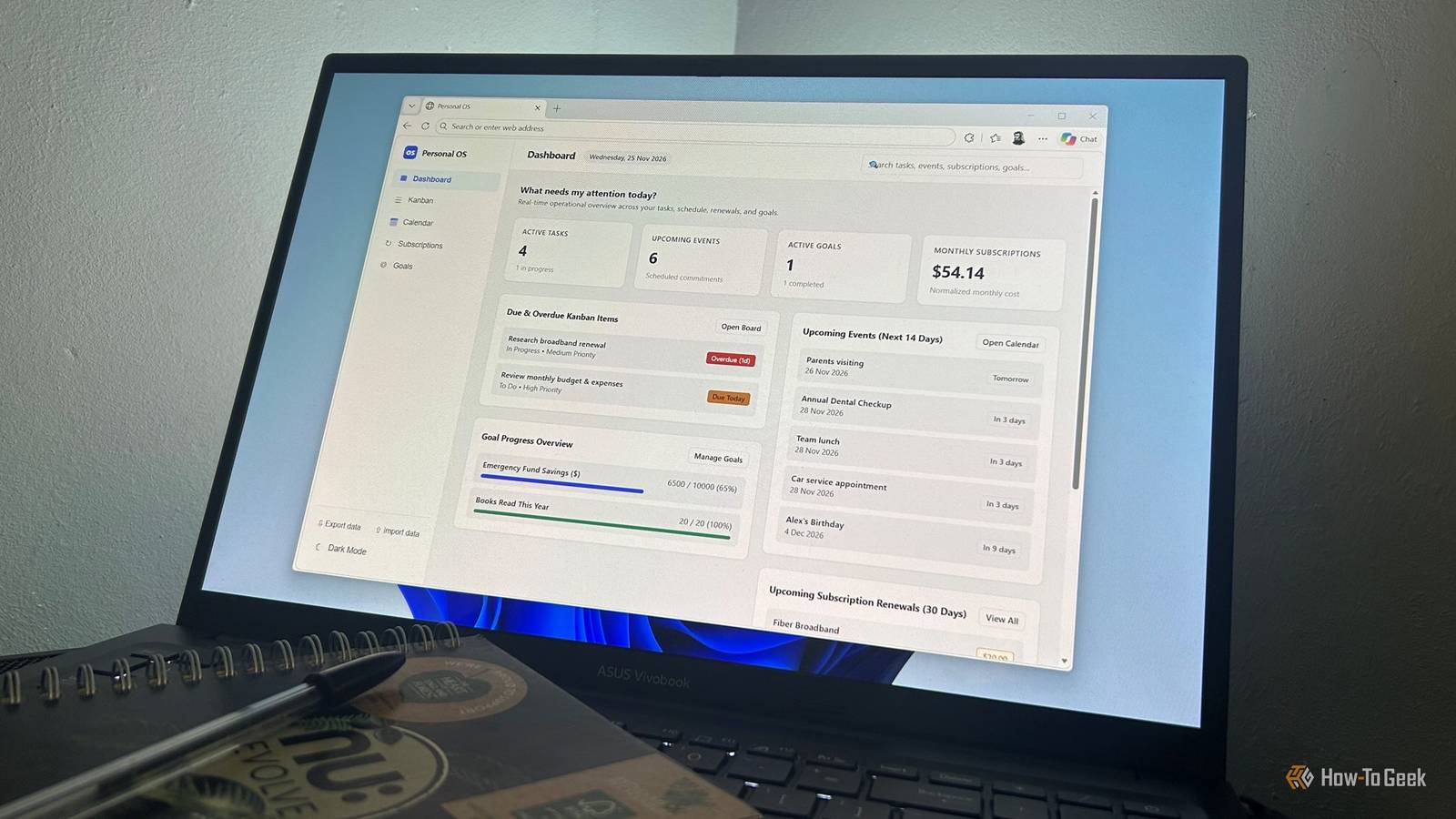
Published Nov 25, 2026, 1:30 PM EST Tony Phillips is a senior author at How-To Geek with over a decade of experience working with documents, data, and digital productivity tools. Holding a dual-honors degree in Linguistics and Hispanic Studies, he combines technical expertise with a passion for making complex topics easy to understand. Before joining How-To Geek in 2024, Tony worked as a document producer, data manager, legal document specialist, and content creator. He has also proofread and edited more than 3 million words of academic and professional writing. While Tony specializes in Microsoft 365, particularly Excel, his interests extend far beyond Office. He enjoys testing software, exploring open-source projects, discovering useful companion apps, and finding ways to customize and optimize Windows. Whether he's building spreadsheets, evaluating new tools, or uncovering hidden features, Tony enjoys helping readers get more from their technology. Outside of tech, he enjoys spending time with his dog, watching football, astrophotography, gardening, and golf. I was getting fed up with opening three or four different apps just to figure out what I needed to do that day. My tasks were in one place, appointments in another, subscriptions somewhere else, and longer-term goals had their own home, too. I liked the individual apps well enough, but keeping everything in order was starting to feel like a job in itself. So I decided to try something different. Rather than searching for yet another productivity app, I used AI to build one tailored to the way I actually organize my life. I expected the difficult part to be creating the software. Instead, the real challenge turned out to be deciding what deserved a place in it. I've included the refined prompt I'd use if I were starting from scratch today at the bottom of this article. Feel free to copy it, modify it, and tailor it to your own workflow. Your result will differ slightly from mine, so treat the output as a starting point and ask for tweaks. I started with an offline HTML file The simplest possible approach I wasn't interested in building a full web app. The whole point was to make life simpler, not create another project that needed maintaining, so I settled on a single HTML file that runs entirely in a browser. There was no hosting to configure, no database to set up, and no account system to manage. Save the file, open it in a browser, and the dashboard works, storing its data locally. Because that data lives in the browser rather than in the file itself, I later added export and import buttons so I can back everything up and restore it if needed. To get things moving, I started with Copilot. I'd previously used Copilot to build a custom Kanban board and knew it could turn an idea into something functional very quickly. My goal was simply to create a prototype I could live with and learn from. The first version certainly looked ambitious. It included a dashboard, tasks, a Kanban board, a calendar, purchases and subscriptions, household organization, notes, and goals. Looking at the sidebar, it felt like I'd successfully combined several productivity apps into one. My first version tried to do too much More features created more overlap The problems only became obvious once I started using the app. In theory, the tasks and Kanban sections served different purposes. In practice, I kept gravitating toward the Kanban board because it gave me more context. A task wasn't just something on a list. It had a status, a due date, notes, and a clear place in my workflow. Before long, I was managing almost everything there anyway. The same thing happened with the household section. Jobs like cleaning the garage, organizing storage, or handling routine life admin didn't feel fundamentally different from any other task. They naturally migrated to the Kanban board as well. I had two separate sections doing essentially the same job. The notes page had the opposite problem. I added it because productivity apps tend to have a notes section, yet I rarely opened it. Whenever I needed to capture information, I found myself using the tools I already trusted. The purchases and subscriptions section looked useful at first, but real life quickly exposed the difference between them. Tracking recurring subscriptions made sense because they represented ongoing commitments. Entering every individual purchase by hand felt like admin for admin's sake. The habit never formed. Even the dashboard needed rethinking. The original version largely reported numbers. It could tell me how many tasks I had, how many events were coming up, and how many goals I was tracking. The information was accurate, but accuracy alone didn't make it useful. Starting over gave me a better result Every section had to earn its place Once I'd spent enough time with the prototype, I moved on to thinking about what the app actually needed to do, not just what it could do. The first version had served its purpose. Copilot helped me turn a vague idea into something tangible, and using that prototype exposed weaknesses I never would have spotted on paper. By then, I had a much clearer picture of what I wanted. For the next phase, I switched to Gemini. I'd also had good results using it for similar projects, so I gave it a fresh brief rather than keep refining an increasingly complicated prototype. The second version ended up being much smaller. The finished app contained just five sections: Kanban, which absorbed the tasks and household sections because all my actionable items naturally ended up there anyway. Calendar, for appointments, birthdays, reminders, and other date-based commitments that didn't belong on a task board. Subscriptions, which survived because recurring commitments were genuinely useful to track, while one-off purchases weren't worth the effort. Goals, which gave longer-term objectives a home separate from day-to-day tasks. Dashboard, which evolved from a page full of statistics into a hub that showed what needed my attention. Instead of telling me I had five subscriptions or four upcoming events, the new dashboard highlighted overdue tasks, approaching subscription renewals, and upcoming appointments. The information was the same, but it was much easier to act on. Building it changed how I think about productivity apps The best version was the smaller one Building the app forced me to think more carefully about my habits. I went into the project assuming I knew exactly how I organized my life. The first version showed me that several of those distinctions only existed because different apps had trained me to organize information in different places. Once I started building my own system, those boundaries became difficult to justify. I'd always treated tasks, household jobs, reminders, and general life admin as separate categories because that's how my existing software treated them. Looking at everything from scratch made me realize I needed fewer categories. That changed how I think about productivity software more generally. At the start, I assumed the ideal system would be the one with the broadest feature set. Actually using the app challenged that assumption: the biggest improvements came from removing things. Every time I cut a feature that wasn't earning its place, the remaining parts became easier to understand and more enjoyable to use. My dashboard improved whenever I simplified it. Removing overlap made navigation clearer, reduced friction, and made it easier to focus on what mattered. A productivity app designed for one person After several rounds of testing and rebuilding, I ended up with something much smaller than I originally planned. It won't replace every productivity app available today, but it does replace the collection of tools I found myself bouncing between every day. A few years ago, creating software for such a specific use case wouldn't have felt realistic to me. AI made that kind of custom software accessible to me. Refined prompt Create a single self-contained HTML file for a personal productivity dashboard that runs entirely offline. Requirements 1. Include all HTML, CSS, and JavaScript in that single file. 2. Do not use external libraries, frameworks, CDNs, or internet resources. 3. The dashboard must work by simply saving the file as a .html file and opening it in a browser. 4. All data must be stored locally using localStorage. 5. The design should feel like a polished desktop productivity application rather than a webpage. 6. Prioritize usability and simplicity over feature count. Concept This application should function as a personal operating system rather than a collection of separate productivity tools. Every section should have a clear purpose and avoid overlap with other sections. The application should contain only: - Dashboard - Kanban - Calendar - Subscriptions - Goals Dashboard Purpose: Answer the question: "What needs my attention today?" Include: - Active task count - Upcoming events count - Active goals count - Monthly subscription cost Also include: - Due and overdue Kanban items - Upcoming events - Upcoming subscription renewals - Goal progress overview - Kanban summary Counts are fine as a quick glance, but the focus should be on actionable items rather than statistics. Kanban Purpose: Manage all actionable items. This section should replace a traditional task list and household task section. Include three columns: - To Do - In Progress - Done Each card must support: - Title - Notes - Priority (Low, Medium, High) - Due date Features: - Create cards - Edit cards - Delete cards - Drag and drop between columns Editing must allow modification of ALL card fields, not just the title. Visual indicators: - High priority highlighted clearly - Medium priority highlighted clearly - Low priority highlighted clearly Due date indicators: - Overdue - Due today - Upcoming Calendar Purpose: Store date-based commitments, not tasks. Examples: - Appointments - Birthdays - Events - Holidays Do not use this section for action items. Each event should support: - Title - Date - Notes Features: - Create - Edit - Delete Display events chronologically. A simple month-view calendar is preferred if practical. Subscriptions Purpose: Track recurring commitments. Do not include purchase tracking. Each subscription should support: - Name - Cost - Category - Start date - Frequency - Optional end date - Optional notes Categories: - Entertainment - Music - Video Streaming - Gaming - News & Publications - Productivity - Cloud Storage - Utilities - Fitness & Health - Shopping - Finance - Other Frequencies: - Weekly - Monthly - Quarterly - Yearly Features: - Create - Edit - Delete Calculate renewal dates automatically from frequency and start date. Highlight subscriptions renewing within the next 30 days. Goals Purpose: Track measurable progress toward long-term objectives. Each goal should support: - Title - Target value - Current progress - Optional deadline Features: - Create - Edit - Delete Display: - Progress bar - Current progress - Target value - Remaining amount Provide quick controls to update progress without opening the edit screen. Highlight completed goals. Search Include a global search box that searches across: - Kanban titles and notes - Calendar titles and notes - Subscription names, categories, and notes - Goal titles Search results should clearly indicate which section a result belongs to. General Features 1. Dark mode and light mode with a toggle. 2. Confirmation before deletion. 3. Clear navigation between sections. 4. Responsive layout optimized primarily for desktop use. 5. Fully working localStorage persistence. 6. No placeholder features or unfinished functionality. Backup Include a small, unobtrusive settings area (or footer) with two buttons: 1. "Export data": downloads all stored data (Kanban cards, calendar events, subscriptions, goals, and settings such as theme) as a single JSON file with today's date in the filename. 2. "Import data": restores from a previously exported file. Include an app identifier and version in the exported file. Before importing, validate that the file matches this format. If it doesn't, show a clear error and leave existing data unchanged. If it does, ask for confirmation before replacing existing data. Code Quality 1. Clean and maintainable code. 2. Organize code logically. 3. Add comments where useful. 4. Everything must work immediately without additional setup. 5. Avoid unnecessary complexity. Return only the complete HTML code inside a single code block.
I got tired of switching productivity apps, so I built one myself
Full Article
Original Source
Read the full article at Howtogeek →KhanList aggregates and links to publicly available news content. We do not host full articles from third-party sources. Always verify important information with original sources.