
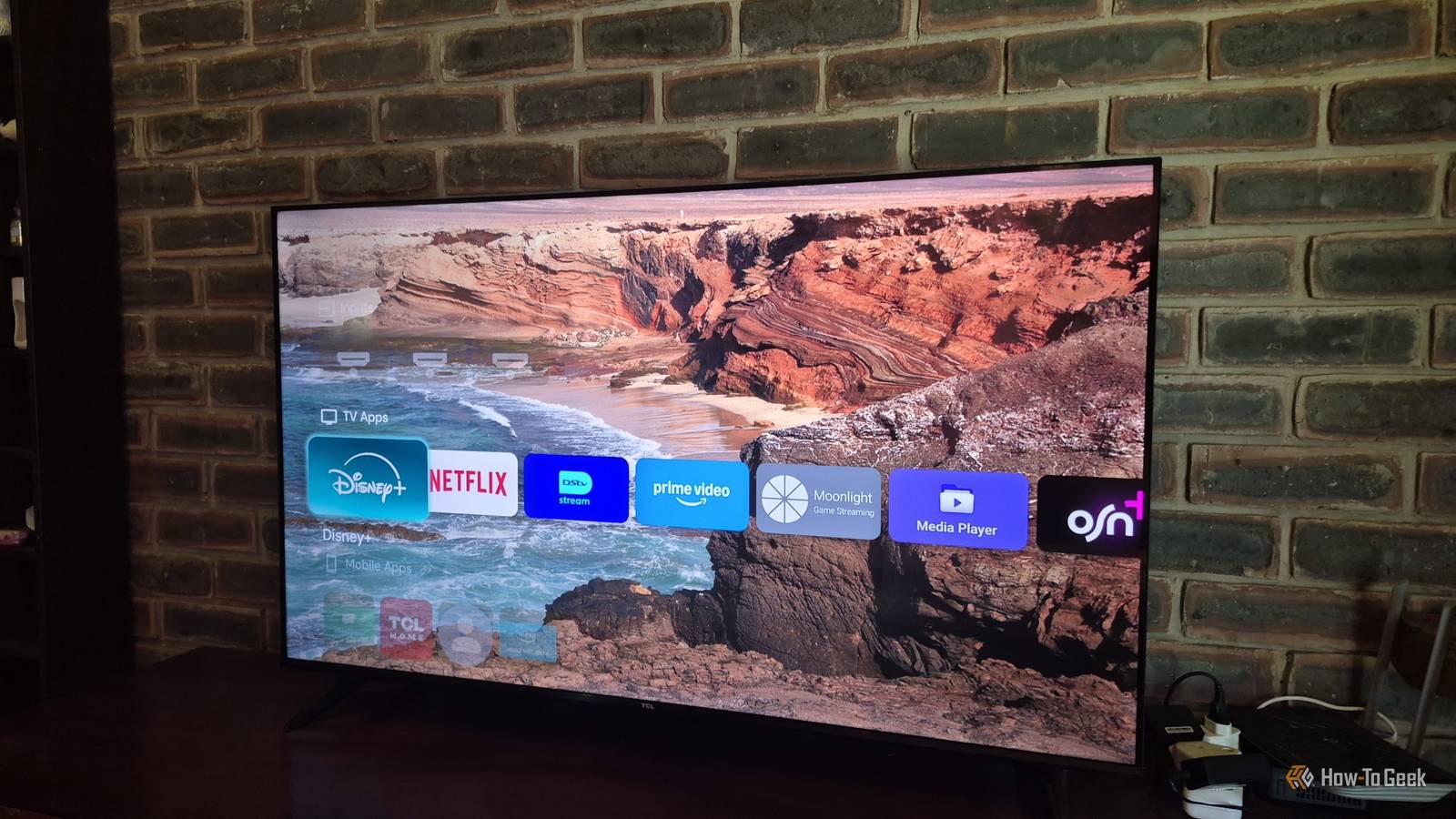
Published Nov 28, 2026, 2:00 PM EST Tyler is an journalist and content contributor at How-To Geek with over three years of experience covering the automotive and tech industries. His work focuses on delivering clear, well-researched, and engaging content that helps readers better understand the vehicles they drive and the technology that they use everyday. Before entering automotive media, he spent five years as an academic editor, developing a strong foundation in research methodology, factual accuracy, and structured analysis. This background informs his journalistic approach today, ensuring that every article balances technical insight with accessibility for a broad audience. Whether your TV runs natively on Google's platform or you make use of a Google TV-based streaming stick or box, you've likely realized how poor the home screen experience is. Beyond the interface being quite unresponsive on budget-oriented devices, it isn't nice to look at, and it's plagued by tons of sponsored content. Replacing the default launcher with something cleaner and more appealing isn't as difficult as you would think. By simply installing an app from the Google Play Store, I managed to clean up my home screen, reducing clutter and removing any and all advertisements. I installed a launcher that cleaned up my Google TV's layout A smooth and simple alternative The default interface on my Google TV had been bothering me for some time. While it isn't outright horrible, it features some annoying little elements that have slowly grated on me, eventually prompting me to look for an alternative. Essentially, you get a row of recommended shows followed by a row of the apps you have installed, then a row of recommendations based on services you're signed in to, with the last row allowing you to continue the shows and movies you already started watching. It is the first row that bothers me the most, with it mostly being sponsored content and it usually being things that I have no interest in watching. Despite the supposed leaps in technology made over the last couple of years, I find that algorithms are still abysmally bad at recommending content most of the time. There are a couple of other issues I have with the default launcher. My TCL TV isn't the latest or the greatest model, and so scrolling through the home page can often feel laggy. No matter how you organize it, the home screen also always feels cluttered and unappealing to look at. The most obvious solution was to find an alternative launcher. Projectivy Launcher made my TV much nicer to look at Very easy to install Projectivy Launcher is a sleek alternative to the default launcher on your Google TV. It's available directly from the Google Play Store, meaning that there is no sideloading required. It is a freemium app, with its most desirable core features being available for free, but some expanded controls require a one-time purchase of $7.49. Once installed, it immediately offered a much more appealing home screen layout. It isn't too removed from the default Google TV experience that it feels alien, but it cleans things up, organizing them into more intuitive rows. Even better is the fact that the home screen with Projectivy Launcher is completely ad-free, meaning the sponsored and promotional rows are completely removed. Even though it is more feature-heavy than the default Google TV home screen, it also feels a lot smoother. After using it for some time, I've found it much less laggy. Projectivy also allows you to override the default launcher. Once you enable its accessibility settings and turn on the override toggle in the settings, your home button on your remote should open the app directly. Some manufacturers are more strict in terms of locking down the home button, but you can get around it by installing a button remapping app. It offers quite a lot of customization as well Build your home screen how you want it Without having to fork out any money for the premium version, you get multiple features with the Projectivy launcher. It gives you quite a lot of control over the customization of your home screen. With the launcher, you can group apps into custom categories/rows, adjust icon sizes, and alter the spacing between each app. You can also tweak the color of icons and hide the icons of any apps that you don't use to help clean up your home screen. When you purchase the premium version, you do get a couple of extra features. Mostly, you get the ability to customize the wallpaper in the background. You can also make use of custom images or icon packs for apps. Premium also offers some expanded parental controls, though I do take issue with the fact that these features aren't offered with the free version of the app. If you are looking to take the customization of your Google TV's home screen a step further, then premium does make sense. There are even some plug-ins that you can install directly from the Play Store, allowing you to customize just about every aspect of the launcher. However, I have mainly stuck to the out-the-box experience. Projectivy is much better than the default Google TV home page I've stuck with the free version of Projectivy because I feel like it offers all the features that I was looking for. It has gotten rid of sponsored content and cleaned up my home screen, and it runs a lot smoother than the default home screen on my Google TV. I actually didn't realize how poor the default experience was until I started using Projectivy, and I won't be going back any time soon.
I got rid of the ads and clutter on my Google TV with one free app
Full Article
Original Source
Read the full article at Howtogeek →KhanList aggregates and links to publicly available news content. We do not host full articles from third-party sources. Always verify important information with original sources.