
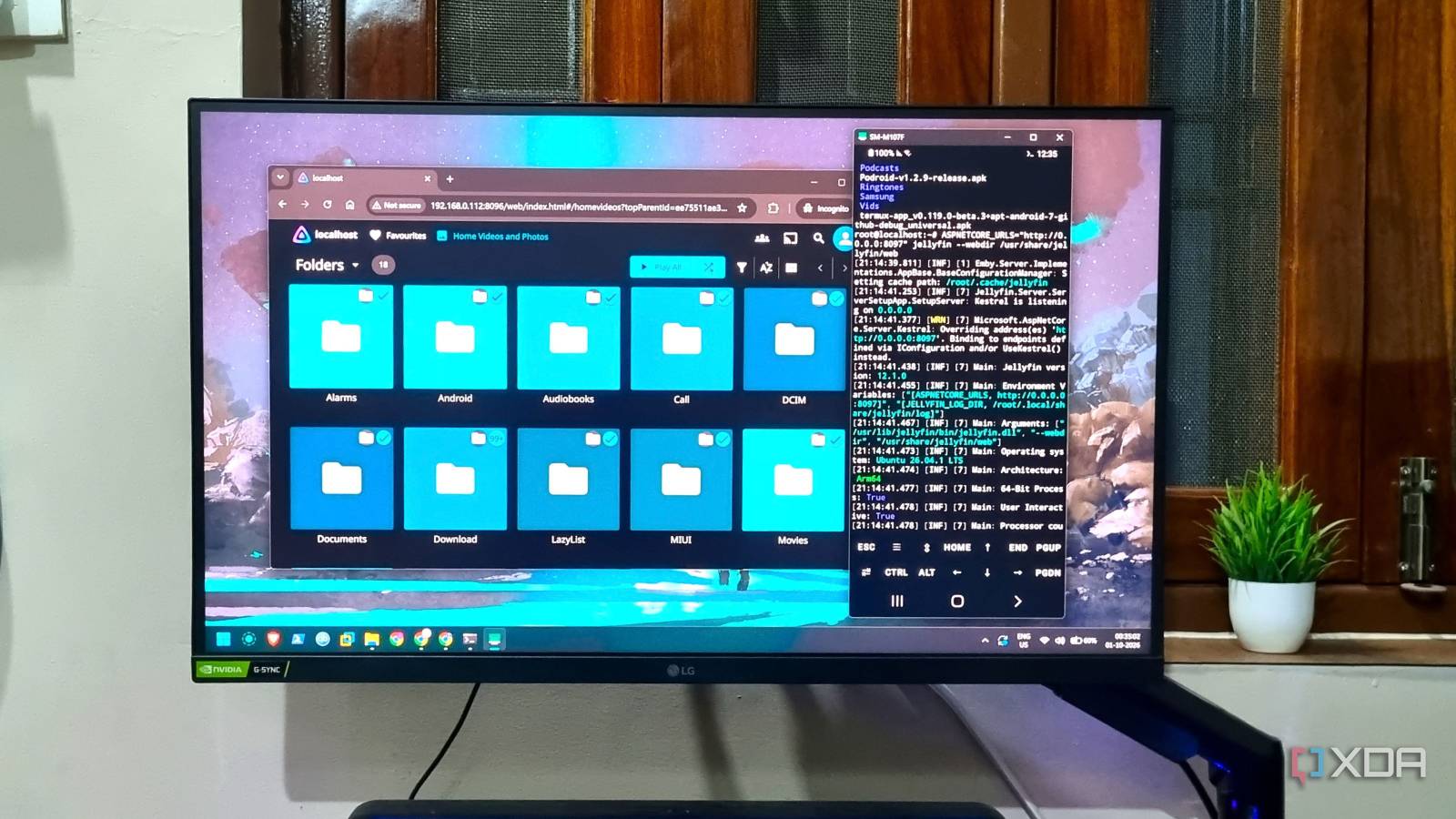
Published Oct 2, 2026, 1:30 PM EDT Abhishek is an author at XDA who covers computing. He has loved computers since he got the Lenovo G570 in 2012. Abhishek holds a master's degree in computer applications and began his writing career in 2018. He loves writing how-to articles, listicles, and informational posts on popular operating systems and web services. He closely follows the Windows Insider program and tests new Insider builds to discover upcoming experimental features and upgrades. His past work includes long-term collaborations with reputed publications like Tom's Hardware, and Windows Latest. When not writing anything, he is busy watching new episodes of One Piece or searching for something binge-worthy. Old phones are among the most ignored devices in my household. Their processor or battery becomes too weak for daily tasks, and some apps stop supporting the old Android versions. Or, family members upgrade to a better version. Whatever the reason is, a slightly weak but still functioning device is out of commission. Since I've already experimented with small home server projects, repurposing old phones was my next goal. I had an old Samsung Galaxy phone lying around, and I wasn’t eager for the Samsung Upcycle program to turn it into e-waste. Rooting the phone has its perks, but I didn't want to risk ruining a working phone. I experimented with a few apps, deployed a Jellyfin container, and even did package installs. Finally, the server was up and running, but it was one of the most frustrating projects I've ever done. Building a server from an old phone Multiple approaches As I mentioned above, there are multiple ways you can approach a project like this. You can root your phone to wipe the Android operating system and then install something like Debian on it. After that, you can install Jellyfin, map the correct ports, and then host the tool. This option gives you the maximum resources because you don't need to run an emulated OS inside Android. The non-root option requires an application like Termux or Podroid to create an isolated space. Termux provides a Linux-like userspace, while Podroid supplies you with all the tools and has preconfigured Docker and other container management systems. You can even run a lightweight installation of Ubuntu inside Termux with PRoot, and then install tools there. This option is safer, doesn't increase your chances of bricking a working phone, and is more convenient. However, there is a significant performance drop when using tools like Termux or Podroid for demanding setups like a media server. The latter uses a form of virtualization, and that's great for resource control and a few other things. But it's certainly not suitable for very old or weak smartphones. Podroid was my first pick But it turned out to be a menace I've built a phone server with Podroid that hosts OmniTools and BentoPDF. Both of them are set up as Docker containers, and Podroid includes the Docker system by default. I thought it would be the same easy method, and spinning up a container doesn't take much time. But it was the least of my problems because running Jellyfin as a container invited multiple problems. I had to factor in bind mounts, assign ports, and handle a few other aspects of networking, which felt infuriating. Initially, the container would deploy without a problem, but would fail health checks and stop automatically. I stopped the health checks by modifying the commands, and then a new problem arose. The tool needed port forwarding, so I had to use ADB to implement that. Jellyfin’s web interface launched after that, and I even tried to do the initial configuration. But it was very slow and unresponsive. The next idea was to install the Jellyfin package directly and avoid Docker altogether. Sadly, this route turned out to be more problematic. The API would load and get stuck at migration, making me wait for 30 minutes or more to launch the page. I ditched this setup for Termux, and it made the whole media server project possible. Termux was pretty straightforward, and I first set up an Ubuntu system using PRoot. Then, I installed all the necessary components, added the necessary repositories, and installed Jellyfin inside this system. There was some additional effort to map the ports and allow the server to access the phone storage contents. Finally, it was ready to serve content over port 8096. Fit for basic streaming demands After the web portal launched, I quickly configured the server and did a few tweaks to allow it to access the phone storage. I created a new library and then set it up for both photo and video content. My old phone has a lot of photos, videos, and some old anime, and it's a perfect concoction for local streaming. I can use it to reminisce about old days, view a slideshow of thousands of images, or play anime or other downloaded media on it. I tested the video files present on it, and 1080p streaming didn't crash the server. Videos played smoothly, and even 1.5x and 2x playback didn't overload the server. But accessing local storage is only one aspect of a media server. I can use SMB to fetch video files from another network storage. I could also use a USB hard drive, but the phone has only one USB port, which becomes a challenge for any other task. You might need ADB for troubleshooting, and you will have to use the phone in plugged-in mode. So, the single USB port becomes a challenge that only network accessible storage can solve. However, the hardware has its limits, and the setup cannot handle demanding transcoding workloads. Jellyfin has to rely on the limited CPU cores for everything, and it's suitable for basic direct playback. Rooted devices can perform slightly better, but they carry a huge risk. Repurposing your phone I never paid attention to the media server aspect of a smartphone. It was difficult to get the project working on a non-rooted phone, but I eventually found success. The overall performance isn’t close to a mini-PC and more like a medium-grade SBC, at least on my phone. I’m happy that the server doesn’t crash like it did when I tried running Jellyfin on a Raspberry Pi Zero 2 W. However, your phone has to be in plugged-in mode if you want 24/7 availability, and unless it's very old, it probably has overcharge protection built in. Connecting physical storage is also not possible, but you can use a large-capacity SD card if your phone has a slot. Termux Termux is a terminal emulator app for Android OS.
I gave up on Samsung's Upcycle program and turned my old Galaxy phone into a Jellyfin media server
Full Article
Original Source
Read the full article at Xda-developers →KhanList aggregates and links to publicly available news content. We do not host full articles from third-party sources. Always verify important information with original sources.