
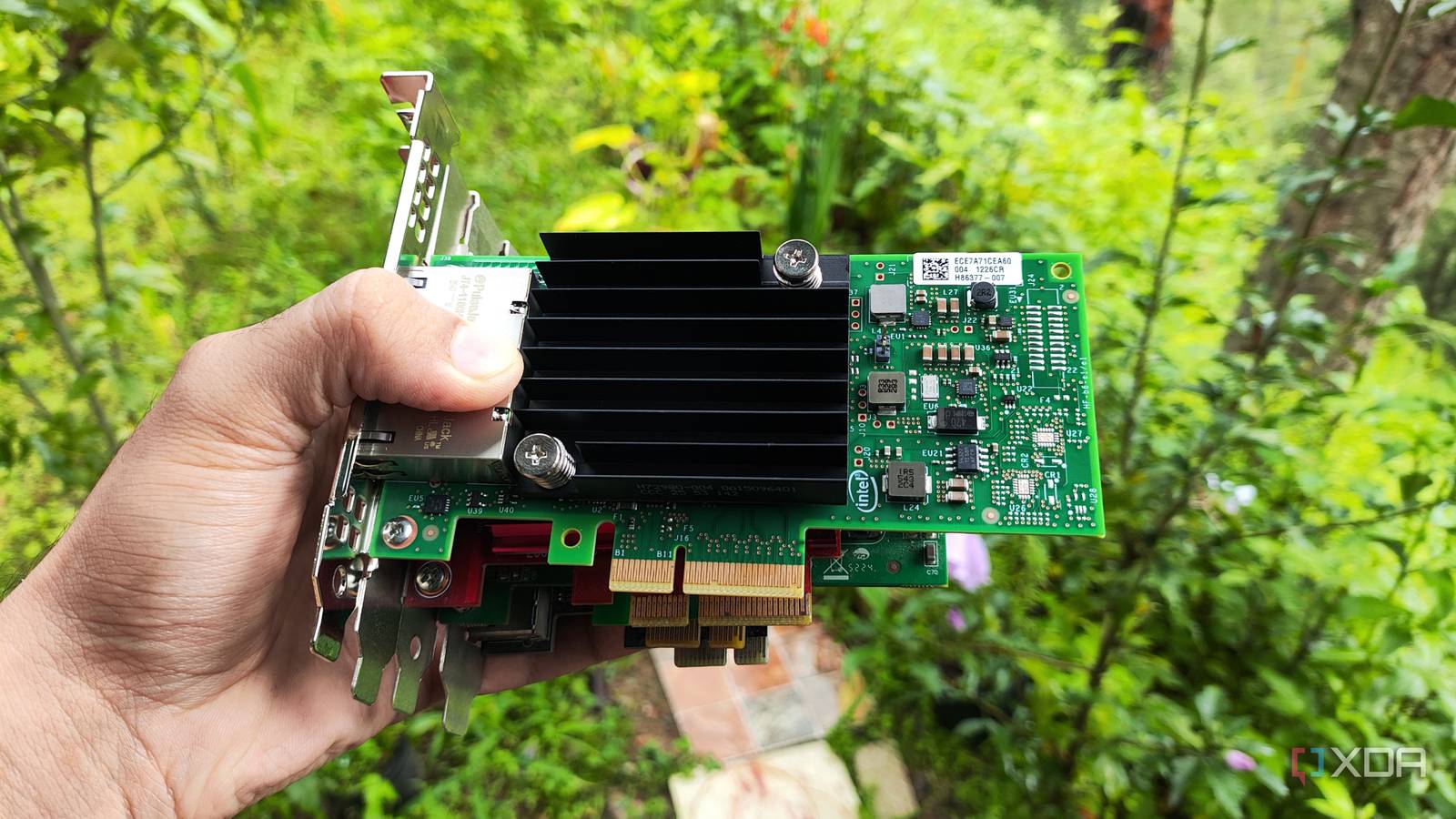
Published Oct 30, 2026, 12:01 PM EDT Ayush Pande is a PC hardware and gaming writer. When he's not working on a new article, you can find him with his head stuck inside a PC or tinkering with a server operating system. Besides computing, his interests include spending hours in long RPGs, yelling at his friends in co-op games, and practicing guitar. Ripping out Windows and replacing it with a lightweight Linux flavor is one of the most common ways to repurpose old but perfectly usable PCs. That said, the Linux distribution in question doesn’t have to be a general-purpose OS laden with UI elements and typical productivity apps. Compared to pre-built Network-Attached Systems and their embedded processors, old tower PCs bearing components from the last 4-5 years tend to pack plenty of firepower – and I say that as someone already using outdated gaming PCs to run ZFS pools within TrueNAS. In fact, I’d go so far as to say that I prefer recycling typical ATX systems into makeshift NAS servers, as their extra PCIe slots let me arm them with a bunch of cool devices. The first-gen Ryzen PC that I currently use for experimental NAS projects is a great example, as two cheap PCIe cards were all it needed to stand its ground against expensive pre-built servers. A 10GbE NIC handles my high-speed NVMe pools It also adds failover provisions to my setup When you turn budget-friendly gaming systems into DIY NAS units, you may realize that the 1G Ethernet is a huge bottleneck even for standard HDDs – and that’s precisely what happened when I tried using my freshly-configured TrueNAS PC as is. After all, a 1 gigabit connection has a max transfer limit of 125 MB/s, and once you consider the slight decrease in the speeds due to real-world network overheads, it’s a bit slow for recurring backup tasks. I’ve got a bunch of cheap refurbished HDDs from flea market servers, and even the slower ones among them can hit at least 150 MB/s. With the right caching tools and RAID pools, the speed bottleneck becomes even larger. Now, you could call me out for going straight for 10GbE cards instead of setting on an affordable 2.5 gigabit connection, but I also have some SSD pools that I use as iSCSI targets for my video-editing and (as wild as may sound) single-player gaming needs. Not to mention, 10G setups are a lot more affordable than they used to be. I initially grabbed a few models of TP Link’s TX401 NIC for a few systems in my arsenal, and barring one instance where I couldn’t get an OPNsense machine to detect their drivers, they’ve served my home lab nodes surprisingly well. Heck, I’d go so far as to say that I’d still be using one of these “inferior” network cards in my NAS had I not salvaged a dual-10GbE X550-T2 card. Between its solid thermals and failover provisions, it serves my NAS nicely, while the TX401 NICs on my gaming PC and Proxmox nodes let my workstations communicate over 10GbE channels. The only expensive part of this setup was the 10 gigabit switch, but since I already had one, my NICs were a cheap investment. And then there’s the other PCIe card I use with my DIY storage hub … A dedicated HBA lets me toss multiple spare drives into my makeshift server This includes cheap, low-capacity SAS drives Compared to typical 4-bay NAS units, the ATX motherboard in my old PC has six SATA ports alongside two NVMe slots, which alone is a win on the storage capacity front. But even with this many SATA slots, I’ve still got leftover refurbished HDDs that I bought for cheap from flea markets over the years. So, you can imagine how enthusiastic I was after getting my hands on an LSI 9400-16i HBA card. After all, this card single-handedly expanded my mobo’s drive capacity to 16 additional HDDs – and I’m not just talking about conventional SATA drives, either. Since it also supports SAS drives, I can finally start using cheap yet low-capacity SAS HDDs for my data archival tasks. Plus, this card typically retails for $100ish on flea markets, making it a solid companion for DIY NAS setups such as mine. I’m not very fond of relying on hardware RAID provisions, as I’ve heard enough horror stories from folks who ended up losing TBs of data because their server-tier RAID controller died and they couldn’t find identical replacements. So, this IT-only HBA meshes really well with the software RAID setup I’ve configured for a couple of drives on TrueNAS. And although I doubt I’d ever need to expand beyond a 16-drive setup for my storage hub, there’s always the option to toss more HDDs and SSDs with my LSI 9400-16i HBA card once I factor some backplanes into the equation. But they aren’t the only PCIe devices I use with my home lab nodes Aside from my NICs and the HBA in my NAS, I’ve armed my virtualization servers with different PCIe cards. For example, my GTX 1080 is now responsible for hosting a bunch of models (including the bulky Gemma-4-26B-A4B via MoE offloading), and it’s all thanks to the LXC passthrough provisions on Proxmox. Likewise, I’ve also tossed a spare PCIe-to-USB expansion card into one of my bulky Xeon nodes, as it lets me add even more I/O devices to the host (and my virtual guests, via USB passthrough).
I gave my old PC two cheap PCIe cards, and it became more powerful than high-end pre-built NAS units
Full Article
Original Source
Read the full article at Xda-developers →KhanList aggregates and links to publicly available news content. We do not host full articles from third-party sources. Always verify important information with original sources.