
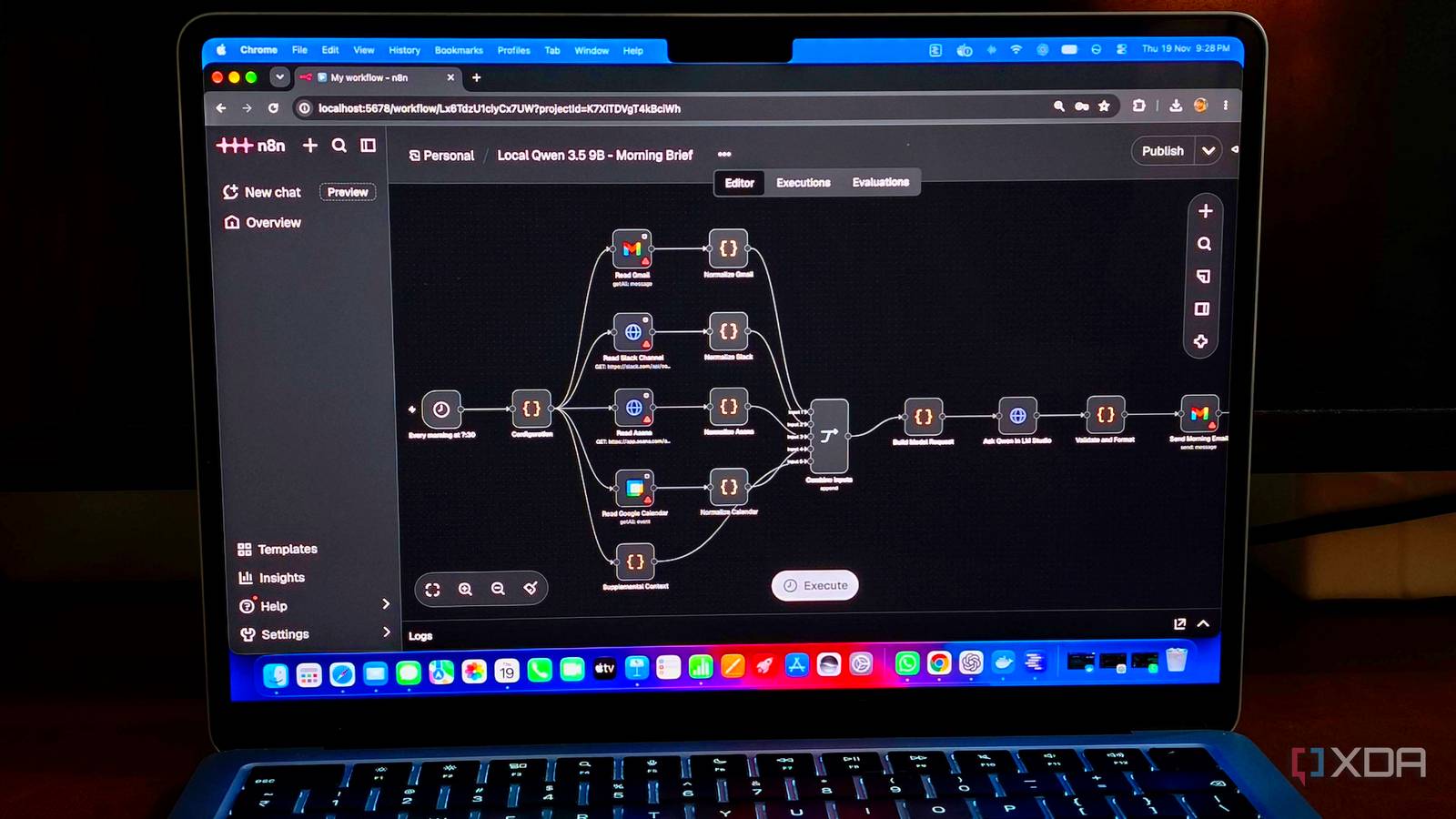
Published Nov 20, 2026, 7:30 AM EST Anurag is an experienced journalist and author who’s been covering tech for the past 5 years, with a focus on Windows, Android, and Apple. He’s written for sites like Android Police, Neowin, Dexerto, and MakeTechEasier. Anurag’s always pumped about tech and loves getting his hands on the latest gadgets. When he's not procrastinating, you’ll probably find him catching the newest movies in theaters or scrolling through Twitter from his bed. I've spent an embarrassing amount of time testing local LLMs, only to discover that most of them make pretty terrible chatbots. They're slow, confidently wrong about basic things, and often need several prompts to complete a task that ChatGPT handles in one. Running AI on your own hardware is cool, but the novelty wears off quickly when you have to babysit every response. I've started to think automations are a far better use for these smaller models. Give one a specific job, supply the information it needs, and let it run in the background without expecting it to be a general-purpose assistant. That's what I did with a morning briefing that goes through my emails, messages, tasks, notes, and work dashboards, then tells me what deserves my attention that day. It's easily the most useful thing I've done with a local LLM. I turned my local LLM into a morning assistant One job, every single morning I've been using n8n for automations for quite some time, so that's where I started. I built a workflow that runs every morning and collects information scattered across the apps I use for work. This includes emails, Slack messages, tasks in Asana, calendar events, notes, and data from internal dashboards. You can connect as many or as few sources as you need, and n8n handles fetching the information before passing it to the local LLM. For the AI part, I'm using Qwen 3.5 9B, running locally on my M5 MacBook Air with 16GB of unified memory. I use LM Studio to run the model, which also exposes an OpenAI-compatible API that n8n can communicate with. The workflow collects the information, sends it to Qwen along with a set of instructions, and receives a structured briefing in return. Since n8n handles the scheduling, integrations, and data retrieval, the model only needs to analyze the information it's given. You can also replicate this setup with Ollama or another local LLM server. My morning briefing is divided into priorities, pending tasks, things I'm waiting on from other people, and meetings that need preparation. It also provides context for each item and links back to the original sources, so I can open a particular email or task directly if I need more information. I can go through the briefing in a couple of minutes instead of opening five different apps to figure out where to start. And because the workflow runs automatically, the report is ready before I even begin checking my messages. It's much more useful than another AI summary Connecting information across different applications Most AI summarizers I've tried aren't particularly useful beyond saving me a few minutes of reading. They'll summarize an email thread or tell me what people discussed in a Slack channel, but I still have to figure out what to do with that information. My morning briefing goes a little further by looking for commitments, approaching deadlines, unresolved requests, and things that require my attention. Suppose someone asks me to revise a product page over Slack. I acknowledge the message but forget to create a task in Asana. That commitment still exists, even if my task manager has no record of it. The LLM can identify the request from the conversation and include it in the briefing alongside my scheduled tasks. Similarly, if several conversations concern the same project, it can consolidate the relevant updates instead of treating every message as a separate item. Meetings are another good example. A calendar entry tells me when a meeting starts, but the context usually lives elsewhere. There might be an unresolved question in an email thread, a document awaiting review, or a decision from an earlier conversation. The briefing can pull together that information so I know what needs to be addressed before joining. It can also distinguish between work I need to complete and tasks that are waiting on someone else's response. I also don't want the model treating every unread email or Slack notification as important — newsletters, automated updates, and casual conversations make up a significant portion of workplace communication. The briefing filters that noise and prioritizes actual requests, deadlines, and blockers. I've finally found a practical use for local LLMs There's plenty more you can automate I've been thinking about other ways I could use this setup, and plenty of tasks would benefit from a local LLM working in the background. For instance, I could build a research assistant that monitors GitHub releases, developer blogs, and RSS feeds related to topics I'm interested in. The model could go through those updates, filter out routine announcements, and suggest a few interesting projects or developments worth exploring. I'd much rather receive a handful of relevant recommendations than spend an hour scrolling through feeds. Someone managing an online store could do something similar with sales data. An automation could collect daily revenue, conversion rates, returns, and other metrics from a dashboard, then have the LLM identify unusual changes and prepare a report. You could also build an assistant that reviews meeting transcripts, extracts action items, and organizes them into a task manager. I also like that local inference gives me more control over how my information is processed. There's no need to send everything to a cloud AI provider, and I don't have to worry about per-request API charges every time an automation runs. I'm giving Qwen more work The morning briefing has made me think about all the other repetitive tasks I could automate. I've already spent enough time testing what local models can do inside a chat window. I'm far more interested in seeing how much useful work I can get Qwen to handle without opening one.
I gave my local LLM one job that runs every morning, and it's done more for me than a year of chatting with it
Full Article
Original Source
Read the full article at Xda-developers →KhanList aggregates and links to publicly available news content. We do not host full articles from third-party sources. Always verify important information with original sources.