
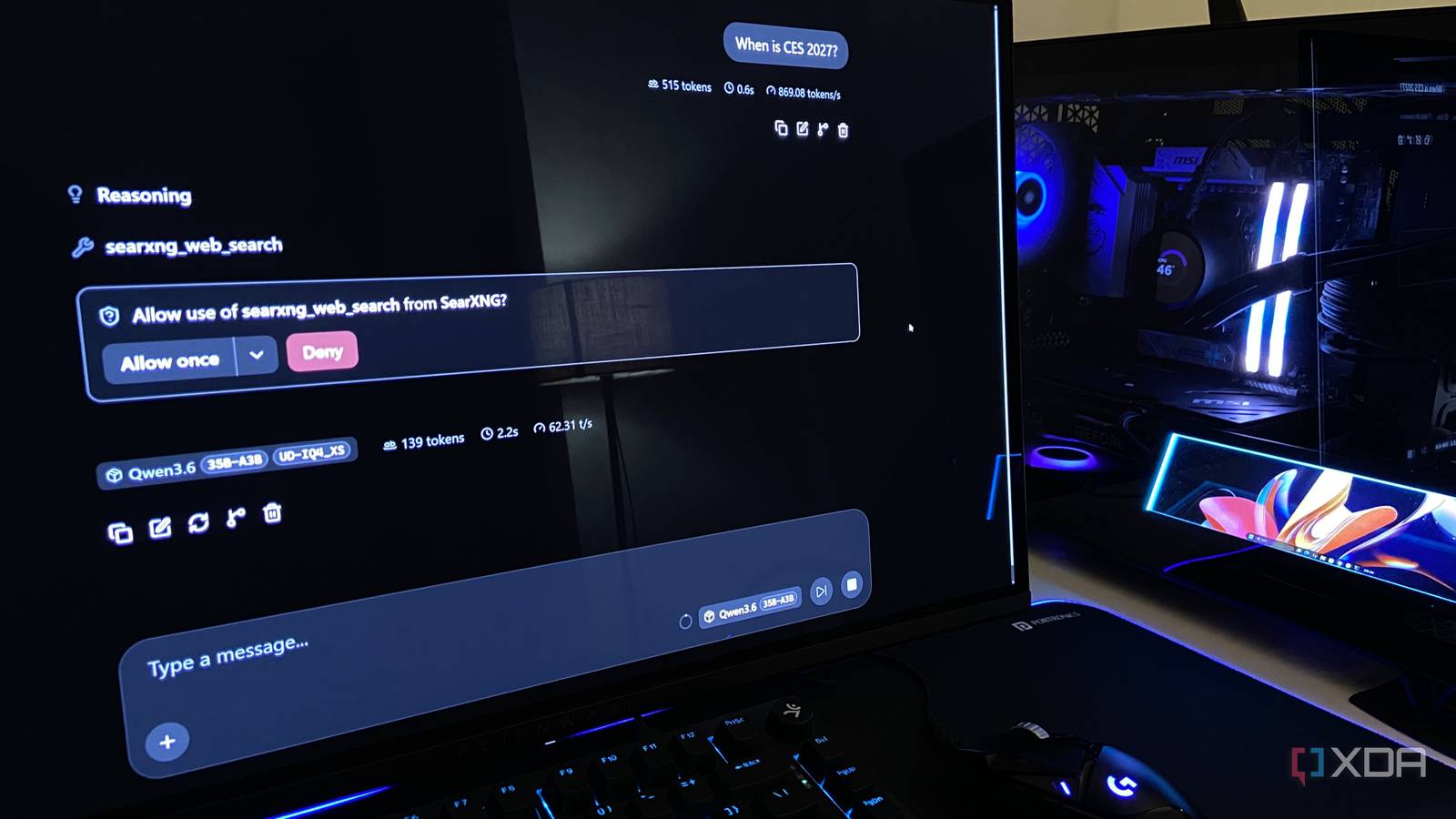
Published Nov 18, 2026, 10:30 AM EST Abhinav pivoted from a career in banking to pursue his first love in writing. Even while working full-time, he continued contributing as an editor-at-large, a role he has held for more than 7 years. A lifelong tech enthusiast who has built three gaming and productivity powerhouse PCs since 2018, his passion for technology keeps him closely following the semiconductor industry, from NVIDIA and AMD to ARM. His MSc dissertation explored how artificial intelligence will reshape the future of work, reflecting his curiosity about the wider social impact of emerging technologies. One of the biggest inhibitors that stand in the way of local AI models replacing cloud LLM services is that local models seldom have native web search capabilities out of the box. You download a model's weights from Hugging Face, fire up llama-server, give up a chunk of your GPU's VRAM only to converse with a model whose knowledge is limited to its training cutoff, which more often than not is one or two years behind the clock. I've always imagined that's one of the major reasons why most people who're new to the local AI space try a local LLM first and transition back to ChatGPT or Gemini after a week. Not having access to live information is a deal-breaker for most workflows, and I can imagine many that can't function without it. Fortunately, for those who're willing to spend a few minutes to work around this problem, there's a way to provide web search capabilities to a model of your liking and reduce your dependence on cloud AI. Here's how I make it work. Local AI used to have an information recency problem Training data cutoffs steered the first wave of users away from local LLMs A major reason why most people use LLMs is to look up information that's tailored to their specific query and provides them with instructions to either assist them with a task or provide them with the knowledge to achieve their goals. While a local model can satisfy these criteria for a wide range of queries, its knowledge is limited to what it saw during training, and the weights alone have no way of cross-referencing the information it provides or looking up new and updated information. If you ask an unequipped model about anything recent, it either admits it doesn't know something, or guesses with full confidence. That's a bit of a problem in a workflow that requires the inflow of real-time information, and not to mention one of the reasons why most people prefer cloud-based LLMs like Claude, Gemini or ChatGPT. Personally, I just see it as a problem that can be solved without spending on a subscription every month. My local model searches the web on its own Stale training data does not stand in the way of my research On my PC, I run Qwen3.6-35B-A3B, which is a mixture-of-experts model with 35 billion total parameters, out of which about 3 billion activate per token. It ships under the Apache 2.0 license. I run a specific Unsloth variant at UD-IQ4_XS quant, which is about 17.7GB in weights. I run it on my RTX 4070 Ti Super with 16GB of GDDR6X, a Ryzen 5 7600X, and 32GB of DDR5-6000, which is a pretty standard mid-range gaming setup. Because the weights alone exceed the VRAM buffer, I offload the expert weights of 12 layers to the system RAM, and run the model at a context window of 64K tokens, which gives me a faster-than-reading speed of about 57 tokens per second for generation and 1,632 tokens per second for prompt processing. The way I have Qwen3.6 set up on my PC is such that whenever the model detects a question that needs current information, it calls a search tool on its own. It's using SearXNG, which is an open-source metasearch engine I host myself. It routes each query to engines like Google, Bing, and DuckDuckGo and hands the combined results back to the model, without an API key or an account. It does it through a small bridge called mcp-searxng which connects it to llama-server's web UI, and adds a tool that reads full webpages. A search engine in a container, a bridge, and a llama-server flag The entire setup is quite simple, and what each component does is relatively easy to understand when you have gone through one after another. It consists of three parts, all three of which have a specific function. The first of them is SearXNG, which is the search engine itself, running through wslc in a container. It can be downloaded and started with a single command, and a short settings file lets other programs read its results. I used the following command: wslc run -d --name searxng -p 8888:8080 -v C:\searxng\config:/etc/searxng -v C:\searxng\data:/var/cache/searxng docker.io/searxng/searxng:latest Bear in mind that this only works if you have updated WSL with the wsl --update command, created two folders, C:\searxng\config and C:\searxng\data and placed a settings.yml file in the config folder that sets a secret key and turns on the JSON output. The second is mcp-searxng, which is a small free program that runs on Node.js, which you can download from nodejs.org. It acts as a translator between SearXNG and the model, turning search and page reads into tools that the model can call. I ran a PowerShell instance and ran the following commands: $env:SEARXNG_URL="http://127.0.0.1:8888" $env:MCP_HTTP_PORT="3000" $env:MCP_HTTP_STATELESS="true" npx -y mcp-searxng The third is llama-server itself, of course, which runs my Qwen3.6. It only needs the --webui-mcp-proxy flag added to its launch command alongside --jinja which is a prerequisite for tool calling. After this, I opened the webUI's MCP servers page, added http://127.0.0.1:3000/mcp as a new server, switched on the "Use llama-server proxy" toggle, and enabled SearXNG for the chat from the + button in the message box. To test it, I asked Qwen when CES 2027 would take place, with no system prompt and no mention of search. It decided on its own that the question warranted a web search, ran a search for the dates, and came back with the correct answer. The web UI shows each tool call in the chat, so I could see exactly when it reached for the web. I don't need ChatGPT or Gemini for every web search now I've been working to make my local AI setup as dependable as I can in various ways, and in doing so, it's important to fix the aspects that keep me reliant on cloud models in the first place. Not having the ability to let my local models search the web for information was a big part of that, but enough persistence and a bit of curiosity solved that problem so that I don't need another $20 subscription to add to my list.
I gave my local LLM live web search for free, and it replaced the one thing I still used ChatGPT and Gemini for
Full Article
Original Source
Read the full article at Xda-developers →KhanList aggregates and links to publicly available news content. We do not host full articles from third-party sources. Always verify important information with original sources.