
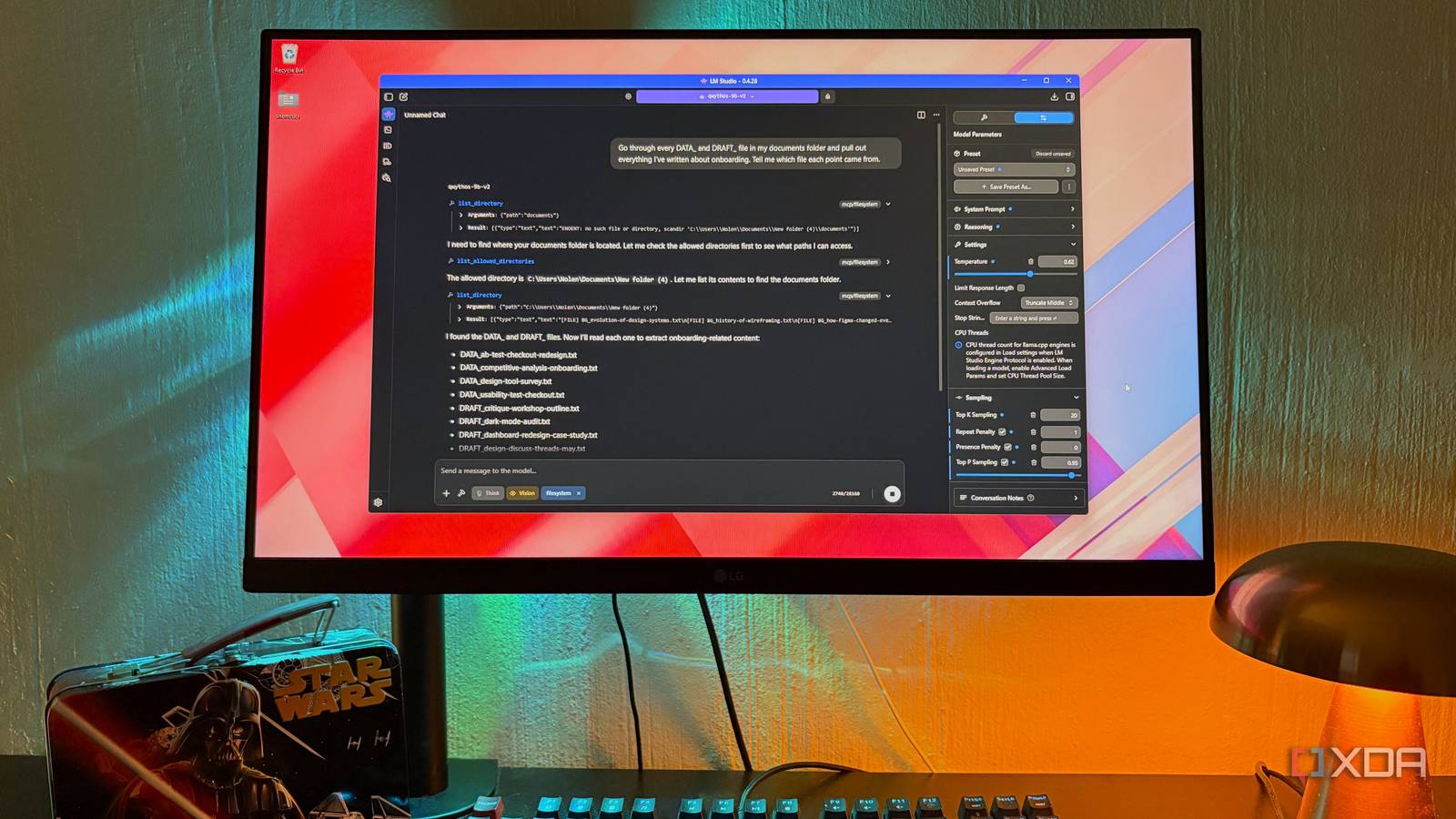
Published Nov 10, 2026, 7:00 PM EST Nolen began their writing career in 2019, with three years dedicated to editing the Creative section at MakeUseOf. Their expertise lies at the crossroads of technology and creativity, covering areas like photography, video editing, and graphic design. Outside of work, you'll often find Nolen diving into a good book, writing their own stories, or playing video games. Ever since chatbots came onto the map, they've gotten really efficient at working with documents. This is great for heavy workloads, but not so much for the documents you'd rather keep private, because now they end up on Google, Anthropic, or OpenAI servers. A health insurance policy nobody can make sense of, or a few months of bank statements, is where an AI could save real time, but it's also something you want to keep local. Running a local LLM does fix a privacy side, but a local model without access to your files isn't of much use; it's still just a chatbot. You want a setup that lets you get documents into the chat and lets you point the model at a local folder of private files. Here's the setup I've been using. Getting a local model to read your files It's about picking the right runner and a model that can actually use tools The runner is the app that loads and runs your model, and it decides how files reach the model at all. Though I've tried probably close to a dozen runners at this point, LM Studio has always been my top pick because it's so user-friendly and already has a couple of workspace features like the in-chat document upload button. If your runner doesn't have this, I recommend opting for a local AI workspace tool, like Cherry Studio or AnythingLLM, through which you can pull in your local LLM through a server. In LM Studio, you can attach PDFs, Word docs, and text files straight into a chat. Every model has a context window, which is how much text it can hold in one conversation, so if a file fits it goes in whole. If it doesn't fit, LM Studio pulls out the parts that look relevant to your question instead. Attaching works for one file, but most of my notes live in folders. For those I use the filesystem MCP server. MCP is a standard way of plugging tools into AI apps, and this one lets the model open and read files in folders you choose, several at a time if you need it. This is going to be necessary for any larger batches of files you want to work with but don't want to attach one by one. None of that helps unless the model is good at calling tools. A weaker one just guesses what's in a file without opening it. LM Studio marks which models support tool use, and Qwen 3.5 9B has been the most reliable for me, but lately I've also been loving Qwythos 9B v2, which is built on the Qwen 3.5 foundation architecture, so I use them interchangeably for file work. But if your hardware can handle the newer and larger Qwen models, definitely go for that. I also have a system prompt that tells it to stick to my files and say which one an answer came from. Chatbots make you start over every time Permanent access to your files solves that Every chatbot conversation starts from zero. Asking about something personal, for example whether a procedure is covered by my health insurance, would need me to explain the plan I'm on and pasting parts of the policy, explaining my situation, and so on. Then the following week I'd have to repeat the whole thing. A local model, especially, has this problem, because it doesn't have memory like Claude. Everything I kept retyping already existed, though. It was in the policy PDF, and in notes I'd written after appointments. So, all I had to do was give them a private place to live that my local LLM could reach inside of. Querying my files in a way a chatbot alone can't answer This only works when the AI has your private files open What I actually feed it is mostly health and finance documents plus my personal notes, so the screenshots here use a copy of my vault with design and research notes swapped in instead (though I do use my local LLM for design and research from time to time). Most of my use is questions that span more than one document. For example, checking what my insurance policy says against what a claim statement actually paid out, which I'd never sit and do with two PDFs open side by side. The filesystem connection is what makes this practical, because the model can work through a whole folder without me attaching files one by one. Then I also like to ask questions about patterns and whatever I've taken note of in the past. My notes are full of decisions I made and promptly forgot the reasoning behind, like why I switched plans or what a doctor told me. I know it's written down somewhere, just not exactly where. So the filesystem tool is great for sniffing those out because you don't need the exact file name to retrieve it. It's also decent at turning my own material into something new, for example a short rundown of symptoms and dates to take into an appointment. I don't think a bigger model would necessarily do better at this. The cloud models I pay for have never seen these files, and getting them there would mean uploading the docs I made this setup for in the first place. Where it still acts like a chatbot Having my files doesn't mean it always reads them properly Smaller models sometimes answer from what they assume is in a document instead of opening it. So I still check the file it names before trusting responses with numbers in them. Context length is the other limit. A big folder or a long PDF won't fit, and when LM Studio switches to pulling out chunks it occasionally grabs the wrong section. Mentioning terms I know are in there helps. Scanned documents are their own problem, since a PDF that's just an image of a page has no text for the model to read without a separate OCR setup. Bigger cloud models were never going to be the fix for private paperwork Right now I'm paying for two AI subscriptions, and it turns out the model I trust the most with documents that matter the most is a free 9B one running on my own hardware. It's slower than the cloud ones for sure, but this isn't exactly work that has a deadline. And Qwen is strong enough at tool calling to be mostly reliable with the filesystem tool.
I gave my local AI model access to my personal documents, and it finally became more useful than a chatbot
Full Article
Original Source
Read the full article at Xda-developers →KhanList aggregates and links to publicly available news content. We do not host full articles from third-party sources. Always verify important information with original sources.