
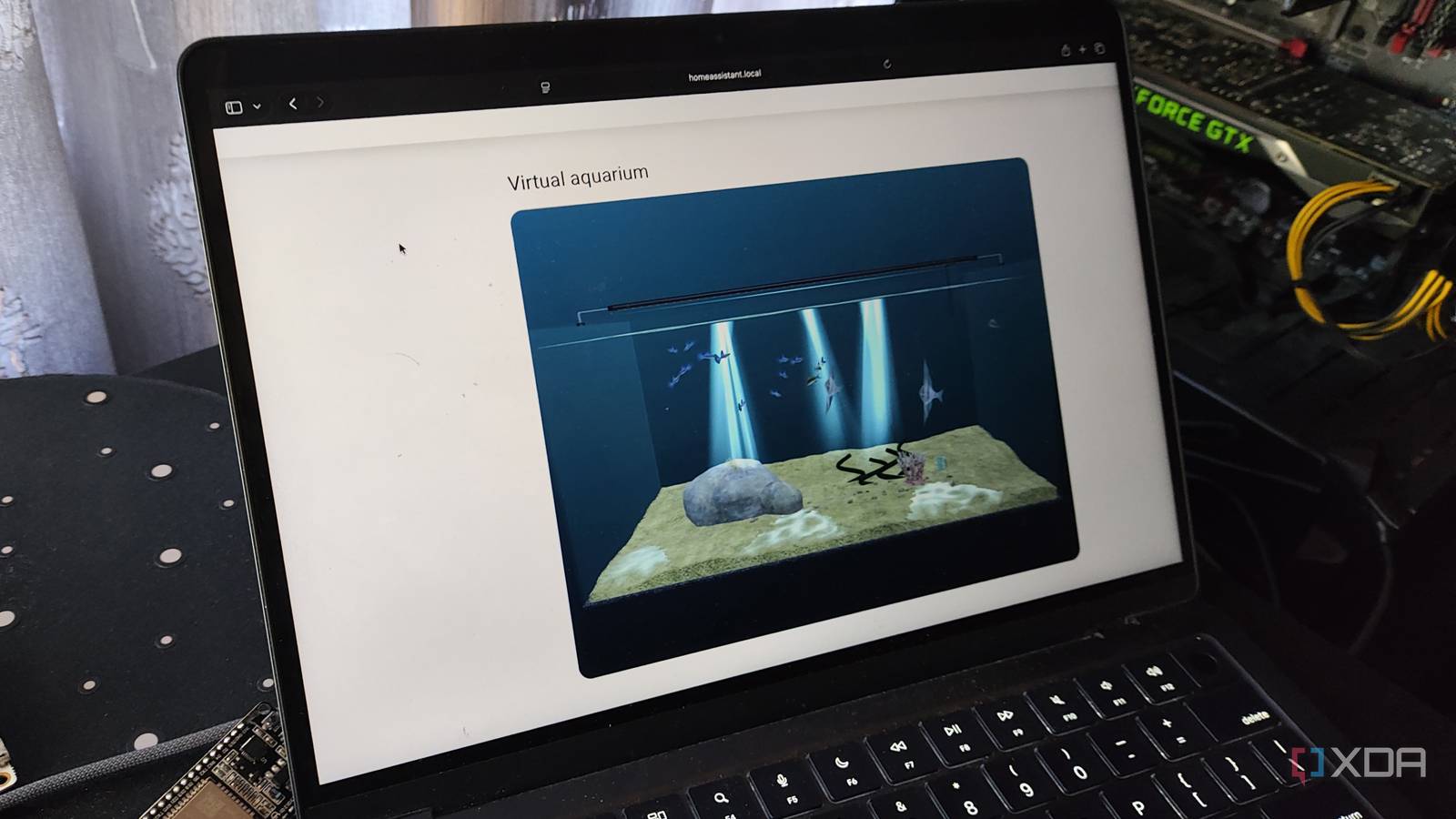
Published Nov 17, 2026, 1:00 PM EST Ayush Pande is a PC hardware and gaming writer. When he's not working on a new article, you can find him with his head stuck inside a PC or tinkering with a server operating system. Besides computing, his interests include spending hours in long RPGs, yelling at his friends in co-op games, and practicing guitar. When I got into Home Assistant, I figured it was just an open-source platform for managing and automating smart gizmos and IoT paraphernalia. But within the first few days of using HASS, I realized it can do a lot more. With a handful of integrations, blueprints, and apps (or add-ons, as we called them back in the day), Home Assistant can control everything from typical FOSS apps and 3D printers to full-fledged storage servers and virtualization hosts. In fact, I’ve spent months arming my Home Assistant with all sorts of practical apps and integrations to bolster my living space’s capabilities. That said, I come across cool packages that, despite not adding more QoL tweaks to my smart home, add some quirky and fun features to HASS. The Mokizen Tank Card by Kaifuz Studio is one such repo, and it’s the reason why I have an interactive virtual fish bowl sitting in the center of my Home Assistant dashboard. The Mokizen Tank Card adds a virtual aquarium to my HASS dashboard Fortunately, setting it up was a breeze If you’ve never heard of Mokizen, it’s a browser-based aquarium (or rather, terrarium) builder that lets you create an entire ecosystem of plants and fish. But on its own, you can only browse these aquarium tanks on a standard PC. Kaifuz Studio’s offering, however, lets you import a virtual fish bowl from Mokizen’s servers as a typical Lovelace card that you can display on your HASS dashboards. And I’m not just talking about a static image that you can pull via the Picture card, either. The Mokizen Tank Card renders a full-fledged 3D model of the aquarium, with all its piscine inhabitants in their animated glory. The only catch is that these statistics are served from Mokizen’s official server, which is why it needs constant Internet access to work. Fortunately, setting it up is fairly simple, especially now that Open Home Foundation has moved the Home Assistant Community Store’s offerings to a dedicated Marketplace section. First, I used the Custom Repositories option within Marketplace to add https://github.com/Kaifuz-Studio/mokizen-tank-card. Then, I modified the current dashboard with the Edit button and added the Mokizen Tank card to render the fish bowl's contents alongside the rest of my smart gizmos. It can also interact with my Home Assistant entities I’ve even synced the aquarium lights with the current time metrics Besides livening up my HASS dashboard, the Mokizen Tank card can also react to my smart entities and physical actions. Clicking (or tapping, when I’m on my phone-turned dashboard) the card, for example, causes the fish to dart around quickly. I’ve even added some extra YAML code to my Mokizen Tank card’s configuration widget to enable more interactions between my virtual aquatic ecosystem and the rest of my smart home arsenal. For example, adding the feed_on function and assigning it to an HASS entity causes the Mokizen Tank card to drop pellets and attract the fish. I’ve mapped it to the button on my doorbell, so the fish can scurry around when I have visitors at my tinkering cave. Likewise, there’s a react_on variable that I’ve mapped to the state entity on my smart switch, so they’d move every time I power the switch connected to my primary workstation on/off. I’ve added the day_night variable and set it to true, which forces the aquarium’s lighting to have a warm effect during the day and transition to a darker hue as the day transitions to night (and vice versa). I’ve also tweaked the height parameter, so the card can fit on my smartphone-sized dashboard and set the fps field to 60, as the default value of 20 frames per second feels a little jarring on my DIY smart panels. Still, it’s not the only third-party card package I’ve added to Home Assistant Besides this quirky card, I've used a couple more community offerings to add some more visual flair to my dashboard. The Bubble Card package, for example, is great for creating pop-ups for my dashboard elements, and I’ve used it to design entire dashboards for my smartphone-sized Home Assistant control panel. I’m also fond of Ultra Card, which lets me create detailed HASS dashboards with neat modules hidden inside containers and menus. Since I’ve got some smart switches for my home lab, I’ve armed Home Assistant with the Compact Power Card as well. Not only does it provide detailed PV energy, grid voltage, and battery capacity stats for my servers, but it can even generate color-coded power flow diagrams. Home Assistant OS Windows, macOS, Linux, Android, iOS, web iOS compatible Yes Android compatible Yes
I gave my Home Assistant dashboard a fish tank that reacts to my smart home devices
Full Article
Original Source
Read the full article at Xda-developers →KhanList aggregates and links to publicly available news content. We do not host full articles from third-party sources. Always verify important information with original sources.