
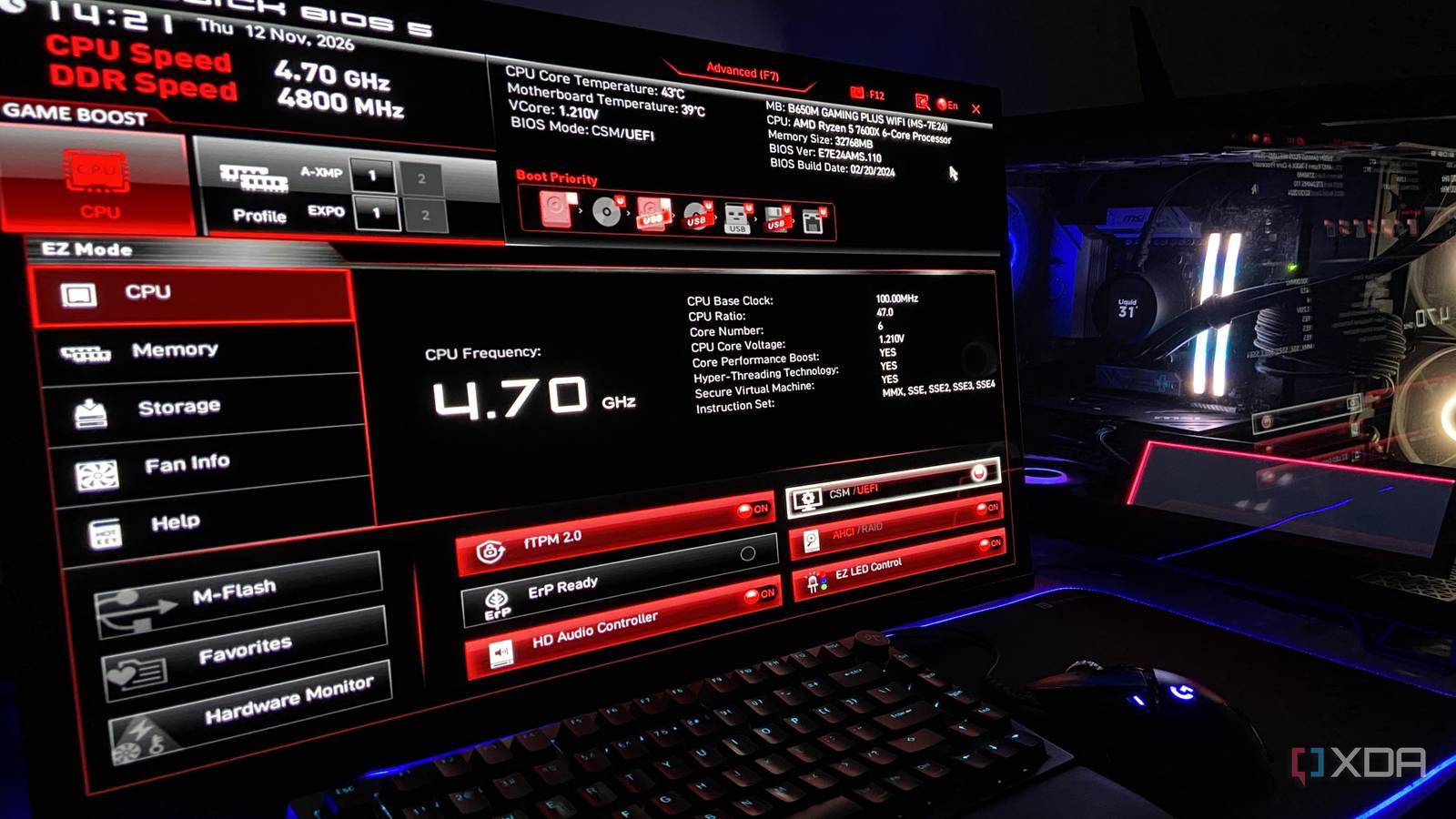
Published Nov 12, 2026, 12:00 PM EST Abhinav pivoted from a career in banking to pursue his first love in writing. Even while working full-time, he continued contributing as an editor-at-large, a role he has held for more than 7 years. A lifelong tech enthusiast who has built three gaming and productivity powerhouse PCs since 2018, his passion for technology keeps him closely following the semiconductor industry, from NVIDIA and AMD to ARM. His MSc dissertation explored how artificial intelligence will reshape the future of work, reflecting his curiosity about the wider social impact of emerging technologies. It will hardly come as a surprise to anyone when I say that more people are using large language models to troubleshoot and tune their devices than ever before. You see people going to Claude, ChatGPT, and Gemini seeking advice on how to best optimize their PCs, and, fair enough, to a reasonable degree, following their advice usually means walking away with a system that's better equipped for how they use it. Recently, I found myself wondering if some of the best local large language models available today were similarly up for the challenge, especially now that they can read photos. To test it, I rolled my MSI B650M Gaming Plus Wi-Fi back to stock settings, photographed its BIOS, and showed it to Gemma 4, Qwen3.8, and Ministral 3 on my RTX 4070 Ti Super. Here's how it turned out. The prompt was something a total beginner would type in Sent to each lab's best model my RTX 4070 Ti Super can run Most average users and first-time PC builders aren't very well-versed with BIOS toggles, and popping into the UEFI for the first time can be slightly overwhelming. I wanted the prompt to reflect how such a beginner would ask for help, so I wrote the kind of question someone would type moments after opening their BIOS for the first time. Reasoning for each model was set to enabled with effort at each model's default values. Each model received two photos via llama.cpp's built-in webUI, followed by this prompt. These are photos of my PC's BIOS. I haven't changed anything since I built it. What are the three changes you'd make to get more performance without risking stability? For each one, tell me the setting name exactly as it appears on screen, what it's set to now, where to find it, and what to set it to. For the purpose of this test, I chose to cap the answer to three toggles to force them to prioritize, and asking for exact names and current values exposes any model that misreads whatever is on the screen. I decided to score every recommendation on three checks, for a maximum of nine. This included whether the model read the setting correctly, whether the change is effective gain on my PC, and whether a beginner could reasonably follow it. I factored in the prompt's stability condition too, so any recommendation that involved a manual overclock or overvolt was disqualified, along with any that named a setting that did not exist. Model Developer Quant Gemma 4 26B A4B Google Q4_K_M Qwen3.8 27B Alibaba Q4_K_M Ministral 3 14B Reasoning Mistral AI Q4_K_M Ministral 3 got the memory right, but not the CPU Two of its three changes were disqualified Ministral 3 ran fully resident in the 16GB of VRAM on my RTX 4070 Ti Super, which meant using it was a breeze. The Ada Lovelace card coupled with a Ryzen 5 7600X and 32GB of DDR5-6000 finished the run in 1 minute and 30 seconds at 56.47 tokens per second with 32K context. The model's first pick was spot on. It spotted the RAM running at 4,800 MT/s, so it inferred the kit's rated speed from the 6,000 MT/s EXPO profile on the screenshot and told me to enable it. Unfortunately, that was when the good recommendations stopped coming in. Ministral 3 then chose to go after the CPU. It read the 4.70GHz as a ceiling and suggested raising the CPU Ratio from 47 to 48. For context, 4.70GHz is the 7600X's base clock, and the chip boosts to 5.3GHz on its own. As such, setting a fixed CPU Ratio is counterproductive, since a manual all-core clock caps the cores at that multiplier, which leaves it in a slightly worse place than when left at default. Its third and final pick was equally questionable, as it recommended raising the CPU Core Voltage to 1.225V. Recommendation Accurate Effective Clear Score Enable EXPO Profile 1 Y Y Y 3 CPU Ratio 47 to 48 DQ DQ DQ Disqualified CPU Core Voltage 1.210V to 1.225V DQ DQ DQ Disqualified Total 1/3 1/3 1/3 3/9 Gemma 4 misread my memory profile, and built a second pick on it Its third pick took my prompt at its word Gemma 4 kept the experts from eight of its 30 layers in the system RAM and finished in 2 minutes and 8 seconds at 58.54 tokens per second, with the same 32K context that I used with the other models. Just like Ministral 3, it caught EXPO as well, but decided that the profile was already selected and not yet applied, as the "1" boxes looked like they were clicked upon. Those boxes only mark available profiles, but this would likely point an attentive user towards the fix as well. That misread, however, fed its second pick. Gemma called A-XMP a conflicting Intel profile and told me to disable it. A-XMP isn't an Intel profile, though. It's how MSI loads XMP profiles on AMD boards, and it wasn't even switched on, so there wasn't anything to disable. Its third pick named Precision Boost Overdrive and Curve Optimizer, but then it stopped instructing me further, since neither setting appeared on the screen. All it told me to do was press F7 to reach Advanced mode, which changes nothing on its own. In fairness, my prompt asked for setting names exactly as they appeared on the screen, and Gemma took that wording quite literally. Recommendation Accurate Effective Clear Score EXPO Profile 1: Set to 1 N Y Y 2/3 A-XMP: 1 to 0 N N N 0/3 Access Advanced Settings (F7) Y N N 1/3 Total 1/3 1/3 1/3 3/9 Qwen3.8 was the slowest by far, and the best of the three What do they say about the slow and steady, again? Qwen3.8 is quite a sizable model, in that, it doesn't fit in 16GB of VRAM at Q4_K_M at all, so I had to keep 46 of its 64 layers on the GPU and the rest in system RAM. That made it the slowest of the three by a light year, as the run took 42 minutes and 51 seconds crawling at 5.81 tokens/second, with 32K context. All that waiting had built up expectations, which were mostly met. Like the other two models, it caught EXPO, and like Ministral 3, it read the setting correctly. Unlike Ministral 3, though, it left the CPU ratio and voltage alone, which was a relief. Tell XDB what you want the PC to do and how much you want to spend. We'll find parts that fit, with current prices. What will you use it for? Pick any Games or apps Optional Budget Its next pick was using Precision Boost Overdrive without using Curve Optimizer, which was in line with my stability condition. Without using CO, though, PBO only raises power limits, and a chip like the 7600X would run into its thermal limits before power becomes a concern, so the extra power goes under-utilized. Regardless, it amounts to a small gain in terms of overall performance, so it is technically adherent to the prompt. It's directions here, however, fell short as the CPU Features menu it pointed me to doesn't exist on the board. Its last pick got me a little excited. Qwen recommended turning on Re-Sizable BAR, which was the right call, since I'd turned it off for this test, and it was the only model to suggest it. That excitement was short-lived, though. Qwen told me to switch off the CSM/UEFI toggle before enabling it. Its instinct was right, since ReBAR only works with CSM disabled, but it misread the screen. On my board, the CSM/UEFI toggle reading ON means UEFI mode is active and CSM is already off, so the step it added was unnecessary here. Recommendation Accurate Effective Clear Score Enable EXPO Profile 1 Y Y Y 3/3 Enable PBO Y Y N 2/3 Enable ReBAR N Y N 1/3 Total 2/3 3/3 1/3 6/9 Qwen3.8 is the winner, but I'd still trust a human-written guide Scoring six out of nine and steering clear of every risky change, Qwen3.8 earned its win, even if it took 43 minutes to get there on my GPU. That said, even if you're running the model on a GPU with 16GB of GDDR6X memory, its just quicker to pull up a guide on how to best optimize your BIOS settings to suit your hardware. It's still one of the most effective and risk-free ways to get the best performance out of your PC.
I gave Gemma 4, Qwen3.8 and Ministral 3 photos of my BIOS, and the slowest model gave the best advice
Full Article
Original Source
Read the full article at Xda-developers →KhanList aggregates and links to publicly available news content. We do not host full articles from third-party sources. Always verify important information with original sources.